
A home theater can bring movies and music to life, but getting the setup right is not always easy. Many people want to connect a center speaker to their stereo receiver, hoping for better dialogue clarity and a more immersive sound experience. However, this process is not always straightforward. Stereo receivers are designed for two speakers (left and right), while the center channel is a key part of surround sound systems. This article will guide you through everything you need to know about connecting a center speaker to a stereo receiver, including possible solutions, technical details, real-world limitations, and tips that even audio beginners often overlook.
Understanding Stereo Receivers And Center Speakers
Before you start connecting wires, it’s important to understand what each device does and how they are designed to work.
What Is A Stereo Receiver?
A stereo receiver is an audio device designed to power two speakers—one left and one right. It takes audio input from sources like CD players, turntables, or streaming devices and amplifies the sound. Most stereo receivers have two speaker outputs and may include a subwoofer output, but they are not built for multi-channel surround sound.
What Is A Center Speaker?
A center speaker is designed to play dialogue and central sounds in a surround sound system, such as a 5.1 or 7.1 setup. It sits above or below your TV, making voices and key sound effects easier to hear. Unlike left and right speakers, which play stereo music, the center channel handles information meant for the “center” of your listening area.
Key Differences
- Stereo receivers are for two channels (left/right).
- Center speakers are for multi-channel home theater systems.
This fundamental difference creates challenges when trying to connect a center speaker to a stereo receiver.
Why People Want To Connect A Center Speaker
There are several reasons why people attempt this setup:
- Clearer Dialogue: TV and movie voices can sound muffled through regular stereo speakers, especially in large or echoey rooms.
- Limited Space: Some setups do not allow for full surround sound, but people still want the benefit of a center channel.
- Upgrading Slowly: You might own a stereo receiver and want to add a center speaker before investing in a full surround system.
- Hearing Needs: For people with hearing difficulties, a center speaker can make voices clearer and more direct.
Understanding your goal will help you decide which method or workaround is best for your situation.
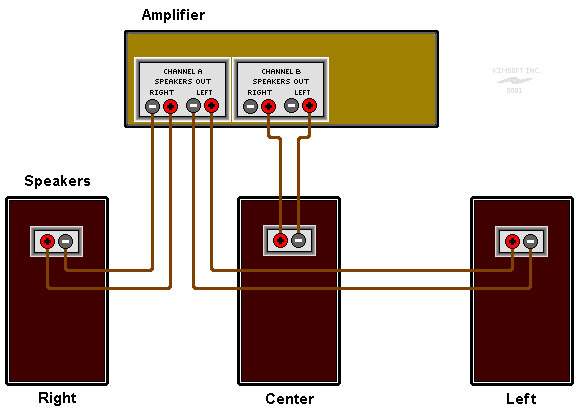
Can You Connect A Center Speaker Directly To A Stereo Receiver?
The short answer is no—you cannot connect a center speaker directly to a standard stereo receiver and expect it to work as intended. Here’s why:
- No Center Output: Stereo receivers do not have a dedicated center speaker output.
- Impedance Issues: Center speakers are designed for specific amplifier channels.
- Signal Mixing: Stereo receivers do not mix left and right channels into a mono center signal.
That said, there are workarounds and solutions for different needs. Let’s explore the options in detail.
Methods For Connecting A Center Speaker To A Stereo Receiver
Depending on what you want to achieve, there are several ways to include a center speaker in your stereo system. Each method has advantages and limitations.
1. Using A Speaker Level “y” Connection
This method combines the left and right speaker outputs and sends the mixed signal to the center speaker. It’s the most common workaround, but it comes with risks.
How It Works
- You use wires from both the left and right outputs and connect them to the center speaker.
- This creates a mono mix of the audio signals.
Step-by-step Instructions
- Turn Off the Receiver: Always start with power off to avoid damage.
- Prepare Wires: Cut two speaker wires of equal length.
- Connect Wires to Receiver: Attach one end of each wire to the positive (+) terminal of the left and right channels.
- Join Wires at the Speaker: Twist both positive wires together and connect to the positive terminal of the center speaker. Do the same for the negatives.
- Check Connections: Make sure wires are tight and not touching each other.
- Turn On and Test: Power on the receiver at low volume to check sound.
Risks And Drawbacks
- Possible Damage: Connecting outputs directly can damage the receiver’s amplifier circuits.
- Impedance Problems: The load on the receiver may be too low, causing overheating.
- Sound Quality: The resulting sound is not true center channel audio; it’s just a blend of left and right signals.
Safer Alternative: Passive Summing Circuit
To avoid damage, some people use a resistor-based summing circuit. This uses resistors to combine signals safely. Here’s a basic example:
- Use two 10-ohm resistors (5 watts or higher).
- Connect each resistor between the left and right positive outputs and the center speaker’s positive terminal.
- Connect the negative wires as before.
This limits the current and reduces the chance of damage.
2. Using A Surround Sound Processor Or Matrix Decoder
Some older stereo receivers have a “center out” or matrix mode. This feature combines left and right channels for a simulated center output.
How To Use
- Check if your receiver has a “center” or “mono out” port.
- If yes, connect this output to an external amplifier, then to the center speaker.
Limitations
- Most modern stereo receivers don’t have this feature.
- The sound is not as clear as a true center channel.
3. Upgrading To An Av Receiver
For the best results, consider upgrading to a home theater AV receiver. These receivers support 5.1 or more channels, with dedicated outputs for center, surround, and subwoofer speakers.
Why Upgrade?
- True Center Channel: Dedicated amplifier and processing for the center speaker.
- Surround Sound Support: Full home theater experience.
- Better Control: Adjust levels for each speaker separately.
Example Comparison
Here’s a simple comparison between stereo and AV receivers:
| Feature | Stereo Receiver | AV Receiver (5.1+) |
|---|---|---|
| Speaker Outputs | 2 (Left/Right) | 5 or more (L/C/R/Surround/Sub) |
| Center Speaker Support | No | Yes |
| Surround Sound | No | Yes |
| Music Listening | Excellent | Good to Excellent |
| Movie Experience | Limited | Immersive |
4. Using A Dedicated Center Channel Amplifier
If you want to keep your stereo receiver, another option is to use a dedicated mono amplifier for the center speaker.
How It Works
- Use the “pre-out” or “tape out” from your stereo receiver.
- Feed this signal into a mono amplifier.
- Connect the center speaker to the mono amplifier.
What To Watch For
- Not all stereo receivers have pre-out or tape-out jacks.
- You may need a line-level mixer to combine left and right signals before sending to the amp.
5. Using A Soundbar With Center Speaker Capabilities
Soundbars are popular for small rooms or simple setups. Some soundbars include a dedicated center channel.
How To Connect
- Connect your stereo source to the soundbar’s input.
- The soundbar processes the signal and uses its built-in center speaker.
Advantages
- Easy Setup: No wiring or amplifier matching needed.
- Compact: Fits under most TVs.
Disadvantages
- Not True Surround: Simulated surround sound, not discrete channels.
- Limited Customization: Less control over individual speaker levels.
Technical Details And Considerations
Connecting a center speaker to a stereo receiver is not just about plugging in wires. There are important technical factors to consider to keep your equipment safe and get the best sound.
Impedance And Amplifier Load
Speakers have impedance ratings (measured in ohms). Most home speakers are 4, 6, or 8 ohms. If you connect a center speaker incorrectly, you can lower the total impedance below what the receiver can handle, risking overheating or amplifier failure.
Example
- Two 8-ohm speakers in parallel = 4-ohm load.
- If your receiver is not rated for 4 ohms, it may overheat.
Power Handling
Make sure the amplifier’s power output matches the center speaker’s handling. Too much power can damage the speaker. Too little can cause distortion at high volumes.
Signal Mixing
Simply joining left and right speaker wires can cause signal cancellation or even electrical shorts. Using resistors or a proper summing mixer helps prevent this.
Speaker Placement
Even with the best connection, poor placement can ruin the effect. The center speaker should be:
- Directly above or below the TV screen
- Pointed toward the main listening area
- At ear level when seated, if possible
Real-world Example
Suppose you have a Yamaha stereo receiver and want to add a center speaker for clearer movie dialogue. The receiver does not have a center output. You try the “Y” wiring method, but after some use, the receiver gets hot. This is a warning sign—the load is too low. In this case, it’s safer to use a resistor-based mixer or upgrade to an AV receiver.
Mistakes To Avoid When Connecting A Center Speaker
Many beginners make errors that can damage equipment or reduce sound quality. Here are common mistakes and how to avoid them:
- Directly Connecting Speaker Outputs: Never join left and right outputs without resistors or a mixer.
- Ignoring Impedance: Always check your receiver’s minimum impedance rating.
- Overpowering the Center Speaker: Use an amplifier that matches the speaker’s power rating.
- Placing the Speaker Poorly: Don’t hide the center speaker inside cabinets or behind objects.
- Using the Wrong Speaker: Don’t use a surround or bookshelf speaker as a center unless it is designed for center channel use.
Non-obvious Insights For Better Results
Most guides cover the basics, but here are some tips even many enthusiasts overlook:
- Use a Phase Tester: If the center speaker sounds hollow, check the wiring phase. Speakers out of phase will cancel out some sounds, especially dialogue.
- Balance Your Levels: If you add a center speaker, adjust the volume levels so it doesn’t overpower the left/right speakers. Some receivers have a “balance” or “trim” setting for this.
- Try a Dedicated Dialogue Enhancer: Some devices process audio to boost dialogue frequencies—helpful if your receiver can’t support a center speaker.
When Connecting A Center Speaker Is Not Recommended
While workarounds exist, sometimes it’s better not to force a center speaker into a stereo system:
- For Music Listening: Most music is mixed for two channels. Adding a center can muddy the stereo image.
- If the Receiver Runs Hot: Overloading the amp can cause long-term damage.
- With High-End Equipment: Expensive stereo systems are designed for precise left/right imaging. Adding a center can reduce sound quality.
If dialogue clarity is your only concern, adjusting speaker placement or using a dialogue enhancer may be safer and more effective.

Alternatives For Better Dialogue Without A Center Speaker
If your main goal is clearer voices or dialogue, consider these alternatives:
- Adjust Speaker Placement: Move left/right speakers closer together or angle them toward the listening area.
- Use “Mono” Mode: Some stereo receivers offer a mono output, which combines left and right signals.
- EQ Adjustments: Boost midrange frequencies (around 2-4 kHz) where voices are most prominent.
- Hearing Assistance Devices: Small wireless speakers or headphones can enhance dialogue without changing your main setup.
Sample Wiring Diagram For Passive Summing
Here’s a simple visual description of the resistor-based passive summing method:
- Connect a 10-ohm resistor to the left positive output.
- Connect another 10-ohm resistor to the right positive output.
- Join the free ends of both resistors to the center speaker’s positive terminal.
- Connect the negative terminals as usual.
This method helps to protect your receiver while providing a mono signal to the center speaker.
Comparison: Stereo Vs. Center Channel For Dialogue Clarity
To help you decide if adding a center speaker is worth it, let’s compare the benefits of stereo and center channels for dialogue:
| Feature | Stereo Speakers | Center Speaker |
|---|---|---|
| Dialogue Focus | Shared with music/effects | Dedicated to voices |
| Placement | Left/Right of TV | Directly under/above TV |
| Room Coverage | Depends on speaker spread | Centralized sound |
| Clarity for Multiple Listeners | Varies by seat | Consistent for all seats |
Troubleshooting Common Problems
If you try any of the methods above and run into issues, here’s how to solve them:
No Sound From Center Speaker
- Check wiring connections at both the receiver and speaker.
- Make sure the receiver is set to output audio to all connected speakers (if it has this option).
- Test the speaker with another amplifier to confirm it works.
Distorted Or Weak Sound
- Check for correct impedance matching.
- Lower the volume and listen for improvement.
- Inspect for loose wires or poor connections.
Receiver Shuts Down Or Overheats
- This is a sign of overload.
- Disconnect the center speaker immediately.
- Use a resistor-based mixer or upgrade to an AV receiver.
Muffled Dialogue
- Try adjusting the EQ on your receiver.
- Move the center speaker to ear level and make sure it’s not blocked.
Practical Tips For Best Results
- Label Your Wires: This helps when troubleshooting or upgrading later.
- Use Quality Speaker Wire: Thicker wire (16 gauge or lower) reduces signal loss, especially for longer runs.
- Check Manufacturer Recommendations: Some receivers have warnings about non-standard connections.
- Start with Low Volume: When testing any new wiring, keep the volume low to prevent damage.
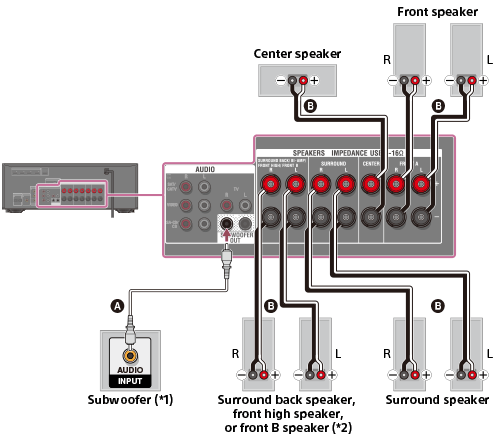
- Consult the Manual: Both your receiver and speaker manuals often have diagrams and warnings specific to your model.
Real-world Example: Upgrading From Stereo To Home Theater
Imagine you start with a basic stereo receiver and two bookshelf speakers. You’re happy with music, but movies sound flat. Dialogue is hard to hear. You try the passive summing method to add a center speaker, and dialogue improves slightly, but the receiver gets warm after long movies.
Realizing the risk, you decide to upgrade to a used 5. 1 AV receiver. With proper left, right, and center channels, your movie experience is transformed—dialogue is crisp, effects are immersive, and the system runs cool and safe.
Expert Advice: When To Seek Professional Help
If you are unsure about wiring, impedance, or amplifier safety, consult a professional audio installer. Some AV stores offer free setup help with purchase. Mistakes can be costly, so investing in expert advice can save money and frustration in the long run.
Further Reading
For a deeper dive into home theater setups and audio wiring, you can visit resources like Crutchfield for comprehensive guides and diagrams.
Frequently Asked Questions
Can I Use Any Speaker As A Center Speaker?
You can physically connect almost any speaker, but center speakers are designed for dialogue and central sound. Using a regular bookshelf speaker may work, but results will vary. Center speakers have special design features, such as horizontal tweeter arrangements, to spread sound evenly.
Is It Safe To Connect A Center Speaker Using A Y Adapter?
Directly using a Y adapter (combining left and right outputs) is risky for your receiver. Use a resistor-based summing circuit to avoid short circuits and overloading the amplifier.
Why Is My Center Speaker Quiet Or Distorted?
This may be due to impedance mismatch, poor wiring, or low amplifier power. Check all connections, use proper resistors, and make sure your amplifier can handle the load.
What’s The Best Way To Improve Dialogue If I Can’t Add A Center Speaker?
Try moving your left and right speakers closer together, angling them toward your seating area, or adjusting your receiver’s EQ settings to boost midrange frequencies.
Should I Upgrade To An Av Receiver For Movies?
If you watch a lot of movies or want true surround sound, upgrading to an AV receiver is the best long-term solution. It supports a real center channel, surround speakers, and better overall audio control.
Connecting a center speaker to a stereo receiver can be tricky, but with the right method and a clear understanding of the risks, you can improve your audio experience. For the best results and long-term satisfaction, consider upgrading to a system designed for surround sound.
Your ears—and your equipment—will thank you.