
Most homes today have a smart TV or a streaming device like Roku. Both let you watch movies, TV shows, and more without cable. But if you already have a smart TV, do you really need Roku too? Many people ask this question before buying a new gadget or signing up for streaming services.
The answer is not always simple. It depends on what you watch, how you use your TV, and the features you want. This guide will explain everything you need to know about using Roku with a smart TV. You’ll learn the differences, benefits, and possible drawbacks.
We’ll also explore when adding Roku makes sense and when you can skip it.
There are important details that are easy to miss. For example, not all smart TVs are equally smart. Some have slow menus or limited apps. Others get updates for only a short time. Many users don’t realize that streaming devices like Roku can solve these problems, even on new TVs.
At the same time, using extra devices can add cost and complexity.
By the end, you’ll understand whether Roku is right for you, or if your smart TV does enough on its own.
What Is A Smart Tv?
A smart TV is a television with built-in internet connectivity. This means you can watch content from apps like Netflix, YouTube, and Amazon Prime Video directly on your TV, without needing extra devices. Most new TVs sold today are smart TVs.
Key features of a smart TV:
- Connects to Wi-Fi or Ethernet
- Accesses streaming services through built-in apps
- Supports basic web browsing
- May allow screen mirroring from phones or tablets
Different brands use different operating systems. For example, Samsung uses Tizen, LG uses webOS, and Sony often uses Google TV. Some cheaper brands have their own systems, which can feel less polished.
Smart TVs aim to be “all-in-one. ” You can watch live TV, stream content, and even play music—all without extra boxes or sticks. But not every smart TV offers the same experience.
What Is Roku?
Roku is a popular brand of streaming devices. These small gadgets plug into your TV and give you access to thousands of streaming apps. Roku’s simple menu and wide app support make it a leader in streaming.
Common types of Roku devices:
- Roku Streaming Stick – A small device that plugs into your TV’s HDMI port.
- Roku Express – An affordable streaming box, easy for beginners.
- Roku Ultra – A premium box with extra features like Ethernet and a remote finder.
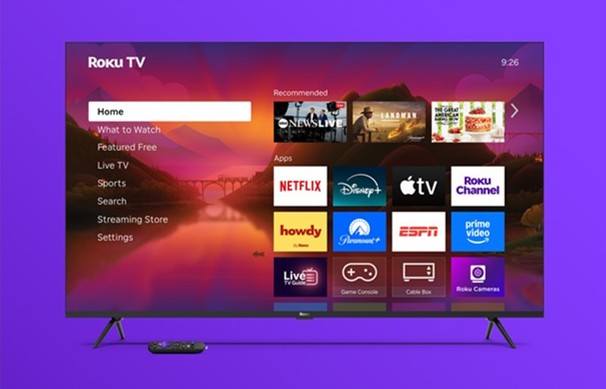
- Roku TVs – Some smart TVs come with Roku’s system built-in, removing the need for an extra device.
Roku devices use a simple remote. You do not need a cable subscription. After connecting Roku to Wi-Fi, you can install apps (called “channels”), rent movies, or watch free content.
Why is Roku popular?
- Easy to use, even for beginners
- Huge selection of streaming channels
- Reliable software updates
- Works with almost any TV with an HDMI port
Main Differences Between Smart Tv And Roku
Smart TVs and Roku devices both let you stream content. But they are not the same. It’s important to see where they differ before deciding if you need both.
Here’s a comparison of key points:
| Feature | Smart TV | Roku Device |
|---|---|---|
| Operating System | Brand-specific (Tizen, webOS, etc.) | Roku OS |
| App Selection | Often limited, varies by brand | Extensive, thousands of channels |
| Updates | 2-5 years, sometimes less | Long-term, regular updates |
| Speed | Can slow down with age | Usually fast, consistent over time |
| Setup | Built-in, ready out of box | Needs HDMI & Wi-Fi setup |
| Remote | Standard, often with many buttons | Simple, often with voice search |
| Cost | Included in TV price | Extra cost ($30-$100+) |
Non-obvious Insight: App Support Changes
Many smart TVs lose support for popular apps after a few years. For example, an older Samsung TV might no longer play the latest version of Netflix or Disney+. Roku devices usually get app updates much longer, sometimes for 7-10 years.
Non-obvious Insight: Performance Over Time
Smart TV systems can become slow as they age. Roku devices stay smooth longer, since they are designed only for streaming.
Pros And Cons Of Using Only A Smart Tv
It’s tempting to keep things simple and use just your smart TV. But there are clear pros and cons.
Advantages
- No extra devices: Fewer wires and remotes.
- Lower cost: You don’t need to buy anything else.
- One remote: Easier for guests and kids.
- Quick setup: Just connect to Wi-Fi and sign in to apps.
Disadvantages
- Limited app selection: Not all smart TVs have every app. Some may miss newer or niche services.
- Slower updates: App updates may stop after a few years, even if your TV works fine.
- Performance issues: Older smart TVs can lag, freeze, or crash more often.
- Basic features: Many smart TVs have simple interfaces and fewer settings.
- Less support: If something goes wrong, TV brands may not offer much help.
Example: If you buy a budget smart TV in 2022, you may find that Hulu or HBO Max stops working by 2025, even though your TV still works for regular channels.
Pros And Cons Of Adding Roku To A Smart Tv
Many people add a Roku to a smart TV to improve their streaming experience. But there are trade-offs.
Benefits
- Wider app support: Roku offers thousands of channels, including rare and international ones.
- Faster performance: Roku devices are designed for streaming and often run smoother than older smart TV systems.
- Consistent updates: Roku keeps software and apps up-to-date for many years.
- Simple interface: Roku menus are easy to understand, with less clutter.
- Better search: Roku’s universal search finds movies and shows across many apps.
- Extra features: Some Roku devices offer voice remote, private listening, or Ethernet support.
- Portability: You can take your Roku with you when traveling or moving.
Drawbacks
- Extra cost: Roku devices start around $30, with premium models costing more.
- More wires/remotes: You’ll have an extra remote and HDMI device.
- Double apps: Some smart TVs and Roku may both show the same apps, which can be confusing.
- Setup time: You need to set up Roku and sign in to your streaming accounts again.
Example: If your smart TV is slow or missing your favorite app, adding a Roku can solve both problems. But you’ll have to switch TV inputs and manage another remote.
When Do You Need Roku With A Smart Tv?
There are clear situations where using a Roku with your smart TV makes sense. Here are the main reasons people add Roku:
- Your smart TV is slow or buggy. If menus freeze or apps crash, a Roku gives a smoother experience.
- Your TV’s app store is missing key services. Some smart TVs lack apps like Apple TV+, Peacock, or regional sports.
- You want a consistent interface. Roku’s simple layout looks the same on all TVs.
- You want better search and recommendations. Roku’s search can find content across many apps at once.
- You travel or move often. A Roku device works on any TV with HDMI, even in hotels.
- Your TV no longer gets updates. Roku keeps apps and software current much longer.
- You have multiple TVs. One Roku device can be moved between TVs easily.
Practical Example: If you have an older LG TV and notice Netflix or YouTube lagging, adding Roku can feel like a brand new TV—at a much lower cost than replacing it.
:max_bytes(150000):strip_icc()/do-i-need-a-streaming-device-with-a-smart-tv-6fb78e2fc8214a1a96e1e4470b3beb42.jpg)
When Can You Skip Roku?
You don’t always need to buy Roku if you already have a smart TV. Here’s when you can safely skip it:
- Your TV is new and runs smoothly. Most smart TVs work well for 2-3 years.
- All your favorite apps are available and work properly.
- You don’t mind the current interface.
- You want the simplest setup with the fewest remotes.
- You mostly watch live TV or cable.
- You don’t need advanced features like private listening or voice search.
Tip: Check your TV’s app store for all the apps you use. If they’re there and work well, Roku may not add much value right now.
Real-world User Scenarios
To see if you need Roku, it helps to look at common situations:
Scenario 1: The Movie Fan
You love movies and subscribe to Netflix, Hulu, Disney+, and Apple TV+. Your 2018 smart TV has only Netflix and Hulu. Disney+ crashes often, and Apple TV+ is missing. Adding a Roku instantly gives you all four apps, with smooth playback and no crashes.
Scenario 2: The Family Home
Your family has a new Samsung smart TV in the living room and an older one in the bedroom. The new TV runs fine, but the old one is slow and missing newer apps. Buying one Roku for the bedroom TV gives you the same streaming experience as the living room, without buying a new TV.
Scenario 3: The Traveler
You travel for work and stay in hotels with basic TVs. A portable Roku stick fits in your bag. Plug it in, connect to Wi-Fi, and you have all your streaming apps wherever you go.
Scenario 4: The Minimalist
You don’t watch much TV. You have a new smart TV, and only use Netflix and YouTube. Both apps work well. In this case, you don’t need Roku—your smart TV does everything you need.
How To Decide: Key Questions To Ask
Before buying Roku, ask yourself:
- Does my smart TV have all the apps I want?
- Is the TV’s interface fast and easy to use?
- How often do I run into errors or crashes?
- Am I missing features like voice search or private listening?
- How old is my TV? Does it still get app updates?
- Do I want the same experience on every TV in my home?
If you answer “no” to most of these, adding Roku will likely improve your streaming. If you answer “yes,” your smart TV may be enough for now.
Performance And App Support: Data And Trends
Most smart TVs work well for streaming in their first 2-3 years. After that, many slow down or stop getting updates. According to a 2023 survey by Statista, over 30% of smart TV owners reported issues with missing apps or slow performance after three years.
Roku, on the other hand, is known for long-term support. Many Roku devices from 2015-2016 still get regular updates and new channels.
Interesting Fact: As of 2024, Roku supports over 5,000 apps (channels), more than most smart TV systems.
Practical Example: If you bought a Samsung smart TV in 2016, you may find that newer streaming services like Peacock or HBO Max are missing. A Roku device, even a cheap one, can restore access to all modern apps.
Smart Tv Vs Roku: Feature Comparison
Let’s look at some features side by side.
| Feature | Smart TV | Roku |
|---|---|---|
| Universal Search | Usually limited to a few apps | Searches across all major apps |
| Voice Control | Some, often brand-specific | Available on most models |
| Private Listening | Rare (on high-end models) | Available with Roku app or certain remotes |
| Free Channels | Some brands offer limited free content | Roku Channel and many free apps |
| Portability | No (TV is fixed) | Yes, easy to move device |
| Software Updates | Limited, varies by brand | Frequent, long-term |
Tip for Beginners: If you want features like private listening (using headphones with your TV) or a universal search that works across Netflix, Hulu, Disney+, and more, Roku offers these out of the box.
The Role Of Internet Speed
Both smart TVs and Roku devices require good internet speed for streaming. A slow connection will cause buffering, no matter which device you use.
Minimum recommended speeds:
- SD (standard definition): 3 Mbps
- HD (high definition): 5 Mbps
- 4K UHD: 15-25 Mbps
Pro Tip: If you stream a lot of 4K content, consider a Roku device with Ethernet support for a more stable connection.
Installation And Setup: What To Expect
Smart Tv
Setting up a smart TV is usually simple:
- Connect to Wi-Fi
- Sign in to your streaming apps
- Update software if needed
You use the TV’s remote for everything.
Roku
To set up Roku:
- Plug device into HDMI port
- Connect to power (USB or wall outlet)
- Switch TV input to Roku
- Follow on-screen steps to connect to Wi-Fi and sign in to apps
You’ll use the Roku remote for streaming. For live TV or cable, you’ll switch back to the TV’s input.
Tip: Many users don’t realize you can program the Roku remote to control TV power and volume, reducing the need for two remotes.
Cost Analysis
Smart TV: The smart features are included in the TV price. There’s no extra cost unless you subscribe to streaming services.
Roku: Devices range from $30 (Roku Express) to $100+ (Roku Ultra). There’s no monthly fee for Roku itself, but you still pay for streaming subscriptions.
When is Roku worth it?
- If buying a new TV is too expensive, a $30-$50 Roku can make an old TV feel new.
- If you have multiple TVs, you can buy one Roku and move it as needed.
Real-World Example: Instead of replacing a laggy five-year-old smart TV for $400, you can add a Roku for $40 and get a much better streaming experience.
User Experience: Real Reviews
Many users report that their smart TVs slow down after a few years. Apps may take longer to load, or crash often. In online forums, users often recommend adding a streaming device like Roku to “breathe new life” into an old TV.
Case Study: On Reddit’s r/cordcutters, hundreds of users share stories of old smart TVs that lag or lose app support after 3-4 years. The most common fix? Add a Roku or similar device.
Alternatives To Roku
Roku is not the only streaming device. Here are some alternatives:
- Amazon Fire TV Stick – Focuses on Amazon content, but supports all major apps.
- Google Chromecast – Casts content from your phone, also has Google TV interface.
- Apple TV – High-end, works well with Apple products, pricier than Roku.
Each has its strengths, but Roku is often praised for its simple interface and wide app support.
External Resource: For a detailed comparison, see Wikipedia’s streaming device overview.
Security And Privacy
A non-obvious detail: streaming devices and smart TVs both collect data about your viewing habits. Roku lets you control some privacy settings, but smart TVs may have fewer options.
Tip: Check your device’s privacy settings. Disable viewing data collection if you prefer more privacy.
Software Updates: Why They Matter
Smart TVs may stop receiving software updates after 2-4 years. This can cause apps to stop working or become unsafe over time. Roku typically updates its devices for many years—sometimes twice as long as smart TVs.
Example: A 2016 Roku device may still get updates in 2024, while a 2016 smart TV is likely unsupported.
Common Mistakes When Choosing
- Assuming all smart TVs have all streaming apps. Always check the app store before buying.
- Thinking all smart TVs run fast forever. Most slow down after a few years.
- Ignoring software update policies. Some brands stop updates quickly.
- Forgetting about input switching. Using Roku means switching TV inputs.
- Not considering the number of remotes. Some users dislike juggling two remotes.
Practical Advice: If you want the fewest hassles, look for a “Roku TV”—a smart TV with Roku built-in. You get all Roku features without an extra device.
Final Thoughts
Do you need Roku if you have a smart TV? It depends on your needs and your current TV. If your smart TV is new, fast, and has all the apps you want, you may not need Roku right now.
But if you notice missing apps, slow menus, or want extra features, Roku is an easy upgrade.
Roku gives you more apps, better performance, and longer support. It can turn an old or basic TV into a full-featured streaming hub. For many users, it’s worth the small extra cost. But if you’re happy with your smart TV’s streaming, you can skip Roku—at least for now.

Frequently Asked Questions
Can I Use Both Roku And My Smart Tv At The Same Time?
Yes, you can. Roku connects to your TV’s HDMI port. You can use your smart TV’s built-in apps or switch to Roku for more options. Most people use Roku for streaming, and the TV’s system for live TV or cable.
Will Roku Work On Any Smart Tv?
Roku works on any TV with an HDMI port, including smart TVs. If your TV is very old and lacks HDMI, you’ll need a different solution. Most TVs from the last 10 years are compatible.
Do I Need To Pay Monthly For Roku?
No, Roku has no monthly fee. You pay for streaming services like Netflix or Hulu if you subscribe. Some channels on Roku are free, and you can add or remove apps as you like.
Is There A Benefit To Using Both Roku And My Smart Tv’s Apps?
Usually, you’ll pick one system for streaming. Roku often has more apps and better performance. But you can use both if you prefer. Some people use their TV’s apps for basic channels and Roku for everything else.
What Should I Do If My Smart Tv Stops Supporting Apps?
If your smart TV loses app support, you don’t need to buy a new TV. Adding a Roku device restores access to all major streaming services. It’s a cost-effective way to keep your TV useful for years.
With this knowledge, you can choose the best setup for your home and your viewing habits. Whether you stick with your smart TV or add a Roku, you’ll be ready for great streaming.