
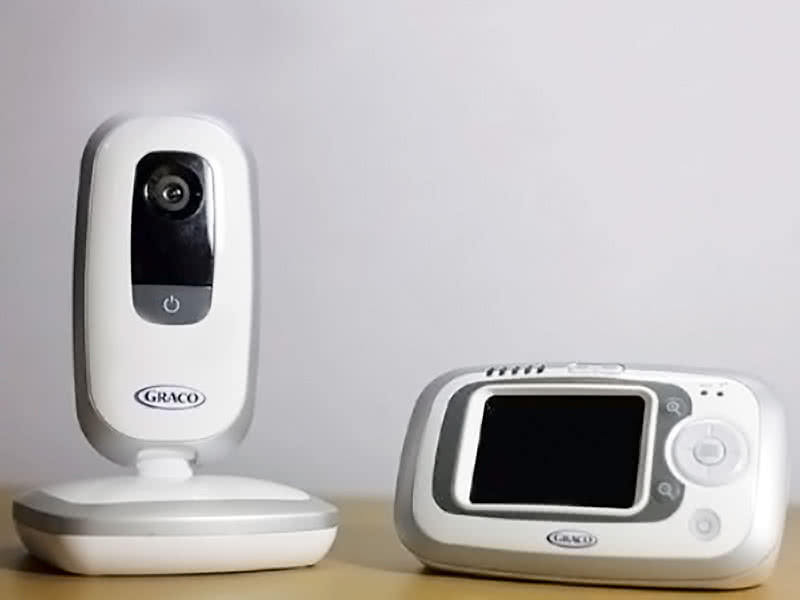
A baby monitor can be a lifeline for parents, allowing you to keep an ear and eye on your baby from another room. If you own a Graco baby monitor, you probably rely on it to give you peace of mind. But what happens when your monitor suddenly starts beeping—sometimes loudly, sometimes persistently, and sometimes for no clear reason? This beeping can be worrying, especially if you don’t know what it means or how to stop it.
Understanding why your Graco baby monitor is beeping, and how to fix it, is important for your family’s comfort and safety. This guide will help you decode the different beeps, solve common problems, and keep your monitor working as it should. Whether your monitor is beeping once, repeating, or showing an error light, you’ll find clear answers here. Let’s take a deep dive into everything you need to know about Graco baby monitor beeping so you can get back to calm, restful nights.
Why Do Graco Baby Monitors Beep?
Baby monitors beep for a reason—they’re trying to get your attention. The beeping is not random or just a design flaw. In most cases, the beeping is a warning signal. It tells you something isn’t right, and the monitor needs your help to work properly. The most common reasons for beeping include low battery, loss of signal, interference, or a connection problem between the parent and baby unit.
Some newer Graco models also beep for less obvious reasons, such as temperature warnings or when the unit is out of range. Understanding the types of beeps and what they mean is the first step to solving the problem.
Common Reasons For Graco Baby Monitor Beeping
Let’s explore the main causes for beeping in more detail, and what you can do about each one.
1. Low Battery
A low battery is by far the most common reason for beeping. Baby monitors use a lot of energy, especially if they have video or sound-activated features. When the battery drops to a certain level, the monitor beeps to warn you.
- How to fix: Plug the monitor into its charger or replace the batteries. Most Graco units have a battery indicator light—check if it’s flashing or red.
- Tip: Recharge batteries fully before first use to extend their life. Avoid letting them run completely empty too often.
2. Out Of Range
When the parent unit gets too far from the baby unit, the signal weakens and the monitor beeps. This can happen if you go outside, move to a different floor, or if there are thick walls between you and the baby’s room.
- How to fix: Move closer to the baby’s room. Try to keep both units within the recommended range (often 500-1000 feet for most Graco models, but check your manual).
- Tip: Large metal appliances, thick concrete, and Wi-Fi routers can block or weaken the signal.
3. Signal Interference
Other devices, such as cordless phones, microwaves, and Wi-Fi routers, can interfere with your baby monitor’s signal. If the frequency is crowded, the monitor may beep to signal a loss of clarity or dropped connection.
- How to fix: Move the monitor away from other electronics. Try switching the channel or frequency if your monitor allows.
- Tip: DECT (Digital Enhanced Cordless Telecommunications) monitors have less interference than analog models.
4. No Power To Baby Unit
If the baby unit loses power, the parent unit will beep to let you know it’s not receiving a signal.
- How to fix: Check that the baby unit is plugged in or that its batteries are charged. Make sure the power outlet is working.
- Tip: Use a surge protector to avoid power interruptions.
5. Volume Or Sensitivity Settings
Sometimes, the monitor will beep if the volume is turned all the way down or the sensitivity is set too low. This can trigger an alert, as the monitor thinks it’s not working properly.
- How to fix: Increase the volume or sensitivity. Make sure the speaker isn’t blocked.
- Tip: For noisy environments, set the sensitivity higher; for quiet rooms, keep it lower to avoid false alarms.
6. Temperature Alerts
Some Graco monitors have built-in temperature sensors. If the room gets too hot or cold, the monitor may beep as a warning.
- How to fix: Adjust the room temperature or change the monitor’s temperature alert settings.
- Tip: Babies sleep best in a room between 68°F and 72°F (20°C to 22°C).
7. Pairing Or Connection Issues
If the units are not paired correctly (especially after a power outage or battery change), the monitor may beep or flash an error.
- How to fix: Re-pair the parent and baby unit according to the instructions. This usually involves pressing a “pair” button on each unit.
- Tip: Keep the units close together during pairing for best results.
8. Faulty Power Adapter Or Cable
A damaged power adapter or cable can cause intermittent power loss, leading to frequent beeping.
- How to fix: Inspect the cables and adapters for damage. Replace any frayed or broken parts.
- Tip: Never use a non-original charger, as voltage differences can cause problems.
9. Battery Contact Issues
If the battery contacts are dirty or corroded, the monitor may not get a proper connection and will beep for low battery.
- How to fix: Remove the batteries and clean the contacts with a dry cloth or a bit of rubbing alcohol.
- Tip: Don’t use water or harsh chemicals on battery contacts.
10. Software Or Firmware Glitches
Sometimes, the monitor’s internal software can freeze or malfunction, causing random beeping even when everything else is fine.
- How to fix: Turn both units off, unplug them, and wait one minute before turning back on. If the problem continues, check for a firmware update or contact Graco support.
- Tip: Always use the latest firmware if your model supports updates.

How To Diagnose The Beeping: Step-by-step
It’s not always easy to know what’s causing the beeping. Here’s a simple step-by-step guide to help you find the issue.
- Check the battery indicator – Is it flashing or red? Try charging.
- Look for error messages – Some monitors display an error code or symbol.
- Listen to the beep pattern – Is it a single beep, repeated, or a long tone? Different patterns mean different problems.
- Check the distance – Are you far from the baby unit? Move closer.
- Inspect all cables and power sources – Make sure everything is plugged in and undamaged.
- Switch off other electronics – Try turning off nearby devices to reduce interference.
- Try resetting both units – Power off and restart.
If you follow these steps, you’ll likely find the cause of the beeping.
Graco Baby Monitor Models And Their Beep Alerts
Graco has produced several different monitor models over the years. Each has slightly different beep alerts and indicators. Here’s a quick comparison of some popular Graco baby monitor models and their beeping features:
| Model | Alert Types | Common Beep Causes | Display/Indicator |
|---|---|---|---|
| Graco Secure Coverage | Beep, Light | Low Battery, Out of Range | LED light, Audio tone |
| Graco Digital Video Monitor | Beep, Screen Flash | Signal Loss, Battery | Screen icon, Beep |
| Graco Direct Connect | Beep, Vibrate | Out of Range, Power Loss | Vibration, Beep |
| Graco iMonitor | Beep, Light, Vibration | Interference, Battery | LED bar, Beep |
Non-obvious insight: Many parents don’t realize that beep patterns (such as one beep vs three beeps) can mean different things even on the same model. It’s worth checking the manual for your specific monitor.
How To Stop Graco Baby Monitor Beeping
It’s frustrating to hear constant beeping, especially when you’re tired or trying to put your baby to sleep. Here are concrete steps you can take to stop the beeping for good:
Recharge Or Replace Batteries
If your monitor uses rechargeable batteries, give them a full charge. For models with removable batteries, try replacing them with fresh ones. Batteries lose their ability to hold a charge over time, so if you’ve had your monitor for more than a year, new batteries may solve the problem.
Check Signal Range And Position
If you’re out of range, move the parent unit closer to the baby unit. Avoid placing the monitor near large metal objects, thick walls, or electronic devices that could block the signal.
Change Channels Or Frequency
If your monitor allows it, try switching to a different channel or frequency. This is especially useful if you live in an apartment or area with many wireless devices.
Inspect Power Supply
Make sure both the parent and baby units are properly plugged in. Check the outlets and cables for wear or damage. Try a different outlet if you’re not sure.
Adjust Settings
Check the volume and sensitivity settings. If they are too low, the monitor may beep. Make small adjustments and see if the beeping stops.
Reset The Monitor
Turn off both units, unplug them, and wait for one minute. Then, plug them back in and turn them on. This can clear minor software glitches.
Re-pair Units
Some monitors need to be re-paired after a power loss. Follow the instructions in your manual to reconnect the parent and baby units.
Clean Battery Contacts
If your monitor is still beeping after changing batteries, clean the battery contacts with a soft, dry cloth.
Update Firmware
If your Graco monitor supports firmware updates, check the official Graco website for the latest version.
Contact Graco Support
If none of these steps work, contact Graco customer support. They can guide you through advanced troubleshooting or arrange for repairs if your monitor is under warranty.
Preventing Beeping In The Future
Taking a few simple actions can help you avoid beeping problems before they start.
- Charge batteries regularly. Don’t let them run down completely.
- Keep units within range. Avoid thick walls and interference.
- Place monitors away from Wi-Fi routers, microwaves, and cordless phones.
- Check cables and adapters every few months for damage.
- Clean battery contacts once or twice a year.
- Update firmware if your model supports it.
Pro tip: Place your monitor on a hard, stable surface, not on a soft bed or blanket. This prevents overheating and signal blockage.
Real-world Examples: Common Beeping Scenarios
Sometimes, the best way to understand the issue is through real-life examples. Here are some situations that real Graco users have faced:
Scenario 1: Beeping In The Middle Of The Night
Sarah noticed her Graco Secure Coverage monitor started beeping around 3 AM. She checked the parent unit and saw the battery light flashing. Plugging it in to charge stopped the beeping immediately.
Scenario 2: Moving House, Now Constant Beeping
After moving to a new apartment, John’s monitor would beep every few minutes. He realized the Wi-Fi router was right next to the baby unit. Moving the monitor to another side of the room fixed the interference problem.
Scenario 3: Beeping With No Obvious Reason
Maria’s monitor beeped even with new batteries. After checking everything else, she cleaned the battery contacts with a dry cloth and the beeping stopped. She hadn’t realized that dust buildup could cause battery connection issues.
Scenario 4: Random Beeping, No Error Lights
Sam’s monitor started beeping, but there were no warning lights. After resetting both units and re-pairing them, the beeping stopped. He found out later that a recent power outage had caused the units to lose their connection.
Scenario 5: Beeping Only At Certain Times
Anna noticed her Graco monitor would beep around lunchtime every day. She realized the microwave in the kitchen, used at that time, was causing interference. She moved the monitor further away and the beeping stopped.
Troubleshooting Table: Quick Solutions
Here’s a quick-glance guide to help you troubleshoot the beeping problem:
| Beep Pattern | Possible Cause | Solution |
|---|---|---|
| Single beep, repeating | Low battery | Charge or replace batteries |
| Continuous beeping | Out of range | Move units closer |
| Three rapid beeps | Signal interference | Change channel or move away from electronics |
| Beep and flashing light | Power loss on baby unit | Check power connection |
| Random beep, no pattern | Software glitch | Reset both units |
Non-obvious insight: Sometimes, a weak battery can cause random beeps even if the battery light is not yet flashing. If you’ve tried everything else, try a new battery.
When To Replace Your Graco Baby Monitor
Most Graco baby monitors are built to last several years, but sometimes it’s better to replace the unit if:
- The beeping does not stop after troubleshooting.
- The battery no longer holds a charge, even with a new replacement.
- The monitor loses signal often, even in the same room.
- The display or sound quality is poor or fails.
- Your model is old and does not support modern interference protection.
If your monitor is more than 5-6 years old, it may be time to upgrade. Newer models have better battery life, longer range, and improved interference protection.
Graco Baby Monitor Beeping Vs Other Brands
How does Graco compare to other baby monitor brands when it comes to beeping issues? Here’s a quick comparison:
| Brand | Common Beep Causes | Beep Volume | Ease of Troubleshooting |
|---|---|---|---|
| Graco | Battery, Range, Interference | Medium | Easy |
| VTech | Battery, Out of Range | Medium-High | Medium |
| Infant Optics | Battery, Signal Loss | Low-Medium | Easy |
| Motorola | Signal, Battery | High | Medium |
Graco monitors are known for clear, easy-to-understand beeping signals and user-friendly troubleshooting. However, each brand has its own quirks and alert systems.
Safety Concerns And Best Practices
Persistent beeping is not just annoying—it can also signal a safety issue. If your monitor is beeping, don’t ignore it. Always check on your baby and the monitor right away.
Here are some best practices for safe use:
- Never cover the monitor with blankets or cloth, as this can cause overheating.
- Keep cords and units out of the baby’s reach.
- Place monitors on a stable surface to avoid drops or damage.
- Avoid using extension cords, which can be a tripping hazard.
- Replace damaged or old batteries immediately.
If you ever feel unsure, consult your monitor’s user manual or the official Graco website.
Frequently Asked Questions
What Does A Single Beep Every Minute Mean On My Graco Baby Monitor?
A single beep every minute usually means the battery is low on your parent unit. Plug it in to charge, or replace the batteries if needed. If the beeping continues after charging, check the battery contacts for dirt or corrosion.
Why Does My Graco Baby Monitor Beep When I Move To Another Room?
This is often a range issue. When you move too far from the baby unit or there are thick walls or metal objects in the way, the monitor loses signal and beeps. Try moving closer or choosing a location with fewer obstacles.
Can Wi-fi Cause My Graco Baby Monitor To Beep?
Yes, Wi-Fi routers and other wireless devices can cause interference. This can make the monitor beep or lose connection. Try moving the monitor further from your router or changing the monitor’s channel if possible.
What Should I Do If My Graco Monitor Keeps Beeping After Trying All The Solutions?
If you’ve checked the battery, range, interference, and reset the units but the beeping won’t stop, there could be a hardware fault. Contact Graco customer support or visit their official site for further help: Graco Customer Support.
Do Graco Monitors Have A Mute Button For Beeping Alerts?
Most Graco monitors do not have a mute button for beeping alerts, as these are important safety signals. However, you can adjust the volume of regular sounds, and in some models, reduce the loudness of alerts in the settings menu.
Final Thoughts
A beeping Graco baby monitor can be stressful, but it’s usually easy to fix once you know what to look for. By understanding the reasons behind the beeps—such as battery, range, or interference—you can solve the problem quickly and keep your baby safe. Remember to maintain your monitor regularly, keep it away from interference, and replace batteries or units when needed. If in doubt, always consult the manual or reach out to Graco support. With the right care and attention, your monitor will continue to be a helpful tool for years to come. For more information on baby monitor safety and troubleshooting, visit the official Consumer Reports guide.