
Losing one AirPod can be frustrating, especially when you rely on them for calls, music, or podcasts every day. Maybe you dropped it in the gym, left it in a coffee shop, or it slipped between your sofa cushions. Whatever the reason, searching for a single AirPod feels much harder than finding the case or both earbuds together.
But the good news is, you have several ways to track down your missing AirPod—even if it’s offline or out of battery. In this guide, you’ll learn every practical step, tip, and tool to find one lost AirPod, no matter where or how you lost it.
Many people try to use Apple’s Find My app, but don’t realize all its features. Others give up too soon or miss simple tricks that could save time and money. Here, you’ll find advice based on real experience, helpful data, and solutions for every situation—including what to do if you can’t get your AirPod back.
Whether you have AirPods Pro, AirPods 2nd generation, or even AirPods Max, these methods can help you get reunited with your favorite listening device.
How Apple’s Find My App Helps You Locate One Airpod
The Find My app is your best friend when it comes to finding a lost AirPod. Many users don’t realize the app works even if only one AirPod is missing, and it can show you the last location where your AirPod was connected.
How Find My Tracks One Airpod
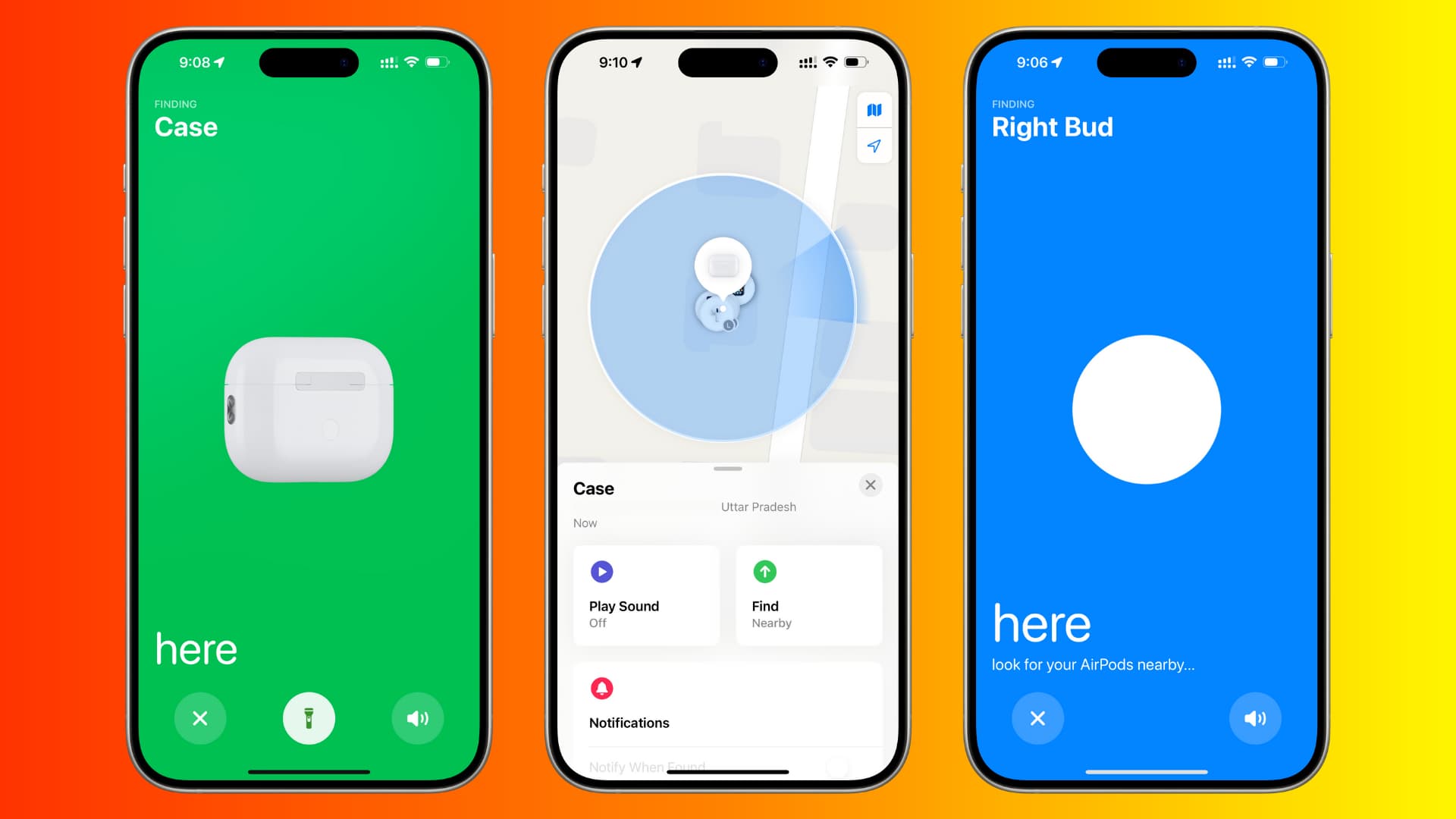
When your AirPods are connected to your iPhone, their location is updated in the Find My app. If you lose one, the app can display the position of each AirPod separately. For example, if you dropped one at home and the other at work, the map will show both spots.
- Open the Find My app on your iPhone, iPad, or Mac.
- Tap Devices at the bottom.
- Select your AirPods.
- You’ll see a map with their last known locations.
If the missing AirPod is out of the case and within Bluetooth range, you can even make it play a sound. This is a feature many people overlook. The AirPod will beep softly, helping you follow the sound and find it under furniture or behind objects.
What If Only One Airpod Is Showing?
The app only shows AirPods that were last connected to your device. If both were together when you last used them, you’ll see only one location. But if you lost them at different times or places, you can refresh the app after finding the first AirPod to get the location of the second.
Tips For Using Find My Effectively
- Act Fast: The sooner you use Find My, the better. The AirPod’s last known location is most accurate right after you lose it.
- Refresh the Map: If you find one AirPod, put it in the case and refresh the Find My app to see the other’s location.
- Play Sound: Use the Play Sound feature in a quiet environment. The AirPod sound is not very loud.
Non-obvious insight: Find My sometimes updates location data when another Apple device comes near your lost AirPod—even if it’s not your iPhone. So, if you lost your AirPod in a public place, check the app regularly. Someone with an iPhone might walk by and update the location, even if they don’t know it.
Step-by-step Guide: Finding One Lost Airpod Nearby
If you think your missing AirPod is somewhere close—like your bedroom, car, or office—there are smart ways to look for it.
1. Use The Play Sound Option
- Open Find My and select your AirPods.
- Tap Play Sound for the missing AirPod.
- Listen carefully for beeps.
Some people expect a loud ringtone, but AirPods only emit a series of soft chirps. Move quietly around the area, pausing often to listen.
2. Narrow Down The Search Area
Retrace your steps. Where did you last use your AirPods? Common places include:
- Under couch cushions
- Inside bags or backpacks
- In pockets or jackets
- Under your car seat
Check these spots before searching random places. Sometimes, the AirPod falls out when you bend over or take off clothing.
3. Use A Flashlight
AirPods are small and white, so they blend into light surfaces. Shine a flashlight under furniture, inside shoes, or between car seats. The light can help the AirPod’s shiny surface stand out.
4. Sweep With A Soft Broom
If you think the AirPod is on the floor, gently sweep the area with a clean, soft broom. This can help move the AirPod into view without pushing it into a hard-to-reach spot.
5. Turn Off Other Noise
Silence TVs, fans, and other background noise before using the Play Sound feature. Even a small hum can make it hard to hear the AirPod’s chirp.
6. Use Bluetooth Signal Tricks
If your missing AirPod is outside the case and has battery, you can sometimes track the Bluetooth signal.
- Walk around with your phone’s Bluetooth screen open.
- Watch for the AirPod to appear in the list of available devices.
- As you get closer, the signal may get stronger.
This method isn’t as precise as Find My, but can help narrow down the location.
7. Get Help From Family Or Friends
Another set of eyes can spot details you miss. Ask someone to help you look, or listen for the chirp from a different part of the room.
Non-obvious insight: AirPods sometimes fall into laundry baskets, trash bins, or shoes. Check these “unlikely” places, especially if you were multitasking when you lost the AirPod.
What To Do If Your Airpod Is Lost Outside Or In A Public Place
Finding a lost AirPod at home is one thing. If you left it on a bus, at the gym, or in a park, the challenge is bigger—but not impossible.
1. Check Find My For Last Known Location
Open the Find My app as soon as you realize you lost the AirPod. The app will show the last place the AirPod was connected to your iPhone.
- If the map shows a public spot, go there quickly if possible.
- Ask staff if anyone turned in lost items.
2. Mark The Airpod As Lost
In Find My, you can mark your AirPods as lost. This locks them and lets you leave a phone number or email. If someone finds your AirPod and connects it to their device, they’ll see your message.
- Open Find My.
- Select your AirPods.
- Scroll down and tap Mark as Lost.
- Follow the prompts to add your contact info.
3. Visit The Place You Lost It
If the AirPod’s location is in a gym, coffee shop, or office, go there and ask if anyone turned in lost AirPods. Many people turn in found electronics, especially if they only find one AirPod.
4. Leave A Note Or Contact Staff
Leave your information with lost and found, or put up a small sign. Some people find AirPods and keep them, but others wait for the owner to ask.
5. Watch For Location Updates
Check the Find My app over several days. Sometimes, another Apple user will walk near your AirPod, and their phone updates the location on your app—even if they don’t realize it.
6. Check Social Media Or Community Boards
If you lost your AirPod at school, work, or a community center, check their Facebook page or lost-and-found boards. People sometimes post about found AirPods, hoping to return them.
7. Accept That Outdoor Airpods Are Harder To Recover
Outdoors, your AirPod might be exposed to rain, dirt, or other damage. If you can’t find it quickly, it may be lost for good. Still, keep checking the app just in case someone finds and tries to connect it.
Non-obvious insight: If you lost your AirPod on public transport, contact the transit authority’s lost and found as soon as possible. Many have special procedures for electronics, and you’ll need to describe the AirPod (and sometimes the serial number).
Advanced Techniques For Finding A Lost Airpod
Sometimes, basic searching and Find My aren’t enough. Here are advanced methods that can help, especially if you’re persistent.
Using Bluetooth Scanners
There are free and paid apps that scan for Bluetooth devices nearby. Apps like LightBlue Explorer or BLE Scanner can detect your AirPod if it’s out of the case and still has battery.
- Download a Bluetooth scanner app.
- Walk slowly around the area.
- Watch for the AirPod to show up in the device list.
This works best indoors and when the AirPod hasn’t lost power.
Metal Detectors
If you lost your AirPod outdoors (like in grass or sand), a metal detector can sometimes help. AirPods contain metal parts that some detectors can pick up.
- Borrow or rent a simple metal detector.
- Sweep the area where you lost your AirPod.
This method is uncommon, but some people have had success with it.
Using Third-party Tracking Accessories
If you often lose things, you might consider attaching a small Bluetooth tracker (like a Tile or AirTag) to your AirPods case. While you can’t attach one to a single AirPod, tracking the case can help you avoid losing both.
Check With Apple Support
If you can’t find your AirPod after trying everything, visit the Apple Support website. They can check if anyone returned AirPods matching your serial number or advise you on replacement costs.
Non-obvious insight: Some Bluetooth scanner apps show signal strength in real time, so you can “hot/cold” your way closer to the AirPod even if it’s hidden behind something.
What If Your Airpod Is Offline Or Out Of Battery?
A common problem: you open Find My and see “Offline” or “No location found” for your missing AirPod. This usually means:
- The AirPod is in the case (and not broadcasting).
- The battery is dead.
- The AirPod is out of Bluetooth range.
What You Can Still Do
- Check the Last Known Location: Even if offline, Find My shows the last place the AirPod connected. Go there and search carefully.
- Keep Checking the App: Sometimes, someone finds the AirPod, charges it, or takes it out of the case. If it comes online again, the app will update.
- Ask Around: If you lost your AirPod at work or a friend’s house, let people know. Someone might pick it up later.
When To Give Up Searching
After a week or two with no updates, it’s likely the AirPod is lost for good. At this point, consider replacing it (see below for how to do this).
Non-obvious insight: If you accidentally washed your AirPod in the laundry, dry it completely before charging or using. Sometimes, water-damaged AirPods can still connect briefly—just enough for Find My to show their location.
What You Need To Know About Replacing A Single Airpod
If you can’t recover your lost AirPod, you don’t have to buy a whole new set. Apple and some authorized resellers offer replacement AirPods for a fee.
How Replacement Works
- Visit the Apple Support website or your local Apple Store.
- Provide your serial number (found on your AirPods case).
- Order a replacement for the lost left or right AirPod.
You’ll pay a service fee, which is usually much less than buying a new set. As of 2024, prices are around $69–$89 per AirPod (for standard or Pro versions). Check Apple’s official site for the latest prices.
What About The Case?
If you lost the charging case instead, you can also buy a replacement case. The same process applies: contact Apple Support, provide your serial number, and pay the replacement fee.
Pairing Your Replacement Airpod
When you get your new AirPod, you need to pair it with your existing one:
- Place both AirPods (old and new) in the charging case.
- Open the lid near your iPhone.
- Press and hold the setup button on the case.
- Follow the on-screen pairing instructions.
After a few seconds, your AirPods will work together as before.
Insurance And Warranty
Some credit cards or insurance policies cover lost electronics. Check your policy to see if you’re eligible for a reimbursement.
Non-obvious insight: If you find your lost AirPod after buying a replacement, you can keep it as a spare. Just pair it as needed. AirPods are interchangeable as long as they match the model.

Credit: magroadvogados.com
How Different Airpods Models Affect Finding One Earbud
Not all AirPods are the same. Your options for finding one AirPod depend on the model you have.
| Model | Can Play Sound? | Uses Precision Finding? | Replacement Cost (USD) |
|---|---|---|---|
| AirPods (1st/2nd Gen) | Yes | No | $69 |
| AirPods Pro | Yes | Yes (2nd Gen) | $89 |
| AirPods Max | No (for earcups) | No | $69 (ear cushion) |
- Precision Finding is a feature on newer AirPods Pro. If you have an iPhone 11 or newer, the Find My app can guide you with arrows and distance, making it easier to find one AirPod.
- Older AirPods rely on the map and sound only.
If you’re not sure which model you have, check the number on the stem or inside the charging case and look it up on Apple’s website.
Non-obvious insight: AirPods Max ear cushions are replaceable and covered under Apple’s lost parts service, but you can’t track the ear cushions with Find My.
Comparing Find My Vs. Third-party Apps For Finding One Airpod
Many people wonder if third-party apps can help find a lost AirPod. Here’s how they compare:
| Feature | Find My (Apple) | Third-Party Apps |
|---|---|---|
| Tracks last known location | Yes | No |
| Plays sound on AirPod | Yes | No |
| Bluetooth signal finder | No | Yes |
| Works offline | No | Partial |
| Official support | Yes | No |
- Find My is best for showing location and playing a sound.
- Third-party apps are helpful if the AirPod is nearby and has battery, but they can’t show a map or play a sound.
Non-obvious insight: Some third-party Bluetooth scanners display “signal strength” so you can move around and see if you’re getting closer, which is not possible in Find My.

Credit: www.youtube.com
Common Mistakes People Make When Searching For One Lost Airpod
When searching for one AirPod, many people repeat the same errors. Avoid these to improve your chances.
1. Waiting Too Long To Search
AirPods are small and can get kicked, vacuumed, or picked up by others if you don’t look quickly.
2. Not Using Find My Properly
Some users don’t realize they can play a sound on a single AirPod, or they forget to refresh the app after finding one.
3. Forgetting To Check Unlikely Places
AirPods often fall into laundry, shoes, or car crevices—areas people rarely check.
4. Assuming It’s Lost For Good Too Soon
Sometimes, AirPods turn up days later in bags, pockets, or even outside. Don’t give up right away.
5. Not Marking As Lost
If you lose your AirPod in public, always mark it as lost in Find My. This increases the chances a good Samaritan can return it.
6. Ignoring Battery Life
AirPods with dead batteries won’t show up in Find My. Keep checking in case someone finds and charges it.
7. Not Notifying Others
Tell family, friends, or coworkers. Someone might find it and not realize it’s yours.
8. Not Cleaning Up After Searching
When searching small spaces, move objects back to their original places to avoid confusion and losing other items.
Non-obvious insight: People often search the same area repeatedly without changing their angle or lighting. Try looking from different heights or using a flashlight for a new perspective.
How To Prevent Losing Your Airpods Again
Prevention is the best solution. Here are ways to avoid losing one AirPod in the future.
1. Always Store Airpods In The Case
Get in the habit of putting AirPods back in the case when not in use. This reduces the chance of dropping or misplacing one.
2. Use Ear Hooks Or Covers
Silicone hooks or covers can help keep AirPods secure in your ears, especially during workouts or running.
3. Label Your Airpods Case
Put a sticker or small tag on your case with your contact info. If someone finds it, they can return it more easily.
4. Set Up Find My Alerts
Enable “Notify When Left Behind” in the Find My app. Your iPhone will alert you if you leave your AirPods behind at a location.
5. Clean Regularly
Dirt and earwax can cause AirPods to fall out more easily. Clean them regularly for a better fit.
6. Track Your Routine
Notice when and where you most often use your AirPods. Avoid removing them in places where you’re likely to forget them.
Non-obvious insight: Some AirPods cases have wrist straps or keychains. These make it easier to keep track of your AirPods when moving around.
Credit: magroadvogados.com
Frequently Asked Questions
How Can I Find One Airpod If It Is Out Of Battery?
If your AirPod’s battery is dead, you can’t play a sound or track it in real time. But you can check the last known location in the Find My app. Go to that spot and search carefully. Sometimes, the AirPod might get charged if someone finds it, and the location will update in Find My.
Can Someone Else Use My Lost Airpod?
Yes, another person can pair your lost AirPod with their device after resetting it. However, if you mark it as lost in the Find My app, your contact info will show up if they try to connect. This makes it easier for honest people to return it.
What Should I Do If I Find Only The Airpod Case?
If you find just the case but not the AirPod, keep searching with the Find My app. The AirPod can still show its location if it’s out of the case and has battery. If you can’t find it, consider ordering a replacement AirPod from Apple.
Is There A Way To Find One Airpod Without An Iphone?
You can use the Find My app on any Apple device (iPad, Mac, or even on the web at iCloud. com). Log in with your Apple ID and follow the steps to locate your AirPod. You’ll need internet access.
How Much Does It Cost To Replace One Lost Airpod?
As of 2024, replacing one AirPod costs about $69–$89 depending on the model. Check the latest prices on the official Apple Support website. Replacement is cheaper than buying a whole new set.
Losing one AirPod can feel overwhelming, but you have more options than you think. With Apple’s tracking tools, careful searching, and a few smart habits, you can often get your lost AirPod back—or replace it without too much hassle. The key is to act fast, use every tool available, and learn from the experience to prevent it from happening again.
Your music, podcasts, and calls will be back in your ears soon.