
Getting water in your phone’s charging port can feel like a mini heart attack. Maybe you dropped your phone in the sink, got caught in heavy rain, or spilled a drink nearby. Suddenly, your phone flashes a warning: “Moisture detected in charging port.” You try to charge, but nothing happens. In today’s world, being without your device isn’t an option for most people. The good news is that water in your charging port doesn’t always mean disaster—if you act quickly and correctly.
Removing water from a charging port is not just about shaking your phone or hoping it will dry. If done wrong, you might cause permanent damage. This guide explains, step by step, how to get water out of a charging port safely, what mistakes to avoid, and what to do if things go wrong.
You’ll also learn how different devices respond to water and why some home remedies can make the problem worse. By the end, you’ll be ready to handle this stressful situation with confidence.
Why Water In A Charging Port Is A Serious Issue
Most people don’t think much about the tiny holes in their phones and devices. But the charging port is one of the most sensitive parts. Water inside can cause:
- Short circuits that damage internal components
- Corrosion that slowly eats away at metal contacts
- Charging errors or total charging failure
- Danger of electric shock if you try to charge while wet
Modern phones have some water resistance (like IP67 or IP68 ratings), but these usually don’t cover the charging port when open. Even a drop of water can be a problem, especially over time.
How Water Gets Into Charging Ports
Some common ways water sneaks in:
- Dropping the phone in water (sink, toilet, pool)
- Using the phone in the rain
- Spills from drinks or food
- High humidity and sweat (like in bathrooms or gyms)
- Steam from showers or cooking
Even if your phone looks dry outside, moisture can remain inside the port.
First Steps: What To Do Immediately
If you suspect water in your charging port, don’t panic. Quick, careful action can prevent damage.
- Turn off your device. This helps stop short circuits.
- Disconnect everything—chargers, headphones, adapters.
- Hold your phone upright with the port facing down. Gravity helps water drip out.
- Do not plug in the charger. Charging a wet port can cause serious damage.
Resist the urge to check if it “works now. ” Wait until you are sure the port is dry.
How To Get Water Out Of A Charging Port: Step-by-step
1. Remove Excess Liquid
First, you want to get out as much water as possible without pushing it deeper.
- Gently shake the device with the charging port facing down. Short, sharp shakes can help, but don’t use force that might send water further inside.
- Use a soft, lint-free cloth or paper towel to blot around the port. Do not insert anything into the port yet.
2. Allow Air Drying
Patience is your best friend here.
- Place your device in a dry, well-ventilated area.
- Position the charging port facing down.
- If possible, use a small fan to blow air across (not into) the port. Room temperature air is fine.
Never use hairdryers, heaters, or direct sunlight. Excess heat can damage your phone’s battery and screen.
3. Use Absorbent Materials Properly
Some materials can help pull out moisture, but only if used correctly.
- Silica gel packets (the kind found in new shoes or bags) are excellent at absorbing moisture. Place your phone in a sealed bag or container with several silica gel packets for at least 24 hours.
- If you don’t have silica gel, uncooked rice is a common home remedy. Place the phone in a container of dry rice, charging port down. Rice is less effective than silica gel but better than nothing. Leave it for 24-48 hours.
Note: Do not put rice grains directly into the charging port—they can get stuck.
4. Avoid Cotton Swabs, Tissues, Or Toothpicks
It’s tempting to poke something inside to “soak up” water. This often makes things worse.
- Cotton swabs leave fibers behind.
- Tissues can break apart and clog the port.
- Toothpicks may damage delicate connectors.
If you must use something, a clean, dry, anti-static brush (like those for electronics) is safest, but air drying is almost always better.
5. Use Isopropyl Alcohol For Stubborn Moisture
If water is mixed with sugary drinks, saltwater, or sticky liquids, drying alone might not work.
- Use 99% isopropyl alcohol. It evaporates quickly and helps remove contaminants.
- Dip a clean, anti-static brush very lightly in alcohol and gently clean the port.
- Let the phone air dry for several hours afterward.
Caution: Only use high-purity alcohol. Lower purity (like 70%) contains water and can worsen the problem.
6. Check For Moisture Warnings
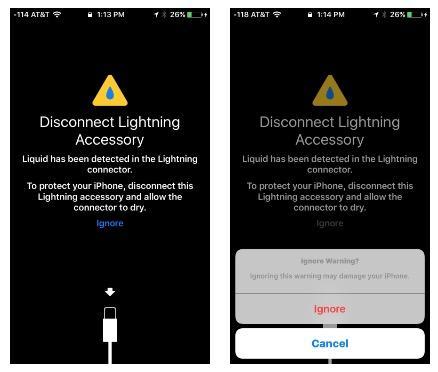
Many modern phones detect water in the charging port. If you see a warning (“Moisture detected”), do not ignore it.
- Try connecting the charger after at least 24 hours of drying.
- If the warning remains, repeat the drying steps.
7. When To Use Compressed Air
Compressed air can help, but only if used carefully.
- Hold the can upright. Tilting can release cold liquid propellant.
- Use short bursts from a safe distance (at least a few inches).
- Never use high-pressure air—this can damage internal parts.
Compressed air is good for blowing out dust but less effective for water. Use it only if drying hasn’t worked after 24-48 hours.
8. When To Seek Professional Help
If your phone still won’t charge after 48 hours, or you see corrosion, rust, or damage inside the port, take it to a repair professional. Modern devices are complex, and water damage can spread to other parts.
What Not To Do: Common Mistakes
Many well-meaning tips online can do more harm than good. Here’s what to avoid:
- Don’t use a hairdryer or microwave. Heat can damage electronics and batteries.
- Don’t stick objects in the port (cotton, paper, metal).
- Don’t ignore error messages. Forced charging can cause permanent damage.
- Don’t shake the phone too hard. You might drive water deeper inside.
Following safe steps can mean the difference between a simple fix and a costly repair.
How Long Does It Take For A Charging Port To Dry?
Drying time depends on:
- Amount of water
- Humidity and temperature of the room
- Device design (some are more “open” than others)
Most charging ports dry within 24 to 48 hours with proper care. Sticky liquids or saltwater take longer and may need cleaning.
Comparison: Drying Methods And Effectiveness
Below is a comparison of different drying methods:
| Drying Method | Effectiveness | Safety | Recommended Use |
|---|---|---|---|
| Air drying (open air) | High | Very Safe | Best for most cases |
| Silica gel packets | Very High | Very Safe | Best for heavy moisture |
| Uncooked rice | Medium | Safe | For emergencies |
| Compressed air | Medium | Safe if gentle | For stubborn moisture |
| Hairdryer/heat | Low | Risky | Not recommended |
Device Differences: Iphone Vs Android Vs Other Gadgets
Iphone Charging Ports
iPhones use a Lightning port (older models) or USB-C (newer). Apple devices have sensors that can detect moisture. If the phone warns you about water, do not attempt to charge it.
- IPhones are water-resistant (from iPhone 7 and newer), but the port is still vulnerable.
- Apple recommends unplugging accessories and waiting until the port is dry.
- Never use external heat sources.
Android Charging Ports
Most Android phones use USB-C ports. Many Samsung, Google, and other brands have built-in moisture sensors.
- If you get a “Moisture detected” warning, follow the same air-drying steps.
- Some phones allow “wireless charging” as a backup, but only if the device is completely dry on the outside.
Other Devices (tablets, Headphones, Etc.)
- Tablets: Use similar steps. Their ports are often larger but still sensitive.
- Wireless earbuds (like AirPods): Use a dry cloth and air drying. Do not use liquids or insert objects.
- Laptops: Larger ports, but same rules—no heat or poking inside.
Device Water-resistance Ratings: What They Mean
Some devices are rated IP67 or IP68. This means they resist water for a short time (like being dropped in a puddle), but the charging port is only protected if the cover is closed (if present). Open ports are always a risk.
| IP Rating | Water Resistance | Port Protection |
|---|---|---|
| IP67 | 1 meter for 30 minutes | Not covered if port is open |
| IP68 | 1.5 meters for 30 minutes | Not covered if port is open |
| No rating | None | High risk if wet |
Insight: Many people believe their “waterproof” phones are safe even with open ports. In reality, the open charging port is the weakest point.
How To Know When The Port Is Dry
It’s not always easy to tell when your charging port is completely dry. Here’s what you can do:
- Wait at least 24 hours before trying to charge.
- Check for visual moisture—use a flashlight to look inside.
- If your phone has a moisture sensor, wait until the warning disappears.
- Try charging with a low-power source (like a computer USB port) instead of a wall charger. If it charges without error, you’re likely safe.
Diy Water Indicator
Some people use a piece of dry tissue pressed gently near (not inside) the port opening. If it absorbs moisture, wait longer.
Pro tip: Even if the device powers on, hidden moisture can cause corrosion over time. If you’re unsure, keep drying.
What If Your Phone Was Exposed To Salt Water Or Sugary Liquids?
Saltwater (like from the ocean) and sugary drinks are much more damaging than plain water. They leave behind residues that can corrode metal quickly.
- Rinse the port with 99% isopropyl alcohol to flush out salt or sugar.
- Air dry for at least 48 hours.
- Do not use rice or silica gel before flushing out contaminants.
If you notice sticky residue, visible corrosion, or green/white powder inside the port, seek professional cleaning as soon as possible.
Can You Use Wireless Charging Instead?
Many modern phones support wireless charging. If your charging port is wet, wireless charging is a safe alternative—but only if the phone’s exterior is dry and undamaged. Never try to use wireless charging if the device was fully submerged and may have internal water.
- Wireless charging won’t fix the port, but it allows you to use your phone while the port dries.
- Still, you should aim to dry the charging port as soon as possible.
Preventing Water Damage In The Future
The best fix is prevention. Here are practical steps:
- Use port covers. Small silicone plugs are available for most phones.
- Keep your device away from water sources—bathrooms, pools, kitchens.
- Avoid using your phone in the rain or with wet hands.
- Store your phone in a waterproof pouch during risky activities.
- Clean the port regularly with a dry, soft brush to prevent buildup of dust and debris.
Non-obvious insight: Even in dry climates, humidity from sweat or steam can cause moisture in the port. Be careful in gyms, saunas, or kitchens.
How Professional Repairs Handle Water In Charging Ports
If drying doesn’t work or you notice damage, professionals have special tools:
- Microscope inspection to check for corrosion or rust
- Ultrasonic cleaning to remove tough residue
- Special drying chambers for deep moisture removal
- Replacing the charging port if needed
Professional repair is usually needed if the device stops charging, won’t turn on, or shows ongoing errors after drying.
Typical Repair Costs
- Simple cleaning: $40–$80
- Port replacement: $80–$200
- Board-level repair: $150–$400+
Prices vary by device and location.
Myths And Misunderstandings About Water In Charging Ports
There’s a lot of bad advice out there. Let’s clear up a few myths:
- Myth: “Rice always works.” Reality: Rice absorbs some moisture, but not as much as silica gel. It’s slow and can leave dust.
- Myth: “If it works after drying, there’s no problem.” Reality: Hidden corrosion can appear weeks later.
- Myth: “Water-resistant phones can’t be damaged.” Reality: Open ports are always a risk.
Credit: www.syncwire.com
What About Other Device Ports? (headphones, Usb, Etc.)
The same principles apply to other ports:
- Air dry, never poke objects inside.
- Use silica gel or a fan.
- For sticky spills, isopropyl alcohol can help.
Many devices use the same port for charging and headphones (like USB-C), so water can affect both at once.
What To Do If Your Device Doesn’t Work After Drying
If you’ve tried every method, but your device:
- Won’t charge
- Shows “Moisture detected” errors for more than 48 hours
- Has visible corrosion or discoloration
…it’s time for professional repair. Don’t force charging—it can cause more damage. Backup your data if possible.
Long-term Effects Of Water Exposure
Even if your device seems fine, water exposure can cause:
- Battery degradation (shorter battery life)
- Corrosion inside the port or logic board
- Intermittent charging problems
- Random shutdowns or glitches
If you notice problems weeks after water exposure, mention this when getting repairs.
When Is It Safe To Charge Again?
After at least 24-48 hours of drying, and when:
- There is no moisture warning
- The port looks dry inside
- The device works normally
Start with a low-power charger (like a computer USB port). If everything works, return to normal use.
Credit: www.businessinsider.com
How To Check For Hidden Water Damage
If you’re unsure, some devices have liquid contact indicators (LCI). These change color when exposed to water.
- On iPhones, the LCI is inside the SIM tray slot. Use a flashlight to check.
- On some Androids, the LCI is near the charging port.
If the LCI is red or pink, water was definitely inside. This can affect your warranty status.
Data Table: Common Devices And Water Damage Response
Here’s a quick look at how different devices handle water in charging ports:
| Device Type | Moisture Warning | Wireless Charging | Water Resistance |
|---|---|---|---|
| iPhone (newer) | Yes | Yes | IP67/IP68 |
| Samsung Galaxy | Yes | Yes | IP68 |
| Google Pixel | Yes | Yes | IP67/IP68 |
| Older Android | No | Sometimes | Usually none |
| Tablets | Rarely | Rarely | Variable |

Credit: www.wikihow.com
Frequently Asked Questions
What Should I Do First If Water Gets Into My Charging Port?
Turn off your device right away. Disconnect any cables or accessories. Hold the phone with the charging port facing down, and gently shake to help water escape. Do not try to charge the device until you are sure the port is fully dry.
Can I Use A Hairdryer To Dry My Phone’s Charging Port?
No. Hairdryers can push water deeper inside and create heat that damages electronics and batteries. It’s safer to use air drying, a fan, or silica gel packets. Only use gentle, room-temperature air.
How Long Should I Wait Before Charging My Phone After Water Exposure?
Wait at least 24 to 48 hours, depending on how much water got inside. Make sure the port looks and feels dry. If your phone has a moisture sensor, wait until the warning disappears. Patience is important to avoid long-term damage.
Is Rice Or Silica Gel Better For Drying A Charging Port?
Silica gel is more effective than rice. Silica gel absorbs moisture faster and does not leave dust or debris. Rice is a common home remedy but should only be used if nothing else is available.
Will Water Damage My Phone Even If It Works After Drying?
Yes, it’s possible. Hidden moisture can cause corrosion inside the port or logic board. Problems may appear weeks later, like charging errors or random shutdowns. If your device starts acting strangely after water exposure, get it checked by a professional.
Water and electronics never mix well, but a calm and careful approach can prevent most lasting problems. Remember, if you’re unsure or if your device doesn’t recover, professional help is always best. You can also find further guidance on moisture and electronics safety from resources like Wikipedia.
With smart steps and a little patience, you can get water out of your charging port and keep your device working well.