
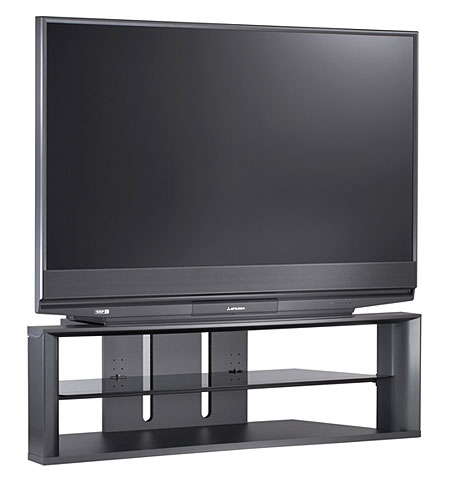
If your Mitsubishi DLP TV won’t turn on, you’re not alone. Many owners face this frustrating problem, often with little warning. One day, the television works perfectly; the next, it stays dark no matter how many times you press the power button. It’s easy to feel stuck, especially if you rely on your TV for news, sports, or relaxing evenings.
This guide dives deep into the causes behind a Mitsubishi DLP TV not turning on. You’ll learn how to diagnose the issue, fix common problems, and decide when to call for professional help. The goal is to give you clear steps, practical advice, and enough knowledge to feel confident about your next move. By the end, you’ll know more than most TV owners and avoid common mistakes that waste time and money.
Understanding Mitsubishi Dlp Tv Technology
Before troubleshooting, it helps to know how a DLP TV works. DLP stands for Digital Light Processing. Instead of using an LCD or plasma panel, these TVs use a lamp, a set of tiny mirrors (the DLP chip), and a color wheel to create the image. The lamp shines light through the wheel, which spins to add color, and the mirrors reflect the light onto the screen.
Key parts inside a Mitsubishi DLP TV:
- Lamp (bulb): Provides the light source for the picture.
- Ballast: Powers and controls the lamp.
- Color wheel: Adds color to the image.
- DLP chip: Contains millions of tiny mirrors that create the picture.
- Power supply board: Delivers power to all components.
- Mainboard: The TV’s “brain” for processing signals and controls.
These parts work together. If one fails, the TV might not turn on. Understanding this system makes it easier to find the real cause when your TV stays off.
First Steps: Quick Checks When Your Tv Won’t Turn On
You can save time by starting with a few simple checks. Sometimes, the solution is easier than you think. Here’s what to do first:
- Check the Power Source
- Plug another device (like a lamp or phone charger) into the same outlet. If it doesn’t work, you have an electrical issue—not a TV problem.
- Make sure the TV’s power cord is firmly plugged in at both ends.
- Look for Signs of Life
- Does the status light on the TV blink, turn red, or stay dark? Different colors and patterns can show what’s wrong.
- Listen for a faint “click” or fan noise after pressing power.
- Try the Remote and TV Buttons
- Sometimes, the remote batteries are dead. Try turning on the TV using the button on the set itself.
- If the TV turns on with the button but not the remote, replace the batteries.
- Check for Obvious Damage
- Look for loose wires, cracked plugs, or signs of burning/smoke around the TV or power cord.
If your TV still won’t turn on, move to more detailed troubleshooting.
Common Causes When A Mitsubishi Dlp Tv Won’t Turn On
Most power failures in Mitsubishi DLP TVs come from a few key areas. Knowing these makes it easier to focus your troubleshooting.
1. Lamp Failure
The most common reason for power failure is a bad lamp. DLP lamps have a limited life, usually 2,000 to 6,000 hours. When the lamp burns out, the TV won’t turn on, or it may flash an error light.
Signs of a bad lamp:
- The status light blinks or turns red/orange.
- You hear the TV click or try to start, but the screen stays black.
- You’ve used the TV for several years without changing the lamp.
2. Ballast Problems
The ballast provides high voltage to ignite the lamp. If it fails, the lamp won’t light up, even if the bulb is new.
Symptoms:
- The TV tries to power up but shuts down quickly.
- The lamp flashes briefly or not at all.
- You may hear a “buzz” or “pop” sound.
3. Power Supply Failure
Inside the TV, the power supply board converts your home’s electricity for the TV’s circuits. If it fails, nothing will turn on—no lights, sounds, or fan.
Warning signs:
- No lights or sounds from the TV.
- The TV was struck by a power surge or lightning.
- Other electronics on the same outlet also failed.
4. Mainboard Issues
If the mainboard fails, the TV may not process the startup command. This is less common but possible, especially after electrical storms or age.
Clues:
- The power light comes on but nothing appears on screen.
- Inputs and controls become unresponsive.
- The TV worked after a lamp change, then failed again.
5. Overheating
Mitsubishi DLP TVs use fans to keep cool. If dust blocks airflow or a fan fails, the TV may shut down to prevent damage.
Typical symptoms:
- The TV works for a few minutes, then shuts off and won’t turn back on.
- The status light blinks a cooling or error code.
- You hear the fan running loudly or not at all.
6. Faulty Cables Or Connections
Sometimes, the issue is a loose or damaged cable. Even a slightly out-of-place power cord can stop the TV from turning on.
What to look for:
- The power cord is frayed, pinched, or bent.
- Wall outlets or surge protectors are faulty.
7. Remote Control Or Button Problems
Rarely, the TV’s power button or IR receiver (for the remote) fails. This makes it seem like the TV is dead, but the problem is only with the controls.
Watch for:
- The TV turns on sometimes, but not always.
- Buttons feel stuck or unresponsive.
How To Diagnose The Problem
To fix your Mitsubishi DLP TV, you need to find the true cause. This section gives you a step-by-step plan to narrow down the issue.
Step 1: Status Light Codes
Most Mitsubishi DLP TVs have a small LED status light on the front. This light can tell you what’s wrong by the way it blinks or changes color. Check your manual for the exact meaning, or look for a label near the light.
Common codes:
- Steady green: TV is on.
- Blinking green: TV is warming up or updating software.
- Red/orange blinking: Lamp or fan problem.
- No light: Power supply problem.
Step 2: Lamp Inspection
If your TV is a few years old, the lamp is the first thing to check.
- Unplug the TV.
- Open the lamp door (usually on the back or side).
- Remove the lamp and inspect it closely:
- Is the bulb blackened, cloudy, or shattered?
- Does it rattle if you shake it?
- Is the filament broken?
If you see any of these signs, you need a new lamp.
Step 3: Listen And Observe
- Do you hear the cooling fan running?
- Does the lamp try to flicker on?
- Any clicks, pops, or beeps?
Sounds can help you spot whether the issue is with the lamp, ballast, or something else.
Step 4: Check The Power Supply
- Test the power outlet with another device.
- Try a different power cord if possible.
- If the TV is totally dead (no lights, noise, or fans), the power supply may have failed.
Step 5: Dust And Overheating
- Shine a flashlight into the vent holes. Is there dust buildup?
- Are fans spinning freely, or are they jammed?
- Clean dust with compressed air or a small vacuum.
Step 6: Try A Lamp Reset
Some TVs have a small reset button near the lamp door. After changing the bulb, you need to reset the lamp timer. If you forget this, the TV may not turn on.
- Hold the reset button for at least 5 seconds.
- Plug the TV back in and try again.
Step 7: Test The Remote And Buttons
- Replace remote batteries.
- Try the power button on the TV itself.
- If the button works, the remote might be faulty.
How To Fix Common Mitsubishi Dlp Tv Power Problems
Once you know the cause, here’s how to fix the most common issues. Not all repairs are safe to do yourself. Only open the TV if you’re comfortable and always unplug it first.
Replacing The Lamp
This is the most common repair for DLP TVs. Lamps are designed to be replaced by owners.
Steps:
- Unplug the TV and let it cool for at least 30 minutes.
- Open the lamp access door.
- Remove the old lamp (usually a few screws).
- Insert the new lamp, making sure it’s seated fully.
- Replace the door and secure all screws.
- Reset the lamp timer (see your manual).
Tips:
- Buy a genuine or high-quality replacement. Cheap lamps may fail quickly or damage the TV.
- Never touch the new bulb with bare fingers—oils can shorten its life.
Fixing Ballast And Power Supply Issues
Replacing a ballast or power supply board is more advanced. If you’re handy, you can do it, but it’s not as simple as changing a bulb.
Steps:
- Unplug the TV and remove the back cover.
- Locate the ballast (near the lamp) or power supply board.
- Disconnect cables and remove mounting screws.
- Install the new part, reconnect wires, and reassemble the TV.
Advice:
- Take photos as you go so you can reconnect everything correctly.
- Buy the exact replacement part for your model.
- If you’re unsure, call a repair technician.
Cleaning For Overheating
Overheating can cause shutdowns or prevent the TV from starting.
How to clean:
- Use compressed air to blow dust out of vents and fans.
- Gently vacuum around the intake and exhaust ports.
- Make sure the TV has plenty of space for air flow.
Warning: Never spray liquid cleaners inside the TV.
Fixing Button And Remote Problems
- Replace the remote batteries.
- Clean the remote’s IR window.
- If the TV’s buttons are stuck, gently pry them free or clean around them.
Lamp Timer Reset
After changing the lamp, always reset the timer. Failing to do this can cause the TV to refuse to start.
How to reset (typical steps):
- With the TV off, press and hold the “MENU” and “INPUT” buttons on the TV (not the remote).
- Continue holding for about 10 seconds.
- Release and turn the TV on.
Check your manual for the correct reset steps for your model.
When To Call A Professional
Some problems are best left to an expert. If you’ve tried the steps above and your TV still won’t turn on, consider these signs that you need help:
- The power supply board is burned or smells like smoke.
- The TV has water damage.
- You hear loud pops, see sparks, or smell burning.
- You’re not comfortable opening the TV.
A repair shop can test boards and components safely. Sometimes, the cost of fixing a power supply or mainboard is close to the price of a new TV. Get an estimate before you commit.

Data Table: Common Faults And Solutions
Here’s a quick reference guide comparing common problems, symptoms, and solutions:
| Problem | Symptoms | Solution |
|---|---|---|
| Lamp failure | Status light blinks, no picture | Replace lamp, reset timer |
| Ballast failure | Lamp doesn’t ignite, buzzing sound | Replace ballast |
| Power supply failure | No lights or sound | Replace power board |
| Overheating | Shuts off after a few minutes | Clean vents, check fans |
| Mainboard failure | Power light on, no response | Professional repair |
How To Avoid Future Tv Power Problems
Once you fix your TV, you want to keep it working. Preventing problems is easier than fixing them. Here’s how:
- Keep Vents Clean
- Dust builds up over months and blocks airflow. Clean your TV’s vents every few months with compressed air.
- Use a Surge Protector
- Power surges can destroy the power supply or mainboard. Always plug your TV into a good surge protector.
- Replace Lamps Proactively
- If your TV is several years old, consider changing the lamp before it fails. Write down the date and track usage hours.
- Don’t Block Airflow
- Place the TV in a spot with open space around the vents. Avoid cabinets with poor ventilation.
- Check Cords and Outlets
- Inspect the power cord for damage. Loose plugs or worn outlets are a fire risk.
- Update Software (if available)
- Some newer Mitsubishi TVs support firmware updates. Check the manufacturer’s website.
Data Table: Average Lifespan Of Key Mitsubishi Dlp Tv Parts
Understanding how long your TV’s parts last can help you plan maintenance:
| Component | Average Lifespan | Replacement Difficulty |
|---|---|---|
| Lamp | 2,000–6,000 hours | Easy |
| Ballast | 5–7 years | Moderate |
| Color wheel | 7–10 years | Advanced |
| Power supply board | 8–12 years | Advanced |
| Mainboard | 8–12 years | Advanced |
| Fans | 5–10 years | Moderate |
Non-obvious Insights Most Owners Miss
1. Lamps Can Fail Early If Mishandled: Even a new lamp can die quickly if installed incorrectly. Oils from your fingers or not seating it fully can cause early burnout. Always handle with gloves or a clean tissue, and make sure the lamp clicks into place.
2. Dust Is a Hidden Enemy: Many owners ignore dust buildup. Even a thin layer can overheat the TV, shut it down, or damage the lamp and color wheel. Regular cleaning is just as important as changing the lamp.
When To Consider A New Tv Instead Of Repair
Sometimes, fixing an old Mitsubishi DLP TV isn’t worth the cost or effort. Here’s how to decide:
- Repair costs are more than half the price of a new TV.
- Parts are hard to find. Many DLP components are now out of production.
- Picture quality has faded (colors are dull, image is dim, or focus is poor).
- Your TV is over 10 years old and has had multiple failures.
Modern LED, OLED, or QLED TVs use less power and last longer. If you need advanced features like smart TV apps or 4K resolution, a new set is a better investment.
Data Table: Repair Cost Comparison
If you’re weighing repair vs. replacement, these are typical costs (parts and labor):
| Repair Type | Average Cost (USD) | Typical Scenario |
|---|---|---|
| Lamp replacement | $80–$150 | Routine, most common fix |
| Ballast replacement | $120–$250 | Required if new lamp doesn’t work |
| Power supply board | $180–$350 | No power, no lights |
| Mainboard replacement | $200–$400 | TV lights up, but no picture |
| Professional cleaning | $60–$120 | For overheating issues |
If two or more major parts fail, replacement makes more sense.
Real-world Example: Diagnosing A “dead” Mitsubishi Dlp Tv
Let’s walk through a real example. Suppose your WD-60738 DLP TV won’t turn on. Here’s a step-by-step approach:
- Check the outlet: Plug in a phone charger—works fine.
- Press power: TV status light blinks green, then turns red.
- Listen: Hear a soft click and the fan starts.
- Inspect lamp: Remove and see a blackened bulb.
- Replace lamp: Install a new lamp, reset the timer.
- Result: TV turns on, picture restored.
Insight: The lamp failed. No need to replace the ballast or power supply. The status light code and lamp inspection saved unnecessary repairs.
Frequently Asked Questions
Why Does My Mitsubishi Dlp Tv Click But Not Turn On?
A clicking sound usually means the TV is trying to start. Often, this points to a lamp or ballast problem. The TV attempts to ignite the lamp, but if the bulb is dead or the ballast can’t provide power, it shuts down. Try replacing the lamp first. If that doesn’t work, the ballast may need replacement.
How Do I Know If My Dlp Tv Lamp Is Bad?
A bad lamp may show black spots, a cloudy appearance, or a broken filament. The TV’s status light often blinks red or orange. If the lamp is old or the screen stays black (with sound or lights working), it’s likely time to replace the bulb.
Can A Power Surge Damage My Mitsubishi Dlp Tv?
Yes, a power surge can destroy the power supply, mainboard, or other sensitive parts. Always use a surge protector. After a storm or outage, if the TV is dead, the power supply may need repair. Sometimes, insurance may help with the cost.
Is It Safe To Replace Mitsubishi Dlp Tv Parts Myself?
Replacing the lamp is safe for most people. For ballasts, boards, or color wheels, only attempt DIY repair if you have technical skills. Always unplug the TV first. If you’re not sure, call a technician to avoid electrical shock or further damage.
Where Can I Buy Genuine Mitsubishi Dlp Tv Replacement Parts?
You can find parts through authorized repair shops, online electronics stores, or large retailers. Make sure to buy genuine or high-quality parts. Avoid very cheap replacements—they often fail quickly. For more on DLP technology, see this Digital Light Processing overview.
If your Mitsubishi DLP TV won’t turn on, use this guide to find the cause and get your TV working again. With patience and the right steps, most owners can solve power problems and enjoy their TV for years to come.