
When your Panasonic TV suddenly stops working and starts flashing a red light four times, it’s natural to feel worried or confused. This blinking code is not random. It’s a signal from your TV, trying to tell you what’s wrong. Many Panasonic TV owners face this problem, and while it’s frustrating, understanding the cause can help you fix it faster and maybe save on repair costs.
In this article, you’ll learn exactly what the Panasonic TV blinking red light 4 times means, what parts are involved, and how you can fix the issue—step by step. Whether you’re a beginner or have some experience with electronics, this guide will make things clear and practical. You’ll also discover tips that most new users overlook, learn how to spot hidden issues, and see how to avoid common mistakes that could make the problem worse.
What Does The Panasonic Tv Blinking Red Light 4 Times Mean?
A Panasonic TV uses blinking red lights as an error code system. When the red light blinks 4 times, it means there is a problem with the TV’s internal hardware. Panasonic engineers designed this system so technicians and users can quickly find out which part has failed, without needing special tools.
The 4-blink code usually points to issues with the power supply board or the backlight inverter circuit. Sometimes, it can also mean problems with the main board or the LED strips. If you see this pattern, the TV is protecting itself from further damage by refusing to turn on. This self-protection is important, but it can also leave you in the dark about what to do next.
Why Does The Panasonic Tv Blink Red Light 4 Times?
Understanding why your TV is blinking 4 times can help you decide what steps to take. Here are the four most common causes linked to the 4-blink error:
- Power Supply Board Failure
- Backlight Inverter Malfunction
- Main Board Fault
- LED Backlight Strip Issues
Let’s look at each of these in detail.
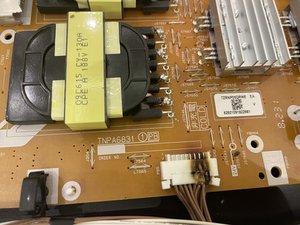
1. Power Supply Board Failure
The power supply board is the heart of your TV. It takes electricity from your wall outlet and changes it into the right type and amount for the TV’s other parts. If this board fails, the TV can’t get the power it needs.
How To Recognize A Power Supply Board Problem
- TV won’t turn on, but the red light blinks 4 times.
- You might hear a faint clicking sound as the TV tries to start.
- No image appears on the screen, not even a faint glow.
Why Does The Power Supply Board Fail?
- Power surges: Lightning or unstable power can burn out components.
- Old age: Capacitors and other parts can wear out after years of use.
- Dust and heat: Blocked vents cause overheating, which damages the board.
What You Can Do
- Unplug the TV: Wait for at least 5 minutes. Sometimes, this resets minor faults.
- Inspect for damage: Look for bulging capacitors, burn marks, or a burnt smell (only if you feel comfortable opening the back panel).
- Replace the board: If you find visible damage, replacing the power supply board is often cheaper than buying a new TV.
Insider Tip
Many beginners miss the fact that bad power outlets or faulty surge protectors can also cause power board failure. Always test your outlet with another device before blaming the TV.
2. Backlight Inverter Malfunction
The backlight inverter is like a light switch for your screen. It powers the LED or CCFL backlights that make the image bright. If this part breaks, your TV can’t light up the screen—even if everything else works.
Signs Of A Backlight Inverter Issue
- The red light blinks 4 times; the TV stays dark.
- You may see a very faint image if you shine a flashlight at the screen.
- The TV seems to “turn on” (sound works, remote responds), but there’s no picture.
Main Reasons For Inverter Failure
- Aging components: The inverter handles high voltage and can wear out.
- Moisture: Humid rooms or spills can cause corrosion.
- Manufacturing defects: Rare, but possible in some TV models.
How To Fix It
- Flashlight test: Shine a light on the dark screen. If you see a shadowy image, the backlight is likely the problem.
- Inspect cables: Loose or broken cables between the inverter and backlight can cause the error.
- Replace the inverter: This is often a simple repair for a technician.
Pro Insight
A common mistake is to change the main board first, but if you can hear sound with no picture, the backlight inverter should be checked first.
3. Main Board Fault
The main board is the “brain” of your Panasonic TV. It controls video, sound, HDMI ports, and tells other boards what to do. If it fails, the TV may not know how to power up or run the backlight safely.
Symptoms Of Main Board Failure
- TV is totally unresponsive except for the blinking red light.
- HDMI and USB ports stop working.
- Sometimes, the TV will try to start but immediately shut down.
Causes Of Main Board Problems
- Static electricity: Touching the ports without grounding yourself can damage sensitive chips.
- Overheating: Dust buildup blocks airflow, raising the board’s temperature.
- Failed firmware updates: In rare cases, a bad update can corrupt the board.
Solutions
- Check for loose connections: Sometimes, connectors between the main board and other parts get loose or dirty.
- Update firmware: If possible, try a firmware update using a USB drive (check your model’s manual).
- Replace the main board: If there’s no improvement, a new main board may be needed.
Extra Tip
Don’t overlook the importance of software resets. Sometimes a main board glitch can be fixed by unplugging the TV for 10 minutes and holding down the power button (while unplugged) for 30 seconds.
4. Led Backlight Strip Issues
Modern Panasonic TVs use LED strips behind the screen to create light. If one or more of these strips fail, it can cause the 4-blink error. The TV’s circuits check for normal power draw; if something is wrong, the TV refuses to start.
How To Spot Led Backlight Problems
- The TV starts to power on, then the red light blinks 4 times.
- Sometimes, the TV screen lights up for a second before going dark.
- Partial screen brightness or flickering before failure.
Why Led Strips Fail
- High usage: LEDs can burn out after thousands of hours.
- Heat: Poor ventilation speeds up LED failure.
- Manufacturing issues: Poor-quality strips can fail early.
What You Can Do
- Check for dim or flickering areas: These are clues to failing strips.
- Consult a technician: Replacing LED strips is a delicate job, often best left to professionals.
- Consider repair cost: Sometimes, the cost of replacing all strips is close to the price of a new TV.
Not-so-obvious Insight
A single bad LED can prevent the whole TV from turning on. Testing each strip individually is often needed, but this requires technical skill and special equipment.
How To Diagnose The 4-blink Problem At Home
You don’t always need expensive tools to figure out what’s wrong. Many problems can be identified with simple tests.
Step-by-step Guide For Diy Diagnosis
- Count the blinks: Make sure it’s always 4 blinks between pauses.
- Unplug and reset: Disconnect the TV for 5–10 minutes, then try again.
- Test the outlet: Plug another device into the same outlet to rule out power issues.
- Listen and look: Is there a click, faint image, or sound when you try to turn the TV on?
- Flashlight test: Shine a flashlight on the screen. If you see a faint image, the backlight is likely the issue.
- Check external devices: Disconnect all HDMI, USB, and antenna cables and try turning the TV on.
- Inspect for damage: If you’re comfortable, remove the TV’s back panel and look for burnt parts, bulging capacitors, or loose wires.
Diy Vs. Professional Repair
Some fixes are simple, but many require special tools and knowledge. Here’s a quick comparison to help you decide:
| Repair Task | DIY Friendly? | Risk Level | Tools Needed |
|---|---|---|---|
| Unplug & Reset | Yes | Low | None |
| Power Board Replacement | Sometimes | Medium | Screwdriver, Multimeter |
| LED Strip Replacement | No | High | Screwdriver, Soldering Iron |
| Main Board Replacement | Sometimes | Medium | Screwdriver |
How Much Does It Cost To Fix The 4-blink Error?
Repair costs can vary a lot, depending on the part that failed and your TV’s size and model.
Typical Cost Estimates
- Power Supply Board: $50–$150 (parts), $80–$200 (labor)
- Backlight Inverter: $30–$100 (parts), $70–$150 (labor)
- Main Board: $100–$300 (parts), $100–$200 (labor)
- LED Strips: $40–$120 (parts), $120–$300 (labor)
Larger TVs and newer models often cost more to repair. In some cases, if your TV is more than 5–7 years old, replacing it may be more cost-effective.
Repair Vs. Replacement: What’s Worth It?
Here’s a quick table to help you decide when to fix or replace your TV:
| TV Age | Estimated Repair Cost | Replacement Cost (Similar TV) | Recommended Action |
|---|---|---|---|
| 1-3 years | $80–$250 | $400–$800 | Repair |
| 4-6 years | $120–$350 | $350–$700 | Consider Age |
| 7+ years | $150–$400 | $300–$600 | Replace |
How To Prevent The 4-blink Error In The Future
While some failures are just bad luck, many can be prevented with good habits.
Practical Prevention Tips
- Use a quality surge protector: Prevents damage from electrical spikes.
- Keep vents clear: Dust and blockages cause overheating. Clean vents with a soft brush every few months.
- Avoid humid rooms: Moisture can damage internal parts. Keep your TV in a dry area.
- Turn off when not in use: Leaving the TV on for hours shortens the life of key parts.
- Regular firmware updates: Check Panasonic’s website for updates to fix bugs and improve performance.
Not-so-obvious Insight
Few owners realize that wall-mounting TVs without proper airflow behind them can lead to overheating and early failure. Always follow Panasonic’s mounting instructions for best cooling.
Common Mistakes To Avoid When Repairing Your Tv
Many well-meaning DIYers end up causing more damage by making these errors:
- Forcing open the case: This can break fragile connectors or void your warranty.
- Touching circuit boards with bare hands: Oils and static can damage components.
- Skipping the basics: Not checking the power outlet or remote batteries wastes time and money.
- Ignoring safety: TV capacitors can hold a dangerous charge even after unplugging. Always wait and use insulated tools.
When To Call A Professional
If you’re not sure what’s wrong, or if the TV is still under warranty, it’s best to get expert help. Professional repair shops have the right tools, experience, and access to genuine Panasonic parts. They can also spot hidden issues that might not be obvious to a beginner.
Be sure to get an estimate before approving any repairs. If the repair cost is more than half the price of a new TV, replacing it is usually smarter.
How Panasonic’s Error Codes Compare To Other Brands
Panasonic uses a blink code system that’s similar to other big brands, but the meaning of the codes can be different.
For example:
- Sony TVs: Four blinks often mean a power board or backlight problem.
- Samsung TVs: Blinking lights usually signal power or main board issues, but the pattern may differ.
Always check your TV’s manual or Panasonic’s official website for your model’s error code meanings.
Real-world Example: A 4-blink Case Solved
A Panasonic Viera owner noticed the TV wouldn’t turn on, and the red light blinked 4 times. After some research, they unplugged the TV, checked the outlet, and then removed the back panel. They found a bulging capacitor on the power supply board.
Replacing the board (a $90 part) fixed the problem—saving hundreds on a new TV. The owner also learned to use a surge protector to prevent future damage.
Where To Find Parts And Repair Help
When looking for replacement parts, always use trusted sources. Panasonic’s official website, authorized repair centers, or well-known electronics suppliers are best. Avoid unknown sellers, as fake parts can cause more harm.
For more technical guides or video tutorials, you can check out communities like iFixit or Panasonic’s support site.
Frequently Asked Questions
What Does It Mean When My Panasonic Tv Blinks Red 4 Times?
The 4-blink red light means there is a hardware issue, usually with the power supply board, backlight inverter, main board, or LED backlight strips. The TV is warning you that it cannot start safely.
Can I Fix The Panasonic Tv 4-blink Error Myself?
Some basic checks (resetting, testing the outlet, checking for loose cables) are safe to do yourself. However, most repairs require opening the TV and handling sensitive electronics, which can be risky without proper tools and knowledge.
How Do I Know Which Part Is Causing The 4-blink Error?
You can use signs like faint images (backlight issue), clicks (power board), or total unresponsiveness (main board). For a clear diagnosis, a technician can test each part with special tools.
Is It Worth Repairing A Panasonic Tv With A 4-blink Error?
If your TV is less than 4–5 years old and the repair cost is reasonable, it’s usually worth fixing. For older TVs, or if the repair cost is over half the price of a new TV, replacement may be smarter.
Where Can I Find Official Repair Information For My Panasonic Tv?
You can find official troubleshooting guides and part numbers on the Panasonic Support website.
Your Panasonic TV’s 4-blink red light might seem scary, but with careful steps and a bit of patience, you can often find the cause and solution. Whether you choose to fix it yourself or call in a pro, knowing what’s behind the blinking light puts you in control.
Remember, taking care of your TV and acting quickly when problems appear will help you enjoy your Panasonic TV for many years.