
Samsung Tv Usb Power Always On: A Complete Guide
Many people want to keep their devices powered by their TV’s USB port, even when the TV is off. Maybe you have a streaming device, LED light strip, or a wireless dongle that needs constant power. With Samsung TVs, the USB ports often cut power as soon as you turn the TV off.
This can be frustrating, especially if you need the USB device to stay charged or running. Let’s dive deep into why this happens, what you can (and cannot) do about it, and how to find the best solution for your setup.
Why Do People Want Samsung Tv Usb Power Always On?
The idea is simple: continuous USB power from your TV makes life easier. Devices like Amazon Fire Stick, Chromecast, wireless keyboards, or even small desk fans often get their power from the TV’s USB port. If the port turns off with the TV, these gadgets lose power and stop working.
A few reasons people want always-on USB power from their Samsung TVs:
- To keep streaming devices ready without restarting each time
- To charge phones, headphones, or smartwatches overnight
- To keep LED backlights or ambient lighting on for room safety
- To power network adapters or smart dongles that need constant Wi-Fi connection
Many users only discover this need after buying a TV and plugging in their devices. They quickly realize that not all TVs handle USB power the same way.
How Samsung Tv Usb Ports Work
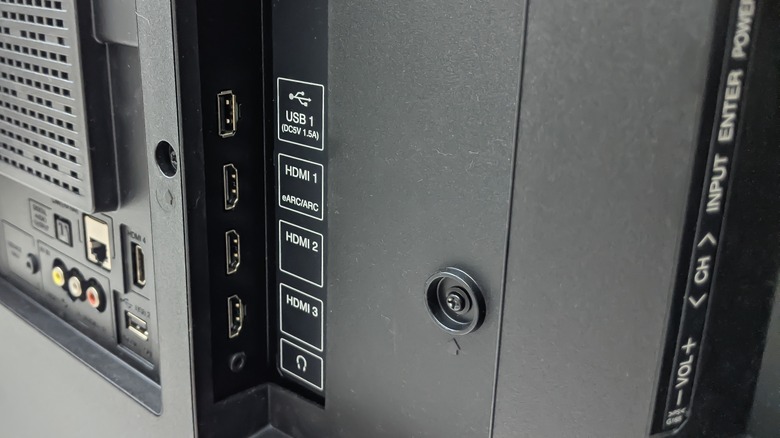
When you connect a device to the USB port of a Samsung TV, it will get power—but usually only when the TV is on or in a light standby mode. Once you fully switch off the TV (with the remote or the main power button), the USB port often loses power.
Typical Power Behavior
For most Samsung TVs:
- TV On: USB port provides 5V power (often up to 0.5A or 1A).
- TV in Standby: Some models keep USB powered for a short time, then cut off.
- TV Off: USB power usually turns off completely.
The reason is energy saving. Modern TVs are designed to use less power when off, and keeping USB ports powered would increase energy use.
Power Output Limitations
Not all Samsung TVs provide the same amount of USB power. Here’s a quick look at typical Samsung USB power specs:
| TV Model Year | USB Output Voltage | Max Current | Always-On Power? |
|---|---|---|---|
| 2016 and earlier | 5V | 0.5A | No |
| 2017–2020 | 5V | 0.5A–1A | No |
| 2021+ | 5V | 1A–1.5A (some models) | Rarely, with exceptions |
Insight: Even for newer Samsung TVs, “always-on” USB power is rare. Most models still cut power when the TV is truly off.

Credit: www.youtube.com
Real-world Examples And Problems
Let’s look at a few practical cases:
- Case 1: You use an Amazon Fire Stick powered by your TV’s USB. Each time you turn the TV on, the Fire Stick restarts. This adds 15–30 seconds every time.
- Case 2: You have a smart LED strip behind your TV, powered by USB. When the TV is off, the lights also go off. You want the lights as a night lamp, but they don’t stay on.
- Case 3: You charge a wireless headset with the TV USB port. Overnight charging doesn’t work if the TV cuts power.
These issues show why always-on USB power is important for some users. But Samsung has chosen to prioritize energy efficiency.
Can You Make Samsung Tv Usb Power Always On?
This is the key question. People look for a setting in the menu—something like “USB Always On”—but usually, there is no built-in option on Samsung TVs. Here’s what you need to know:
Why Samsung Does Not Offer This Feature
- Energy regulations: New TVs must meet strict energy-saving standards. Always-on USB would use extra power.
- Component safety: Some USB devices draw more power than the port supports, risking overheating.
- Hardware design: Most Samsung TVs physically disconnect power from USB when the TV is off.
Common Myths And Misunderstandings
- Myth: “There’s a secret service menu to enable always-on USB.”
- Reality: No such setting exists on most consumer models. Service menus are for repairs, not user features.
- Myth: “All smart TVs offer always-on USB.”
- Reality: Only a few brands or premium models sometimes offer this. Even then, it is not always reliable.
- Myth: “Leaving the TV in standby keeps USB powered.”
- Reality: Most Samsung TVs cut USB power even in standby mode.
Insight: If you see online guides promising a menu option, be cautious. Most are not accurate for Samsung TVs.
Possible Solutions And Workarounds
Even if your Samsung TV does not support always-on USB power, you have options. Some are simple, while others require extra hardware.
1. Use A Separate Usb Power Adapter
The easiest and most reliable method is to use the device’s original wall charger instead of the TV’s USB port.
- Pros: Always-on power, correct voltage and current, safe for all devices.
- Cons: Uses another wall outlet, more visible cables.
This is the best solution for devices that need to stay on or charge overnight.
2. Smart Plugs With Usb Ports
A smart plug (or smart power strip) with built-in USB ports can deliver constant power. You can control the plug using an app, schedule times, or even use voice assistants like Alexa or Google Assistant.
- Pros: Set schedules, remote control, often supports multiple devices.
- Cons: Needs Wi-Fi setup, more expensive than basic adapters.
3. Powered Usb Hub
A powered USB hub connects to the wall for power, then splits that power to several USB devices. You can plug your devices into the hub and the hub into the TV for data, but use the wall power for energy.
- Pros: Powers several devices, some hubs allow both data and charging.
- Cons: Can be bulky, requires cable management.
Non-obvious tip: Make sure the hub supports “charging” even when the TV is off. Some hubs cut power when the TV’s USB is off unless they have their own dedicated power.
4. Tv Service Usb Ports (if Available)
Some Samsung TVs have a service USB port (often hidden or labeled “service only”). Rarely, these ports may stay powered longer for diagnostics. But this is not guaranteed and not supported for everyday use. Check your TV manual before trying.
5. Battery Packs With Pass-through Charging
A portable USB battery pack that supports “pass-through charging” can stay plugged into the TV and power your device. When the TV is on, the battery charges; when the TV is off, the battery keeps powering your device until it’s empty.
- Pros: Keeps devices running for several hours after TV is off.
- Cons: Not truly “always-on,” and you must recharge the battery.
6. Hdmi-cec Power Settings
Some smart devices can wake up or stay on if the TV supports HDMI-CEC (Consumer Electronics Control). But this usually controls device sleep/wake, not USB power, so it’s not a full solution.
7. Check For Firmware Updates
Rarely, a firmware update adds or changes USB power behavior. Check Samsung’s support page for your model. Don’t expect a miracle, but it’s worth a look.
8. Consult The Tv’s Service Manual
If you are technically skilled, you can find your TV’s service manual online. Sometimes, the manual will mention the USB power design. Don’t open the TV or try to rewire unless you are a professional—this is risky, may void your warranty, and can cause damage.
Important: Always prioritize safety. Avoid “DIY” hacks from forums that suggest modifying your TV’s hardware.
How Samsung Tv Usb Power Compares To Other Brands
Many TV buyers think all USB ports are the same, but there are real differences between brands. Here’s a comparison:
| Brand | Always-On USB Power? | Typical USB Amps | Special Settings? |
|---|---|---|---|
| Samsung | Rarely | 0.5A–1A | No |
| LG | Sometimes (select models) | 0.5A–1A | Some settings menu options |
| Sony | Only on Android TV models (special port) | 1A | Limited models |
| TCL/Hisense | Rarely | 0.5A | No |
| Philips | Rarely | 0.5A–1A | No |
Insight: If always-on USB power is critical, check the TV’s specs before buying. Some LG and Sony Android TVs offer this, but Samsung mostly does not.
Devices That Need Always-on Usb Power
Not all USB devices need to stay on. Here are some examples where constant power matters:
- Streaming sticks (Amazon Fire Stick, Chromecast, Roku)
- Wireless HDMI transmitters
- LED backlight strips
- Bluetooth transmitters/receivers
- Network adapters
- Charging cables for phones, watches, headphones
- Smart home hubs (some brands)
- USB fans or lights
If your device only needs power when the TV is on (like a webcam), the default USB behavior is fine.
How To Check If Your Tv Usb Port Is Always On
Don’t guess—test your TV’s USB port. Here’s how:
- Plug a USB-powered device (like a phone charger or LED strip) into the TV’s USB port.
- Turn the TV on. The device should get power.
- Turn the TV off with the remote. Wait 1–2 minutes.
- Check if the device is still running or charging.
- Unplug the TV from the wall (if you want to test full power-off).
Tip: Some TVs have a “fast start” or “instant on” mode that keeps ports powered for a few minutes. This is not the same as always-on.
Non-obvious insight: If your device has a power light, watch closely. Some TVs send a “pulse” of power even when off, but it’s not enough to run most devices.
Common Mistakes To Avoid
- Using the wrong USB port: Some TVs have multiple USB ports, but they usually work the same way. Try all ports, but don’t expect different results.
- Relying on third-party guides: Many online videos promise a “secret setting” for Samsung TVs. These rarely work and can waste time.
- Overloading the USB port: Don’t plug in high-power devices (like hard drives) expecting them to charge quickly. TV USB ports are low power.
- Ignoring safety: Avoid using cheap “USB always-on” adapters that claim to hack your TV’s power supply. They can damage your TV or device.
Energy Saving Vs. Convenience
Samsung’s choice to turn off USB power when the TV is off comes from global energy regulations. TV manufacturers must meet limits on standby power usage. If every TV kept its USB ports active, energy use would rise.
For most people, the slight inconvenience is worth the energy savings. But for some, constant USB power is critical. It’s a trade-off you must consider.
Credit: www.ebay.com
When Is Always-on Usb Power Useful (and When Isn’t It)?
Useful when:
- You need to run LED strips as night lighting
- You want to charge devices overnight (with no extra wall outlet)
- Streaming devices should stay on for fast startup
Not useful when:
- You only use the USB port for photos, videos, or occasional charging
- You care more about saving energy and safety
- Your device has its own battery backup
User Stories: Real Experiences
Many Samsung TV owners share their experiences in forums and reviews:
- “I tried charging my phone with the TV USB overnight. Every morning, the phone was still low on battery. I switched to a wall adapter—problem solved.”
- “My Fire Stick kept restarting because it lost power when I turned the TV off. Now I use a smart plug’s USB port, and it works perfectly.”
- “I bought a powered USB hub with its own power adapter. Now, my LED backlight stays on all night, even when the TV is off.”
These stories show that using a dedicated power source is the most reliable method for always-on USB power.
Credit: www.slashgear.com
How To Choose The Right Solution
If you decide you need Samsung TV USB power always on, consider:
- How many devices do you need to power? If it’s just one, a single wall adapter works.
- Do you want automation? Go for a smart plug if you want to schedule power.
- Do you need high power? Some devices (like external hard drives) need more than 1A. Use a high-quality USB power adapter.
- Do you want clean cable management? Some USB hubs or wall outlets hide cables better than others.
Always choose a trusted brand for adapters and hubs to avoid electrical risks.
Advanced Options (for Tech Enthusiasts Only)
Some advanced users with electronics skills build their own “always-on” USB solutions. They tap into the TV’s internal power supply or add a relay. However, this is not recommended unless you are experienced with electronics and willing to void your warranty.
- Risk: Can damage your TV, cause electrical hazards, or even start a fire.
- Warranty: All modifications will void your Samsung warranty.
If you are not confident, stick to external adapters.
Environmental Impact
Keeping USB power always on increases energy use. While it may be small for one TV, millions of TVs using always-on USB could add up. Consider the planet as well as your convenience.
Tip: If you only need the device running for a few hours after the TV is off, use a battery pack or smart plug with scheduling.
What The Experts Say
Consumer electronics experts recommend using the device’s original power adapter for constant power. TV USB ports are meant for short-term use, not as a primary power source.
For more technical information about USB power, see the official USB Wikipedia page.
Summary: What You Need To Know
- Samsung TVs do not offer always-on USB power by default.
- This is due to energy-saving design and regulations.
- Most users should use a wall adapter, smart plug, or powered USB hub for devices that need constant power.
- Test your TV’s USB ports if you are unsure.
- Don’t trust “secret menu” hacks—stick to safe, proven solutions.
- Consider the environment before forcing always-on power.
Knowing these facts helps you plan your setup and avoid frustration.
Frequently Asked Questions
Why Does My Samsung Tv Turn Off Usb Power When I Turn Off The Tv?
Samsung TVs are designed to save energy. When you turn off the TV, it also cuts power to the USB ports to reduce standby power use. This helps meet global energy-saving standards and keeps your electricity bill lower.
Can I Enable Always-on Usb Power Through The Tv’s Settings Menu?
No, most Samsung TVs do not offer this option. There is no user setting or service menu option for always-on USB power. You must use an external solution like a wall adapter or smart plug.
Will Using A Powered Usb Hub Keep My Devices On When The Tv Is Off?
Yes, if the hub has its own power adapter. A powered USB hub draws energy from the wall and can keep your devices running even when the TV is off. Make sure the hub supports charging without a computer or TV connection.
Is It Safe To Modify My Tv For Always-on Usb Power?
No, it is risky and not recommended. Opening your TV or modifying the power supply can void your warranty and cause electrical hazards. Use external adapters or hubs for safety.
Do Any Samsung Tv Models Have Always-on Usb Power?
Very few, if any. Most Samsung TVs cut USB power when turned off. Only a few professional or hospitality models may support always-on USB, but these are not common for home use.
—
If you want your devices powered all the time, the best way is to use a dedicated USB wall adapter or a smart plug. While it may seem inconvenient, it’s safer, more reliable, and works with any TV—not just Samsung. By understanding your options, you can set up your devices the way you want, with no surprises.