
If your Samsung TV won’t turn on, you might feel frustrated or even worried that your device is broken for good. But before you think about buying a new TV or calling for expensive repairs, it’s important to know that this problem is often fixable at home. Many people face this issue, and in most cases, the solution is simple. Whether your TV shows a black screen, the standby light blinks, or nothing happens at all, understanding the possible causes can save you time and money.
This article will walk you through every possible reason why your Samsung TV is not turning on, explain what to check, and show you practical steps to get your TV working again. We’ll cover basic troubleshooting, advanced fixes, and when to seek professional help. You’ll also find answers to common questions and learn ways to prevent this problem in the future. Let’s get started and bring your Samsung TV back to life.
Basic Checks Before Troubleshooting
Before you open your TV or call for help, start with these simple checks. Many TV power problems come from something easy to fix.
1. Check The Power Cable And Outlet
Sometimes, the power cord is not plugged in all the way, or the wall outlet is not working. Unplug the power cable from your Samsung TV and plug it back in firmly. Try a different wall outlet, preferably one you know works, like the one for your phone charger.
If the TV turns on now, you found the problem.
2. Test The Remote And Power Button
Batteries in the remote could be dead. Try turning on your TV using the physical power button, usually found on the bottom or side of the TV. If the TV works with the button but not the remote, replace the batteries or use the Samsung SmartThings app as a remote.
3. Look For The Standby Light
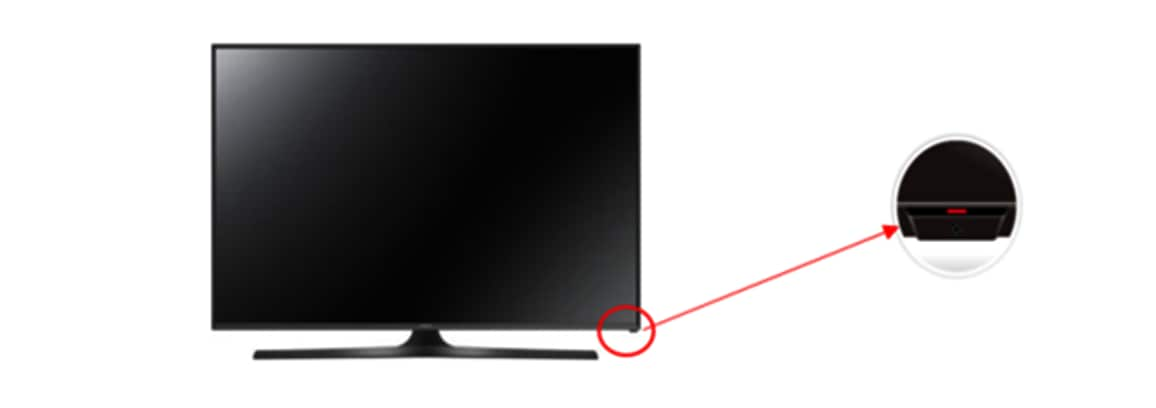
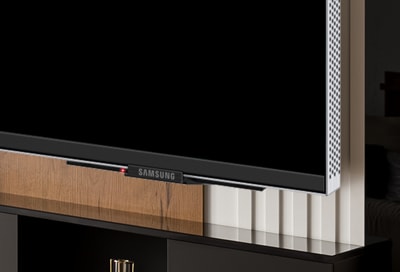
Most Samsung TVs have a small red standby light on the front. If this light is on or blinking, it tells you something about the power status.
- Solid red: The TV is getting power but is in standby mode.
- Blinking: There might be a power supply or mainboard problem.
- No light: The TV might not be getting power at all.
- Check the Surge Protector or Extension Cord
If your TV is plugged into a surge protector or extension cord, it might be faulty. Plug the TV directly into the wall to see if it turns on. Sometimes, these devices fail and block power without you knowing.
5. Inspect The Power Cable For Damage
Look at the entire length of the power cord. If you see cuts, frayed wires, or burn marks, replace the cable. Damaged cables are a fire risk and can stop your TV from working.
Common Causes And Solutions For Samsung Tv Not Turning On
If the basics didn’t solve the problem, you need to look deeper. Here are the most common causes and what you can do about each one.
1. Power Supply Issues
Samsung TVs need a steady flow of power. Any break in this flow can stop the TV from turning on.
- Capacitor failure is one of the most frequent hardware problems. Capacitors are small electronic parts that store power. If they fail, the TV cannot start.
- Symptoms: The standby light blinks, you hear a clicking sound, or the TV tries to turn on but shuts off again.
What to do:
Unplug your TV for 1-2 minutes, then plug it back in. This sometimes resets internal parts. If the TV still doesn’t turn on, the power supply board or capacitors might need repair. This usually means opening the TV and is best handled by a professional unless you have experience with electronics.
2. Firmware Or Software Glitches
Modern Samsung Smart TVs run on software. Sometimes, the software can crash, causing the TV not to start.
- Symptoms: The TV is stuck on the logo, doesn’t respond to the remote, or the screen stays black.
What to do:
Try a hard reset: unplug the TV, hold the power button on the TV (not the remote) for 30 seconds, then plug it back in and turn it on. If the TV starts, update the software as soon as possible.
3. Backlight Failure
Even if your TV turns on, a failed backlight can make the screen look black. You might hear sound, but see no picture.
- How to check: Shine a flashlight closely on the screen while the TV is on. If you see a faint image, the backlight is likely the problem.
What to do:
Backlight repair is possible but requires opening the TV. This is tricky and should be done by a technician.
4. Mainboard Problems
The mainboard is the brain of your TV. If it fails, the TV might not turn on at all.
- Symptoms: No standby light, TV doesn’t respond to any buttons, no sound or picture.
What to do:
Mainboard issues often need a board replacement. If your TV is under warranty, contact Samsung support. Otherwise, compare the cost of repair with a new TV, as mainboard replacement can be expensive.
5. Hdmi Or External Device Interference
Sometimes, a device connected to your TV (like a game console or streaming stick) can cause the TV to stay off or get stuck in a loop.
- What to do:
Unplug all HDMI and USB devices from your TV. Wait 1-2 minutes, then try turning it on. If this works, reconnect your devices one at a time to see which one caused the issue.
6. Overheating
If your TV gets too hot, it might shut down and refuse to start to protect itself.
- What to do:
Let the TV cool for at least 30 minutes. Ensure there’s enough space around your TV for air to move. Clean dust from vents and fans, if possible.
7. Faulty Internal Components
Other parts like the T-Con board or LED driver can fail and stop your TV from working.
- What to do:
If you hear clicking or see flashing lights, but nothing else happens, the problem may be inside the TV. This requires professional diagnosis.
Troubleshooting Steps For Samsung Tv Won’t Turn On
Let’s put all the solutions together in a simple, step-by-step process.
- Unplug the TV from the wall. Wait at least 60 seconds.
- Press and hold the TV’s power button for 30 seconds (while unplugged).
- Plug the TV back in and press the power button on the TV (not the remote).
- Look for the standby light.
- If it’s on but the TV won’t start, try the remote and the button again.
- If it’s off, check the outlet and power cable.
- Remove all external devices. Unplug HDMI, USB, antenna, and soundbar cables.
- Try a different power outlet.
- Test with a new power cable (if you have one).
- Check for faint images with a flashlight on the screen.
- Let the TV cool down if it feels hot.
- Contact support or a technician if nothing works.
Samsung Tv Power Indicator: What It Means
The standby light gives you clues about what’s wrong. Here’s a quick reference:
| Standby Light Status | Possible Meaning | Action to Take |
|---|---|---|
| Solid red | TV is in standby mode | Try power button, check remote |
| Blinking red | Power or mainboard issue | Check power, try reset, call support if needed |
| No light | No power reaching TV | Check outlet, cable, power board |
Many people miss this: the light often tells you if your TV is getting power at all. If there’s no light, focus on cables and the outlet. If the light blinks, the problem is likely inside the TV.
Credit: www.samsung.com
Special Cases: Samsung Tv Turns On Then Off
Some users find their Samsung TV turns on, then off again by itself. This can be confusing, but it usually points to a few causes:
- Capacitor or power supply failure: The TV tries to start but fails.
- Software glitch: The TV gets stuck in a restart loop.
- Connected device problem: An HDMI device might be sending a bad signal.
Tip: Disconnect all devices and try turning the TV on. If it works, reconnect one device at a time.
When To Call For Professional Repair
Sometimes, home troubleshooting isn’t enough. Here’s when you should call an expert:
- You hear clicking sounds and the TV won’t turn on.
- There’s a burning smell or signs of melted parts.
- You see no standby light and the outlet/cable is fine.
- The TV is under warranty. Don’t open the TV; this can void your coverage.
- You feel uncomfortable opening electronics.
Professional repair shops can diagnose and fix problems with the power board, mainboard, or screen. For out-of-warranty TVs, get a repair quote first—sometimes, the cost is close to buying a new TV.
Preventing Samsung Tv Power Problems
Avoiding power issues is easier than you think. Here are some smart habits:
- Use a surge protector to prevent damage from power spikes.
- Don’t overload outlets with too many devices.
- Keep your TV firmware updated for the latest fixes.
- Clean vents and fans every few months to avoid overheating.
- Unplug the TV during storms or long trips.
Many people forget that dust and heat can shorten your TV’s life. A simple cleaning with compressed air can prevent overheating and extend your TV’s lifespan.
Common Myths About Samsung Tv Power Problems
Let’s clear up some misunderstandings:
- Myth: A black screen means the TV is dead.
Fact: Often, it’s just a backlight or power supply issue.
- Myth: Only old TVs have capacitor problems.
Fact: Even new TVs can have faulty capacitors.
- Myth: If the standby light is on, the TV must work.
Fact: The mainboard or software can still fail with the light on.
- Myth: Always replace the TV if it won’t turn on.
Fact: Repairs are often cheaper, especially for common issues.
Comparison: Diy Vs Professional Repair
Should you fix your Samsung TV yourself or call a pro? Here’s a quick look:
| Option | Pros | Cons | Cost |
|---|---|---|---|
| DIY Repair | Cheaper, quick for small problems | Risky, can void warranty, needs tools | Usually $0–$50 (parts only) |
| Professional Repair | Expert help, warranty-safe, safer | More expensive, longer wait | $80–$250 (labor + parts) |
A non-obvious tip: If your TV is less than 3 years old, check for a hidden warranty or recall. Sometimes, Samsung will repair known issues for free.
How Different Samsung Tv Models Handle Power Issues
Not all Samsung TVs are built the same. Here’s how power problems differ by model:
| Model Type | Common Power Issues | Special Tips |
|---|---|---|
| LED/LCD | Backlight failure, power board issues | Check for faint image with flashlight |
| Plasma | Capacitor failure, screen flicker | Listen for buzzing, check for recalls |
| QLED | Firmware bugs, HDMI handshake issues | Update software, unplug all devices |
| Smart TV (Tizen OS) | Software crashes, stuck on logo | Try hard reset, update firmware |
It’s important to know your TV’s model and year. Search for your model number on the Samsung website for specific troubleshooting guides.
Credit: www.samsung.com
Advanced Troubleshooting (for Experienced Users)
If you have some technical skill, you can try these steps. Warning: This can void your warranty and may damage the TV if done wrong.
- Open the back panel (unplug TV first! ).
- Check for bulged capacitors on the power supply board. These look swollen at the top.
- Look for burnt or dark areas on circuit boards.
- Use a multimeter to test the power supply output.
- Replace the power board or capacitors if you find clear damage.
If you’re not sure, take photos and show them to a repair tech. Never work on the TV while it’s plugged in.
What If Your Samsung Tv Still Won’t Turn On?
If you’ve tried every step and your Samsung TV still won’t turn on, it’s time to weigh your options:
- Check your warranty: TVs under one year are usually covered.
- Contact Samsung support: They may offer remote help or recommend a repair shop.
- Get a repair quote: Sometimes, fixing an old TV costs more than a new model.
- Recycle your TV responsibly if it’s truly dead.

Credit: www.youtube.com
Real-world Example: What A Repair Looks Like
Let’s say your Samsung TV’s standby light blinks, and you hear a clicking sound. This is classic capacitor failure. A repair shop will:
- Open the TV and confirm the faulty parts.
- Replace the bad capacitors or the whole power board.
- Test the TV before closing it up.
- Charge between $80 and $200, depending on your location.
Many people don’t realize that this is a routine fix. If you ask, some shops will even show you the old parts.
Environmental Factors That Affect Samsung Tvs
Where you place your TV matters more than you think. Here’s how your environment can cause problems:
- High humidity: Can cause corrosion and short circuits.
- Dusty rooms: Block vents and lead to overheating.
- Direct sunlight: Warps plastic and overheats the TV.
- Near strong magnets or speakers: Can damage the screen or electronics.
To avoid these issues, keep your TV in a cool, dry, and clean area. Leave space around it for air to flow.
How To Find Your Samsung Tv Model Number
If you need to search for help or order parts, you’ll need the model number. Here’s how to find it:
- Check the back of the TV for a white sticker with model and serial numbers.
- Look in the TV’s menu (if you can turn it on) under Settings > Support > About This TV.
- Keep your purchase receipt, which usually lists the model.
Knowing your exact model helps you get the right advice and parts.
Cost Of Repair Vs Buying A New Samsung Tv
Should you repair or replace your TV? Here are some numbers:
- Power board or capacitor repair: $80–$200
- Mainboard replacement: $120–$350
- Screen replacement: $300–$800 (often not worth it)
- New Samsung LED TV: $250–$800 for most sizes
If repair costs are more than half the price of a new TV, it’s usually better to buy new.
Additional Resources
For more information about electronics repair, you can visit Wikipedia’s page on Television Repair. This resource offers a detailed overview of TV troubleshooting and repair history.
Frequently Asked Questions
Why Does My Samsung Tv’s Standby Light Blink But Not Turn On?
A blinking standby light often means a power supply problem or a failed mainboard. Try unplugging your TV for 1-2 minutes, then plug it back in. If it still doesn’t work, you may need a professional repair.
Can A Power Surge Damage My Samsung Tv?
Yes, a power surge can damage the power board, capacitors, or mainboard. Using a good surge protector helps prevent this kind of damage.
Is It Safe To Repair My Samsung Tv Myself?
Simple steps like changing the power cable or cleaning vents are safe. Opening the TV to replace parts is risky and can void your warranty. Only do this if you have experience with electronics.
How Do I Know If My Samsung Tv Needs A New Power Board?
If your TV doesn’t turn on, shows no standby light, or you hear clicking, the power board might be bad. A repair shop can test and replace it.
What Should I Do If My Samsung Tv Keeps Turning Off By Itself?
First, check for overheating and remove all connected devices. Update your TV’s software. If the problem continues, the mainboard or power supply may need repair.
Bringing your Samsung TV back to life is often possible with the right steps. Most power issues can be fixed at home, but don’t hesitate to call a professional for serious problems. Regular care and smart habits will help your TV last for many years.