
If your Sony TV suddenly starts blinking a red light, it can feel confusing and even a little scary. Many people worry their TV is broken for good. But in reality, these blinking red light codes are actually a way your Sony TV is trying to tell you what’s wrong. Think of them as a secret language for troubleshooting problems. If you know how to read these codes, you can often fix the issue yourself or, at the very least, explain it clearly to a repair technician. This guide covers Sony TV blinking red light codes in detail, so you can quickly understand what your TV needs and how to get it working again.
What Does The Blinking Red Light Mean On Sony Tvs?
Sony TVs have a built-in system that uses the standby indicator light to signal errors. When your TV detects a problem, the red light will blink in a pattern—one blink, two blinks, three, and so on. Each pattern points to a specific issue inside the TV. For example, a two-blink code usually means something different from a five-blink code.
These codes help both owners and technicians identify the problem quickly. The blinking can happen when you try to turn on the TV, after a power outage, or even while watching. The main thing to remember: Counting the blinks is your first step to finding a solution.
Why Do Sony Tvs Use Blinking Codes?
Sony started using this system to make troubleshooting easier. Instead of showing a confusing error message, the TV simply blinks a set number of times in a repeating cycle. This blinking is called a self-diagnosis function. It helps because:
- It identifies the type of error (for example, power supply, mainboard, or backlight problem).
- It reduces guesswork for both users and repair professionals.
- It can sometimes prevent further damage by shutting down the TV safely.
How To Read Sony Tv Blinking Red Light Codes
To use these codes, start by:
- Unplugging the TV for 60 seconds. Sometimes, this resets small errors.
- Plug the TV back in and try turning it on. If it still blinks, watch the standby light carefully.
- Count the blinks before the light pauses and repeats. Write down the number.
- Repeat this a few times to be sure you’ve counted correctly.
Once you have the number, you can look up the meaning and suggested fixes.
The Most Common Sony Tv Blinking Red Light Codes
Sony TVs have several different red light codes. Let’s look at what each one usually means, what causes it, and what you can try to fix it.
1 Blink: Power Board Or System Error
A single blink usually points to a power supply issue or a problem with the main system board.
Possible causes:
- Power surge or outage
- Faulty power board
- Bad connection or loose cable
What to try:
- Unplug the TV for 2 minutes, then plug back in.
- Use a different power outlet.
- Check the power cord for damage.
- If the problem continues, the power board may need service.
Non-obvious tip: Sometimes, plugging the TV directly into a wall outlet (not a power strip) can fix minor power board errors.
2 Blinks: Power Supply Or Overcurrent Error
Two blinks often signal that the TV has detected an overcurrent or short circuit, usually in the power supply.
Possible causes:
- Internal power board failure
- Shorted component on the main board
- Faulty outlet or surge protector
What to try:
- Disconnect all external devices (HDMI, USB, etc.)
- Reset the TV by unplugging for 2 minutes
- Try a different power source
If the error continues, professional repair is likely needed.
3 Blinks: Main Board Error
Three blinks are a sign of a main board or motherboard malfunction.
Possible causes:
- Faulty main board circuitry
- Software glitch
- Overheating
What to try:
- Unplug and allow the TV to cool for 10 minutes
- Update the TV’s software (if you can access the menu)
- If these steps do not help, main board replacement may be needed
Insider insight: Sometimes, bugs in recent firmware updates can cause this error. Checking for software updates can help.
4 Blinks: Backlight Or Inverter Issue
Four blinks usually mean the TV’s backlight or inverter circuit is not working.
Possible causes:
- Failed LED backlight strips
- Faulty inverter board
- Voltage problems
What to try:
- Shine a flashlight on the screen while the TV is on—if you see a faint image, the backlight is the problem.
- Unplug and reset the TV.
- If the backlight is the issue, professional repair is needed.
5 Blinks: T-con Board Or Panel Failure
Five blinks point to a T-Con board or display panel error.
Possible causes:
- T-Con (Timing Control) board failure
- Bad connection between T-Con and panel
- Panel itself is damaged
What to try:
- Disconnect and reconnect the T-Con cables (only if you’re comfortable opening the TV)
- Otherwise, contact a technician, as T-Con and panel repairs are advanced
6 Blinks: Backlight, Inverter, Or Power Board Issue
Six blinks can be tricky, as they may point to backlight, inverter, or sometimes power board problems.
Possible causes:
- Burned-out backlight LEDs
- Inverter board short
- Power board delivering the wrong voltage
What to try:
- Unplug and reset
- Remove all connected devices
- If the issue remains, professional diagnosis is best
7 Blinks: Temperature Or Audio Error
Seven blinks indicate a temperature sensor issue or audio amplifier problem.
Possible causes:
- Overheating TV
- Blocked ventilation
- Audio amplifier failure
What to try:
- Move the TV to a cooler spot with more airflow
- Clean dust from vents
- If the problem persists, internal repair may be needed
Not-so-obvious insight: Even a thin layer of dust inside can cause overheating. Regular cleaning helps prevent this code.
8 Blinks: Audio Or Power Board Issue
Eight blinks commonly mean an audio circuit or power board failure.
Possible causes:
- Audio amplifier shorted
- Internal speaker wiring fault
- Power board issue
What to try:
- Unplug and reset
- Disconnect external speakers or soundbars
- If this doesn’t help, service is likely needed
9 Blinks: Panel Or Power Supply Error
Nine blinks are a sign of a panel or sometimes a major power supply issue.
Possible causes:
- Broken panel
- Serious power surge
- Bad power supply circuit
What to try:
- Unplug and wait a few minutes before restarting
- If the error repeats, panel or power supply replacement may be required
10 Blinks: Communication Error
Ten blinks almost always mean a communication error between the main board and the display panel.
Possible causes:
- Main board not “talking” to the panel
- Ribbon cable loose or damaged
- Failed connection
What to try:
- Unplug and try again
- If possible, reseat panel cables (advanced)
- Otherwise, seek professional repair
More Than 10 Blinks: Rare Or Model-specific Errors
Some Sony TVs show more than 10 blinks. These are rare and usually point to unique, model-specific errors. If you see this, it’s best to check your Sony TV’s manual or contact Sony support with your model number.

Credit: www.scribd.com
Sony Tv Blinking Codes: Quick Comparison Table
Here’s a summary of the main codes and their likely causes:
| Blink Code | Likely Problem | DIY Fix Possible? | When to Call a Pro |
|---|---|---|---|
| 1 blink | Power board/system error | Yes (basic checks) | If persists after reset |
| 2 blinks | Power supply/overcurrent | Sometimes | If unplug/reset fails |
| 3 blinks | Main board error | Rarely | Board replacement needed |
| 4 blinks | Backlight/inverter | No | Backlight repair needed |
| 5 blinks | T-Con/panel failure | No | Advanced repair |
| 6 blinks | Backlight/inverter/power board | Sometimes | If reset fails |
| 7 blinks | Temp/audio error | Yes (vent cleaning) | If persists |
| 8 blinks | Audio/power board | Rarely | Audio board repair |
| 9 blinks | Panel/power supply | No | Panel or supply replacement |
| 10 blinks | Communication error | Rarely | Professional repair |
How To Fix Sony Tv Red Blinking Light Codes: Step-by-step Guide
While some issues need a professional, you can try several steps yourself. Here’s a general troubleshooting process that works for most Sony TVs.
1. Power Cycle Your Tv
This is the simplest and often the most effective step.
- Unplug the TV from the wall.
- Wait at least 2 minutes.
- Press and hold the power button (on the TV, not the remote) for 30 seconds.
- Plug the TV back in and turn it on.
This resets the TV and clears many temporary errors.
2. Check The Power Source
A weak or unstable power supply can cause blinking codes.
- Plug the TV directly into a wall outlet, avoiding power strips and surge protectors.
- Try a different outlet if possible.
- Check the power cord for damage.
3. Remove External Devices
Sometimes, a connected device can cause a fault.
- Disconnect all HDMI devices, USB drives, and soundbars.
- Try turning on the TV with nothing attached.
4. Inspect For Overheating
Feel the TV’s back and sides. If it’s very hot, overheating could be the problem.
- Make sure the TV has space around it for air to move.
- Clean dust from all vents and fans.
- Move the TV away from heat sources.
5. Factory Reset (if Accessible)
If the TV menu works, try a factory reset.
- Open the menu and find “Settings” > “Device Preferences” > “Reset.”
- Follow on-screen instructions.
- Note: This will erase all your settings and apps.
6. Check For Software Updates
Sometimes, bugs in the TV’s software can cause blinking codes.
- If you can access the menu, look for “Software Update” under Settings.
- Connect to Wi-Fi and update if prompted.
7. Try A Soft Reset
If the TV is unresponsive, a soft reset may help.
- Hold the power button on the TV for 10 seconds until it restarts.
- If this doesn’t work, unplug and restart as above.
8. Contact Sony Support
If none of these steps fix the problem, contact Sony support. Have your TV model number and blink code ready for faster help.

Credit: www.youtube.com
Advanced Troubleshooting: When To Call A Professional
Some errors are too complex or dangerous to fix yourself. If you have tried all the basic steps and the TV still blinks, it’s time to call a pro. Here are signs you need expert help:
- The TV keeps blinking after resets and new outlets.
- You hear clicking, buzzing, or see smoke.
- The screen stays black, or shows lines or flickers.
- The blink code points to backlight, T-Con, or panel errors.
TV repair technicians have the tools and skills to open the TV, check components, and replace damaged parts safely.
What Does A Technician Do?
- Opens the TV’s back and checks boards, wiring, and connectors.
- Uses special meters to test voltage and look for shorts.
- Replaces faulty parts like the power board, main board, or backlight strips.
Non-obvious advice: If your TV is still under warranty, never open it yourself. Let an authorized Sony technician handle the repair.
Sony Tv Models And Blinking Codes: Are They All The Same?
Sony uses similar blink codes across most models, but there can be small differences based on the year and type. For example:
- Bravia and XBR models have almost identical codes.
- Older Sony LCDs may have fewer codes.
- Some newer OLED or 4K models show extra codes for advanced features.
Always check your specific model’s manual for the most accurate code meanings.
Example: Sony Bravia Vs. Sony Oled
Here’s a simple comparison:
| Feature | Sony Bravia | Sony OLED |
|---|---|---|
| Common Blink Codes | 1-10 blinks | 1-10 blinks plus OLED-specific codes |
| Backlight Type | LED/LCD | OLED panel |
| Panel Issues | Backlight failure | Panel/driver failure |
| Audio Issues | Amplifier, speakers | Integrated audio board |
How To Prevent Sony Tv Blinking Light Problems
Many blinking errors can be avoided with a few simple habits.
1. Use A Surge Protector
A quality surge protector can prevent damage from power surges and lightning strikes. Cheaper power strips may not offer real protection, so invest in a good one.
2. Clean Vents Regularly
Dust can block vents and cause overheating, which leads to many blink codes. Use a vacuum or a can of compressed air every few months.
3. Avoid Blocking Airflow
Place your TV where air can move freely around it. Don’t stack devices or cover vents.
4. Update Software
Keep your TV’s software updated. Manufacturers often release fixes for bugs that can cause error codes.
5. Handle Power Outages Carefully
After a power cut, wait a minute before turning the TV back on. This lets power levels stabilize and protects sensitive parts.
When Is It Worth Repairing A Blinking Sony Tv?
Not all TV repairs make sense. Sometimes, the cost of fixing a blinking code error is close to buying a new TV.
When To Repair:
- The TV is less than 3 years old
- The repair is under $200
- The error is a minor board or connection issue
When To Replace:
- The TV is over 5-7 years old
- The panel or main board needs replacement (often $300+)
- The repair cost is more than half the price of a new TV
Insider tip: Ask for an estimate before agreeing to repairs. Sometimes, technicians will diagnose for free if you bring the TV to their shop.
What If Your Sony Tv Blinks, Then Shuts Down?
In some cases, the TV tries to start, shows the Sony logo, then blinks and turns off. This usually means:
- The TV found a serious error at startup.
- It is protecting itself from damage.
- The error could be in the power, main, or backlight circuits.
Follow the basic troubleshooting steps above. If these do not work, a technician’s help is needed.
How Sony Tv Blinking Codes Help You Save Time And Money
Understanding these codes is more than just technical knowledge. If you can tell a repair shop, “My Sony TV blinks red four times,” you:
- Save time in diagnosis
- Avoid paying for unnecessary repairs
- Can sometimes fix the issue yourself
- Know when a repair is too expensive
This knowledge puts you in control and helps you make smarter choices.
Where To Find Official Sony Tv Blink Code References
Sony offers official troubleshooting guides and support articles for most models. You can find your TV’s specific codes and solutions at the official Sony Support site.
Data Table: Typical Repair Costs For Sony Tv Blink Code Errors
Wondering what repairs might cost? Here’s a general guide based on US averages:
| Error Type | Common Code | Typical Repair Cost | DIY Possible? |
|---|---|---|---|
| Power Board | 1-2 blinks | $80–$200 | Sometimes |
| Main Board | 3 blinks | $120–$250 | No |
| Backlight/Inverter | 4, 6 blinks | $150–$300 | No |
| T-Con Board | 5 blinks | $100–$220 | No |
| Panel Replacement | 5, 9 blinks | $300–$700 | No |
| Audio Board | 7, 8 blinks | $90–$200 | Rarely |
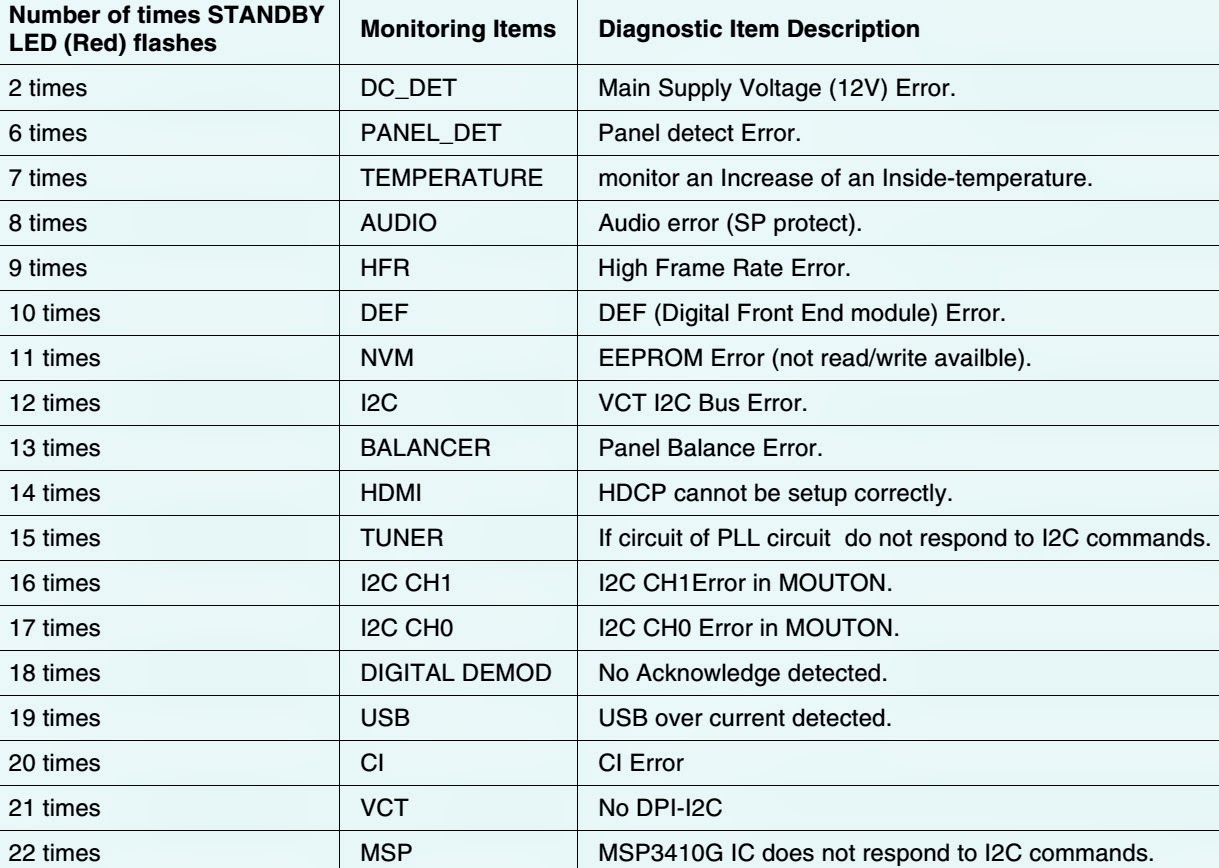
Credit: electro404.rssing.com
Frequently Asked Questions
Why Is My Sony Tv Blinking Red And Not Turning On?
A blinking red light usually means your TV has detected an internal error. The number of blinks points to the problem area, like the power board or backlight. Unplug the TV, count the blinks, and try the troubleshooting steps above.
Can I Fix A Sony Tv Red Blinking Code Myself?
You can often fix basic issues like power resets or removing external devices. But for errors involving boards, backlight, or the panel, it’s safer and easier to call a professional.
Does A Blinking Red Light Mean My Sony Tv Is Broken Forever?
Not always. Many blinking codes are caused by simple problems like a power glitch or overheating. Only in cases of major board or panel failure is the TV usually beyond repair.
Is It Safe To Open My Sony Tv To Fix A Blink Code?
No, unless you have experience with electronics. TVs contain high voltages, even when unplugged. Opening the TV yourself can be dangerous and may void your warranty.
Where Can I Find The Meaning Of My Sony Tv’s Blink Code?
You can look up your TV’s specific blink code meanings in the user manual or on the official Sony Support website. Always use your exact model number for accurate results.
Fixing a Sony TV blinking red light code can seem tough at first, but with clear steps and the right knowledge, many issues can be solved quickly. Whether you fix it yourself or get help, knowing what those blinks mean puts you in control and can save you both time and money.