
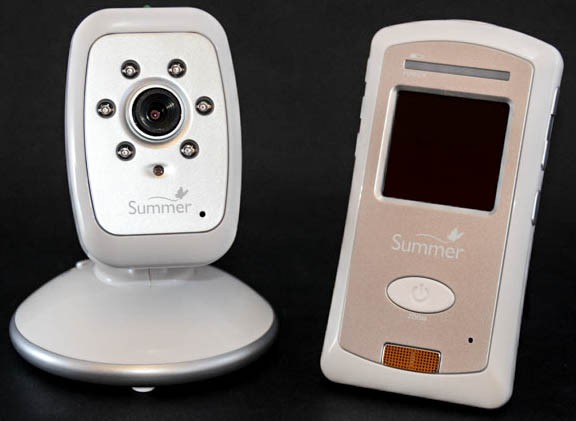
When you buy a Summer Infant baby monitor, you expect peace of mind. The goal is simple: see and hear your baby anytime, from anywhere in your home. But sometimes, instead of your child’s peaceful sleep, your monitor screen flashes a message you do not want: “No Signal.” This problem can make parents feel frustrated, worried, or even helpless, especially in the middle of the night. If you are reading this, you likely have faced this issue and want clear, step-by-step help.
This article will explain why your Summer Infant baby monitor keeps saying no signal, what you can do to fix it, and how to avoid it in the future. You will find easy instructions, practical tips, and answers to common questions. We will also cover real examples, common mistakes, and what to do when nothing seems to work. By the end, you will feel confident about handling this problem—so you can focus on your baby, not the monitor.
Understanding The “no Signal” Problem
When your Summer Infant monitor says “No Signal,” it means that the camera and the parent unit are not connecting. Some parents think this means the monitor is broken, but usually, the issue is with the connection. The monitor uses radio frequency (like a walkie-talkie) or Wi-Fi (for smart models) to send video and sound from your baby’s room to your screen.
This problem can happen suddenly or start slowly, such as the signal dropping sometimes before failing completely. Understanding the main causes helps you fix it faster.
Main Causes
- Physical Obstructions: Walls, floors, and furniture block radio signals. The more barriers, the weaker the signal.
- Distance: If you are too far from the camera, the monitor cannot keep a strong connection.
- Interference: Other electronics (Wi-Fi routers, microwaves, cordless phones) can disrupt the signal.
- Low Battery: Both the camera and parent unit need enough power. Low battery can cause disconnects.
- Outdated Firmware: For smart monitors, old software may cause errors.
- Pairing Problems: The camera and parent unit may not be paired or can lose their pairing.
- Device Faults: Damaged wires, broken antennas, or hardware issues also cause this warning.
Initial Checks Before Troubleshooting
Before making big changes, do these quick checks. Many parents overlook them, but they solve a large percentage of “No Signal” cases.
- Check power: Are both camera and monitor plugged in and turned on? Check the outlet and adapter.
- Look for flashing lights: Many models have a power light or signal indicator. Is it on or blinking?
- Move closer: Bring the parent unit closer to the camera to see if the signal returns.
- Try another outlet: Sometimes, the problem is with the power source, not the device.
- Restart both units: Turn off, then on again. This can clear temporary glitches.
These steps sound simple, but even tech-savvy parents sometimes miss them when tired or stressed. If the problem continues, it is time to go deeper.
Common Causes And How To Fix Them
Let’s look at each main cause in detail and what you can do.
1. Physical Obstructions
Walls, doors, floors, and even large furniture can block the radio signal. Older houses with thick walls (brick, concrete, stone) are especially tough on signals. Metal in walls or mirrors nearby makes it worse.
How to fix:
- Move the camera and monitor to reduce barriers.
- Try placing the camera higher on a wall or shelf.
- Avoid putting the camera behind a TV, curtain, or large piece of furniture.
- Remove or move metal objects between the camera and monitor.
Tip: Signal is usually strongest with a clear “line of sight.” Imagine you could draw a straight line between the camera and monitor—keep this line as clear as possible.
2. Distance
Most Summer Infant monitors have a range of 600 to 1,000 feet in open space. In real homes with walls, the range is much less—often 100 to 300 feet. If you move too far from the camera, the “No Signal” message appears.
How to fix:
- Test the range by slowly walking away from the camera until you lose the signal.
- Place the camera and monitor in rooms closer together.
- Avoid using the monitor in the garage, basement, or yard if the camera is far inside the house.
Non-obvious insight: Even if you are within the range, signal can drop if you walk through a hallway with metal pipes or appliances between the units.
3. Interference
Your home is full of devices that use radio waves: Wi-Fi routers, cordless phones, microwave ovens, Bluetooth speakers, and even smart TVs. If they use the same frequency as your baby monitor (often 2.4 GHz), they can interfere.
How to fix:
- Turn off other wireless devices to test if interference is the issue.
- Move the monitor and camera away from Wi-Fi routers, cordless phones, or microwaves.
- Try changing the channel on your Wi-Fi router if possible (for smart monitors).
- Move the baby monitor to a different part of the room.
Example: If you only lose signal when the microwave is on, interference is the likely cause.
Practical tip: Some Summer Infant monitors let you change their channel. Check your manual. Switching channels can reduce interference.
4. Low Battery
If the monitor or camera runs on battery, a low charge may cause the signal to drop. Sometimes, batteries wear out over time and cannot hold a charge, even when plugged in.
How to fix:
- Charge both units fully.
- If the monitor does not charge, try another charger.
- Replace old rechargeable batteries with new ones (check your model for battery type).
- If the camera uses only AC power, make sure the cord is not loose or damaged.
Non-obvious insight: Batteries lose strength as they age. Even if the battery indicator looks full, a weak battery can cause random disconnects.
5. Outdated Firmware (for Wi-fi Models)
Smart monitors that use Wi-Fi sometimes need software updates, just like your phone. Old firmware can cause bugs, including signal loss.
How to fix:
- Check the Summer Infant website for firmware updates.
- Follow the manual to update your monitor’s software.
- Make sure your Wi-Fi network is stable and has enough speed.
Note: Firmware updates can fix hidden bugs that cause “No Signal” even when everything else seems fine.
6. Pairing Problems
If the camera and monitor are not “paired,” they cannot connect. Pairing means the two devices know to talk to each other.
How to fix:
- Read the manual for pairing instructions. Usually, you press a button on both units.
- Make sure only one camera and one monitor are turned on during pairing.
- If your monitor supports multiple cameras, make sure you are on the correct camera channel.
Example: If you replace your camera or reset the monitor, you must pair them again.
7. Device Faults
Sometimes the problem is inside the device: a loose antenna, damaged wire, or broken part.
How to check:
- Inspect all cables for cuts or bends.
- Gently wiggle the power adapter where it plugs in.
- Listen for strange sounds when you shake the monitor (should be silent).
- Try your monitor in another room or another house. If it still says “No Signal,” hardware is likely at fault.
If you suspect a fault, contact Summer Infant support or the retailer for repair or replacement.
Troubleshooting Steps (step-by-step)
If you want a clear process to follow, use these steps. They cover most common cases and help you avoid missing something important.
- Check power: Are both units plugged in or fully charged? Try different outlets.
- Restart both units: Turn off and on again.
- Reduce distance and barriers: Bring the monitor closer to the camera, keep in same room if possible.
- Check for interference: Turn off other wireless devices nearby.
- Pair devices: Follow the manual to pair camera and monitor again.
- Update firmware: For Wi-Fi models, check for updates.
- Replace batteries: If units are old or do not hold charge.
- Inspect hardware: Check cables, plugs, antennas.
- Try another location: Test devices in a different room or house.
- Contact support: If none of the above work, call Summer Infant or your seller.
When The Problem Happens At Night
A “No Signal” message at 2 a.m. is more stressful. Many parents try to fix things quickly and may make mistakes. Here are tips to handle nighttime issues:
- Keep a flashlight nearby: So you do not trip or fumble in the dark.
- Have spare batteries ready: If your monitor uses them.
- Know basic steps: Practice turning off and on, pairing, and moving units during the day.
- Backup plan: If you cannot fix the monitor quickly, use a phone or audio-only monitor as a backup.
Special Considerations For Wi-fi (smart) Models
Some Summer Infant monitors use Wi-Fi and connect to an app on your phone. These have extra problems and solutions.
Common Wi-fi Model Issues
- Wi-Fi signal too weak in baby’s room.
- Router is overloaded with too many devices.
- App or monitor software is outdated.
- Network security blocks the camera.
- Camera disconnected from network during a power outage.
Solutions
- Move the router closer to the baby’s room or use a Wi-Fi extender.
- Reduce the number of devices on the Wi-Fi, especially when using the monitor.
- Update the app and firmware.
- Check if your router blocks the camera (check parental controls, firewalls).
- Reconnect the camera after a power cut (may need to re-pair).
Non-obvious insight: Even if your phone shows full Wi-Fi bars in your room, the camera may still have a weak signal if it is behind a thick wall or in a corner.
Comparison: Analog Vs. Digital Summer Infant Monitors
Here is a summary to show how analog and digital (including Wi-Fi) models differ in causes and solutions for “No Signal” errors.
| Feature | Analog Models | Digital/Wi-Fi Models |
|---|---|---|
| Signal Range | Shorter (100-300 ft) | Longer (up to 1,000 ft or unlimited on Wi-Fi) |
| Interference Risk | High (more devices use 2.4 GHz) | Medium (can switch frequency or use Wi-Fi) |
| Setup Complexity | Simple plug-and-play | May require app, pairing, and firmware updates |
| “No Signal” Causes | Distance, barriers, interference, battery | All analog causes + Wi-Fi issues, firmware |
| Fixes | Move units, replace battery, reduce interference | All analog fixes + Wi-Fi/network troubleshooting |
Real-world Examples
To make things clearer, here are some situations from real parents:
Example 1: Maria lives in a two-story home. Her monitor works fine in the living room but says “No Signal” in the kitchen. She discovers her refrigerator and microwave are between the rooms. Moving the monitor two feet away from the kitchen appliances solves the problem.
Example 2: Alex uses a Summer Infant Wi-Fi monitor. The signal drops every night at 9 p.m. He finds out his neighbor’s Wi-Fi router turns on at that time. Changing his router to a less crowded channel improves the connection.
Example 3: Priya’s monitor stopped working after a power outage. She tries restarting, but nothing works. After reading the manual, she learns she must re-pair the camera and monitor after the power cut.
These stories show that solutions are often simple, but you must look for the specific cause in your home.

Mistakes To Avoid
Many parents repeat the same errors. Here are some common ones and how to avoid them:
- Not checking both units: Sometimes only the parent unit is working, or only the camera is off.
- Ignoring low battery warnings: A flashing battery light is easy to miss.
- Forgetting to pair after reset: Power loss or moving units can reset pairing.
- Not reading the manual: Each model is a little different. Manuals contain pairing and troubleshooting steps.
- Using damaged cords: Old power cords can look fine but have breaks inside.
- Assuming a device is broken: Many “No Signal” problems are easy to fix without buying a new monitor.
Pro tip: Label your cords and keep the manual in a drawer you can reach at night.
Comparing Summer Infant With Other Brands
How does Summer Infant compare to other brands when it comes to “No Signal” issues? This table gives a quick overview.
| Brand | Typical Range | “No Signal” Frequency | Ease of Troubleshooting | Customer Support Quality |
|---|---|---|---|---|
| Summer Infant | 600-1,000 ft | Medium | Good (clear manual) | Good |
| Infant Optics | 700 ft | Low | Very Good | Excellent |
| VTech | 1,000 ft | Low-Medium | Good | Good |
| Motorola | 900 ft | Medium | Average | Average |
| Nanit (Wi-Fi) | Unlimited (Wi-Fi) | Low | Average (more complex setup) | Good |
Insight: Summer Infant is reliable, but like all monitors, is not immune to signal issues. However, their manuals are clear, and support is better than many brands.
When To Contact Support Or Replace Your Monitor
If you have tried all fixes and still see “No Signal,” it may be time to ask for help or consider a new monitor.
Contact support if:
- Your monitor and camera do not power on, even with new cords.
- Pairing instructions fail every time.
- The device is under warranty (most are for one year).
- There are visible signs of damage (cracks, water inside, loose parts).
Consider replacing if:
- Your model is more than 4–5 years old (batteries and electronics wear out).
- The monitor drops signal often, even after moving or repairs.
- You need features your old monitor does not have (like Wi-Fi, extra cameras).
Pro tip: Keep your proof of purchase and register your monitor on the Summer Infant website for faster support.
For more on baby monitor safety and technology, see this Wikipedia page.
How To Prevent “no Signal” Problems
It is easier to prevent issues than fix them at 3 a.m. Here’s how:
- Choose the right location: Set up the camera and monitor with as few barriers as possible.
- Keep the area clean: Dust and dirt can block vents and heat up the device, leading to shutdowns.
- Check batteries regularly: Replace old ones before they fail.
- Update software: For smart models, check for app and firmware updates monthly.
- Label chargers and cords: Avoid confusion with other devices.
- Test the signal: Walk around your house with the monitor before your baby arrives.
- Store the manual: Keep it handy for quick troubleshooting.
Extra insight: If you plan to move, test the monitor in your new house before your baby sleeps there.
Frequently Asked Questions
Why Does My Summer Infant Monitor Lose Signal Only At Certain Times Of The Day?
Wireless interference is often the cause. Devices like microwaves, Wi-Fi routers, or even neighbor’s electronics can disrupt your monitor’s signal. Try to notice if the loss happens when other devices are in use and move your monitor away from them.
Can I Boost The Range Of My Summer Infant Monitor?
You can improve range by reducing obstacles, moving the monitor and camera higher, or using a Wi-Fi extender (for smart models). Some parents use aftermarket antennas, but this can void your warranty.
How Do I Know If My Monitor’s Battery Is The Problem?
If the monitor works only when plugged in, or loses signal after a short time, the battery may be weak or dead. Replace the battery if possible, or contact support if the battery is built-in.
Do Walls And Floors Really Block The Monitor’s Signal That Much?
Yes, especially thick or metal-reinforced walls. Even drywall can lower the range. Try to keep as clear a path as possible between camera and monitor for the best signal.
Is It Normal For The Signal To Drop For A Few Seconds Sometimes?
Short drops can happen if you walk between rooms, turn on other electronics, or if the battery is low. If the drops are rare and brief, it is normal. If they happen often, use the steps in this article to fix the cause.
When your Summer Infant baby monitor keeps saying “No Signal,” the solution is usually close at hand. With the right approach—checking power, reducing interference, pairing devices, and updating software—you can fix most problems yourself. Remember, almost all parents deal with this at some point. With the tips above, you will spend less time fixing your monitor and more time enjoying the calm of knowing your baby is safe.