
When your TV volume keeps going up on its own, it can quickly turn watching a favorite show into a frustrating experience. Many people face this problem and wonder why the TV acts like it has a mind of its own. The issue is not just annoying—it can also signal deeper problems with your TV or connected devices. Understanding why this happens and how to fix it can save you time, money, and stress.
This guide will walk you through all the reasons your TV volume may rise by itself, practical ways to fix the problem, and how to prevent it from happening again. You will also find comparison tables, real-life examples, and answers to common questions.
Whether you have a smart TV or a classic model, the advice here will help you take control of your TV’s sound—once and for all.
Why Does Tv Volume Keep Going Up?
When you notice your TV volume increasing automatically, there are several possible causes. Some are simple to fix, while others require more effort or even professional help. Here are the main reasons:
1. Remote Control Issues
The most common cause is the remote control. Sometimes, the volume button can get stuck, or the remote sends signals even when you don’t press a button. If the remote is old or has leaking batteries, it might behave strangely.
2. Faulty Tv Buttons
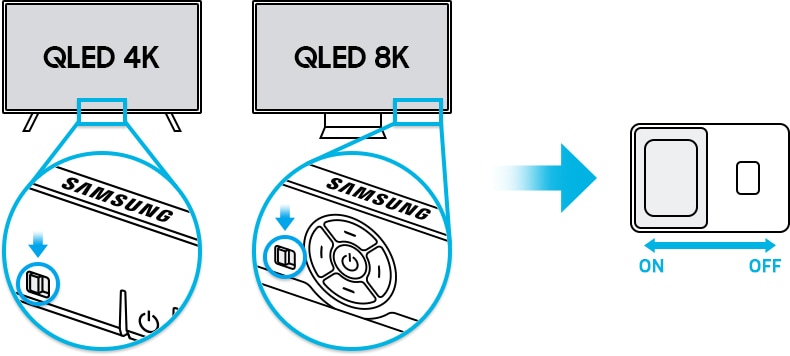
If your TV has physical buttons (usually on the side or bottom), dirt or wear can cause the volume up button to stick or trigger without being touched.
3. Interference From Other Devices
Other electronics in your home, especially those with infrared remotes, can send signals to your TV by accident. Devices like soundbars, universal remotes, or even toys can interfere.
4. Hdmi-cec Settings
Most modern TVs have a feature called HDMI-CEC (Consumer Electronics Control). It lets connected devices control each other. For example, your DVD player or streaming device might change your TV’s volume.
5. Software Or Firmware Bugs
Smart TVs run on software, just like computers. Sometimes, a glitch or outdated firmware can cause volume control errors.
6. Automatic Volume Adjustment Features
Some TVs and soundbars have features like auto volume leveling or night mode. If these are set incorrectly, they might make the volume go up or down unexpectedly.
7. Faulty Audio Cables Or Accessories
Bad HDMI, optical, or RCA cables can send incorrect signals to your TV. The same goes for external speakers or soundbars.
8. Malfunctioning Mainboard Or Hardware
If none of the above applies, your TV’s mainboard (the main electronic board inside) might be faulty. This is less common but is serious.
9. Smart Home Devices Or Apps
Voice assistants like Alexa or Google Home can control your TV volume. A misheard command or a buggy app can cause the volume to change.
10. Signal Interference From Neighbors
If you live in an apartment, a neighbor’s remote control might have the same frequency as yours, causing your TV to react.
It’s easy to blame the TV, but sometimes the problem is outside your living room. Understanding all these possible causes helps you choose the right fix.
How To Diagnose The Problem
Before you start fixing, you need to know what’s causing the issue. Here’s a simple step-by-step process to diagnose why your TV volume keeps going up.
- Remove the Batteries from the Remote: Take out the batteries and see if the problem stops. If it does, your remote is the problem.
- Unplug External Devices: Disconnect everything from your TV (soundbars, gaming consoles, cable boxes). If the issue stops, one of these devices is causing it.
- Check Physical Buttons: Gently press all the TV’s physical buttons. If one feels stuck, that may be the cause.
- Turn Off HDMI-CEC: Go to your TV’s settings and turn off HDMI-CEC. If the volume stops rising, a connected device was controlling your TV.
- Update Your TV’s Software: Go into the TV’s menu and check for updates. Bugs often get fixed in new updates.
- Move the TV to a Different Room: This can help rule out interference from neighbors or other electronics.
- Factory Reset: As a last resort, reset the TV to factory settings. This will erase all custom settings, so only do this if nothing else works.
This process helps you narrow down the real cause. Most people skip diagnosis and try random fixes, but that often leads to more frustration.
Common Fixes For Tv Volume Going Up
Once you know the likely cause, you can fix the problem. The solution depends on what you found during diagnosis.
Remote Control Solutions
- Clean the Remote: Open it up (if possible) and clean around the buttons. Dust or crumbs can cause sticking.
- Replace Batteries: Weak batteries can send random signals.
- Replace the Remote: If it’s old or damaged, a new remote is often cheap and effective.
Tv Button Solutions
- Clean Physical Buttons: Use a soft cloth or a cotton swab with a little alcohol. Gently clean around all buttons.
- Disable TV Buttons: Some TVs allow you to disable physical buttons in the settings menu.
Device Interference Solutions
- Change Remote Codes: If you use a universal remote, pick a different code.
- Move Devices Apart: Put other electronics further from your TV.
- Check Soundbar Settings: Make sure soundbars or AV receivers are not set to control your TV’s volume.
Hdmi-cec Solutions
- Disable HDMI-CEC: Go to TV settings and turn off this feature.
- Update Connected Devices: Make sure all HDMI devices have the latest software.
Software/firmware Solutions
- Update TV Software: Always install the latest updates from the manufacturer.
- Factory Reset: If updates don’t help, reset the TV.
Auto Volume Adjustment Solutions
- Turn Off Auto Volume: In sound settings, disable features like auto volume, leveling, or night mode.
- Check Sound Modes: Try switching from “Standard” to “Movie” or “Music” mode.
Cable And Accessory Solutions
- Replace Cables: Old or damaged cables can cause problems. Try new HDMI or audio cables.
- Test Without Accessories: Remove all accessories to see if the problem stops.
Hardware Failure Solutions
- Call a Technician: If you suspect a mainboard problem, it’s best to get professional help.
- Warranty Check: If your TV is new, see if the warranty covers repairs.
Smart Home Solutions
- Check Voice Assistant History: Look at your Alexa or Google Home app’s command history.
- Disable TV Control: Turn off TV control features in your smart home app.
Neighbor Interference Solutions
- Change TV Remote Frequency: Some TVs let you pick a different frequency.
- Block Infrared Sensors: As a temporary solution, cover the TV’s IR sensor with tape.
Two non-obvious insights many people miss:
- Universal Remotes and App Controls: If you’ve ever connected your phone to the TV as a remote, an app running in the background can sometimes send random commands.
- Firmware Rollback: Sometimes, a new software update causes the problem. Rolling back to an older version (if possible) can solve it.
Comparing Causes: How Likely Is Each One?
To help you see which problems are most common, here’s a comparison.
| Cause | Likelihood | Difficulty to Fix |
|---|---|---|
| Remote Control Problems | Very Common | Easy |
| Stuck TV Buttons | Common | Easy |
| HDMI-CEC Interference | Moderate | Medium |
| Software Bugs | Moderate | Medium |
| Hardware Failure | Rare | Hard |
| Smart Home Devices | Rare | Medium |
| Neighbor Interference | Rare | Medium |
As you can see, most problems are caused by remotes or buttons, which are simple to fix.

Credit: eldoradohearing.com
Preventing Future Volume Problems
Once you fix your TV, you’ll want to keep it working smoothly. Here are practical steps to prevent the TV volume from going up by itself again.
- Keep Remotes Clean: Regularly clean your remote and replace batteries every six months.
- Update TV Software: Check for updates every few months.
- Organize Cables: Don’t tangle cables or pull them tight. Replace damaged cables immediately.
- Check External Devices: Only connect trusted devices. Update their software too.
- Secure TV Location: Place the TV away from other electronics and out of direct sunlight, which can damage buttons.
- Monitor Smart Home Devices: Set up clear voice commands and review device histories for errors.
- Label Remotes: If you have multiple TVs or devices, label each remote to avoid confusion.
Many people overlook the importance of software updates and cable health. These small steps can save you from big headaches later.
When To Call A Professional
Sometimes, DIY fixes don’t work. Here’s when to get expert help:
- Mainboard Problems: If cleaning buttons and replacing the remote don’t help, the internal electronics may be failing.
- No Menu Access: If you can’t use your TV menus because the volume keeps rising, you’ll need professional repair.
- Under Warranty: Always contact the manufacturer if your TV is still under warranty.
- Physical Damage: Cracked screens or water damage need expert attention.
Getting professional help is sometimes the fastest way to a lasting solution.

Credit: www.youtube.com
Case Studies: Real-life Examples
Let’s look at three real situations that show how people fixed their TV volume issues.
Case 1: The Sticky Remote
Sarah’s TV volume would rise every few minutes. She noticed the volume button on the remote was harder to press than others. After opening the remote, she found a sticky spill inside. Cleaning it with rubbing alcohol fixed the issue immediately.
Case 2: Hdmi-cec Surprise
John connected a new soundbar to his Samsung TV. Every time he used his Blu-ray player, the TV volume jumped to maximum. The cause was HDMI-CEC, which let the Blu-ray player control the TV’s sound. Turning off HDMI-CEC in the settings solved the problem.
Case 3: App Interference
Carlos used his phone as a remote control. After installing a new smart TV app, the volume would sometimes increase on its own. He checked the app’s permissions and found it was sending volume commands by mistake. Uninstalling the app stopped the problem.
These stories show the value of careful diagnosis and not overlooking simple causes.
Tv Brands And Model Differences
Different brands and models have their own unique issues and solutions. Here’s a quick overview:
| Brand | Common Issue | Special Solution |
|---|---|---|
| Samsung | HDMI-CEC conflicts | Disable “Anynet+” in settings |
| LG | Remote control stuck in pairing mode | Re-pair or reset remote |
| Sony | Software glitches | Update software and reset audio settings |
| Vizio | Physical button problems | Clean and inspect TV buttons |
| TCL/Hisense | App interference | Check Roku/Google TV app settings |
Some brands have unique menu names for features like HDMI-CEC or auto volume. Always check your manual or the manufacturer’s website for details.
Advanced Troubleshooting Tips
If basic steps don’t help, try these advanced tips:
Check For Signal Reflection
Infrared signals can bounce off mirrors, glass, or shiny furniture. Move your TV and remote to see if the problem stops.
Use A Universal Remote
A universal remote can help you test if the original remote is the problem. If the volume does not go up with the universal remote, you know the original is faulty.
Block The Ir Sensor
If you need a quick fix, cover the TV’s infrared sensor with opaque tape. This prevents any remote from affecting the TV. Remember, you’ll lose remote control until you remove the tape.
Test In A New Environment
Take your TV to a friend’s house and see if the volume problem continues. If it does, the issue is inside the TV. If not, it’s something in your home environment.
Monitor Power Surges
Unstable power can cause electronics to behave strangely. Use a surge protector to keep your TV safe.
These advanced steps are rarely needed, but they can catch unusual causes that most people never consider.
How To Get Help From The Manufacturer
If you need help from the brand, here’s how to prepare:
- Write Down the Model Number: You’ll find this on the back or in the TV’s menu.
- Describe the Issue Clearly: Mention when it started, what you’ve tried, and any error messages.
- Take Photos or Videos: Evidence can help the support team diagnose the problem.
- Keep Receipts and Warranty Info: You’ll need these for free repairs.
Contact support through official channels. Most brands offer chat, email, or phone support. For more information on how TVs work and troubleshooting, you can also check resources like Wikipedia.
Credit: www.samsung.com
Frequently Asked Questions
Why Does My Tv Volume Keep Rising Even When I’m Not Touching Anything?
This usually happens because of a stuck remote button, interference from another device, or a software glitch. Try removing the remote batteries and disconnecting external devices to see if the problem stops.
Can Wifi Or Bluetooth Devices Cause My Tv Volume To Change?
Yes. Smart home devices like Alexa, Google Home, or even smartphone apps can send volume commands without you noticing. Check the command history in your smart home app to find the cause.
Is It Dangerous If My Tv Volume Goes Up By Itself?
It’s not directly dangerous, but it can signal a hardware or software problem that might get worse. If you see other issues (like the TV turning on/off by itself), get it checked by a technician.
How Do I Stop My Neighbor’s Remote From Controlling My Tv?
Try changing your TV’s remote frequency (if possible), or block the infrared sensor with tape as a temporary fix. Moving the TV can also help.
Will A Factory Reset Always Fix Volume Problems?
A factory reset can solve many software-related issues, but not hardware problems. Only use it after trying other steps, since it will erase all your settings and apps.
Taking action is the key. Don’t ignore the problem—diagnose and fix it so you can enjoy your TV the way it’s meant to be.
Every TV owner faces small problems over time, but with the right approach, you can solve most sound issues yourself. If your TV volume keeps going up, stay calm, follow the steps here, and you’ll soon have a quieter, more relaxing living room again.