
What does “Live” mean on Find My iPhone? This question pops up for many Apple users when they notice the word Live under a device’s name in the Find My app. At first glance, it might seem simple. But the meaning of “Live” in this context is more powerful, and understanding it can help you protect your devices and make smarter choices when tracking them.
Apple’s Find My iPhone has become an essential tool for millions. Whether you’ve lost your phone at home, left your iPad at a friend’s house, or fear your device has been stolen, Find My iPhone gives you a way to locate and sometimes recover your Apple devices. But as the app has evolved, it now offers new features like Live Location. This article explains in detail what “Live” means on Find My iPhone, how it works, why it’s important, and when you can rely on it.
We’ll also explore common misunderstandings, privacy implications, and real-world uses of the Live feature. By the end, you’ll understand everything about this feature—even if you’re new to Apple devices or technology. Let’s dive in.
What Is Find My Iphone?
Find My iPhone is a core feature in the Find My app, which Apple created to help users locate their devices. Originally released in 2010, it has evolved from a simple location tool to a powerful security and tracking service. Today, Find My iPhone is part of the Find My app, which also helps you find friends, family, AirPods, and even AirTags.
You can access Find My iPhone from another Apple device, on the web, or even ask Siri. The main functions include:
- Seeing your device’s last known location on a map.
- Playing a sound to help you find it nearby.
- Marking the device as lost.
- Erasing your device remotely if you think it’s stolen.
The app uses Apple ID to link all your devices together. This means you can track any device signed in with your Apple account. The system relies on a mix of GPS, Wi-Fi, Bluetooth, and the internet.
Understanding how Find My iPhone works is important before diving into the “Live” feature, as it builds on these basic location services.
The Basics Of Location Tracking On Find My Iphone
When you use Find My iPhone, your device regularly sends its location to Apple’s servers. This location is shown as a dot on the map. Most of the time, this dot represents a recent location, but not always the exact, current spot. The quality of this location depends on several factors:
- Is the device connected to the internet?
- Is location services turned on?
- Is the device turned on or off?
Sometimes, you’ll see a timestamp saying “5 minutes ago” or “Now. ” But what if you want to see your device moving in real time? This is where “Live” comes in.
What Does “live” Mean On Find My Iphone?
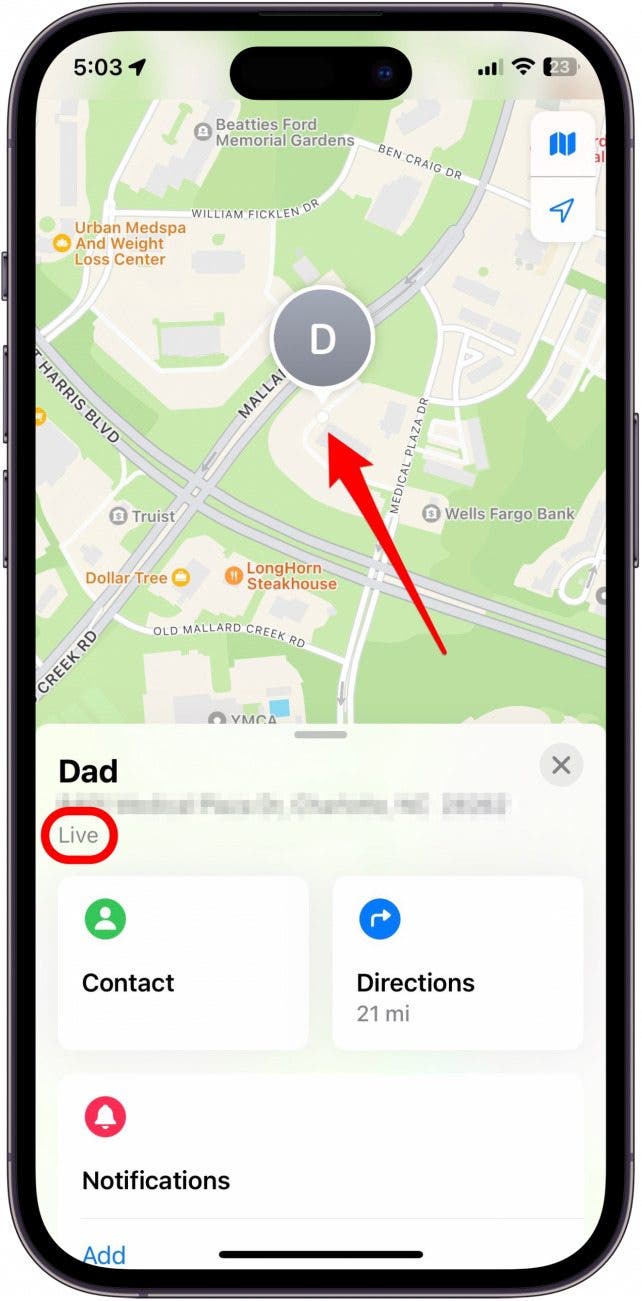
When you see Live under your device’s name in Find My iPhone, it means you are seeing the real-time, continuously updating location of that device. The map updates every few seconds as the device moves, rather than waiting for a new location to be sent every minute or so.
Here’s what makes the Live feature special:
- The location dot moves smoothly as the device changes position.
- The app updates the map with the device’s current location, not just the last known spot.
- The Live label shows you’re not seeing old or delayed data.
This is useful when someone is moving—walking, biking, or driving. You can watch the device’s route as it happens, which is a big advantage for finding lost or stolen devices.
Key Differences Between “now” And “live”
- Now: The location is updated when you open the app or refresh, but it’s a single point in time.
- Live: The location is updated every few seconds, showing movement in real time.
The Live feature is more dynamic and interactive.
How Does Live Location Tracking Work?
Apple uses a mix of technologies to deliver Live Location:
- GPS for satellite-based location.
- Wi-Fi to help pinpoint the device in areas where GPS signals are weak (like indoors).
- Bluetooth for short-range device finding, especially with AirTags.
- Cellular data to send location info to Apple’s servers.
When a device is online and moving, it sends updates every few seconds. The Find My app shows these updates as a moving dot—this is the Live effect.
Real-time Vs. Delayed Location: How They Compare
Here’s a side-by-side look at regular location vs. Live location:
| Feature | Standard Location | Live Location |
|---|---|---|
| Update Frequency | Every few minutes or on demand | Every few seconds (continuous) |
| Movement Tracking | Shows fixed points | Shows movement as it happens |
| Best Use Case | Finding a lost device | Tracking moving devices in real time |
| Data Usage | Lower | Higher (uses more battery and data) |
This table shows that Live is best when you need up-to-the-second information, but it can use more battery and data.
When Does “live” Appear In Find My Iphone?
The Live label does not always show up. It appears only when certain conditions are met:
- Device must be online: The tracked device needs to be connected to Wi-Fi or cellular data.
- Find My must be enabled: Location Services must be active for the device.
- Supported device and iOS version: Live requires iOS 15 or later for iPhones.
- You are actively tracking: If you open the Find My app and select the device, Live starts.
- Device is moving: If the device is stationary, Live may not appear, or the location dot will not move.
If the device is offline, powered off, or not supported, you will not see “Live. “
Devices That Support Live Location
Not all Apple devices support Live location in the Find My app. Here’s a quick comparison of supported devices and requirements:
| Device | Live Location Support | Minimum OS Version |
|---|---|---|
| iPhone | Yes | iOS 15+ |
| iPad | Yes | iPadOS 15+ |
| Mac | No | – |
| Apple Watch | Limited | watchOS 8+ |
| AirPods/AirPods Pro | No (Approximate location only) | – |
| AirTag | Yes (Ultra Wideband required) | – |
Notice that older devices or Macs do not support Live location. AirPods and some accessories only show their last known spot.
How To Use Live Location On Find My Iphone
If you want to use the Live feature, follow these steps:
- Open the Find My app on any Apple device.
- Tap the Devices tab.
- Select the device you want to track.
- If the device is online and moving, you’ll see Live under its name.
You can watch the device move in real time. This is especially useful if someone is bringing your lost phone to you, or if you’re meeting up with family or friends.
Pro Tip: Live Sharing Between People
If you and your family both use Apple devices, you can share Live Location with each other. This helps parents keep track of children, or groups stay connected at events.
Why Live Location Matters: Real-world Uses
The Live feature is more than just a technical upgrade. Here are some practical examples where it makes a real difference:
- Finding a moving device: If you left your iPhone in a taxi, you can watch the driver’s route and call the company to intercept your device.
- Safety for families: Parents can see their children’s iPhones moving on the way to school or home.
- Coordinating meet-ups: Friends can watch each other’s live location to meet at concerts, parks, or airports.
- Recovering stolen devices: Police can use the live feed to track down thieves (though you should never confront a thief yourself).
These real-world uses show how Live goes beyond just finding a lost phone—it improves safety and convenience.
Privacy And Security Of Live Location
Many users worry about privacy when sharing location, especially in real time. Apple designed Find My iPhone and Live location with strong privacy controls.
How Apple Protects Your Privacy
- End-to-end encryption: Only people you share location with can see your live location.
- No location stored permanently: Location updates are not saved long-term by Apple.
- You control sharing: You decide who can see your live location and can stop sharing at any time.
- Notifications: Apple notifies you if your location is being shared.
Apple’s privacy focus means your Live location is not available to anyone except those you authorize.
Troubleshooting: Why You Might Not See “live”
Sometimes, you expect to see Live but only see a timestamp or old location. Here are common reasons:
- Device offline: No internet connection.
- Location Services off: Check device settings.
- Old iOS version: Update to iOS 15 or later.
- Device is stationary: Live only shows movement.
- Battery saving mode: Some features may be limited to save battery.
- Permissions: You might not have permission to see live location for a person or device.
If you still have issues, try restarting both devices or logging out and back into your Apple ID.
Limitations Of Live Location
Even though Live is powerful, it has some limits:
- Battery drain: Continuous location updates use more battery.
- Data usage: Frequent updates use more mobile data.
- Accuracy depends on signal: In tunnels, subways, or thick buildings, accuracy drops.
- Not available everywhere: Some countries or regions block location sharing.
- Device compatibility: Only newer devices support this feature.
Understanding these limits helps avoid surprises and disappointment.
Common Myths About Live On Find My Iphone
There are several myths and misunderstandings about Live:
- Myth: Live means someone is watching me 24/7.
- Fact: Live only works when both devices are online, and you’ve chosen to share location.
- Myth: Live is always more accurate.
- Fact: Live is only as accurate as the device’s GPS and data connection.
- Myth: Live drains the battery instantly.
- Fact: It uses more battery, but not dramatically if used for short periods.
Being aware of these myths helps you use the feature with confidence.
Security Tips When Using Live Location
If you want to stay safe and protect your privacy while using Live:
- Only share your location with people you trust.
- Turn off location sharing when you don’t need it.
- Review the list of people who can see your location in your Apple ID settings.
- Teach children and teens about safe sharing practices.
- If you lose your device, use Lost Mode to lock it and prevent misuse.
These steps help you enjoy the benefits without risking your privacy.
How Live Location Impacts Lost Or Stolen Devices
If your device is lost or stolen, Live location can make a critical difference:
- Faster recovery: Real-time tracking means you can act quickly.
- Accurate directions: You can give police exact, live directions.
- Remote actions: Mark the device as lost or erase data if you see it moving in the wrong hands.
However, never try to recover a stolen device yourself. Always work with law enforcement for your safety.

Comparing Find My Iphone Live To Similar Services
Other platforms offer location tracking, but Apple’s Live feature is unique. Here’s a comparison with competitors:
| Service | Real-Time Location | Privacy Controls | Supported Devices |
|---|---|---|---|
| Find My iPhone (Apple) | Yes (Live) | Strong, end-to-end encrypted | iPhone, iPad, AirTag |
| Google Find My Device | No (updates periodically) | Good, but not end-to-end encrypted | Android phones/tablets |
| Samsung SmartThings Find | Yes (for some devices) | Strong, but less transparent than Apple | Samsung Galaxy devices |
| Life360 | Yes (for families) | Customizable, but data may be sold | iOS/Android |
Apple’s Live feature stands out for privacy and device integration.
How To Turn Off Live Location
Sometimes, you may want to turn off Live location for privacy or battery reasons. Here’s how:
- Open the Find My app.
- Tap your device or your name.
- Tap Stop Sharing My Location.
You can also turn off Location Services in the device settings, but this will affect other apps like Maps and Weather.

Non-obvious Insights Most Users Miss
Many users only use Live location in emergencies. However, there are less obvious ways to use this feature:
- Coordinating travel: Families on road trips can keep track of each car in real time, reducing stress.
- Event logistics: At large events, teams can split up and regroup easily using Live.
- Health and safety: Elderly family members can share live location for peace of mind, especially if they are prone to getting lost.
Another insight: If your device is running low on battery, Find My will often send its last location before shutting off. This helps even when Live is not possible.
The Future Of Live Location And Find My Iphone
Apple continues to improve Find My iPhone. With each update, Live location gets faster and more accurate. Future updates may bring:
- Even better battery management.
- Integration with more devices, like cars or bikes.
- More precise indoor tracking with Ultra Wideband and AR features.
For the latest updates, you can check the official Apple Support page.
Frequently Asked Questions
What Does “live” Mean Under A Person’s Name In Find My?
Live means you’re seeing that person’s location updating in real time, every few seconds, as they move. This is more accurate than periodic updates and helps track someone who is on the go.
Why Is “live” Not Showing For My Device?
If “Live” is missing, the device may be offline, using an old iOS version, or not moving. Check your internet connection and update your device if needed. Also, make sure you have permission to see the device’s live location.
Does Live Location Drain My Battery?
Yes, using Live can use more battery because it sends location data more often. However, for short periods, the impact is usually small. For long-term tracking, consider battery-saving options.
Is Live Location Always 100% Accurate?
No, accuracy depends on GPS, Wi-Fi, and cellular signal strength. In open areas, it’s usually very accurate. In buildings or underground, it may be less precise.
Can Someone Track Me Without My Knowledge Using Live?
No, Apple requires you to give permission before anyone can see your live location. You also receive notifications when your location is being shared, so you always stay in control.
With this complete understanding, you can use “Live” on Find My iPhone with confidence and make the most of Apple’s location technology. Whether it’s for finding a lost device, staying connected with loved ones, or protecting your privacy, this feature is a powerful tool for modern life.