
Have you ever been listening to your favorite song, podcast, or an important phone call, and suddenly your AirPods cut out? One moment, the sound is clear. The next, it drops, skips, or disconnects completely. This can be frustrating—especially if it happens often. While AirPods are known for their simple design and easy connection, they are not immune to problems. Many users across the world experience the same issue: AirPods that keep cutting out.
So, what causes this annoying problem? Is it a hardware defect, a software glitch, or something else? In this guide, you’ll find out all the reasons your AirPods might be cutting out and, more importantly, how to fix them. With clear explanations, practical advice, and helpful examples, you’ll be able to enjoy your AirPods again without interruptions.
Understanding The Problem: What Does “cutting Out” Mean?
When people say their AirPods are “cutting out,” it usually means the sound:
- Stops and starts
- Skips or stutters
- Disconnects from the device
- Becomes silent for a few seconds before returning
Sometimes, only one AirPod cuts out. Other times, both do. The problem might happen once a day, or every few minutes.
It’s important to know that this is a common issue. You are not alone. Apple’s support forums and social media are filled with users asking, “Why do my AirPods keep cutting out? ” The good news is that most causes have solutions.
Main Causes Of Airpods Cutting Out
Let’s look at the main reasons why your AirPods keep cutting out. Each one has different signs and solutions.
1. Wireless Interference
AirPods use Bluetooth to connect to your device. Bluetooth is a type of wireless signal that can be affected by other electronics. If you are in a place with a lot of signals—like offices, airports, or cafes—your AirPods can lose connection.
Common sources of interference:
- Wi-Fi routers
- Microwaves
- Other Bluetooth devices (speakers, smartwatches, keyboards)
- Wireless cameras
Bluetooth works best within a short range (about 30 feet/10 meters). If you move too far from your device, or there are obstacles (walls, metal objects), the signal can weaken and cut out.
2. Low Battery
If your AirPods or their charging case have a low battery, they may disconnect or stop working correctly. Sometimes, one AirPod has less charge than the other, causing only one to cut out.
Signs of low battery:
- Sudden disconnection
- Audio drops when you move your head
- One AirPod stops working before the other
Always check battery levels on your iPhone, iPad, or Mac.
3. Outdated Firmware
Firmware is the software running inside your AirPods. Apple updates firmware to fix bugs and improve performance. If your AirPods are not up to date, they might have problems staying connected.
How to check firmware:
- Connect your AirPods to your iPhone.
- Go to Settings > Bluetooth.
- Tap the “i” next to your AirPods.
- Scroll down to Version.
Compare your version with the latest on Apple’s website.
4. Software Problems On Your Device
Sometimes, the issue is not with the AirPods but with your phone, tablet, or computer. Outdated operating systems, buggy apps, or Bluetooth issues on the device can all cause audio to cut out.
Common signs:
- Other Bluetooth devices also cut out
- Cutting out happens only with a specific app
- Restarting the device temporarily fixes the issue
5. Physical Obstructions And Signal Blockage
Bluetooth signals can be blocked by physical objects. Common obstacles include:
- Walls
- Bodies of water (even your own body if the device is in your back pocket)
- Metal furniture or appliances
Even carrying your phone in your bag or pocket can affect the connection if your body is between the phone and the AirPods.
6. Dirty Airpods Or Charging Ports
Dirt, dust, or earwax in your AirPods or charging case can cause charging or connection problems. If the contacts are dirty, the AirPods may not charge properly, leading to power drops and cutouts.
Signs of dirt-related issues:
- AirPods don’t charge fully
- Case doesn’t close properly
- One AirPod works, the other doesn’t
7. Device Compatibility Problems
AirPods work best with Apple devices, but they can also connect to Android or Windows. Sometimes, connections with non-Apple devices are less stable. Features like auto-pause or seamless switching may not work, leading to cutouts.
8. Hardware Damage
If your AirPods have been dropped or exposed to water, the internal parts may be damaged. This can cause random disconnects or permanent cutting out.
Signs of hardware damage:
- One AirPod never works
- Sound is always distorted
- No response when charging
9. Overloaded Bluetooth Connections
If your device is connected to many Bluetooth gadgets at the same time (smartwatch, speaker, keyboard), there may not be enough bandwidth for all. This can cause your AirPods to cut out, especially during calls or music streaming.
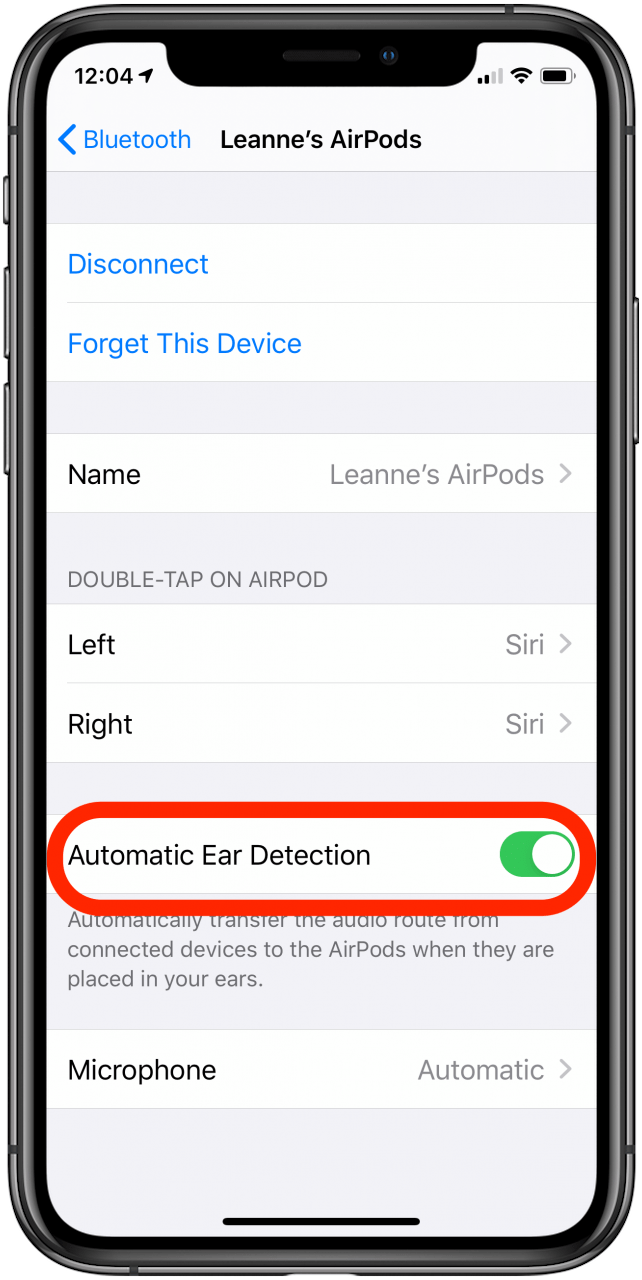
10. Automatic Ear Detection Problems
AirPods have sensors that know when they’re in your ears. If these sensors are dirty or buggy, they might think you removed an AirPod and pause or stop the sound.
11. Out-of-range Issues
If you walk too far from your device, the Bluetooth connection gets weak. Going into another room or behind a wall can cause the AirPods to lose connection and cut out.
12. Software Bugs In Airpods Or Apps
Sometimes, the app you’re using (like Spotify, Zoom, or YouTube) has a bug or doesn’t work well with AirPods. App updates, or even AirPods firmware glitches, can cause sudden audio drops.
13. Environmental Factors
Heavy wireless traffic, crowded public spaces, or even electrical storms can sometimes impact Bluetooth signals.
14. Settings Conflicts
Features like audio sharing, spatial audio, or noise control can sometimes conflict with each other, especially if not updated. This can cause brief cutouts or distortions.
15. Pairing Problems
If your AirPods are paired with more than one device, or your device is also trying to connect to other headphones, the connections can get confused. This can cause the AirPods to lose connection and cut out.
Credit: www.iphonelife.com
How To Fix Airpods That Keep Cutting Out
Now that you know the main causes, let’s move to solutions. The right fix depends on the problem. Try these steps, starting with the easiest.
1. Move Away From Interference
If you’re in a place with many wireless devices, try moving to a less crowded area. Turn off unused Bluetooth devices. Avoid using AirPods near microwaves or Wi-Fi routers.
2. Keep Your Airpods And Case Charged
Always charge your AirPods and their case fully. Check the battery level before long calls or workouts.
- On iPhone: Open the case near your phone to see the battery status pop-up.
- On Mac: Click the Bluetooth icon in the menu bar.
If one AirPod drains faster, clean the contacts or reset the AirPods.
3. Update Airpods Firmware
Firmware updates are automatic, but you can speed them up:
- Put AirPods in their case.
- Connect the case to power.
- Place the case near your iPhone (connected to Wi-Fi).
- Leave them together for 30 minutes.
Check for new versions on Apple’s support page.
4. Restart Your Device
Turn your iPhone, iPad, or computer off and on. This clears out small software glitches that could affect Bluetooth.
5. Clean Your Airpods And Charging Case
Use a soft, dry cloth or a Q-tip to clean the AirPods and the charging contacts. Never use water or sharp objects. Apple recommends a 70% isopropyl alcohol wipe for tough dirt.
6. Forget And Re-pair Airpods
Sometimes, re-pairing solves connection issues:
- On your device, go to Bluetooth settings.
- Tap the “i” next to your AirPods.
- Tap Forget This Device.
- Place AirPods in the case, open the lid, and press the setup button until the light flashes white.
- Reconnect them to your device.
7. Reduce Bluetooth Connections
Disconnect other Bluetooth devices when using AirPods. This gives them the best chance for a strong connection.
8. Stay Within Range
Keep your phone or device close to you—ideally, in your hand or pocket. Avoid going into another room or behind thick walls.
9. Check App And Os Updates
Update your apps and the operating system. App bugs can often cause audio issues.
10. Reset Airpods To Factory Settings
If nothing works, reset your AirPods:
- Put them in the charging case and close the lid.
- Wait 30 seconds, then open the lid.
- Press and hold the setup button until the status light flashes amber, then white.
- Reconnect to your device.
11. Test With Another Device
Try your AirPods with another phone or computer. If they work fine, the problem is with your original device.
12. Check For Hardware Damage
Inspect your AirPods for cracks or water damage. If you see damage, contact Apple Support.
13. Adjust Settings
Turn off features like Automatic Ear Detection, Spatial Audio, or Audio Sharing in Bluetooth settings and see if the issue improves.
14. Remove Physical Obstacles
If you’re exercising or working, make sure your device is not blocked by your body, clothes, or bags.
15. Use One Device At A Time
Disconnect your AirPods from other devices. If you use iCloud, make sure only one device is actively connected.
Comparing Common Causes And Their Fixes
Here’s a quick look at the most common causes and their best solutions:
| Cause | Typical Sign | Best Fix |
|---|---|---|
| Wireless interference | Audio skips in crowded places | Move to a quieter area |
| Low battery | Sudden disconnects | Charge AirPods and case |
| Outdated firmware | Random dropouts | Update firmware |
| Dirty contacts | One AirPod cuts out | Clean AirPods and case |
| Range issues | Cuts out when moving away | Stay close to device |
Non-obvious Insights Most Beginners Miss
Many guides cover the basics, but here are two insights that often go unnoticed:
- ICloud Device Handoffs Can Cause Cutouts: If you use iCloud and have multiple Apple devices nearby (like an iPad, Mac, and iPhone), your AirPods might try to switch between them. This seamless handoff is helpful but can cause random disconnects if the devices are all active. Try turning off Bluetooth on the devices you’re not using.
- Bluetooth Codec Problems: Some apps or devices use different Bluetooth audio codecs (like AAC, SBC, or aptX). Mismatches or forced codec switches can cause short dropouts. This is more common when using AirPods with Android or Windows.
When To Contact Apple Support
If you’ve tried all the above fixes and your AirPods still keep cutting out, it might be a hardware problem. Contact Apple Support if:
- Your AirPods are under warranty
- You see physical damage
- The problem started after dropping or getting them wet
Apple can run diagnostics or replace your AirPods if needed.

Credit: www.wikihow.com
How To Prevent Future Cutouts
Prevention is always better than cure. Here are some tips to keep your AirPods working smoothly:
- Keep firmware and software updated.
- Charge your AirPods and case regularly.
- Clean the AirPods and case every week.
- Avoid using AirPods in high-interference environments.
- Don’t overload your device with too many Bluetooth connections.
- Store AirPods safely in their case when not in use.
- Handle them with care—avoid drops and water.
Airpods Vs. Other Wireless Earbuds: Are Airpods More Likely To Cut Out?
Many people wonder if AirPods are more reliable than other wireless earbuds. While Apple’s AirPods are known for their smooth integration with iPhones and Macs, all Bluetooth earbuds can experience cutouts. The main differences come from:
- Bluetooth version: Newer models (like AirPods Pro 2nd Gen) have better connectivity.
- Chipset: Apple’s H1 and H2 chips improve switching and stability.
- Firmware updates: Apple pushes updates more often than some other brands.
Here’s a quick comparison:
| Earbud Brand | Typical Range | Firmware Updates | Known Cutout Issues |
|---|---|---|---|
| Apple AirPods | ~30 feet | Frequent, automatic | Occasional, usually fixed with updates |
| Samsung Galaxy Buds | ~30 feet | Manual, less frequent | Some users report cutouts with older devices |
| Sony WF-1000XM4 | ~30 feet | Manual, semi-regular | Rare, but possible in crowded areas |
Real-world Examples
Let’s look at a few real-life situations:
- Maria uses her AirPods in a busy airport. She often experiences cutouts. Moving away from the crowd and turning off other Bluetooth devices in her bag solves the problem.
- Jake notices his right AirPod always cuts out first. After cleaning the charging contacts, both AirPods work fine.
- Linda has an Android phone. Her AirPods cut out more often than with her iPhone. She learns that not all AirPods features work perfectly on Android.
The Role Of Bluetooth Technology
Bluetooth is a convenient but imperfect technology. It uses the 2. 4 GHz frequency, which is crowded by Wi-Fi, cordless phones, and even microwaves. Bluetooth 5. 0 (used by newer AirPods) is faster and more stable than older versions, but no wireless system is completely immune to interference.
If you’re using older AirPods (first or second generation), they may cut out more often than newer ones.
How To Check For Firmware And App Updates
Many users don’t realize that both their AirPods and their music or call apps need updates for best performance.
- For AirPods: Updates install automatically when AirPods are in the case and near your iPhone with Wi-Fi on.
- For Apps: Go to the App Store or Google Play, and check for updates to music, podcast, or calling apps.
- For Devices: Regularly update your iOS, iPadOS, or macOS for best Bluetooth performance.
Data On Airpods Issues
According to Apple Support forums and a 2023 survey by Statista, about 18% of AirPods users report connection or cutting out problems at least once per month. Most find that updating firmware or re-pairing the AirPods solves the problem. Only about 2% need hardware repair or replacement.
Credit: www.iphonelife.com
Key Troubleshooting Steps At A Glance
For quick reference, here’s a summary of the most effective steps:
| Step | What to Do |
|---|---|
| 1 | Move away from interference |
| 2 | Check and charge battery |
| 3 | Update firmware and apps |
| 4 | Clean AirPods and case |
| 5 | Re-pair or reset AirPods |
Frequently Asked Questions
Why Do My Airpods Cut Out When I Walk Away From My Phone?
AirPods use Bluetooth, which has a limited range (about 30 feet). Walls, metal, or your own body can block the signal, causing the sound to cut out. Keep your device close and avoid obstacles.
How Do I Know If My Airpods Need A Firmware Update?
Connect your AirPods to your iPhone, go to Settings > Bluetooth, tap the “i” next to your AirPods, and check the Version. Compare it to the latest version on the Apple Support site.
Can Dirty Airpods Cause Them To Cut Out?
Yes. Dirt, dust, or earwax on the charging contacts or speakers can stop the AirPods from charging properly or fitting in your ear. Clean them gently with a dry cloth or a Q-tip.
Why Do My Airpods Cut Out On Calls But Not Music?
Phone calls use a different Bluetooth profile (HFP) than music (A2DP). If your AirPods cut out only during calls, your device may have a Bluetooth profile issue. Try restarting your device and updating all software.
Is It Normal For Airpods To Cut Out In Crowded Places?
Yes, it can happen. Places with many wireless signals (airports, gyms, offices) can cause interference. Try moving to a less crowded area, or turning off other Bluetooth devices nearby.
AirPods are a fantastic product, but they’re not perfect. If you follow the advice above, you’ll solve most cutting out issues and enjoy smooth, wireless sound. If all else fails, Apple Support is ready to help.