
Apple AirTag Range: How Far, How It Works, and What You Need to Know
Losing your keys, wallet, or bag can ruin your day. That’s why many people turn to Apple AirTag, a small tracking device designed to help you find lost items. But before you buy, you might wonder: How far does an AirTag work? Understanding the AirTag’s range is important if you want to track things across your home, office, or even the city. In this article, you’ll learn exactly how AirTag range works, what affects it, and how it compares to other trackers. We’ll also cover real-world tips, common mistakes, and answer your biggest questions. If you want to get the most from your AirTag, read on—you’ll find everything you need here.
What Is Apple Airtag And How Does It Work?
The Apple AirTag is a small, coin-sized device that helps you keep track of your belongings. It’s part of Apple’s Find My network, which uses millions of Apple devices to help you locate lost items. Here’s how it works:
- You attach the AirTag to your keys, bag, or other things.
- The AirTag sends out a Bluetooth signal.
- Nearby Apple devices (iPhones, iPads, Macs) detect this signal and send the location to your iCloud account.
- You can see the last known location in the Find My app.
If you’re close to your AirTag, you can use Precision Finding (on iPhone 11 or newer) for step-by-step directions. This uses Ultra-Wideband technology for even more accurate results.
Key facts:
- An AirTag does not have GPS.
- It relies on Bluetooth and Apple’s Find My network.
- It works best in places with many Apple devices nearby.
The True Range Of Apple Airtag
Bluetooth Range In Detail
Apple AirTag uses Bluetooth Low Energy (BLE) to communicate. The official Bluetooth range is about 33 feet (10 meters) in open space. In reality, walls, doors, and other objects can reduce this range. Here’s what you need to know:
- Open space (no walls): Up to 33 feet (10 meters)
- Inside a house (with walls): Often 15-25 feet (5-8 meters)
- Obstructions (thick walls, metal): Range drops to 10 feet (3 meters) or less
If you’re within Bluetooth range, you’ll get a sound or use Precision Finding to locate your AirTag.
Beyond Bluetooth: Find My Network
The magic of AirTag is the Find My network. If your AirTag is out of Bluetooth range, it can still be found using other people’s Apple devices. Here’s how:
- Your AirTag sends out a Bluetooth signal.
- When an iPhone, iPad, or Mac comes near, it picks up the signal.
- That device sends the location (anonymously) to your iCloud.
- You see the updated location in your Find My app.
This means the “range” of AirTag can be almost unlimited—anywhere with Apple devices nearby.
Real-world Range Examples
- Lost at home: Use Bluetooth and Precision Finding.
- Lost at the office: If coworkers have iPhones, you’ll get updates.
- Lost in the city: High chance to be found, thanks to many Apple users.
- Lost in the countryside: Harder to find, since fewer Apple devices are around.
Non-obvious insight: The AirTag’s practical range is huge in cities but very limited in remote areas with few Apple devices.
How Precision Finding Works
Precision Finding is a special feature for iPhone 11, 12, 13, 14, and newer models. It uses Ultra-Wideband (UWB) technology, which is more accurate than Bluetooth.
- Gives you arrows and distance to your AirTag.
- Works up to about 15-30 feet (5-10 meters), depending on obstacles.
- Needs good lighting and a clear path for best results.
If you have an older iPhone, you’ll only see the general location and can play a sound on the AirTag.
Tip: Not all iPads or Macs support Ultra-Wideband. Check your device specs if Precision Finding is important to you.
What Affects Airtag Range?
Several factors can make your AirTag’s range better or worse. Here’s what you should watch out for:
1. Obstacles
- Walls (especially concrete or brick) block Bluetooth signals.
- Metal objects can reflect or absorb the signal.
- Water (even your body) can block signals.
2. Device Density
- More Apple devices nearby (iPhones, iPads, Macs), better chance to locate.
- In crowded places (city, mall), the Find My network works best.
- In remote places, the AirTag can’t send its location without nearby Apple devices.
3. Battery Life
- AirTag uses a CR2032 coin cell battery.
- Low battery can reduce signal strength and range.
- Replace the battery once a year for best performance.
4. Weather And Environment
- Rain, fog, or snow can absorb Bluetooth signals outdoors.
- Indoors, electronic interference (from microwaves or WiFi) can reduce range.
Non-obvious insight: Even a bag of groceries or a thick coat can block an AirTag’s Bluetooth signal, making it harder to find indoors.
Airtag Range Compared To Other Trackers
How does Apple AirTag’s range compare to other tracking devices? Let’s look at the facts.
| Tracker | Bluetooth Range | Network Range | Special Features |
|---|---|---|---|
| Apple AirTag | 33 ft (10 m) | Unlimited (Find My network) | Precision Finding, Secure Network |
| Tile Pro | 400 ft (120 m) | Limited (Tile network) | Community Find, Ringtone |
| Samsung SmartTag | 390 ft (120 m) | Limited (Galaxy Find network) | Smart Home Control |
- AirTag has a shorter Bluetooth range than Tile or SmartTag, but a much larger network (thanks to millions of iPhones).
- Tile and SmartTag rely on their own user base, which is much smaller than Apple’s.
Practical tip: If you travel to places with many iPhone users, AirTag is the best choice. In remote areas or Android-only environments, a different tracker might work better.
Using Airtag In Real Life: Scenarios And Range
At Home
If you lose your keys or wallet at home, the AirTag’s Bluetooth range is enough. Walls and furniture can reduce the signal, but you’ll usually find your item within one or two rooms. Use the Find My app to play a sound or use Precision Finding (if your iPhone supports it).
In The Car
Attach an AirTag to your car keys or even hide one in your car. The AirTag helps you remember where you parked, especially in large parking lots. If your car gets stolen, the AirTag’s range depends on nearby iPhones. In a busy city, you’ll likely see frequent location updates.
At Work
Lost your bag at the office? If coworkers use iPhones, the AirTag will update its location whenever someone passes by. In a building with thick walls, Bluetooth range will be lower, but the Find My network fills in the gaps.
Traveling
Attach AirTag to your luggage for peace of mind at the airport. The AirTag’s range lets you track your bag as long as airport staff or travelers have iPhones. You can see if your luggage made it onto the plane or is still at the terminal.
Pets And Kids
Some people use AirTags on pet collars or kids’ backpacks. Remember, AirTag is not a live GPS tracker. If your pet or child is in an area with few iPhones, updates may be slow or missing. It’s helpful for finding them at the park or in a busy place, but not for real-time tracking.
Practical insight: AirTag is great for lost items, but not for tracking fast-moving things over long distances.
Security And Privacy Of Airtag Range
Apple takes privacy seriously with AirTag. Here’s how it works:
- Your AirTag’s location is encrypted. Only you can see it.
- Other people’s iPhones relay the location, but they don’t know whose AirTag it is.
- If someone places an AirTag in your bag without permission, you’ll get an alert on your iPhone.
- AirTag beeps if separated from its owner for a long time, helping prevent stalking.
Tip: Always use AirTags ethically. Never use them to track people or pets without their knowledge.
Common Mistakes And How To Avoid Them
Many new AirTag users run into problems. Here’s what to watch for:
1. Expecting Gps Tracking
AirTags don’t have GPS. They rely on Bluetooth and the Find My network. If your item is in a remote area, updates may be slow.
2. Hiding Airtag Too Well
If you put an AirTag inside a metal box, under too many layers, or inside thick luggage, the Bluetooth signal may not get out. Place it where the signal can reach the outside.
3. Not Replacing The Battery
A dead battery means no signal. Check your battery status in the Find My app and replace it as needed.
4. Using With Android Devices
AirTag works best with Apple devices. Android users can only detect an AirTag that’s been following them, not track their own AirTags.
5. Not Registering Airtag
After buying, set up your AirTag in the Find My app. If you skip this, the device won’t work.
Practical insight: Test your AirTag at home first. Hide it and see if you can find it—this helps you learn its real-world limits before you need it.

Credit: www.eufy.com
Apple Airtag Range: Strengths And Weaknesses
Let’s break down the pros and cons of the AirTag’s range:
| Strengths | Weaknesses |
|---|---|
|
|
Best Practices For Maximizing Your Airtag Range
You can get better results from your AirTag by following these tips:
- Place the AirTag smartly: Don’t hide it behind metal or thick objects. Let the signal reach the outside.
- Keep battery fresh: Change the battery every 10-12 months or as soon as you get a low-battery warning.
- Use in populated areas: AirTag works best where many Apple users are present.
- Update your devices: Make sure your iPhone and AirTag firmware are up to date for the best range and features.
- Label your AirTag: Give each AirTag a unique name in the Find My app (“Car Keys,” “Backpack,” etc.) To avoid confusion.
- Test before you travel: Try finding your AirTag in different places in your house or office.

Credit: www.alphr.com
Advanced: How The Find My Network Expands Airtag’s Range
The biggest advantage of AirTag is Apple’s Find My network. With over 1.5 billion active devices worldwide, the network helps you find lost items even if they’re far away.
- When your AirTag is lost, it keeps sending out a Bluetooth signal.
- Any nearby iPhone, iPad, or Mac can “hear” this signal and send the location to your iCloud.
- The process is anonymous and secure—no one else knows whose AirTag it is.
- You see the last reported location in your Find My app.
Real-world example: If you leave your backpack in a coffee shop, another customer’s iPhone might update your AirTag’s location—even if you’re miles away.
Non-obvious insight: The Find My network works even if the other Apple device’s owner has no idea your AirTag is nearby.
Airtag Range For Travelers
Travelers often ask how well AirTag works in airports, hotels, and foreign countries.
- Airports: Many Apple devices, so AirTag works very well for luggage.
- Hotels: If staff or guests use iPhones, you’ll get location updates.
- Foreign countries: AirTag works anywhere Apple’s Find My network is supported. Some countries restrict Ultra-Wideband, so Precision Finding might not be available everywhere.
- Public transport: Updates depend on other passengers’ devices.
Tip: For international trips, check local laws about Bluetooth trackers. Some countries have restrictions.
Airtag Vs Tile And Samsung Smarttag: Range Face-off
It’s useful to compare AirTag’s range with leading alternatives. Here’s a quick summary:
- Bluetooth range: Tile Pro and Samsung SmartTag have longer direct Bluetooth range (up to 400 ft) compared to AirTag’s 33 ft.
- Network coverage: AirTag wins by a large margin in cities, thanks to Apple’s network.
- Rural performance: Tile Pro or SmartTag might be better if you’re in an area with few iPhone users.
Practical example: If you drop your AirTag in a busy park, you’ll likely get a location update within minutes. If you drop a Tile tracker, it may take hours unless another Tile user passes by.
Real-world User Experiences
Many users share their AirTag stories online. Here are a few highlights:
- Lost luggage: Travelers report finding suitcases at airports in different countries, often before airline staff.
- Stolen bikes: Some have recovered stolen bikes when the AirTag pinged its location as the thief moved through the city.
- Lost pets: AirTag helped owners find pets lost in neighborhoods, but not so well in forests or rural areas.
Important note: AirTag is not a replacement for a dedicated GPS pet tracker. It’s best for items that don’t move far or fast.
Technical Details: How Airtag Sends Signals
- Bluetooth Low Energy: Main method for close-range tracking.
- Ultra-Wideband (UWB): For Precision Finding (iPhone 11 and newer).
- No GPS: AirTag never uses satellites.
- NFC: If someone finds your AirTag, they can tap it with their phone to see your contact info (if you marked it as lost).
Security feature: Your AirTag’s Bluetooth ID changes frequently, so nobody can track you using your AirTag.
Airtag Range In Special Situations
Underground Or Subways
AirTag will not update its location in subways or underground garages unless there are Apple devices nearby. Bluetooth signals struggle through concrete and metal.
Airplane Mode
If all nearby devices are in airplane mode, your AirTag can’t send its location until someone turns their phone back on.
Locked Or Off Devices
If an iPhone nearby is locked or out of battery, it cannot relay your AirTag’s location.
Non-obvious insight: The network effect is powerful, but not guaranteed. In “dead zones” (no Apple devices), AirTag is as lost as your item.
Airtag Range: Myths Vs. Facts
Let’s clear up some confusion:
- Myth: AirTag has unlimited real-time range.
- Fact: Range is “unlimited” only where Apple devices are present. It’s not live GPS.
- Myth: AirTag works with Android.
- Fact: Android users can only detect unknown AirTags, not track their own.
- Myth: AirTag always updates instantly.
- Fact: Updates depend on how often other Apple devices pass by.
Tip: For best results, use AirTag for items you lose in places where people use iPhones.
What To Do If Airtag Is Out Of Range
If you can’t find your AirTag:
- Open the Find My app and check the last known location.
- Mark the AirTag as lost in the app. If someone finds it, they can contact you.
- Wait for a location update—this happens when another Apple device passes by.
- If the item is valuable, visit the last known location and look in person.
Practical tip: The AirTag may not update for hours or days in low-traffic areas. Don’t rely on it for urgent tracking in the countryside.
When Airtag Range Might Not Be Enough
AirTag is not perfect. Here are cases where its range might disappoint:
- Hiking or camping: Few Apple users, so updates are rare.
- Remote travel: In areas without iPhones, AirTag is not helpful.
- High-speed travel: If your item moves quickly (e.g., on a train), location updates may lag.
For live, global tracking, consider a GPS tracker instead.
Responsible Use: Airtag And Privacy
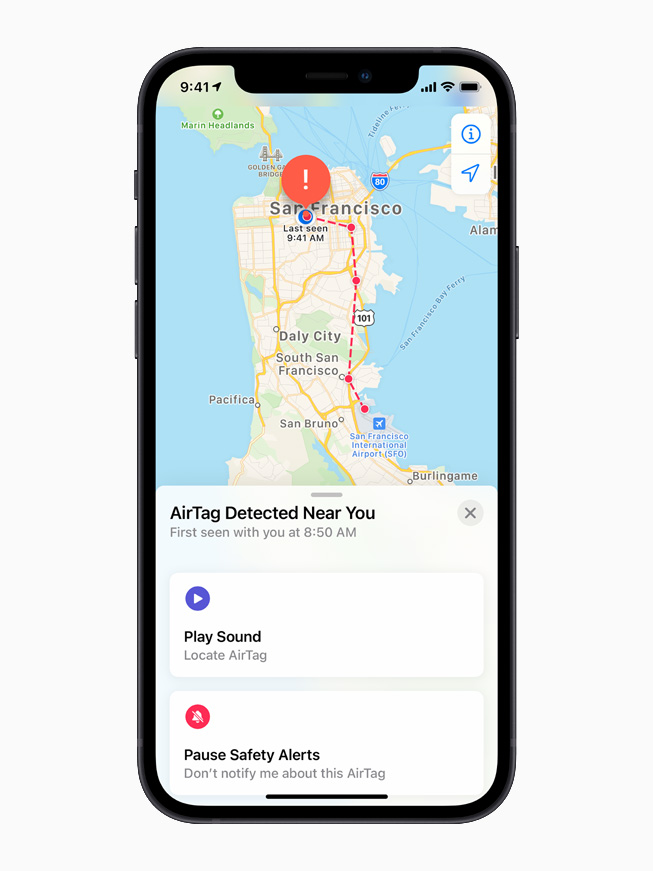
Always use AirTags for your own items. Never use them to track people or things you don’t own. Apple has built in alerts and beeps to prevent misuse.
Legal tip: In some countries, using AirTag to track someone without permission is illegal. Check your local laws.
If you receive an alert about an unknown AirTag moving with you, check your belongings and follow the instructions in the alert.
Credit: www.apple.com
Frequently Asked Questions
What Is The Maximum Range Of An Apple Airtag?
The Bluetooth range is about 33 feet (10 meters) in open space. With Apple’s Find My network, the practical range can be unlimited—as long as there are Apple devices nearby to relay the location.
Can I Use Airtag To Track My Car If It’s Stolen?
You can try, but AirTag is not designed for car tracking. If your car is in a city with many iPhones, you may get location updates. However, AirTag is not a substitute for a dedicated GPS car tracker.
Does Airtag Work Without An Iphone Nearby?
AirTag itself doesn’t need your iPhone nearby, but it needs any Apple device (iPhone, iPad, Mac) within Bluetooth range to relay its location to the Find My network. Without nearby Apple devices, the AirTag cannot update its location.
Can Airtag Track My Pet Or Child In Real Time?
No. AirTag is not a real-time GPS tracker. It updates location only when another Apple device passes by. For active tracking, use a GPS tracker designed for pets or kids.
How Secure Is My Location Data With Airtag?
Apple protects your location with end-to-end encryption. Only you can see your AirTag’s location. Other Apple devices that relay signals never know whose AirTag it is. For more, see Apple’s privacy policy on the Apple Privacy site.
Final Thoughts
Apple AirTag range is both simple and powerful. Up close, the Bluetooth range is about 33 feet—enough for finding things at home or in the office. But with Apple’s massive Find My network, your AirTag can be found almost anywhere people use iPhones. This makes it a great tool for finding lost items in busy places, airports, and cities. However, it’s not perfect—remote areas and fast-moving items are harder to track. By understanding how AirTag’s range works, using smart placement, and following best practices, you’ll get the most from this small but mighty device. Whether you’re a frequent traveler, busy parent, or just forgetful with your keys, AirTag can help you find peace of mind—one lost item at a time.