
Have you ever noticed flashing lights on your Shark vacuum and wondered what they mean? Those blinking signals aren’t just random—they’re trying to tell you something important about your vacuum’s health and performance.
Whether your brush roll has stopped spinning or the battery isn’t charging right, understanding these flashing lights can save you time and frustration. You’ll learn what each light pattern means and how to fix common issues quickly, so your Shark vacuum keeps working like new.
Keep reading to get your vacuum back on track with simple, effective steps you can do today.
Common Light Patterns
Shark vacuums use flashing lights to communicate their status. Understanding these common light patterns helps you identify issues quickly. Each pattern signals something different about your vacuum’s operation or condition. Knowing what these lights mean can save time and avoid frustration.
Single Flashing Light
A single flashing light often means the vacuum needs attention. It can signal a minor issue like a clogged brush or filter. Check for blockages and clean the brush roll. Sometimes, a simple reset fixes the problem. This light is usually a warning, not a critical error.
Multiple Lights Flashing
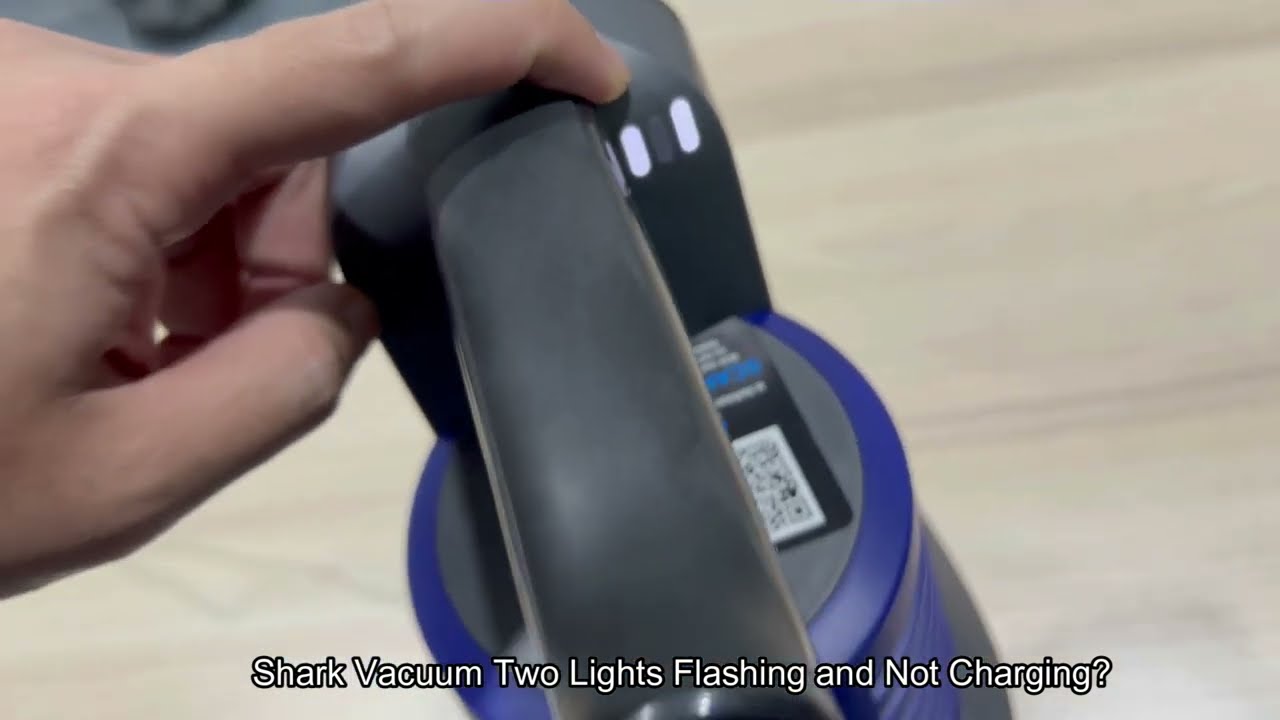
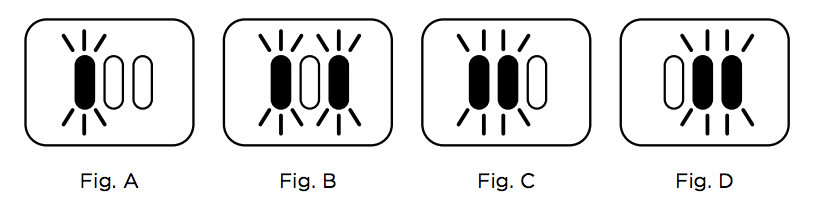
When several lights flash together, the vacuum may have a more serious problem. This pattern often points to battery or motor issues. The vacuum might stop working until you fix the cause. Try charging the battery fully or cleaning the sensors. Multiple flashing lights require more careful troubleshooting.
Colors And Their Meanings
Shark vacuums use different colors for their lights. A green light usually means the vacuum is ready or fully charged. Red lights often indicate errors or low battery. Blue or white lights may show normal operation or standby mode. Learning the color codes helps you understand the vacuum’s status at a glance.
Credit: www.youtube.com
Battery Issues
Battery issues often cause flashing lights on a Shark vacuum. These lights alert users to problems that affect vacuum performance and charging. Understanding these signals helps maintain your vacuum’s battery health. It also ensures longer use between charges.
Charging Problems
Flashing lights may signal charging problems. The vacuum might not charge fully or at all. Check the charger connection and power outlet. Dirt or debris on the charging contacts can block charging. Clean the contacts gently with a dry cloth. A damaged charger cable can also cause issues. Replace it if you see visible wear or breaks.
Battery Temperature Alerts
Shark vacuums monitor battery temperature during charging. Flashing lights can warn that the battery is too hot or cold. Charging pauses until the battery cools or warms. Keep the vacuum in a room with normal temperature. Avoid charging in very hot or cold places. This helps protect the battery and improves its lifespan.
Resetting The Battery
Sometimes, resetting the battery fixes flashing light problems. Turn off the vacuum and unplug it from charging. Remove the battery if possible, then wait one minute. Reinsert the battery and plug the vacuum back in. Turn the vacuum on and see if the lights stop flashing. This reset can clear minor errors and restore normal function.
Brush Roll Problems
The brush roll is a key part of your Shark vacuum’s cleaning power. It sweeps dirt and debris into the vacuum’s suction path. Problems with the brush roll often cause flashing lights on your vacuum. These flashing lights act as alerts for brush roll issues.
Brush roll problems usually stop the vacuum from working properly. The vacuum may not pick up dirt well or the brush roll might stop spinning. Fixing these problems quickly keeps your vacuum running smoothly.
Brush Roll Jam
A brush roll jam happens when hair, string, or debris wraps around the brush. This blocks the brush from spinning. The vacuum’s lights will flash to warn you about the jam.
Turn off the vacuum and unplug it before checking the brush roll. Clear away any tangled debris carefully. Make sure the brush spins freely before using the vacuum again.
Cleaning The Brush Roll
Regular cleaning of the brush roll prevents jams and buildup. Remove the brush roll following your vacuum’s instructions. Use scissors or a brush to cut and remove hair and dust.
Wipe the brush roll with a damp cloth to remove stuck dirt. Clean the brush roll area and edges. Reinstall the brush roll securely to avoid sensor errors and flashing lights.
Brush Roll Sensor Errors
The vacuum uses sensors to check if the brush roll spins correctly. Dust or debris on the sensor can cause errors. These errors trigger flashing lights on your vacuum.
Inspect the brush roll sensor for dirt or blockage. Use a dry cloth or a small brush to clean the sensor gently. Keep the sensor area clear to prevent false error signals.
Power And Connection
Power and connection play a key role in the performance of your Shark vacuum. Problems with these areas often cause flashing lights. Understanding the signs helps you fix the issue quickly and avoid downtime. This section covers common power and connection problems and their solutions.
Vacuum Not Turning On
If your Shark vacuum won’t turn on, start by checking the power source. Make sure the outlet is working by plugging in another device. Look for any visible damage on the power cord. A damaged cord can stop power flow and cause flashing lights. Sometimes, a simple reset can help. Unplug the vacuum, wait a minute, then plug it back in. Watch if the lights stop flashing and the vacuum powers on.
Power Cord And Charging Dock
Check the power cord for cuts, frays, or kinks. A damaged cord stops charging and causes flashing lights. The charging dock must sit on a flat surface and plug securely into the outlet. Dirt or debris on the charging contacts can block the connection. Clean the dock and vacuum contacts with a dry cloth. Ensure the vacuum sits properly on the dock. Misalignment can stop charging and trigger flashing lights.
Proper Assembly Checks
Incorrect assembly can cause power issues and flashing lights. Remove the vacuum from the charging dock. Check all parts are locked into place firmly. This includes the dustbin, filters, and brush roll. Loose parts can disrupt power flow. Look for any blockages inside the vacuum. Clear dirt or hair that may stop parts from fitting correctly. Reassemble the vacuum carefully and place it back on the dock. The flashing lights should stop if the vacuum is connected properly.
Error Codes And Indicators
Flashing lights on a Shark vacuum often signal an issue or status update. These lights act as error codes and indicators. They help identify problems without needing complex diagnostics. Understanding these signals can save time and prevent further damage. This section explains how to read and use these light codes effectively.
Interpreting Error Lights
Shark vacuums use different flashing lights to show errors. A blinking light means the vacuum needs attention. For example, a flashing brush light may indicate a jam. A blinking battery light can mean low charge or a charging fault. Each light pattern points to a specific problem or status. Watching the lights helps you quickly fix the issue.
Model-specific Light Codes
Different Shark models use unique light codes. The Navigator model may flash two lights for a battery reset. The Apex model might flash the brush roll light if it is clogged. Some models show a flashing floor icon for sensor errors. Check your vacuum’s model to understand its exact light signals. This prevents confusion and helps target the right fix fast.
Using The User Manual
The user manual is the best source for decoding light signals. It lists all error codes and their meanings for your model. The manual also provides step-by-step solutions to common problems. Keep the manual handy for quick reference. Following the manual’s advice ensures safe and proper vacuum maintenance.

Credit: www.youtube.com
Troubleshooting Steps
Flashing lights on a Shark vacuum can signal various issues. These signals help you understand what needs attention. Following simple troubleshooting steps often fixes the problem quickly. Start with easy checks before moving to complex solutions. This guide offers clear steps to resolve common flashing light problems.
Basic Reset Procedures
Turn off the vacuum and unplug it from the power source. Wait for 30 seconds to 1 minute before plugging it back in. Press the power button to turn it on again. This reset can clear temporary errors. Some models have a reset button; press it if available. Resetting often stops flashing lights and restores normal function.
Cleaning And Maintenance Tips
Remove and clean the brush roll regularly. Clear any hair or debris tangled around it. Empty the dustbin to avoid blockages. Check the filters and clean or replace them as needed. Clean the vacuum’s sensors and wheels with a soft cloth. Proper maintenance prevents many issues that cause flashing lights.
When To Contact Support
Contact support if flashing lights continue after resets and cleaning. Persistent flashing may indicate a battery or motor problem. Reach out for professional help if the vacuum will not turn on. Use support for guidance on parts replacement or warranty claims. Support teams provide specific solutions for your vacuum model.
Credit: sharkcleanapac.zendesk.com
Frequently Asked Questions
Why Are My Shark Vacuum Lights Blinking?
Shark vacuum lights blink to indicate issues like brush roll jams, low battery, charging faults, or sensor errors. Check and clear blockages, ensure proper charging, and reset the vacuum by unplugging and plugging it back in.
What Does The Light Flashing On The Shark Mean?
Flashing lights on a Shark vacuum usually signal a brush roll jam, low battery, or charging issue. Unplug, clear clogs, and reset.
Is There A Reset Button On A Shark Vacuum Cleaner?
Shark vacuum cleaners do not have a dedicated reset button. To reset, unplug the vacuum, wait 10 seconds, then plug it back in. This can resolve minor issues and flashing lights. Refer to the user manual for model-specific troubleshooting steps.
What Do The Lights Mean On A Shark Hoover?
Flashing lights on a Shark Hoover usually indicate battery issues, brush roll jams, or sensor errors. Check for clogs, reset the battery, or ensure proper charging.
Why Are The Lights Flashing On My Shark Vacuum?
Flashing lights usually signal a problem like a clogged brush or low battery. Check for blockages and ensure the battery is charged. This helps diagnose the issue quickly.
Conclusion
Flashing lights on a Shark vacuum often signal simple issues. Check for brush roll clogs or battery problems first. Make sure the vacuum parts fit tightly and are clean. Sometimes, a quick reset by unplugging helps. Paying attention to these lights helps keep your vacuum working well.
Regular care can prevent most flashing light problems. Stay calm and follow these easy steps. Your Shark vacuum will run smoothly again in no time.