
Your Kenmore Elite oven is more than just an appliance; it’s the heart of your kitchen. But what happens when it suddenly flashes an unfamiliar error code?
Panic sets in, and you find yourself wondering, “What now? ” Don’t worry—you’re not alone. Error codes are your oven’s way of telling you something’s not quite right, and they can be surprisingly simple to decipher. Imagine being able to fix the issue yourself, saving time and avoiding costly repair bills.
This guide will walk you through the most common Kenmore Elite oven error codes, helping you understand what they mean and what you can do about them. Stay with us, and you’ll soon be back to baking, roasting, and grilling without a hitch.

Credit: www.searshomeservices.com
Common Error Codes
Kenmore Elite ovens are a staple in many kitchens, known for their reliability and advanced features. However, like any appliance, they occasionally display error codes. Understanding these codes can save you time and hassle. Addressing them promptly ensures your oven remains in top working condition. Let’s explore some common error codes you might encounter.
E1 Code
The E1 code often signals a problem with the oven’s temperature sensor. If you’ve ever noticed your oven taking longer to heat up, this could be why. Check the sensor for any visible damage or disconnections. If you’re unsure, consulting the manual or reaching out to a technician might be the best course of action. Have you ever wondered why your cookies aren’t baking evenly? This error might be the culprit.
F2 Code
Encountering the F2 code can be frustrating. It typically indicates the oven is overheating. This might be due to a faulty thermostat or a blocked ventilation system. Ensure your oven has adequate air circulation. Have you been using your oven more frequently during the holidays? Overuse can sometimes trigger this code. Regular maintenance can prevent such issues and keep your culinary adventures on track.
F3 Code
The F3 code points to a malfunctioning oven sensor. A glitch here can lead to inaccurate temperature readings, throwing off your cooking precision. Double-check the connection between the sensor and the control board. Is your roast taking forever to cook? This error might be affecting the heat distribution. A quick fix often involves replacing the sensor, ensuring your meals are cooked to perfection.
E5 Code
An E5 code usually indicates a problem with the oven’s electronic control board. This board is essential for managing all oven functions. A sudden power surge can sometimes disrupt its operations. Are your settings suddenly changing without your input? The control board might be acting up. Consider resetting your oven or, if the problem persists, seeking professional help to restore its functionality.
Understanding these codes not only helps in troubleshooting but also extends the life of your oven. Regular checks and timely interventions can prevent minor issues from turning into major problems. Do you regularly inspect your kitchen appliances? It might be time to start. Share your experiences and tips with us, and together, let’s master the art of maintaining our kitchen gadgets.

Credit: www.youtube.com
Identifying The Problem
Troubleshooting Kenmore Elite oven error codes helps address cooking issues. Each code points to a specific malfunction. Understanding these can save time and prevent further damage.
Identifying the Problem Is your Kenmore Elite oven flashing error codes on its display? Understanding these codes can save you time and frustration. Error codes are your oven’s way of communicating what’s wrong. Recognizing them is the first step towards a solution. Let’s explore the key indicators that can help you identify the problem with your oven.Display Screen Messages
Your oven’s display screen is the primary communicator. Error codes like “F1” or “E0” might appear. Each code corresponds to a specific issue. For instance, “F1” often signals a problem with the electronic control board. You might need to replace it or check the wiring connections. Sometimes, the display might show “E0,” indicating a sensor failure. Replacing the sensor can usually resolve this. Pay attention to these messages. They provide clues about what’s happening inside your oven. Have you ever wondered how a simple display message can pinpoint a problem?Beep Patterns
Beeping sounds are not just for alerts; they can indicate specific errors. A continuous beep might signal a stuck button. This can be fixed by cleaning the keypad or resetting the control panel. Intermittent beeps may point to a sensor issue. These patterns are like a Morse code for your oven. Are you able to decode these beeps? They’re vital in understanding what’s going on. Listening closely can help you identify the problem before it escalates. Understanding these indicators can make troubleshooting easier. What steps will you take to decode your oven’s signals today?Basic Troubleshooting Steps
If you’re dealing with Kenmore Elite Oven error codes, don’t panic. Many issues are simple and can be fixed with basic troubleshooting steps. These steps could save you time and money, and you might even learn something new about your oven. Let’s dive into some practical solutions that could get your oven back on track.
Resetting The Oven
Sometimes, all your oven needs is a reset. A reset can clear temporary glitches that cause error codes. Start by turning off the oven using the power button.
Then, unplug the oven from the wall socket. Leave it unplugged for a few minutes to ensure a full reset. Plug it back in and turn it on.
Has the error code disappeared? If so, you’ve successfully reset your oven. If not, it might be time to explore other troubleshooting avenues.
Checking Electrical Connections
Loose or faulty electrical connections can trigger error codes. Begin by examining the power cord for any visible damage or wear. Is it securely connected to the outlet?
If the cord seems fine, check the outlet itself. Try plugging another appliance into the same outlet to ensure it’s working. Electrical issues could be the root cause of persistent error codes.
If everything seems in order, consider checking the internal wiring if you’re comfortable doing so. But remember, safety first! If you’re unsure, calling a professional might be the best option.
Have you tried resetting the oven and checking electrical connections? These steps often resolve common error codes. What would you do next if the problem persists?
When To Call A Professional
Kenmore Elite ovens are reliable, but error codes can be confusing. If the display shows unfamiliar codes, it might be time to call a professional. Understanding when expert help is necessary can save time and stress.
Persistent Error Codes
Some error codes appear again and again, despite attempts to fix them. This persistence may indicate deeper issues that require expert attention. If a code doesn’t clear, a technician can diagnose the problem accurately.
Repeated errors might point to faulty components. Professionals have the tools to pinpoint the exact cause. This ensures a thorough solution rather than a temporary fix.
Complex Repairs
Ovens involve intricate systems that can be challenging to repair. Complex problems often need specialized knowledge. A professional can handle these repairs efficiently and safely.
In-depth repairs might involve wiring or electronic parts. Incorrect handling can worsen the issue or cause safety hazards. Experts know the best practices for these situations.
Calling a professional guarantees that the oven will be fixed correctly. This not only resolves the error but also extends the appliance’s life.
Maintaining Your Oven
Kenmore Elite Oven error codes help diagnose issues quickly. Regular maintenance and understanding these codes can prevent costly repairs. Keep your oven in top shape by addressing error codes promptly.
Maintaining your Kenmore Elite oven can feel like a daunting task, especially when error codes pop up unexpectedly. However, by focusing on regular upkeep, you can minimize these interruptions and keep your oven running smoothly. Proper maintenance isn’t just about handling problems when they arise; it’s about preventing them from happening in the first place. By integrating simple habits into your routine, you ensure your oven remains a reliable kitchen companion.Regular Cleaning
Regular cleaning is the cornerstone of oven maintenance. A clean oven not only functions better but also lasts longer. Make it a habit to wipe spills immediately to prevent them from hardening. Use a gentle cleaning solution to avoid damaging the oven’s surface. Set aside time monthly to give your oven a deeper clean. Remove the racks and clean them separately. This effort pays off when you see your oven’s performance improve.Routine Inspections
Routine inspections are essential for catching issues before they escalate. Just like you wouldn’t skip a doctor’s appointment, don’t skip checking your oven. Inspect the heating elements and door seals regularly. A cracked seal can lead to heat loss and inefficient cooking. Use your senses. Listen for unusual sounds or smells during operation. If something seems off, don’t ignore it. Addressing small problems early can prevent larger ones later. Maintaining your oven doesn’t have to be overwhelming. By incorporating these habits, you extend the life of your appliance and enhance your cooking experience. What maintenance steps will you start taking today to ensure your oven stays in top shape?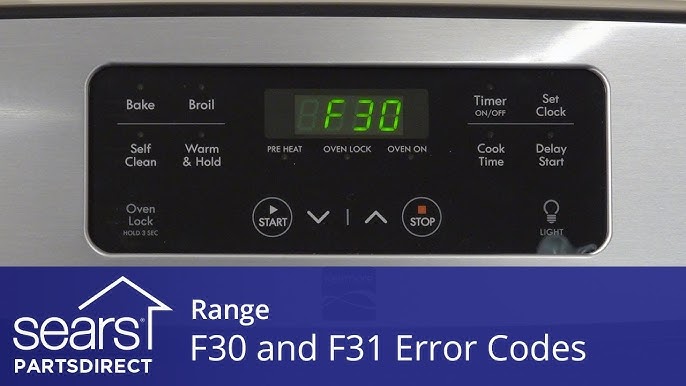
Credit: www.youtube.com
Preventing Future Errors
Understanding Kenmore Elite Oven error codes helps prevent future issues. Regular maintenance ensures smooth operation. Addressing minor problems early saves time and money. Stay informed to keep your oven running efficiently.
Preventing future errors with your Kenmore Elite Oven is not just about addressing issues as they arise—it’s about adopting smart practices that ensure your appliance runs smoothly for years. By understanding how to properly use your oven and avoid common pitfalls, you can greatly reduce the chances of encountering those pesky error codes. Let’s dive into some practical strategies to keep your oven in top shape.Proper Usage
Using your Kenmore Elite Oven correctly is crucial to its longevity. Always refer to the user manual for guidance on operating modes and functions. Ignoring these can lead to unintended errors. Consider this: are you preheating your oven correctly? Many users skip this step, leading to uneven cooking and unexpected errors. Take the time to preheat and allow your oven to stabilize. Regular cleaning is another aspect of proper usage. Residue buildup can cause overheating and trigger error codes. Make it a habit to clean spills immediately and conduct thorough cleanups periodically.Avoiding Overloads
Overloading your oven is a common mistake that can cause issues. When you cram too much food inside, it can obstruct airflow and lead to overheating. This not only affects cooking quality but might also trigger an error. Think about the last time you hosted a big dinner. Did you find yourself stuffing the oven to save time? It’s tempting, but spacing your dishes properly ensures better results and reduces stress on your appliance. Consider the oven’s capacity. Overloading can strain the heating elements and fans, leading to wear and tear. It’s a simple step that can prevent many potential problems down the line. By adopting these practices, you can significantly reduce the likelihood of facing error codes with your Kenmore Elite Oven. Isn’t it worth the peace of mind?Frequently Asked Questions
What Do Kenmore Elite Oven Error Codes Mean?
Kenmore Elite oven error codes indicate specific problems. They help identify issues like faulty sensors or heating problems.
How Can I Fix F10 Error On My Kenmore Oven?
F10 error usually means overheating. Check the temperature sensor and ensure proper ventilation around the oven.
Why Does My Kenmore Oven Show F1 Error Code?
F1 error often signals a defective touchpad or control board. Inspect connections or consider a replacement.
What Should I Do If I See F3 Error?
F3 error suggests a faulty temperature sensor. You might need to replace the sensor or check wiring connections.
How To Reset Kenmore Elite Oven Error Codes?
To reset, unplug your oven for a few minutes. Plug it back in. This may clear minor errors.
Conclusion
Understanding Kenmore Elite oven error codes is essential. It saves time and avoids frustration. These codes help identify common issues. You can fix minor problems yourself. Always consult your manual first. If needed, reach out to a professional for help.
Regular maintenance prevents many errors. Keep your oven clean and inspect it often. A well-maintained oven lasts longer. Cooking becomes easier and more enjoyable. Remember, safety comes first. Never ignore error codes. They ensure your oven runs smoothly and safely.
Stay informed and enjoy hassle-free cooking.