
Many parents rely on Motorola baby monitors to watch over their little ones day and night. One of the most helpful features is night vision, which allows you to see your baby even in a completely dark room. But what happens when this feature suddenly stops working? A malfunctioning night vision can cause stress, sleepless nights, and even safety concerns. If you find yourself frustrated by a black screen or a grainy image when the lights go out, you’re not alone. Many families face this problem at some point, but the good news is that most issues can be fixed without buying a new monitor.
Understanding why your Motorola baby monitor night vision is not working is the first step to restoring peace of mind. In this article, you’ll learn how night vision works, why it might fail, and how to solve the most common problems. You’ll also find advanced troubleshooting tips, practical advice, and clear guidance to help you get your monitor back on track—even if you’re not a tech expert. Whether you’re dealing with a brand new device or an older model, this guide will help you see your baby clearly again.
How Motorola Baby Monitor Night Vision Works
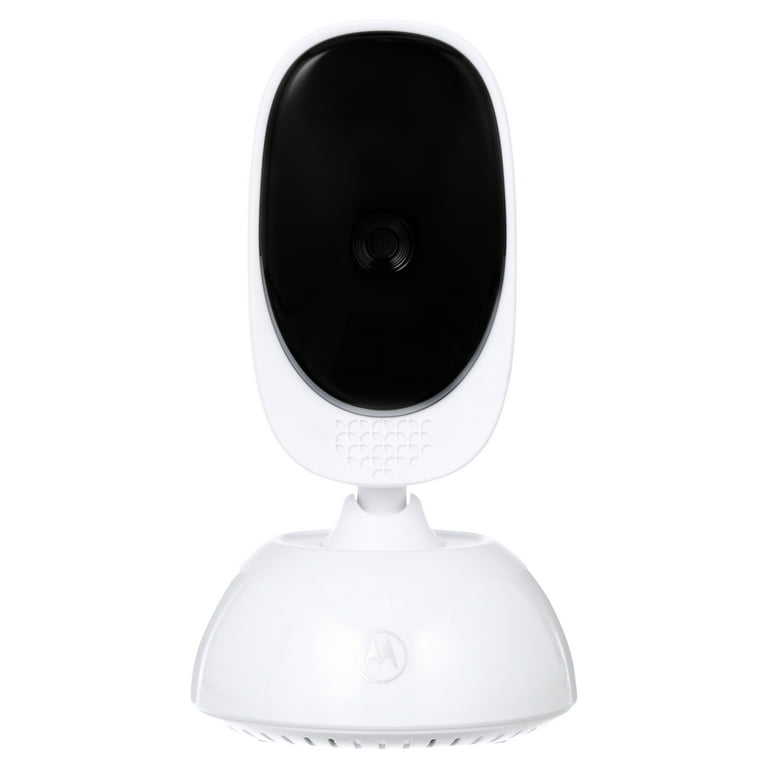
Night vision on baby monitors uses infrared (IR) technology. When the room gets dark, small IR LEDs (light-emitting diodes) near the camera lens turn on automatically. These LEDs shine invisible light that the camera can see, but you cannot. The camera converts these signals into a clear black-and-white image, which appears on your monitor screen.
Key components of night vision:
- IR LEDs: Emit invisible light to brighten the dark for the camera.
- Light sensor: Detects when the room is dark and tells the LEDs to turn on.
- Camera lens: Captures the IR light and forms an image.
- Monitor display: Shows you the black-and-white video.
If any of these parts fail, night vision will not work correctly. Sometimes, the problem is simple—like a blocked sensor or low battery. Other times, the fix is more complex.
Main Reasons Night Vision Stops Working
When your Motorola baby monitor night vision is not working, it usually comes down to a few common causes. Understanding these will help you identify the right solution.
1. Dirty Or Blocked Ir Leds
Dust, fingerprints, or even stickers can cover the IR lights, stopping them from shining into the room.
2. Faulty Light Sensor
If the sensor cannot detect darkness, the LEDs will not turn on, and the camera stays in day mode.
3. Power Problems
Low battery or poor power connection means not enough energy for the IR LEDs.
4. Camera Placement Issues
If the camera points directly at a bright object or window, it might not switch to night vision even if the room is dark.
5. Software Bugs Or Settings
Sometimes, a setting or a glitch in the software can disable night vision.
6. Hardware Damage
Physical damage to the camera or monitor can break the night vision feature.
7. Interference From Other Lights
Nearby nightlights, TVs, or even digital clocks can confuse the camera sensor.
8. Aging Components
Older monitors may have worn-out LEDs or sensors.
Now, let’s look at these issues more closely and learn how to fix them.
Step-by-step Troubleshooting Guide
Getting your night vision back is often about following simple steps. Here’s a detailed process to help you.
1. Check The Room Lighting
Night vision activates only in low light. If the room is not dark enough, it will not switch on.
- Turn off all lights in the baby’s room.
- Close curtains to block outside streetlights.
- Wait for 30 seconds to see if the screen switches to black-and-white mode.
Tip: Flashing a bright light into the camera and then quickly turning it off can help reset the sensor.
2. Clean The Camera Lens And Ir Leds
Dirt or dust can block the infrared light.
- Gently wipe the camera lens and LED area with a soft, dry microfiber cloth.
- Check for fingerprints, stickers, or small objects stuck near the lens.
Don’t use harsh chemicals—these can damage the lens or LEDs.
3. Test The Power Supply
Weak power is a common cause of night vision problems.
- Ensure the power adapter is plugged in tightly.
- Try a different power outlet.
- Test with a new adapter if you have one.
- For battery-powered monitors, recharge fully.
A low battery often leads to flickering or dim night vision.
4. Adjust Camera Position
Where you place the camera matters.
- Don’t aim the camera at windows, mirrors, or nightlights.
- Move it so it faces the crib directly, away from bright sources.
- Mount the camera at least 6 feet from the baby for a balanced view.
5. Listen For Clicking Sounds
Most Motorola cameras make a soft click when switching to night vision. If you do not hear this, the IR filter or sensor may not be working.
- Cover the camera lens and listen for a click.
- If you hear nothing, move to software checks.
6. Reset Or Power Cycle The Monitor
Software glitches can freeze the night vision function.
- Turn off both the camera and monitor.
- Unplug for 1 minute.
- Plug back in and turn on.
Some models have a reset button—press with a paperclip if available.
7. Check Monitor Settings
On some Motorola models, you can control night vision in the menu.
- Open the monitor menu.
- Look for settings related to “night vision,” “infrared,” or “night mode.”
- Make sure these are enabled.
Advanced tip: Some advanced models let you set “auto” or “manual” IR—choose “auto” for best results.
8. Update Firmware
Older software can cause bugs.
- Visit Motorola’s support website.
- Download the latest firmware for your model.
- Follow instructions to install.
Warning: Don’t turn off the device during a firmware update.
9. Test In Total Darkness
To rule out false triggers, test the camera in a completely dark room.
- Place the camera in a closet or cover with a thick cloth (not touching the lens).
- Watch for the night vision to activate.
10. Inspect For Physical Damage
If the camera was dropped or exposed to water, the IR LEDs or sensor might be broken.
- Look for cracks, dents, or broken plastic.
- If you see damage, contact Motorola support.
11. Eliminate Interference
Other electronics can confuse the night vision sensor.
- Move digital clocks, baby nightlights, or nearby electronics away from the camera.
- Test night vision again.
12. Test With Another Monitor
If possible, connect the camera to a different Motorola monitor.
- If night vision works, the problem is with your monitor unit.
- If not, the camera unit is likely at fault.
13. Contact Motorola Support
If all else fails, reach out to the experts.
- Prepare your model number and purchase details.
- Explain the troubleshooting steps you’ve tried.
- Ask about warranty options.
Motorola’s support is often helpful with step-by-step guidance for your specific model.
Common Mistakes When Troubleshooting
Many parents make errors that slow down the fix. Avoid these for a smoother process.
1. Ignoring The Power Supply
People often focus on the camera, but weak or faulty power is a top cause.
2. Using Harsh Cleaners
Chemicals can damage the lens and IR LEDs, making the problem worse.
3. Testing In Dim, Not Dark, Rooms
Night vision needs true darkness. Even a tiny nightlight can keep it off.
4. Skipping Firmware Updates
Older software can block night vision functions on newer cameras.
5. Overlooking Interference
Digital gadgets nearby often go unnoticed as sources of confusion for the light sensor.
Non-obvious insight: Some baby monitors are sensitive to even small LED lights from other devices. Try covering or unplugging electronics you might not think of, like humidifiers with LED displays.
Credit: www.woolyyarn.com
How To Know If The Problem Is The Camera Or The Monitor
It’s not always clear which part is broken. Here’s how you can tell:
- If the screen is completely black (no menu, no icons), the monitor unit may be bad.
- If you see the room in color, but it doesn’t switch to black-and-white at night, the camera or its sensor is the likely problem.
- If night vision works with a different camera or monitor, swap the parts to isolate the faulty unit.
Comparison: Symptoms And Likely Causes
| Symptom | Likely Cause | What to Check First |
|---|---|---|
| Black screen in darkness | Camera IR LEDs or power issue | Power supply, camera lens, test in darkness |
| Color image at night | Night vision not activating | Light sensor, camera position, settings |
| Grainy or fuzzy night image | Dirty lens or weak IR LEDs | Clean lens, check for obstructions |
| No sound from camera | Monitor speaker or connection issue | Test with another monitor, check volume |
Advanced Fixes For Persistent Problems
If the basic steps don’t solve your night vision issue, try these advanced solutions.
Test Ir Leds With A Smartphone Camera
Smartphone cameras can often “see” infrared light.
- Turn on your baby monitor in a dark room.
- Point your smartphone camera at the monitor’s camera lens.
- Look for small purple or white dots of light (the IR LEDs).
- If you see nothing, the LEDs might be dead.
Factory Reset The System
This will erase all settings and restore factory defaults.
- Find the reset button (often a small hole).
- Press and hold with a paperclip for 10-15 seconds.
- Re-pair the camera and monitor as described in your manual.
Caution: You’ll lose custom settings and saved data.
Update Both Camera And Monitor Firmware
Some Motorola models allow updating both units.
- Check the Motorola support site for your specific model.
- Follow update instructions carefully.
Replace Faulty Parts
If only the power adapter is faulty, you can buy a replacement.
If the IR LEDs or sensor are physically damaged, professional repair or replacement is needed.
Contact Motorola For Repair Or Warranty Service
If your monitor is under warranty, Motorola may repair or replace it at no cost.
Contact them with your serial number, purchase date, and issue description.
Non-obvious insight: Even out-of-warranty Motorola monitors sometimes qualify for a discount on a replacement if you contact support directly.

Credit: www.woolyyarn.com
How To Prevent Night Vision Problems
Prevention saves time and worry. Here’s how to keep your night vision working:
- Clean the camera lens and LEDs monthly with a soft cloth.
- Keep the camera away from humidifiers and other moisture sources.
- Avoid placing the camera near windows to reduce light sensor confusion.
- Check for firmware updates every few months.
- Use original power adapters to avoid voltage problems.
- Store the monitor and camera safely when not in use.
Pro tip: Label the power adapters with tape to avoid mixing them up with other chargers.
Motorola Baby Monitor Night Vision: Model Differences
Not all Motorola baby monitors use the same technology. Some models are more reliable than others. Here’s a quick look at popular models and their night vision features:
| Model | Night Vision Type | Special Features | Common Issues |
|---|---|---|---|
| MBP36XL | Auto IR LED | Remote pan/tilt/zoom | Sensor confusion from nightlights |
| MBP50-G2 | Auto IR LED | Split-screen viewing | Firmware bugs, power issues |
| VM36XL | Auto IR LED | 2-way talk, lullabies | Dirty lens, LED wear-out |
| VM65X | Smart IR sensor | Wi-Fi connectivity, app control | Software glitches, interference |
Tip: Always check your model’s manual for model-specific troubleshooting tips.
When To Replace Your Baby Monitor
Sometimes, it’s better to replace the monitor than repair it. Consider a new monitor if:
- The camera or monitor is physically damaged beyond repair.
- The IR LEDs do not light up even after cleaning and checking power.
- The unit is more than 3-4 years old and out of warranty.
- Frequent software glitches make the device unreliable.
- You need updated features like remote viewing or better range.
Fact: Most baby monitors are designed to last 2–4 years with regular use.
Alternatives While Waiting For A Fix
If you must wait for a repair or replacement, there are temporary solutions to watch your baby at night:
- Plug in a dim nightlight (away from the crib) so the regular camera works.
- Use your smartphone camera as a temporary baby monitor.
- Borrow a monitor from a friend or neighbor.
Important: Never leave your baby unsupervised while troubleshooting equipment.
Expert Tips For Clear Night Vision
Getting a crisp night image takes more than just turning on the monitor.
- Place the camera at a slight angle, not straight at the baby, to reduce glare.
- Avoid placing soft toys or blankets near the lens.
- If you use a nightlight, keep it dim and far from the camera.
- Test night vision before your baby sleeps to catch problems early.
- Mark the camera’s mounting spot for quick repositioning if needed.
Did you know? The human eye can’t see infrared light, but some pets can. If your cat or dog seems interested in the camera, it might be seeing the IR LEDs.
Real-world Example
Sarah, a mother of two, noticed her Motorola MBP36XL monitor’s night vision stopped working after cleaning the nursery. She tried moving the camera and even bought a new power adapter with no luck. After reading about IR LED blockage, she realized a tiny sticker on the lens was blocking the sensor. Removing it fixed the problem instantly.
Lesson: Even a small obstruction can cause complete night vision failure.
Motorola Support And Resources
If you need more help, Motorola offers several support options:
- Official Motorola support site: Motorola Support
- User manuals for every model
- Firmware and software updates
- Live chat or phone help
Always use your model number when searching for instructions or updates.
Frequently Asked Questions
Why Does My Motorola Baby Monitor Night Vision Work Sometimes But Not Always?
Inconsistent night vision usually means the camera sensor is getting mixed signals about the light level. Bright objects, even small LEDs from clocks or toys, can keep the camera in day mode. Try using the monitor in total darkness and remove any nearby light sources to see if night vision activates consistently.
How Can I Tell If The Ir Leds Are Working On My Camera?
Most IR LEDs are invisible to the human eye, but you can use a smartphone camera to check. Point your phone’s camera at the baby monitor lens in a dark room. You should see small purple or white dots—these are the IR LEDs.
If you don’t see them, they might be broken or blocked.
What Should I Do If Cleaning And Resetting Doesn’t Fix Night Vision?
If basic troubleshooting fails, try a full factory reset and update the firmware. If the problem remains, the hardware may be damaged, and you should contact Motorola support for repair or replacement options.
Can A Firmware Update Fix Night Vision Issues?
Yes, sometimes Motorola releases firmware updates that fix bugs or improve night vision performance. Always check for the latest software for both your camera and monitor. Follow Motorola’s instructions carefully when updating to avoid further issues.
Is It Safe To Use A Dim Nightlight Instead Of Night Vision?
A dim nightlight can help the camera show a visible image if night vision is not working, but it’s not a perfect replacement. Night vision is designed for safety and clarity in total darkness. If you use a nightlight, keep it far from the camera to avoid glare and test your setup before leaving your baby alone.
In the end, a working night vision feature on your Motorola baby monitor brings comfort and peace of mind. With the right steps, you can solve most issues yourself and enjoy reliable, clear images every night. If problems persist, don’t hesitate to reach out for expert help—your baby’s safety is always worth the effort.

Credit: stogagirlssoccer.com