
When your Panasonic TV suddenly stops working and starts blinking a red light 7 times, it can feel confusing and stressful. Many people panic, thinking their television is permanently broken. But this blinking code is not random—it’s your TV’s way of telling you exactly what is wrong. Understanding this signal can save you time, money, and frustration. This guide will help you decode the meaning of 7 red blinks, explain the most common reasons, and walk you through practical solutions. Even if you are not a TV expert, you will learn what to check, what you can fix yourself, and when you should call for help.
After reading, you will know how to handle the Panasonic TV blinking red light 7 times problem confidently. No guesswork, no wasted time—just clear guidance.
What Does 7 Red Blinks Mean On A Panasonic Tv?
When your Panasonic TV blinks its red standby light 7 times in a row, it is sending you an error code. Panasonic engineers designed these blinking codes to help technicians quickly diagnose problems.
Seven blinks specifically point to a problem with the sustain boards or the SC/SS boards inside the TV. These boards are crucial for powering the plasma display in Panasonic plasma TVs. If they fail, your screen stays black, and the red light flashes in a repeating pattern: seven quick blinks, a pause, then seven more.
This error is common in Panasonic plasma TVs, especially models from 2008 to 2013. Many owners have faced this issue, so you are not alone. The good news is, with a little knowledge, you can often narrow down the cause and decide what to do next.
7 Main Causes Of Panasonic Tv Blinking Red Light 7 Times
Each cause has its own symptoms, risks, and solutions. Let’s look at the seven most common reasons for the 7-blink error, one by one.
1. Sc Board Failure
The SC board controls the vertical scan drive on your TV’s plasma panel. If this board fails, the TV senses a problem and shuts down for safety, triggering the 7-blink code.
Why does the SC board fail?
- Power surges
- Overheating
- Age and wear
Symptoms:
- No picture on the screen
- TV clicks but does not turn on
- Seven red blinks on the front LED
What can you do?
First, unplug the TV and let it sit for a few minutes. Plug it back in and try again. If the blinking continues, the SC board likely needs repair or replacement. These boards can sometimes be fixed by a trained technician, but replacing the board is usually more reliable.
Non-obvious insight: The SC board can sometimes fail because of bad solder joints or damaged connectors, not just the electronic parts. Resoldering or re-seating the connectors can sometimes revive the board.
2. Ss Board Failure
The SS board (sometimes called the sustain board) works with the SC board to power the plasma panel. If the SS board fails, the TV detects it and shows the 7-blink error code.
Common causes:
- Component failure (especially MOSFETs or capacitors)
- Short circuits
- Moisture damage
Symptoms:
- Black screen
- Clicks or relay sounds when trying to start
- Consistent 7-blink pattern
What can you do?
Check for visible damage, like burned spots or blown capacitors on the SS board. Replacing the board is often the best solution. If you have experience with electronics, you can test the board for shorts using a multimeter.
Practical tip: Always unplug the TV before opening it. High voltages remain inside, even after unplugging, so wait at least 30 minutes before touching any internal parts.
3. Power Supply Board Issues
The power supply board delivers stable voltage to all internal components. If it develops a fault (like a blown fuse or failed capacitor), it can cause a false 7-blink code or trigger a real failure in the sustain boards.
Key signs:
- TV will not power up at all
- You hear a “click,” but nothing happens on the screen
- The power board may have visible bulging capacitors or burnt areas
What to check:
Open the back panel (if you are comfortable and the TV is unplugged). Inspect the power supply board for damaged parts. Compare good and bad capacitors using this summary:
| Capacitor Condition | Good | Bad |
|---|---|---|
| Top Surface | Flat | Bulging or Leaking |
| Color | Clean | Darkened/Burnt |
| Function | Stable Power | Unstable/No Power |
Repair tip: Replacing capacitors is possible if you have soldering skills. Otherwise, a complete board swap is faster and safer for most users.
4. Loose Or Damaged Ribbon Cables
Inside your TV, thin ribbon cables connect the main, SC, SS, and power boards. If a ribbon cable comes loose or gets damaged, the TV may not detect the boards correctly and triggers the 7-blink error.
How does this happen?
- Rough handling
- TV falls or strong vibration
- Dust build-up leading to poor contact
What to look for:
- Ribbons not fully seated in connectors
- Visible kinks, tears, or burnt spots on the ribbon
Fixing the problem:
Carefully unplug the TV. Open the back and check each cable. Gently press each ribbon into its connector. If a ribbon is damaged, it must be replaced with the same type.
Non-obvious insight: Sometimes, cleaning the contacts on the ribbon and connector with isopropyl alcohol can restore a weak connection and fix the error.
5. Faulty Buffer Boards
Some Panasonic plasma TVs use buffer boards to drive the screen. If one of these boards fails, it can cause the 7-blink code.
Common failure reasons:
- Shorted transistors or ICs
- Corrosion from humidity
- Manufacturing defects
Symptoms:
- 7-blink pattern
- No picture or sound
How to check:
Buffer boards are usually slim, long boards attached to the edge of the display. If you see burn marks or melted components, the board has failed.
Solution:
You will need to replace the buffer board. In rare cases, only a single chip fails, but board-level repair is only for advanced electronics techs.
6. Main Board Problems
The main board (sometimes called the logic board or A-board) controls all TV functions. If it fails to send the correct signals, the TV may misinterpret the problem and flash the 7-blink error.
Possible causes:
- Power surges or lightning strikes
- Overheating due to blocked vents
- Software corruption (rare)
Key things to notice:
- TV might show other errors before the 7-blink starts
- Menu or sound may work for a few seconds, then the TV shuts down
Repair advice:
Main board replacement is possible but requires matching the exact model number. Some techs can “reflow” solder on these boards to fix cracked connections, but this is not a beginner repair.
Practical tip: Always use your TV in a well-ventilated space and connect it to a surge protector. This reduces the risk of main board failure.
7. Shorted Plasma Panel
The plasma display panel itself can develop an internal short circuit, especially as the TV ages. When this happens, the TV’s safety system detects the problem and flashes the 7-blink code.
How does this happen?
- Age and heat cycles cause internal degradation
- Impact damage (from moving or dropping the TV)
- Manufacturing defects (rare)
Symptoms:
- All other boards test OK, but the TV still blinks 7 times
- Sometimes, you may hear faint buzzing from the panel
What can you do?
Sadly, if the plasma panel itself is shorted, repair is not practical. Plasma panels are costly and hard to replace. In most cases, it is better to consider replacing the TV.
Non-obvious insight: Some repair shops will test your panel using specialized tools. If the panel is bad, they may offer to buy your working boards for parts.
How To Troubleshoot Panasonic Tv 7 Blinks Issue
Knowing the possible causes helps, but what should you actually do when faced with the 7-blink code? Here’s a step-by-step process to diagnose and possibly fix the problem.
Step 1: Power Cycle Your Tv
Unplug your TV from the wall for at least 5 minutes. This resets the internal system. Plug it back in and try turning it on. If the blinking stops, the issue was temporary—often due to a power spike.
Step 2: Listen And Observe
When you turn the TV on, pay attention to:
- Number and speed of blinks (confirm it is seven)
- Any relay clicks or buzzing sounds
- The screen (is there a brief flash or nothing at all?)
Step 3: Inspect The Back Panel
If you are comfortable and have unplugged the TV, carefully remove the back cover. Look for:
- Burnt or damaged components
- Loose or disconnected cables
- Swollen or leaking capacitors
Compare what you see with this quick reference:
| Board Type | Normal Appearance | Signs of Damage |
|---|---|---|
| SC Board | Clean, no burns | Burn marks, cracked chips |
| SS Board | Uniform color | Blown fuses, blackened spots |
| Power Board | Flat capacitors | Bulging/leaking capacitors |
Step 4: Check Ribbons And Cables
Gently press all ribbon connectors into place. Look for any cables that appear out of alignment or frayed.
Step 5: Test Individual Boards
If you have a multimeter and some electronics knowledge, you can test for shorts on the SC and SS boards. Most failed boards will show a very low (near zero) resistance between certain test points.
Step 6: Remove And Isolate Boards
Some Panasonic TVs allow you to disconnect the SC or SS board and power on the TV. If the blinking changes or stops, you have narrowed down the failed board.
Warning: Only attempt this if you understand the risks and follow proper safety procedures.
Step 7: Decide On Repair Or Replacement
If you identify the failed part, you can look for replacement boards online. Always match part numbers exactly. Used boards are cheaper but carry some risk. If the plasma panel is shorted, buying a new TV is more practical.
Can You Fix The 7-blink Error Yourself?
Some repairs are safe for confident DIYers, but others require specialist tools and safety knowledge. Here’s what you can do yourself:
- Safe for DIY:
- Reseating ribbon cables
- Replacing obviously damaged boards (with proper part numbers)
- Cleaning connectors
- Best left to professionals:
- Board-level soldering or chip replacement
- Repairing the plasma panel
- Handling high-voltage components
Pro tip: Always take photos as you disassemble the TV. This helps you put everything back in the right place.
How Much Does It Cost To Fix The 7-blink Error?
Repair costs vary depending on the failed part and labor rates in your area. Here’s a rough guide:
| Part | DIY Replacement Cost | Professional Repair Cost |
|---|---|---|
| SC/SS Board | $40–$120 (used) | $150–$350 |
| Power Board | $30–$80 | $120–$250 |
| Main Board | $60–$150 | $200–$400 |
| Buffer Board | $20–$70 | $100–$180 |
| Plasma Panel | Not practical | Not practical |
If the repair cost is more than half the price of a new TV, consider buying a replacement instead.
When Should You Call A Professional?
If you are not comfortable working with electronics, or if your first attempt does not solve the problem, it is best to call a qualified TV repair technician. Here’s when you should get help:
- You smell burning or see smoke
- You cannot identify the damaged part
- The same error returns after a board swap
- You suspect a shorted plasma panel
A professional can safely diagnose the problem, use specialized tools, and source the correct replacement parts. They can also test your TV to make sure it is safe to use.

Tips To Prevent Panasonic Tv 7-blink Issues
Prevention is always better than repair. Here are some practical ways to reduce the risk of this error in the future:
- Use a surge protector to prevent damage from power spikes.
- Keep the TV in a cool, ventilated area to prevent overheating.
- Clean dust from vents and internal boards every 6–12 months.
- Avoid moving the TV unless necessary. If you must move it, handle gently.
- Check cables and connectors regularly for signs of wear.
- Do not block ventilation holes with objects or wall mounts.
- Update your firmware if Panasonic releases a fix for your model (rare, but possible).
Is It Worth Fixing A Panasonic Plasma Tv?
Panasonic plasma TVs are famous for their picture quality, but they are now considered older technology. LCD and OLED TVs are lighter, more energy-efficient, and sometimes cheaper to repair.
If your plasma TV is over 10 years old, compare the repair cost to the price of a new TV. For some people, the deep blacks and color of a plasma screen are worth the repair. For others, buying a new model is a better investment.
Non-obvious insight: Working Panasonic plasma TVs in good condition still have value for home theater fans. If you decide not to repair yours, you might be able to sell it for parts.
Where To Find Parts And Help
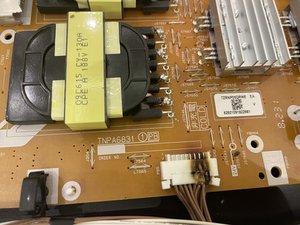
Replacement boards can be found online. Look for reputable sellers on eBay, ShopJimmy, or TVPartsToday. Always match part numbers exactly. If you prefer professional repair, search for local Panasonic-authorized service centers.
For more technical reading, the official Panasonic service manuals are sometimes available online. They provide detailed diagrams and part numbers for your exact model. For further reading, the Wikipedia Plasma Display article explains the science behind these TVs.
Frequently Asked Questions
Why Does My Panasonic Tv Blink Red 7 Times And Not Turn On?
The 7-blink code means there is a hardware failure, usually in the SC or SS boards. The TV’s safety system prevents it from turning on to avoid further damage.
Can I Fix The 7-blink Error Without Opening The Tv?
If the problem is a temporary glitch, unplugging the TV for a few minutes can reset it. But for real hardware failures, you must inspect or replace parts inside the TV.
How Do I Know If The Plasma Panel Is Bad?
If you have replaced all suspect boards and the 7-blink error remains, the plasma panel itself may be shorted. Only a technician with special tools can test this for sure.
Is It Dangerous To Repair A Panasonic Plasma Tv Myself?
There are high voltages inside, even after unplugging. If you are not experienced with electronics, you can get shocked or cause more damage. For most people, professional repair is safer.
Where Can I Buy Replacement Sc Or Ss Boards?
You can find replacement parts on sites like eBay, ShopJimmy, or through Panasonic service centers. Always check the part number and buy from trusted sellers.
When your Panasonic TV starts blinking red 7 times, it is not the end. With the right approach, you can often bring your TV back to life—or at least make an informed decision. Whether you choose repair or replacement, understanding the 7-blink code puts you in control.