
Is your paper shredder refusing to work when you need it most? It’s frustrating when you feed your documents in, and nothing happens—or worse, the shredder jams and stops completely.
You rely on this simple machine to protect your personal information, but now it’s letting you down. Don’t worry—you’re not alone, and there are easy steps you can take to fix it. You’ll discover why your paper shredder might not be working and how you can quickly get it back to shredding smoothly.
Keep reading to save time, avoid costly repairs, and protect your privacy with confidence.

Common Causes Of Shredder Failure
Paper shredders can stop working for many reasons. Knowing the common causes helps fix problems fast. This saves time and avoids extra costs.
Some issues are easy to fix. Others may need parts or professional help. Here are the main reasons shredders fail.
Paper Jams And How They Occur
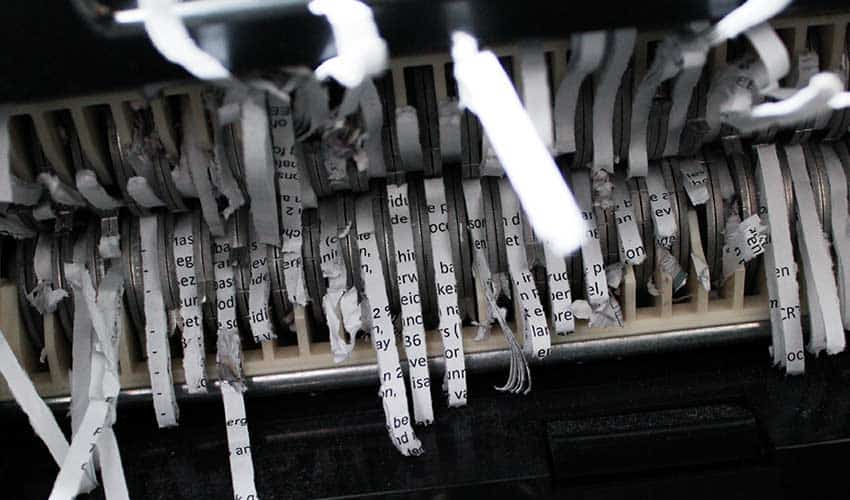
Paper jams happen when too many sheets go in at once. Thin or wrinkled paper can also cause jams. Dust and small bits of paper build up inside. The shredder blades get stuck or blocked. When jammed, the shredder may stop or reverse.
Overheating Issues
Shredders overheat if used too long without breaks. The motor gets hot and shuts down to protect itself. Overheating can happen if the shredder is too small for the job. Poor ventilation or dirty fans make heat worse. Letting the shredder cool down fixes this.
Electrical Problems
Power failures or loose plugs stop the shredder from working. Faulty switches or internal wiring cause electrical faults. A blown fuse or tripped circuit breaker may block power. Moisture or dust inside the machine can cause short circuits. Regular checks prevent these problems.
Worn Or Damaged Blades
Blades wear out over time from frequent use. Dull blades cannot cut paper properly. Hard materials like staples or credit cards can damage blades. Broken or bent blades cause uneven shredding or jams. Replacing or sharpening blades restores performance.
Credit: www.recycling.com
Quick Fixes For Jammed Shredders
Paper shredders can jam at any time, stopping your work and causing frustration. Quick fixes can help you clear jams without needing a repair service. These simple steps often get your shredder running again fast. Follow these easy methods to handle common jams safely and effectively.
Using The Reverse Function
Most shredders have a reverse feature. Press this button to back the paper out slowly. Reverse helps loosen stuck sheets and clears small jams. Use short bursts to avoid overheating the motor. Repeat until the paper releases fully. This method saves time and avoids damage.
Manual Paper Removal Techniques
Turn off and unplug the shredder first. Use tweezers or needle-nose pliers to pull out jammed paper gently. Avoid yanking hard to prevent tearing or damaging the blades. If paper is deep inside, try pulling from both ends carefully. Take your time; patience reduces risk of harm to the machine.
Unplugging And Cooling Down
Paper shredders can overheat after heavy use or jams. Unplug the shredder and let it cool for 30 to 60 minutes. Cooling prevents motor damage and resets thermal protection. After cooling, try the reverse function or manual removal again. Regular breaks keep your shredder working longer.
Troubleshooting Power Issues
Power problems are common reasons paper shredders stop working. Without power, the shredder won’t start or run. Troubleshooting these issues can often fix the problem quickly. Check the power source, power switch, and reset the shredder. These steps help identify simple faults that block power flow.
Checking The Power Source
First, ensure the shredder is plugged into a working outlet. Try plugging in another device to confirm the outlet has power. Avoid using extension cords that may be damaged. Also, check if the circuit breaker or fuse for the outlet has tripped or blown. Reset the breaker or replace the fuse if needed.
Inspecting The Power Switch And Cord
Look closely at the power switch for any signs of damage or wear. Press the switch firmly to make sure it clicks properly. Examine the power cord for cuts, frays, or loose connections. A damaged cord can prevent power from reaching the shredder. Replace the cord if you find any damage.
Resetting The Shredder
Many shredders have a reset button or switch. Turn off and unplug the shredder first. Press and hold the reset button for a few seconds. This can clear internal errors that stop power flow. After resetting, plug in the shredder and try turning it on again. This step often resolves simple power issues.
Maintaining Feed Rollers And Blades
Maintaining the feed rollers and blades of a paper shredder is essential for smooth operation. These parts handle the paper directly and often face wear and dirt buildup. Regular care helps prevent jams and extends the shredder’s life. Neglecting them can cause the shredder to stop working properly.
Cleaning And Lubricating
Dust, paper bits, and debris collect on feed rollers and blades. Clean them gently with a soft cloth or brush. Avoid using water or harsh chemicals. Use shredder oil or lubricant sheets to keep blades sharp and rollers moving freely. Lubricate the shredder regularly to reduce friction and prevent overheating.
Replacing Worn Parts
Over time, feed rollers and blades wear out. Blades may become dull and rollers lose grip. Replace these parts to restore shredding efficiency. Check the manufacturer’s guide for compatible replacement parts. Do not use broken or damaged components as they can harm the machine.
Signs You Need Professional Repair
Persistent jams or unusual noises indicate deeper problems. If cleaning and part replacement do not fix the issue, seek professional help. Also, if the shredder stops turning on or overheats quickly, it might need expert service. Timely repairs prevent further damage and costly replacements.
Preventing Future Problems
Preventing future problems with your paper shredder saves time and money. Simple habits keep the machine running smoothly. A few easy steps reduce jams and overheating. Follow these tips to extend your shredder’s life and avoid breakdowns.
Proper Paper Loading Techniques
Always load paper evenly into the shredder slot. Avoid pushing too many sheets at once. Follow the shredder’s sheet limit guide. Align paper edges before inserting. Feeding folded or wrinkled paper can cause jams. Insert paper slowly and steadily to prevent overload. Remove staples and paper clips before shredding. This protects the blades and prevents damage.
Avoiding Overuse And Overheating
Limit continuous shredding time according to the manual. Most shredders need breaks after a few minutes of use. Overuse causes overheating and can stop the motor. Allow the shredder to cool down between sessions. Avoid shredding large volumes at once. Use the reverse function to clear small jams quickly. Overheating reduces the shredder’s lifespan and performance.
Regular Maintenance Tips
Clean the shredder blades regularly to remove dust and paper bits. Use shredder oil or lubricant sheets to keep blades sharp and smooth. Avoid using household oils as they can damage parts. Clear paper jams carefully with tweezers or the reverse setting. Keep the shredder in a dry, dust-free environment. Check the power cord and switch for damage. Regular care keeps the shredder working well for years.
When To Replace Your Shredder
Knowing the right time to replace your paper shredder saves money and stress. Not every problem means the shredder must go. Some issues fix easily, but others signal the end of its life. Understanding when replacement is better helps keep your shredding smooth.
Cost Of Repairs Vs. Replacement
Repairs can cost a lot, sometimes close to a new shredder’s price. Parts and labor add up fast. If the repair bill is more than half the cost of a new shredder, replacement is smarter. Frequent breakdowns also increase repair costs over time.
Evaluating Shredder Lifespan
Most shredders last about 5 to 7 years with regular use. Heavy use shortens this lifespan. If your shredder is old and has many problems, it may be worn out. Newer models offer better technology and safety features.
Choosing A New Model
Pick a shredder that fits your needs. Consider sheet capacity, run time, and shred type. Look for energy-efficient options to save power. Check customer reviews for reliability and ease of use. A good new shredder reduces future headaches.

Credit: www.youtube.com
Frequently Asked Questions
How Do I Reset A Paper Shredder?
To reset a paper shredder, unplug it, wait 10-15 minutes, then plug it back in. Use the reverse mode to clear jams. Ensure the safety switch is engaged before restarting.
Is It Worth Fixing A Paper Shredder?
Fixing a paper shredder can be costly and sometimes unsafe. Consider repair costs versus replacing with a new shredder.
What To Do If My Paper Shredder Stops Working?
Unplug the shredder and wait 30 minutes to cool. Use the reverse function to clear jams. Remove stuck paper carefully with tweezers. Check for overheating or worn parts. Regularly oil blades and avoid overloading to prevent future issues.
What Is The Life Expectancy Of A Paper Shredder?
A paper shredder typically lasts 5 to 10 years with proper use and regular maintenance. Overuse or poor care shortens its lifespan.
Why Is My Paper Shredder Not Turning On?
Check if the shredder is plugged in and the power switch is on. Also, ensure the safety lock or bin is properly closed. Faulty power cords or blown fuses can cause power issues.
Conclusion
A paper shredder not working can be frustrating and slow your tasks. Simple fixes like clearing jams or resetting the machine often solve the problem. Regular maintenance helps prevent future issues and keeps your shredder running smoothly. Sometimes, replacing worn parts saves time and money.
Always unplug the shredder before attempting repairs for safety. Staying patient and following these tips brings your shredder back to life. Keep your documents safe by ensuring your shredder works when you need it most.