
Is your Samsung refrigerator freezing up and leaving you frustrated? You’re not alone.
When your fridge or freezer starts icing over, it can disrupt your daily routine, spoil your food, and even cause water damage in your kitchen. But don’t worry—you can fix this problem yourself with some simple steps. Understanding why your Samsung fridge freezes up is key to stopping it from happening again.
Whether it’s a clogged drain, warm air sneaking in, or a faulty sensor, this guide will help you identify the cause and get your refrigerator running smoothly again. Keep reading to learn easy, effective ways to tackle the freeze-up and keep your fridge working perfectly.
Causes Of Ice Build-up
Ice build-up inside your Samsung refrigerator can cause many problems. It can block airflow and stop proper cooling. Understanding the causes helps you fix the issue fast. Most ice build-up happens due to three main reasons. These include warm air entering, clogged drains, and broken defrost parts.
Warm Humid Air Infiltration
Warm air from outside can enter the fridge if the door seal is weak or damaged. This air carries moisture that turns into frost inside. Leaving the door open for long or storing hot food also brings in humidity. This moisture freezes on cold surfaces, causing ice build-up.
Clogged Defrost Drain
The defrost drain removes melted water during the defrost cycle. Sometimes, food particles or ice block this drain. Water then pools inside the freezer and freezes again. This blockage can cause ice to form under the drawers or bottom of the freezer. Cleaning the drain regularly helps avoid this issue.
Faulty Defrost Components
The defrost system includes parts like the heater, thermostat, and timer. If any of these fail, the ice will not melt during the cycle. The heater may stop working or the thermostat may give wrong signals. This leads to continuous ice build-up inside the freezer compartment.

Starting With Defrosting
Samsung refrigerators freezing up often start with ice buildup inside. Removing this ice is key before fixing deeper issues. Defrosting clears ice and helps you check parts easily. It stops water leaks and strange noises. Start simple to avoid damage and save money.
Using Forced Defrost Mode
Many Samsung models have a forced defrost mode. This melts ice quickly inside the fridge and freezer. To activate, press the Fridge button several times. Watch the display for “Fd” or “rd” to appear. “Fd” means full defrost, “rd” means fridge only. The fridge will stop cooling and heat briefly. Wait 20 to 30 minutes for ice to melt.
Forced defrost clears ice without unplugging the fridge. It helps if you see frost on coils or walls. After defrost, wipe excess water to prevent refreezing. This method is safe and easy for most users.
Manual Ice Melting Techniques
Sometimes forced defrost isn’t an option. In this case, try manual ice melting. Unplug the fridge to stop power. Open freezer and fridge doors wide. Place towels to catch dripping water. Use a bowl of hot water inside to speed melting.
A hairdryer on low heat works well too. Keep it moving to avoid damage. Never use sharp tools to chip ice. This can harm cooling parts or walls. Manual melting takes time but is effective for thick ice layers.
Clearing The Defrost Drain
Clearing the defrost drain is a key step to fix a Samsung refrigerator that freezes up. The defrost drain carries water from melted frost to a drain pan. If it clogs or freezes, water builds up inside the fridge. This causes ice to form in unwanted places. Clearing the drain helps stop ice build-up and water leaks. It also helps your fridge run more efficiently.
Accessing The Drain Line
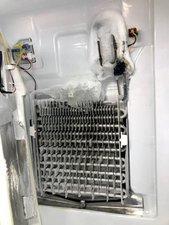
First, unplug the refrigerator for safety. Remove food and shelves to reach the back panel inside the freezer. Use a screwdriver to take off the panel covering the evaporator coils. The defrost drain is usually at the bottom behind this panel. Look for a small hole or tube leading to the drain pan. This is where water normally flows out.
Melting Ice Blockages
Ice often blocks the defrost drain. Use a hairdryer on low heat to melt the ice carefully. Avoid direct contact to prevent damage. Another option is to pour warm water slowly into the drain hole. This helps melt ice inside the tube. Keep a towel ready to catch any dripping water. Repeat until water flows freely down the drain.
Ensuring Proper Drainage
After clearing ice, check for clogs. Use a flexible pipe cleaner or small brush to clear debris inside the drain tube. Flush the drain with warm water again. Make sure water flows easily to the drain pan below the fridge. Reinstall the back panel and shelves. Plug the fridge back in and monitor for any leaks or ice build-up. A clear drain prevents freezing problems and keeps your Samsung refrigerator working well.
Checking Defrost Sensors
Checking the defrost sensors is a key step to fix a Samsung refrigerator that freezes up. These sensors control the defrost cycle and prevent ice buildup. Faulty sensors can cause the fridge to freeze excessively. Testing and replacing these parts can restore proper function.
Removing The Rear Panel
First, unplug the refrigerator for safety. Remove the rear panel inside the freezer compartment. Use a screwdriver to take out screws holding the panel. Carefully pull the panel away to expose the defrost sensors and heater. Keep track of all screws for reassembly.
Testing Heater And Thermistor
Use a multimeter to test the defrost heater and thermistor. Check the heater for continuity; it should show a low resistance. Test the thermistor by measuring resistance at room temperature. A bad thermistor will show no reading or infinite resistance. These tests identify if either part is faulty.
Replacing Faulty Parts
If the heater or thermistor fails the test, replace it with an exact match. Disconnect the old part carefully, noting wire placement. Install the new part and reconnect wires securely. Reattach the rear panel and plug in the fridge. Run a forced defrost cycle to confirm the repair.
Handling Ice Maker Compartment
The ice maker compartment in a Samsung refrigerator can freeze up due to air leaks. Warm air entering this area causes frost and ice buildup. This stops the ice maker from working properly.
Fixing ice buildup in the ice maker compartment helps keep your fridge efficient. It also prevents damage to the appliance. Focus on finding leaks and sealing gaps around the compartment.
Identifying Warm Air Leaks
Look for cracks or gaps near the ice maker compartment door. Check where the door seal meets the frame. Warm air passes through these openings and causes freezing.
Use a flashlight to spot small holes or splits. Feel around the edges for cold air escaping. These leaks let moist air in and ice forms quickly.
Sealing Gaps With Food-safe Silicone
Apply food-safe silicone sealant to close the gaps you found. This stops warm air from entering the ice maker compartment. Choose silicone made for refrigerators to avoid damage.
Clean the area before applying the sealant. Smooth the silicone with a finger for a tight seal. Let it dry fully before using the ice maker again.
Troubleshooting Door Seals And Vents
Freezing issues in Samsung refrigerators often relate to door seals and vents. These parts keep cold air inside and warm air outside. If they fail, frost can build up quickly. Checking and fixing these parts helps stop ice from forming.
Air leaks from faulty door seals let moist air enter the fridge. Blocked vents reduce airflow, causing uneven cooling. Both problems lead to freezer frost and food freezing in the fridge section. Proper care of seals and vents keeps your refrigerator working well.
Performing Door Seal Test
Check the door seal by closing the door on a dollar bill. If you can pull the bill out easily, the seal is weak. Do this test at several spots around the door. Clean the seal with warm water and mild soap to remove dirt. Replace the seal if it is cracked or torn. A tight door seal stops warm air from entering the fridge.
Adjusting Lifestyle Habits
Open the fridge door less often. Each time you open, warm air enters and causes frost. Don’t leave the door open for a long time. Avoid placing hot or warm food inside. Let food cool before storing it. Check vents inside the fridge and freezer for blockages. Keep items clear from vents to allow airflow. These habits reduce frost build-up and keep your fridge running smoothly.
Preventing Future Ice Build-up
Preventing future ice build-up in your Samsung refrigerator helps keep it running smoothly. Ice blocks airflow and reduces cooling efficiency. Regular care stops ice from forming and causing damage.
Simple habits and small checks can make a big difference. Keeping your fridge clean and at the right temperature avoids ice problems. Follow these easy steps to maintain your appliance and reduce ice build-up.
Regular Maintenance Tips
Clean the defrost drain regularly to prevent clogs. Check and remove any food debris or frost near the drain. Keep door seals clean and free of cracks to stop warm air entry. Inspect the gasket for damage and replace if needed. Defrost the fridge manually if ice forms faster than usual. Remove and clean the water filter as per the user manual. Avoid overloading the fridge to allow proper air circulation. Keep vents inside the fridge clear of items. Regularly wipe down the interior to prevent moisture build-up.
Proper Temperature Settings
Set the fridge temperature between 37°F and 40°F for best results. The freezer should stay between 0°F and 5°F. Avoid setting temperatures too low, which can cause excess frost. Use a fridge thermometer to check the actual temperature. Adjust settings if the fridge runs too cold or warm. Keep the temperature stable by closing doors properly. Opening the fridge often raises humidity and causes ice. Ensure the fridge is level to help door seals work correctly. Proper temperature control reduces ice and saves energy.
Frequently Asked Questions
How Do I Stop My Samsung Refrigerator From Freezing?
Stop your Samsung refrigerator from freezing by clearing the defrost drain and ensuring the door seals properly. Use forced defrost mode to melt ice. Check and replace faulty defrost sensors or heater if ice builds rapidly. Keep the fridge temperature at recommended settings to prevent freezing.
How Do I Unfreeze My Samsung Fridge?
To unfreeze your Samsung fridge, press the Fridge button until “Fd” appears for forced defrost. Remove frozen ice by melting it with warm water or a hairdryer. Clear clogged defrost drains by accessing and melting ice blockages. Check and replace faulty sensors or heaters if ice returns quickly.
What Is The Most Common Problem With A Samsung Refrigerator?
The most common problem with a Samsung refrigerator is ice buildup. It often results from a clogged defrost drain or a faulty defrost sensor. This issue causes freezing inside the fridge or freezer, leading to poor cooling and water leakage.
Regular maintenance prevents these problems.
What Is The Average Lifespan Of A Samsung Refrigerator Freezer?
The average lifespan of a Samsung refrigerator freezer is typically 10 to 15 years. Proper maintenance can extend its durability.
Why Does My Samsung Refrigerator Freeze Up Frequently?
Samsung refrigerators freeze up mainly due to warm air entering the fridge or a blocked defrost drain. Faulty defrost parts like the heater or thermistor can also cause ice buildup. Regular checks help prevent this issue.
Conclusion
Samsung refrigerators freezing up can cause frustration and food spoilage. Regular checks help catch issues early. Keep vents clear and door seals tight to prevent warm air entry. Clear clogged drains to stop ice buildup. Use the forced defrost mode to melt existing ice safely.
Timely repairs protect your fridge and keep it running smoothly. Following simple steps can save time and money. Stay attentive to changes in temperature or noise. A well-maintained Samsung fridge will serve you longer and better.