
A Samsung TV that plays sound but shows no picture can be frustrating and confusing. You might sit down to watch your favorite show, hear the audio, but the screen stays black. This issue is more common than you think, and it doesn’t always mean your TV is broken for good.
Many people immediately worry about expensive repairs or buying a new TV, but there are practical steps you can take to figure out what’s wrong—and sometimes even fix it yourself.
Understanding why your Samsung TV has sound but no picture starts with knowing how modern TVs work. Today’s TVs are complex devices, with different components responsible for audio, video, and power. When one part fails, it can affect only the picture, leaving sound working as normal. This article will explain why this happens, what you can do to fix it, and how to avoid common mistakes people make when troubleshooting. Whether you’re a tech beginner or have some experience, you’ll find clear steps, useful tips, and key insights to help you get your Samsung TV working again.
Why Does A Samsung Tv Have Sound But No Picture?
Several parts make up your TV’s display system. When you have sound but no picture, it usually means the audio circuit is working fine, but the video circuit or backlight system is not. Here are the main reasons this problem happens:
- Faulty Backlight: The backlight lights up the screen. If it fails, the screen stays dark even if the TV is on.
- Loose or Damaged Cables: HDMI or power cables that are loose, damaged, or not plugged in properly can cause display issues.
- Display Panel Damage: The TV screen itself may be damaged, preventing the image from appearing.
- Main Board Failure: The main board controls all TV functions. If it malfunctions, it can affect video output.
- Firmware/Software Glitches: Sometimes, software bugs can cause the screen to go black.
- Incorrect Input Source: If the wrong input is selected, the TV may show a black screen but still play sound from another source.
- Energy Saving Modes or Sleep Timer: Power-saving features or timers can turn off the display without turning off the sound.
- Overheating or Power Surges: Sudden power changes can damage internal circuits.
Understanding these causes helps you know where to start. For example, if the backlight is the problem, you may still see a faint image on the screen with a flashlight. If it’s a software issue, a simple reset might fix everything.
How To Diagnose The Problem
Before you start fixing your TV, you need to find out what’s actually wrong. Here’s a step-by-step guide to diagnosing the issue:
Step 1: Check For A Faint Image
- In a dark room, turn on your TV and play something with sound.
- Shine a flashlight closely at the screen from different angles.
- If you see a very faint image, your backlight is likely the problem.
Step 2: Verify Cables And Connections
- Make sure all cables, especially HDMI and power cords, are plugged in securely.
- Try using a different HDMI port or cable to see if the problem changes.
- Disconnect and reconnect all cables.
Step 3: Test The Input Source
- Use your remote to switch between HDMI, AV, and TV inputs.
- If your TV shows a picture on another input, the source device (like a cable box or game console) may be the problem.
Step 4: Listen For Startup Sounds
- When you turn on the TV, listen for the Samsung startup chime.
- If you hear it, the main system is working but the picture isn’t displaying.
Step 5: Remote Control And Indicator Lights
- Try using the remote to adjust volume or change channels.
- Watch for any blinking lights on the TV—these sometimes indicate an error code.
Step 6: Try The Tv Menu
- Press the Menu button on your remote.
- If the menu appears, the problem is with your source device, not the TV itself.
- If the menu does not appear, the issue is inside the TV.
Step 7: Rule Out Temporary Software Issues
- Unplug your TV from the wall for at least 60 seconds.
- Plug it back in and turn it on.
- This simple reset can often fix temporary glitches.
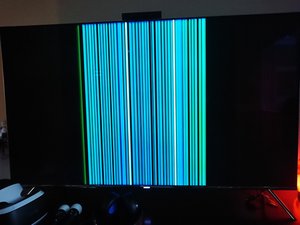
Common Fixes For Samsung Tv With Sound But No Picture
Once you know where the problem might be, you can try some practical fixes. Here are the most effective solutions, starting with the easiest:
Power Cycle The Tv
- Turn off the TV and unplug it from the wall.
- Wait at least 60 seconds.
- Hold the Power button on the TV (not the remote) for 30 seconds, if possible.
- Plug the TV back in and turn it on.
Why it works: This process can clear temporary system errors and reset the TV’s main board.
Check And Reseat All Cables
- Remove and reconnect all HDMI, AV, and power cables.
- Make sure cables are not frayed, bent, or loose.
- Try using a different HDMI port or a new cable.
Non-obvious insight: Many users overlook the HDMI cable. Faulty or low-quality HDMI cables can cause the screen to go black but still allow audio to pass through.
Change The Input Source
- Use the Source button on your remote.
- Cycle through all input options.
- Try connecting a different device (laptop, DVD player) to see if the picture appears.
Adjust The Brightness And Backlight Settings
- If the screen is very dim, the backlight setting might be too low.
- Use the remote to access the TV menu.
- Increase Brightness and Backlight levels.
Update Or Reset The Tv Firmware
- If you can access the menu:
- Go to Settings > Support > Software Update.
- Select Update Now.
- If you can’t see the menu, try a factory reset:
- Hold the Exit button on the remote for 12 seconds (on some models).
- Or unplug the TV for several minutes.
Practical tip: Always update your TV software. Samsung releases updates to fix bugs that can cause display issues.
Test For Backlight Failure
- If you see a faint image with a flashlight, the backlight is likely broken.
- Backlight repairs are complex and may need a technician.
- If you’re comfortable with electronics, you can open the TV and check the LED strips, but this voids the warranty.
Non-obvious insight: Backlight failure is more common in TVs used at maximum brightness or left on for long periods. Lowering brightness can extend your TV’s life.
Disable Energy Saving Modes
- Go to Settings > General > Eco Solution.
- Turn off Energy Saving Mode and Ambient Light Detection.
- These features can dim or turn off the screen.
Remove Any External Devices
- Disconnect all external devices (USB drives, streaming sticks, soundbars).
- Restart the TV with nothing plugged in.
- Sometimes, a faulty device can cause display issues.
Factory Reset The Tv
- If possible, access Settings > General > Reset.
- Enter your PIN (default is 0000) and confirm.
- This restores the TV to factory settings.
Note: This step erases all your apps and settings.
Seek Professional Repair
- If none of the above steps work, contact Samsung support or a qualified repair service.
- Main board or panel repairs often require special tools and experience.
Comparing Samsung Tv Issues: Sound Only Vs. No Power Vs. Picture Only
Understanding your TV’s symptoms can point you to the right fix. Here’s a comparison to help clarify:
| Symptom | Likely Cause | What to Try First |
|---|---|---|
| Sound but no picture | Backlight, cables, input, main board | Power cycle, check cables, flashlight test |
| No sound, no picture | Power supply, main board, fuse | Check power, look for LED lights, try reset |
| Picture but no sound | Audio settings, speakers, source device | Check mute, adjust audio, try headphones |
Key takeaway: When you have only sound, focus on video hardware and connections. No power usually means a bigger hardware problem.

How The Samsung Tv Backlight Works
The backlight is a set of LED lights behind the screen that make the image visible. If these LEDs fail, the TV looks black, even if it’s working inside.
Signs Of Backlight Failure
- You can faintly see images with a flashlight.
- The TV turns on (sound/chime), but the screen is always black.
- Adjusting brightness doesn’t help.
What Causes Backlight Failure?
- Aging LEDs: LEDs wear out after several years of use.
- Power Surges: Sudden spikes in electricity can damage the backlight circuit.
- High Brightness Settings: Constantly using max brightness shortens backlight lifespan.
- Overheating: Poor ventilation heats up the TV and damages LEDs.
Is Backlight Repair Worth It?
- For newer or large TVs, backlight repair (often $100–$200) may be worth it.
- For older or smaller TVs, replacement may make more sense.
| TV Size/Age | Estimated Repair Cost | Should You Repair? |
|---|---|---|
| Under 32″ / 5+ years old | $100–$150 | Often not worth it |
| 32″–55″ / under 5 years | $120–$200 | Usually yes |
| Over 55″ / under 3 years | $150–$250 | Usually yes |
Pro tip: Always check if your TV is under warranty before paying for repairs.
When To Call A Technician
Some TV problems need professional help. Here’s when you should not try to fix it yourself:
- You hear popping or crackling sounds from the TV.
- The TV smells like burnt plastic.
- There are visible cracks or liquid stains inside the screen.
- You’ve tried all basic fixes and nothing changes.
- The TV is still under warranty.
Professional repair shops have tools to test the main board, T-Con board, and other parts. Trying to fix these yourself can be dangerous or make the problem worse.
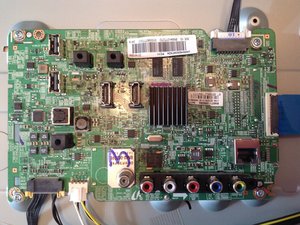
Preventing Future Display Problems
You can’t stop all TV problems, but these steps can reduce the risk:
- Use a surge protector: Protects your TV from sudden power changes.
- Lower brightness: Set your TV’s backlight to 70–80%, not maximum.
- Give your TV space: Avoid placing it in small, hot spaces.
- Turn off when not in use: Don’t leave your TV on for long periods.
- Update software regularly: Keep your TV’s firmware up to date.
Extra insight: Many users don’t realize that dust can block vents and cause overheating. Clean your TV’s vents every few months with a soft brush or vacuum.
What To Avoid When Fixing Your Tv
It’s easy to make mistakes when trying to fix a TV. Here are common errors to avoid:
- Don’t open the TV unless you know what you’re doing. TVs can hold dangerous voltage inside, even when unplugged.
- Don’t ignore the warranty. Opening the TV usually voids the warranty.
- Don’t use random cables. Low-quality HDMI or power cords can cause more problems.
- Don’t guess the problem. Always diagnose before buying new parts.
- Don’t tap or hit the TV. This rarely works and can break other parts.
Comparing Samsung Tv Models: Which Are Most Prone To Display Issues?
Some Samsung TV models are more likely to have display problems than others, often due to design differences. Here’s a quick look:
| Model Series | Common Issues | Reliability Rating |
|---|---|---|
| KU/K Series (2016–2018) | Backlight, T-Con board | Average |
| NU/N Series (2018–2020) | Backlight, firmware bugs | Above average |
| QLED (Q60, Q70, etc.) | Rare display issues | High |
| M Series (32″–43″) | Backlight, power board | Average |
Note: Most Samsung TVs are reliable, but older and entry-level models tend to have more display problems.
Real-world Example
Let’s say you have a 2018 Samsung 50″ NU7100 TV. You turn it on, and the sound plays, but the screen is black. You try the flashlight test and see a faint image. After checking cables and power cycling, the problem stays.
This points to a failed backlight. Repair costs for this model are around $150–$200. If the TV is under 5 years old, repair makes sense. If it’s older, you might consider a new TV.
When Is It Time To Replace Your Tv?
Sometimes, repair isn’t the best option. You should consider replacing your TV if:
- The repair cost is more than 50% of a new TV’s price.
- The TV is over 7 years old.
- Multiple parts are failing (e.g., backlight and main board).
- You want the latest features (like 4K or smart functions).
Stat: The average US household replaces their TV every 7–8 years.
What If It’s Not A Tv Problem?
Before you start fixing your TV, make sure the issue isn’t with your other devices:
- Try a different HDMI device (like a game console or DVD player).
- Test the same device on another TV.
- Replace the HDMI cable.
Sometimes, the problem is with your cable box, streaming stick, or even your wall socket.
Advanced Troubleshooting Steps
If you’re comfortable and out of warranty, you can try these advanced steps:
Check The T-con Board
The T-Con (timing control) board connects the main board to the display panel. If it fails, you may get no picture.
- Open the back panel carefully.
- Look for signs of burn or damage.
- T-Con boards can sometimes be replaced for $30–$60.
Warning: Only do this if you’re experienced with electronics.
Test With An External Monitor
Some Samsung TVs have HDMI output. Connect another screen (like a computer monitor):
- If the monitor shows a picture, the TV’s display is faulty.
- If not, the main board or source device is at fault.
Look For Blinking Error Codes
Some Samsung TVs blink the power LED in patterns to show errors. Count the blinks and check the manual or the official Samsung support page.
How To Find Reliable Repair Services
If you decide to repair your TV, here’s how to choose a good service:
- Check reviews: Look for shops with strong customer feedback.
- Ask about warranty: Good shops guarantee their work (usually 30–90 days).
- Get a clear estimate: Ask for a fixed price before repairs begin.
- Use Samsung authorized centers: They use genuine parts.
For more details on Samsung repair centers, visit the official Samsung Support site.
Frequently Asked Questions
Why Does My Samsung Tv Have Sound But A Black Screen?
This happens when the audio system works but the video system (especially the backlight or main board) fails. Common causes include a faulty backlight, loose cables, wrong input settings, or software glitches.
How Do I Know If My Tv’s Backlight Is Broken?
Shine a flashlight at the screen while playing sound. If you see a faint image, your backlight is likely bad. No image at all usually means a different problem.
Can I Fix The Backlight Myself?
It’s possible but not easy. You need to open the TV, which can be risky and void your warranty. If you’re not experienced with electronics, it’s best to call a technician.
Will A Factory Reset Fix The Picture Problem?
A factory reset can fix software bugs but won’t help with hardware failures (like a bad backlight or main board). Try a reset if you suspect a software problem.
Is It Better To Repair Or Replace A Samsung Tv With No Picture?
If the TV is less than 5 years old and repair costs are reasonable (under 50% of a new TV), repair makes sense. For older TVs or expensive repairs, replacement is usually the smarter option.
A Samsung TV with sound but no picture doesn’t always mean disaster. With careful troubleshooting, you can often find the cause and decide the best fix. Start with simple steps—check cables, power cycle, and do the flashlight test. If you’re not comfortable with repairs, professional help is always available.
Taking care of your TV with regular cleaning, moderate brightness, and surge protection can prevent most display problems. And if it’s time for a new TV, you’ll know you made the right choice after considering all your options.