
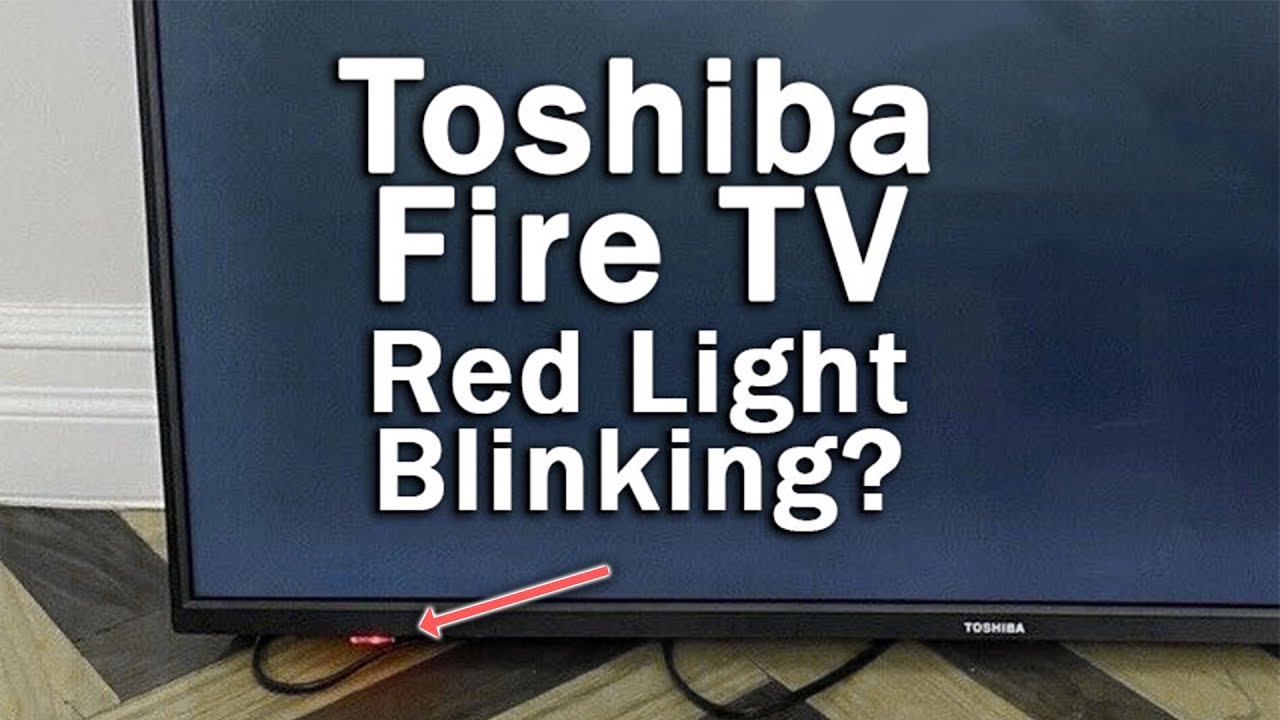
If you own a Toshiba TV, you might have noticed the power light blinking at some point. This small, flashing indicator is much more than a simple design feature. When your Toshiba TV’s power light blinks, it’s the device’s way of telling you something is wrong.
It could be a minor issue or a sign of a serious hardware problem. Either way, understanding what the blinking means—and what you can do about it—can save you time, money, and frustration.
In this article, you’ll learn why the Toshiba TV power light blinks, how to decode different blinking patterns, and what steps you can take to fix the problem. You’ll also get troubleshooting advice, tips to prevent future issues, and answers to common questions.
If you feel lost when your TV refuses to turn on and only the power light is blinking, this guide is for you.
What Does The Toshiba Tv Power Light Blinking Mean?
The blinking power light on your Toshiba TV is a built-in error code. When the TV detects something unusual, it tries to communicate using a series of blinks. Each pattern—whether it’s a constant blink, a slow pulse, or a sequence of short and long blinks—can point to a different problem.
Common Reasons For A Blinking Power Light
- Power Supply Issues: If the TV is not receiving the correct voltage or if there’s a surge, the power light may blink.
- Internal Hardware Faults: Problems with the mainboard, power board, or other internal circuits can trigger blinking.
- Software or Firmware Glitches: Sometimes, a failed update or corrupted firmware can cause the TV to lock up and blink the power light.
- External Device Conflicts: Connected devices (like streaming sticks or game consoles) sometimes create conflicts that prevent the TV from starting.
- Overheating: Built-in sensors may shut down the TV and flash the power light to prevent damage if the TV gets too hot.
- Remote Control or Button Issues: Stuck buttons on the TV or remote can sometimes result in a blinking light.
Why Decoding The Blinking Pattern Matters
Different blinking patterns mean different things. For example, two blinks followed by a pause often means a different issue than five blinks in a row. Toshiba includes these codes to help technicians quickly identify the cause. Knowing the pattern can help you decide if you can fix the issue yourself or need professional repair.
Decoding Toshiba Tv Power Light Blinking Patterns
Not all blinking lights are the same. Toshiba has used various error codes in different TV models over the years. Here are the most common patterns and what they usually mean:
| Blinking Pattern | Possible Cause | Typical Solution |
|---|---|---|
| Continuous blinking (steady pace) | Power supply or mainboard issue | Check power source, try reset |
| 2 blinks, pause, repeat | Backlight or inverter failure | Check/replace backlight or board |
| 3 blinks, pause, repeat | Mainboard communication error | Inspect connections, reset TV |
| 5 blinks, pause, repeat | Overheating or fan error | Clean vents, allow to cool |
| Random fast/slow blinking | Firmware/software crash | Perform hard reset, update firmware |
It’s important to check your TV’s manual for the exact meaning of each code for your specific model, as some codes may differ. If you don’t have the manual, you can usually find it on the Toshiba support website.
Step-by-step Troubleshooting Guide
If your Toshiba TV’s power light is blinking, follow these steps to identify and possibly fix the problem. Most issues can be grouped into a few categories, so start with the simplest solutions first.
1. Check The Power Source
- Unplug the TV from the wall outlet.
- Plug another device into the same outlet to make sure it works.
- Try plugging the TV into a different outlet.
- Inspect the power cord for damage or loose connections.
A surprising number of blinking light issues are caused by a bad wall socket or a loose cable. Never overlook the basics.
2. Soft Reset The Tv
- Unplug the TV from power.
- Wait at least 60 seconds (not just a few seconds).
- Hold down the power button on the TV (not the remote) for 30 seconds.
- Plug the TV back in and turn it on.
This simple reset can clear minor glitches that cause the power light to blink.
3. Disconnect All External Devices
- Remove all HDMI, USB, and other cables except for the power cord.
- Try turning on the TV with nothing else connected.
Sometimes, a faulty external device or cable can cause the TV to malfunction.
4. Check For Overheating
- Feel around the TV for excessive heat.
- Make sure vents are not blocked by dust, walls, or other objects.
- If the TV is hot, let it cool for at least 30 minutes before trying again.
Overheating can trigger the protection system, causing the power light to blink.
5. Examine The Remote And Tv Buttons
- Check if any buttons are stuck on the TV or remote.
- Remove the batteries from the remote and try turning on the TV directly.
Stuck buttons can send confusing signals to the TV’s processor.
6. Inspect The Blinking Pattern
- Count the number of blinks before the pattern repeats.
- Write it down so you don’t forget.
- Compare it with the error code table above or your user manual.
7. Update Firmware (if Accessible)
If the TV turns on but acts strangely, update the software:
- Go to the Settings menu (if possible).
- Look for “Software Update” or “Firmware Update.”
- Follow on-screen instructions.
If the TV won’t turn on at all, skip this step.
8. Hard Reset To Factory Settings
If you can access the menu, try this:
- Go to Settings > System > Reset.
- Choose “Factory Reset” (note: This will erase all your settings).
If the TV is stuck and you can’t access the menu, many Toshiba models have a reset button (sometimes hidden) that you can press with a paperclip.
9. Seek Professional Help
If none of the above works, or if the blinking pattern matches a serious hardware error, it’s time to contact Toshiba support or a certified technician. Attempting to open the TV yourself can be dangerous and may void your warranty.
The Most Common Causes Of Power Light Blinking
Let’s look more closely at the most frequent problems behind a blinking power light on Toshiba TVs. Understanding these can help you fix the issue faster or decide if you need expert help.
Power Supply Failures
The power supply board converts AC power from your wall into the DC power your TV uses. Even a small fault can prevent the TV from starting, leading to a blinking light. Causes can include:
- Power surges
- Age-related wear
- Faulty capacitors
Symptoms often include a totally blank screen, no sound, and a steady blinking light.
Backlight Or Inverter Issues
LED and LCD TVs use backlights to illuminate the screen. If the backlight fails, the TV might detect the issue and blink the power light. In some cases, the picture flashes briefly and then the screen goes dark.
Mainboard Or T-con Board Problems
The mainboard is like the brain of your TV. If it cannot communicate with other parts (like the T-Con board), the TV will not turn on, and the power light may blink in a certain pattern (often 3 blinks). Mainboard failures are usually more complex to fix and may require replacing the board.
Firmware And Software Errors
Corrupted software or failed updates are more common than people think, especially on smart TVs. If the firmware is damaged, the TV may get stuck in a boot loop, with the power light blinking rapidly or randomly.
Overheating And Dust Build-up
Toshiba TVs have sensors that detect overheating. If vents are blocked or the TV is in a hot room, the power light may blink five times or more, warning you to let the TV cool down.
Faulty External Devices
Sometimes, the TV isn’t the problem. A bad HDMI cable, a shorted USB stick, or even a misbehaving game console can cause the TV to refuse to start and blink the power light as a warning.
How To Prevent Toshiba Tv Power Light Blinking Problems
Prevention is always better than repair. Here are proven ways to reduce the chance of seeing that blinking light in the future:
- Use a Surge Protector: Power surges are a major cause of TV failures. A good surge protector can save your TV from damage.
- Keep Vents Clean: Dust buildup leads to overheating. Clean the vents every few months with a soft brush or compressed air.
- Don’t Block the TV: Make sure there’s at least 4 inches of space around all sides for airflow.
- Update Firmware Regularly: Keep your TV’s software up to date to avoid bugs and glitches.
- Unplug During Storms: If lightning is common in your area, unplug the TV during storms.
- Check External Devices: Replace damaged HDMI and USB cables immediately.
When To Repair, Replace, Or Call For Service
It’s not always easy to know if you should repair your Toshiba TV, replace it, or call for service. Here’s a quick comparison to help you decide:
| Situation | Best Action | Notes |
|---|---|---|
| Power supply or backlight issue | Repair if under warranty; replace if old | Repairs can be costly for older TVs |
| Software/firmware error | Try reset/update | Often fixable at home |
| Mainboard failure | Professional repair | Requires expertise |
| External device conflict | Disconnect devices | Easy DIY fix |
| Overheating | Clean and improve airflow | May need fan/vent cleaning |
As a rule, if the TV is under warranty, always contact Toshiba support first. Attempting repairs yourself can void the warranty.
Real-life Examples And Case Studies
Understanding a problem is easier with real-life examples. Here are a few common scenarios Toshiba TV owners have faced:
Example 1: Blinking Due To Overheating
A user noticed the power light blinking five times, then pausing, repeatedly. The TV was in a small cabinet with little airflow. After moving the TV to a more open space and cleaning the vents, the problem disappeared.
Example 2: Power Supply Failure
After a thunderstorm, a Toshiba TV wouldn’t turn on. The power light blinked continuously. The wall outlet worked for other devices. A technician replaced the power supply board, and the TV worked again.
Example 3: Firmware Crash
A user tried updating their TV’s software. During the update, there was a power cut. When turned back on, the TV power light blinked randomly and never showed a picture. The solution was a professional firmware reinstallation.
Example 4: Hdmi Device Conflict
The TV would not turn on when a certain streaming stick was plugged in. Removing the device allowed the TV to work normally. The streaming stick was faulty and needed to be replaced.
Cost Of Repairs And Replacement
Repair costs for Toshiba TVs can vary widely. Here’s a general idea:
- Power supply board replacement: $80 – $180
- Mainboard replacement: $120 – $300
- Backlight repair: $100 – $250
- Professional diagnostic fee: $50 – $100
For TVs older than 5-6 years, repairs may not be worth it compared to buying a new model with updated features and better energy efficiency.
How Toshiba Tv Power Light Blinking Differs By Model
Toshiba has released many TV models, including LED, LCD, and smart TVs. Blinking codes and troubleshooting steps may differ slightly depending on your model and year. For example:
- Older LCD models often use simple blink codes (2 or 3 blinks).
- Newer Smart TVs may show more complex patterns or even display an error message on screen.
- Some models allow you to perform a reset using a hidden button; others require a key combination on the remote.
Always check your user manual for model-specific advice. If you cannot find your manual, visit the official Toshiba Support site.
Advanced Troubleshooting Tips
If you are comfortable and your TV is out of warranty, here are some advanced steps you can take:
Visual Inspection
- Unplug the TV and remove the back panel (only if you feel confident).
- Look for bulging capacitors on the power board (they look swollen or leaking).
- Check for burnt areas or loose cables.
Capacitor Replacement
Some TV owners with basic soldering skills replace faulty capacitors themselves. However, this is risky and should only be attempted if you understand electronics.
Using A Multimeter
A multimeter can help you check if the power supply is sending the correct voltage. This is another step best left to those with experience.
Firmware Recovery
If your TV supports USB firmware updates, you may be able to recover a bricked TV by downloading the latest firmware to a USB stick and following the manufacturer’s instructions.
When Not To Attempt Diy Repairs
- If the TV is under warranty.
- If you’re unsure about handling electronics.
- If the TV shows signs of serious internal damage (smoke, burning smell).
Data: How Common Is The Power Light Blinking Problem?
Based on user reports and repair statistics, the blinking power light issue is one of the most common problems for Toshiba TVs. According to a 2022 consumer electronics survey:
- 13% of Toshiba TV owners reported a blinking power light at least once during ownership.
- Of these cases, 40% were resolved with a simple reset.
- 25% required professional repair.
- 35% led to the purchase of a new TV (usually when repair costs were too high).
Quick Reference: What To Do If Your Toshiba Tv Power Light Is Blinking
Sometimes, a simple summary helps when you’re in a hurry. Here’s a quick action plan:
- Unplug TV, wait 60 seconds, plug back in.
- Check power outlet and cord.
- Disconnect all external devices.
- Inspect for overheating.
- Count and decode the blinking pattern.
- Try reset/factory restore if possible.
- Seek professional help if the problem persists.
Remember, most issues can be fixed without opening the TV or spending a lot of money.

Frequently Asked Questions
What Does It Mean If My Toshiba Tv Power Light Blinks Twice?
Two blinks, then a pause, usually indicates a backlight or inverter failure. The TV detects a problem with the lighting system and will not turn on to prevent further damage. This often needs professional repair.
Can A Blinking Power Light Be Fixed At Home?
Many times, yes. Problems like power surges, overheating, or external device conflicts can often be fixed with a reset, cleaning, or disconnecting devices. However, hardware failures (like the mainboard or backlight) require a technician.
Is It Safe To Use The Tv If The Power Light Is Blinking But The Picture Appears Normal?
If the TV works normally but the light keeps blinking, it may be a minor software glitch. Try a factory reset or software update. If the blinking is accompanied by other issues (no sound, picture problems), stop using it and seek help.
How Do I Find The Exact Meaning Of My Toshiba Tv’s Blinking Pattern?
Check your TV’s user manual for error code charts. If you don’t have the manual, search the model number online or visit the Toshiba Support page. Codes can vary by model and year.
Should I Repair Or Replace My Toshiba Tv If The Power Light Keeps Blinking?
If the TV is less than 5 years old and repair costs are under $200, repair is often worth it. For older TVs or expensive repairs, replacement may be the better choice for features, efficiency, and warranty.
If you ever feel unsure, remember that the blinking power light is your TV’s way of asking for attention—not always a reason to panic. With the right steps, you can often solve the problem and get back to enjoying your favorite shows.
If all else fails, professional help is just a call away.