
Struggling to find the power button on your TCL Roku TV? You’re not alone.
Unlike traditional TVs, TCL Roku models often hide their power button in less obvious spots, making it tricky when you need to turn your TV on or off without a remote. But don’t worry—knowing exactly where to look can save you time and frustration.
You’ll discover the common locations of the power button on TCL Roku TVs and learn simple tricks to power your TV on or off quickly. Keep reading to take full control of your viewing experience, even without your remote in hand!
Power Button Locations
The power button on a TCL Roku TV is small but essential. It lets you turn your TV on and off without the remote. Knowing its location helps when the remote is missing or unresponsive. The button acts as a power switch and sometimes helps with menu navigation. Different TCL Roku models place the button in various spots. Here are the common locations to check.
Below Tcl Logo
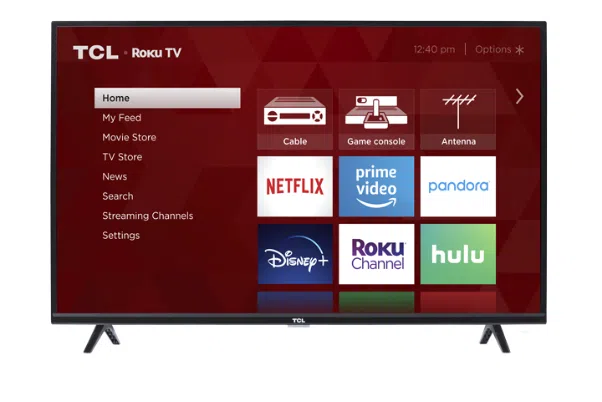
Many TCL Roku TVs have the power button just below the TCL logo. It sits at the center of the front bezel. This spot makes the button easy to find without moving the TV. The button is small and blends in with the frame. Press it once to turn the TV on or off.
Back Right Side
Some models place the power button on the back right side. Reach around the right edge of the TV to feel for a small, tactile button. This location keeps the front clean but still allows quick access. Press the button once to power the TV on or off.
Back Left Side
Other TCL Roku TVs have the power button on the back left side. Check the left edge of the TV by reaching behind it. The button is usually near other control buttons. A single press turns the TV on or off, and holding it might open the menu.
Underside Near Led
Some TCL Roku TVs place the power button underneath the screen. Look near the LED indicator light at the bottom edge. This button is hidden from direct view but easy to press with a finger. Tap it once to switch the TV on or off.
Using The Power Button
Using the power button on your TCL Roku TV is simple and helps you control the TV without a remote. This button lets you turn the TV on and off and access important menus. Knowing where it is and how to use it can save time and effort.
Turning On The Tv
Find the power button below the TCL logo or on the back side. Press the button once to turn on the TV. You will see the screen light up and hear the start-up sound. This button acts as the main power switch for your TV.
Accessing Power Off Menu
Press the power button once to open the menu on the screen. Use the same button to scroll through the options. When you reach the power off choice, press and hold the button briefly. The TV will then turn off safely.
Navigating Menus Without Remote
The power button also helps you move through menus without a remote. Press the button to select or scroll through options. It works like a basic remote control for simple tasks. This is useful when the remote is missing or out of reach.
Alternative Power Options
Sometimes the physical power button on your TCL Roku TV is hard to find or reach. Other times, the button might not work properly. Luckily, there are other ways to control your TV’s power.
These options let you turn the TV on or off without using the button. They also add more convenience to your viewing experience. Using your smartphone or voice commands can be quick and easy.
Using Roku Mobile App
The Roku Mobile App lets you control your TV from your phone. Download it from the App Store or Google Play. Once connected, you can turn the TV on or off with a tap. The app also lets you change channels and adjust volume.
This app works well if your remote is lost or broken. It provides a simple way to manage your TV from anywhere in your home.
Smartphone As Remote
Your smartphone can act as a full remote control for TCL Roku TVs. After pairing the phone with your TV via Wi-Fi, you can power it on or off. The phone’s touch screen replaces buttons with easy controls.
This method helps if you want to avoid pressing the physical button. It also offers extra features like a keyboard for search and private listening.
Voice Control Features
TCL Roku TVs support voice commands through assistants like Alexa and Google Assistant. You can say commands to turn the TV on or off. For example, say “Turn on TCL TV” or “Power off Roku TV.”
Voice control is hands-free and very convenient. It works well when your hands are busy or the remote is not nearby.

Power Button Variations By Model
The location and design of the power button on TCL Roku TVs vary by model. Understanding these variations helps users find and use the button easily. Some models have a simple single button, while others feature multiple buttons. A few newer models do not have a physical power button at all.
Single Button Controls
Many TCL Roku TVs include one small button for power and navigation. This button is often on the back of the TV, below the TCL logo or near the side edge. Press it once to turn the TV on or off. Holding or pressing the button multiple times may open the menu for additional controls. This simple design reduces clutter on the TV’s surface.
Multiple Button Layouts
Some TCL Roku models have more than one button grouped together. These buttons control power, volume, and input source. The power button is usually marked or placed separately for easy access. This layout lets users adjust settings without the remote. Buttons are typically placed on the back or underside of the TV frame.
No Physical Power Button Models
Certain TCL Roku TVs do not have a dedicated physical power button. These models stay in a low-power standby mode and turn on via remote or voice commands. Users rely on the Roku app or remote control to power the TV on or off. This design supports a sleek look but requires alternative control methods.
Troubleshooting Power Issues
Power problems with your TCL Roku TV can be frustrating. This section helps you solve these issues fast. Understanding common causes and quick fixes saves time and stress. Follow simple steps to get your TV working again.
Button Not Responding
Sometimes the power button does not respond. Check if the button feels stuck or damaged. Press firmly and hold for a few seconds. Try unplugging the TV for 30 seconds, then plug it back in. The button may work after a reset. Test the remote control batteries too. Weak batteries cause power issues often.
Missing Power Button
Some TCL Roku TVs have no visible power button. Instead, use the Roku mobile app to turn the TV on or off. Download the app on your smartphone and connect it to the TV’s Wi-Fi. The app lets you control power and other functions easily. This method works well if the physical button is hard to find or broken.
Resetting The Tv
Resetting your TCL Roku TV can fix many power problems. Unplug the TV from the power outlet. Wait at least 60 seconds before plugging it back in. This clears temporary errors and refreshes the system. If the TV still won’t turn on, try a factory reset using the settings menu or the remote app. Be aware that a factory reset deletes all settings and apps.
Tips For Managing Tv Without Remote
Managing your TCL Roku TV without a remote can be simple. Knowing alternative ways helps when the remote is lost or broken. These tips let you control your TV with ease. Try using physical buttons, mobile apps, or external devices to keep watching your favorite shows.
Using Physical Buttons
The power button on TCL Roku TVs is often small and tactile. It is usually found below the TCL logo or on the back side of the TV. Press it once to turn the TV on. To turn it off, press the button to open the menu. Then use the same button to navigate to the power-off option.
Besides power, the physical buttons can control volume and change channels. They work as simple navigation tools when the remote is not available. Check the sides or underside of your TV for these buttons.
Mobile App Navigation
The Roku mobile app lets you control your TV from a smartphone. Download the official Roku app from the Google Play Store or Apple App Store. Connect your phone to the same Wi-Fi network as your TV. The app provides a virtual remote, keyboard, and voice control.
This method is helpful for quick access and easier typing. The app also offers features like launching channels and adjusting settings. It is a good backup if the physical buttons are hard to reach.
Connecting External Devices
Using devices like game controllers or keyboards can help control your TCL Roku TV. Many external devices connect via USB or Bluetooth. Once connected, you can navigate menus and control playback.
Smart hubs or universal remotes also work well with TCL Roku TVs. These devices offer more buttons and functions than the original remote. They provide a smooth viewing experience without needing the original remote.
Frequently Asked Questions
Where Is The Power Button On Tcl Roku Tv Without Remote?
The power button on a TCL Roku TV without a remote is usually below the TCL logo or on the back side. Press it once to turn on the TV. Some models place it on the back left or right side near other control buttons.
Where Is The Power Button On A Tcl Tv?
The power button on a TCL TV is usually below the TCL logo or on the back right or left side. Press it once to turn on.
Does Tcl Have A Physical Power Button?
Yes, TCL Roku TVs have a physical power button. It is usually located below the TCL logo or on the back side. Press it once to turn the TV on or use it to access the power-off menu.
Why Does My Roku Not Have A Power Button?
Roku streaming players lack a power button because they are designed to stay on and connected continuously. Use the remote or Roku app to control power functions. TCL Roku TVs usually have a physical power button under the TCL logo or on the back for manual control.
Where Is The Power Button On A Tcl Roku Tv Located?
The power button is usually on the back of the TV, under the TCL logo or on the right or left side. It is a small, tactile button that also helps with menu navigation.
Conclusion
Finding the power button on a TCL Roku TV is simple once you know where to look. It is usually a small button located below the TCL logo or on the back sides of the TV. Press it once to turn the TV on or off.
If the button is hard to reach, the Roku mobile app offers an easy way to control your TV. This makes managing your TCL Roku TV convenient, even without the remote. Now, you can enjoy your TV without any hassle.