
When you set up your living room, you might not think much about where your air conditioner points. But if your air conditioner is blowing directly on your TV, it can lead to problems you never expected. Many people focus on comfort and cool air, but the position of your AC unit matters for your electronics, too. TVs are expensive and sensitive, and the wrong airflow can shorten their life or affect your viewing experience. This guide will help you understand why this happens, what you risk, and how to fix it, even if your English is not perfect.
Why Does Air Conditioner Placement Matter For Tvs?
Most people install their air conditioner for maximum cooling. However, air conditioners do more than just lower the temperature. They also affect humidity levels, air flow, and dust movement. When the cold air from your AC blows straight on your TV, it creates a micro-climate different from the rest of the room.
For example, have you noticed how your TV screen feels cold after the AC runs for a while? That’s not just about comfort. Electronics work best at stable temperatures and humidity. Rapid changes, cold drafts, or condensation can cause problems.
TVs, especially LCD and OLED models, are sensitive to such changes.
Risks Of Direct Ac Airflow On Your Tv
Let’s look at the main reasons why letting your AC blow directly on your TV can be a bad idea:
1. Condensation And Moisture
When cold air from the AC hits a warm TV screen, condensation can form. This is similar to how a cold glass of water sweats on a hot day. Moisture on or inside your TV can lead to:
- Short circuits
- Corrosion of internal parts
- Malfunction or display problems
2. Temperature Fluctuations
Electronics need stable temperatures. Direct airflow can cause the TV to cool too quickly, leading to thermal stress. This can result in:
- Cracks in the screen or housing
- Faster aging of components
- Solder joints breaking inside the TV
3. Dust And Debris Build-up
Air conditioners often blow dust and fine particles around the room. When the AC is aimed at your TV, these particles can settle inside:
- Blocked vents
- Overheating due to poor ventilation
- Dull or dirty screen
4. Reduced Image Quality
Cold air can cause a thin film of moisture or fog on the screen. This can make the image look blurry or less bright, especially on humid days when condensation is likely.
5. Increased Energy Use
If your TV’s sensors detect cold air, they may try to adjust brightness or contrast, thinking the room is darker than it is. This can use more electricity and reduce screen life.
How Air Conditioners Affect Electronic Devices
To understand why TVs are vulnerable, let’s explore how air conditioners interact with electronics:
- Humidity Control: AC units lower humidity, but if the air is too dry, it can cause static electricity. Static is dangerous for sensitive electronics.
- Air Movement: Constant cold air on one spot creates uneven temperatures, which is bad for circuit boards.
- Temperature Difference: TVs generate heat. If the outside is cooled too quickly, the inside stays hot. This difference can warp parts or damage circuits.
In a study by the Consumer Electronics Association, electronics in extreme temperature swings were 30% more likely to fail within three years compared to those in stable environments.
Common Mistakes People Make
Many people don’t realize the impact of air direction on electronics. Here are a few common mistakes:
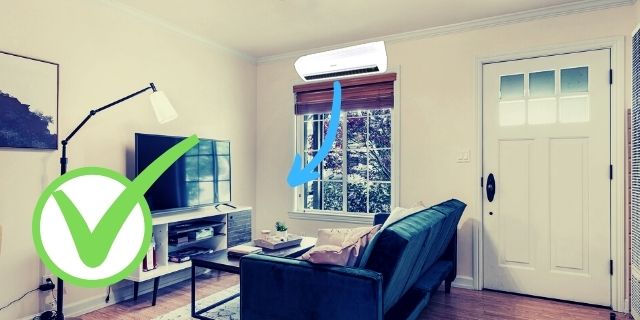
- Installing AC units above or beside the TV: This looks neat but exposes the TV to direct airflow.
- Ignoring vent direction: Not adjusting the AC vents means cold air always targets the TV.
- Mounting TVs on exterior walls: These get cold faster, increasing the risk of condensation when AC is on.
- Not checking for drafts: Sometimes, even a small, unnoticed draft can cause problems over time.
Signs That Your Tv Is Affected By Ac Airflow
If you suspect your TV is suffering from the AC, watch for these signs:
- Screen fogs up after the AC runs
- Random restarts or power issues
- Lines or flickers on the display
- Unusual noises or clicks
- The back of the TV feels much colder than the rest of the room
If you see these problems, act quickly to prevent permanent damage.
Steps To Protect Your Tv From Direct Ac Airflow
You don’t always need to remodel your whole room. Here’s how you can protect your TV and still enjoy a cool space:
1. Change The Ac Direction
Most split ACs and window units let you adjust the louvers or vents. Angle them away from the TV. If possible, direct the airflow toward the center of the room or an empty wall.
2. Move The Tv Or Ac Unit
If you’re setting up a new room, place the TV so it is not in the path of the AC. If moving the AC is too costly, try moving the TV a few feet away.
3. Use Deflectors Or Shields
You can buy plastic or metal air deflectors. These clip onto the AC vent and redirect cold air. Some people also use simple cardboard or acrylic sheets as a DIY solution. Make sure the deflector does not block airflow too much, or the AC may overwork.
4. Install A Tv Cover
Soft, anti-static covers can protect your TV when not in use. This keeps dust and moisture away, especially if the AC runs often.
5. Regular Maintenance
Clean both your AC filter and your TV vents every month. Less dust means less risk to your TV. Also, check that the AC drain is not leaking near the TV.
6. Monitor Room Temperature And Humidity
A simple digital thermometer and hygrometer can help you keep the room at safe levels. Ideal conditions for TVs are:
- Temperature: 60°F to 75°F (15°C to 24°C)
- Humidity: 40% to 60%
7. Consider Professional Installation
If you’re unsure, hire a professional to plan your AC and TV setup. They can suggest the best locations and even install custom deflectors or shelves.
Comparing Tv Types And Their Sensitivity To Cold Air
Different TVs react in different ways to cold drafts from an AC. Here’s a side-by-side look at how LED, OLED, Plasma, and CRT TVs respond:
| TV Type | Sensitivity to Direct Cold Air | Main Risk | Recommended Precaution |
|---|---|---|---|
| LED/LCD | High | Condensation on screen | Use deflector, avoid direct airflow |
| OLED | Very High | Moisture damage, screen warping | Keep AC at least 3 feet away |
| Plasma | Medium | Thermal stress cracks | Monitor temperature closely |
| CRT | Low | Dust inside vents | Clean regularly |
As you can see, modern TVs (LED, OLED) are more sensitive than older CRT models.
Real-life Examples: What Can Go Wrong?
Let’s look at some situations people have faced:
- Case 1: A family in Texas noticed their 55-inch OLED TV showing lines on the screen after three months of direct AC airflow. The repair shop found moisture damage inside, voiding the warranty.
- Case 2: An office placed a smart TV right under a split AC. After a year, the TV started to flicker, and eventually, the main board failed due to corrosion.
- Case 3: A gamer in Japan put his TV near a window AC. Dust collected inside, causing overheating and sudden shutdowns.
These real stories show that even small mistakes can lead to costly repairs or replacements.
How To Arrange Your Room For Tv And Ac Safety
Planning your room correctly can prevent many of these issues. Here are practical tips:
Best Tv Placement
- Place the TV on an interior wall away from windows and AC units.
- Keep at least 3 feet of space between the TV and any air conditioner.
- Avoid direct sunlight, which can also cause temperature swings.
Best Ac Placement
- Install AC units high on the wall but not directly above the TV.
- Position the AC so its strongest airflow points to the center or another part of the room.
Furniture Tips
- Use shelves or cabinets with open backs to allow air circulation behind the TV.
- Don’t block AC vents with tall furniture, as this can cause air to bounce down onto the TV.
Cables And Power Outlets
- Keep power strips and cables away from AC water drains to avoid moisture risk.
- Use surge protectors to handle voltage spikes if your AC and TV share a circuit.
Data: How Common Is This Problem?
A survey by Home Electronics Association found:
- 34% of TV owners with ACs reported issues after five years.
- Of those, 60% had their TV directly in the path of the AC airflow.
- Warranty claims for moisture or condensation damage have increased by 18% since 2018.
These numbers show this is not a rare problem.

How Ac Airflow Affects Tv Viewing Experience
Aside from damage, direct AC airflow can change how you enjoy TV:
- Screen Reflection: Cold air on the screen can create fog or streaks, making it hard to see.
- Sound Quality: Moisture in speakers can muffle sound.
- Remote Control: Some remotes become less responsive if the sensors get too cold or dirty.
It’s not just about the TV’s health—your comfort and entertainment are affected too.
Diy Solutions Vs Professional Help
You can do a lot yourself, but sometimes, hiring an expert is smarter. Here’s a quick comparison:
| Solution Type | Pros | Cons | Best For |
|---|---|---|---|
| DIY (Deflectors, moving TV) | Low cost, fast | May not fix airflow completely | Small rooms, renters |
| Professional Installation | Custom solution, safe | Higher cost, needs planning | New homes, long-term setups |
| Hybrid (DIY + Expert Advice) | Balanced, flexible | May still need some investment | Most situations |
Non-obvious Insights Most People Miss
- TV warranties often exclude condensation damage. If your TV is damaged by moisture from the AC, the warranty may not cover repairs. Always read the fine print and consider extra protection if your setup is risky.
- Some smart TVs have built-in sensors for temperature and humidity. If your TV keeps adjusting brightness or shutting off, check if these sensors are being triggered by direct cold air.
- Long-term exposure to AC airflow can dry out plastic parts, making them brittle. This can cause cracks in the casing or remote control.
How To Check If Your Tv Is At Risk
To check if your setup is safe:
- Stand in front of your TV while the AC is running. If you feel a breeze, your TV is at risk.
- Touch the back of the TV. If it feels much colder than other areas, move either the TV or the AC vent.
- Look for dust on the screen or vents. If there’s more dust than other areas, the AC might be blowing particles at your TV.
Best Practices For Long-term Tv Health
- Use your AC at a moderate temperature. Don’t set it too cold just for quick comfort.
- Give your TV a break. If you’re not watching, cover it or turn it off to avoid constant cold airflow.
- Schedule yearly professional cleaning for both your TV and AC unit.
When To Seek Professional Help
If you notice any of the warning signs (flickering, condensation, power issues), don’t wait. Call a technician. Trying to fix it yourself can make things worse, especially if moisture is inside the TV.
Professional help is also needed if:
- You want to build a custom entertainment wall with AC nearby.
- Your AC drips water close to your TV or power outlets.
- You plan to upgrade to a larger TV in the same spot.
Frequently Asked Questions
What Happens If Cold Air From The Ac Keeps Blowing On My Tv?
Over time, direct cold air can cause condensation on your TV, leading to moisture inside the screen or electronics. This can result in display problems, short circuits, or even permanent damage. It’s best to avoid this by changing the airflow direction or moving your TV.
Can Cold Drafts Make My Tv Stop Working?
Yes, cold drafts can create rapid temperature changes inside your TV. This thermal stress can cause cracks, broken solder joints, or internal corrosion. If your TV starts acting strange after long AC use, check for cold airflow issues.
Is It Safe To Mount My Tv Under An Air Conditioner?
It’s not recommended to mount your TV directly under an air conditioner. Dripping water or direct airflow can cause damage. If you have no other choice, use a deflector and a protective cover, and check both the TV and AC regularly.
Are Some Tv Brands More Sensitive To Ac Airflow?
Most modern TVs, especially OLED and LED models, are sensitive to temperature and moisture. Older CRTs handle it better, but it’s still best to avoid direct airflow. Always check your TV’s manual for environmental recommendations.
How Far Should My Tv Be From The Air Conditioner?
Keep at least 3 feet (1 meter) between your TV and any AC vent. If space is limited, use a deflector to direct the air away. Monitor your TV for any signs of moisture or cold spots.
Taking care of your TV’s environment is as important as choosing the right model. By understanding how air conditioner airflow affects your TV, you can prevent damage, enjoy better viewing, and make your electronics last longer. If you want more technical details, you can visit the Wikipedia page on air conditioners for deeper insights. Your TV is a big investment—don’t let a simple airflow mistake shorten its life.