
If you rely on Starlink for your internet, you know how frustrating it is when power outages interrupt your connection. Imagine losing your online work, calls, or streaming just because the power flickered.
That’s where a UPS battery backup comes in—it keeps your Starlink system running smoothly even when the lights go out. But how do you choose the right UPS for your Starlink setup? This guide will help you understand what to look for, so you can protect your connection, avoid equipment damage, and enjoy uninterrupted internet.
Keep reading to find out how to pick the perfect UPS battery backup tailored for your Starlink needs.

Benefits Of Using Ups With Starlink
Using a UPS (Uninterruptible Power Supply) with your Starlink system offers many important benefits. It keeps your internet connection stable during power problems. A UPS protects your equipment and helps avoid interruptions. These advantages make a UPS a smart choice for Starlink users.
Preventing Power Outages
A UPS supplies power during outages. It keeps Starlink running without interruption. This helps you stay connected for work or entertainment. No sudden loss of internet during storms or blackouts. The battery backup gives you time until power returns.
Protecting Against Power Surges
Power surges can harm Starlink devices. A UPS acts as a shield against sudden voltage spikes. It absorbs extra power to protect your router and modem. This prevents damage and extends the life of your equipment. Safe and steady power means fewer repairs.
Avoiding Equipment Reboots
Power interruptions often cause Starlink to reboot. Reboots disrupt your internet and slow down work. With a UPS, your system stays on without restarting. This keeps your connection stable and reliable. Avoid frustration and lost time from unexpected reboots.
Starlink Power Requirements
Understanding the power needs of your Starlink system helps pick the right UPS battery backup. Starlink requires a steady power supply to keep internet access stable. A UPS keeps your connection alive during outages and prevents damage from power surges. Knowing how much power Starlink uses and for how long helps avoid choosing an underpowered or oversized UPS.
Typical Power Draw
Starlink usually draws around 40 to 100 watts during normal use. The exact power depends on the model and usage. The dish, router, and modem all consume power. The dish is the main power consumer, especially when it adjusts for signal. The router uses less power but adds to the total draw. Check your Starlink device specifications for precise numbers.
Battery Backup Duration
The backup time depends on the UPS battery size and the power draw. A small UPS may only provide 15 to 30 minutes of backup. Larger batteries can keep Starlink running for several hours. Decide how long you want your internet to stay active during outages. This helps select a UPS with the right battery capacity. Remember, longer backup means bigger and more expensive batteries.
Power Consumption Variations
Starlink’s power use changes during startup, normal use, and heavy data transfer. Startup consumes more power as the dish aligns with satellites. Heavy internet use can increase power slightly. Idle or low activity lowers power draw. These variations affect the UPS runtime. Consider these changes to avoid unexpected shutdowns during critical use.
Types Of Ups For Starlink
Choosing the right UPS battery backup for Starlink depends on understanding the available types. Each UPS type has unique features that affect performance and cost. This section explains four common UPS types suitable for Starlink. Knowing these helps you pick a backup that fits your needs and budget.
Standby Ups
Standby UPS is the simplest and most affordable type. It stays idle until a power outage occurs. When the power fails, it switches to battery power instantly. This UPS protects against short outages and power surges. It is ideal for small Starlink setups with low power needs.
Line-interactive Ups
Line-Interactive UPS offers better power regulation than standby models. It can adjust voltage fluctuations without switching to battery. This reduces battery use and extends its life. It handles brownouts and surges well. This UPS suits moderate Starlink systems in areas with unstable power.
Online Ups
Online UPS provides continuous power from its battery. It converts incoming AC power to DC, then back to AC. This process filters out all power disturbances. It offers the highest protection and zero switching time. Online UPS is perfect for critical Starlink installations that cannot risk downtime.
Solar Generators As Backup
Solar generators use solar panels and batteries to store energy. They provide power without relying on the grid. Solar generators are eco-friendly and portable. They work well for Starlink users in remote areas or off-grid locations. These systems offer longer backup times but cost more upfront.
Choosing The Right Ups Size
Choosing the right UPS size is crucial for keeping your Starlink system running during power outages. A properly sized UPS prevents sudden shutdowns and protects your equipment from damage. Selecting the correct size helps you balance cost and backup time effectively.
Calculating Power Needs
Start by checking the power consumption of your Starlink hardware. This includes the satellite dish, router, and any connected devices. Add their wattage to find the total power requirement. Use this number to select a UPS that can handle the load without strain.
Runtime Expectations
Decide how long you need backup power to last. Short outages need less runtime, while longer outages require more battery capacity. Match the UPS runtime with your typical power outage length to avoid running out of power unexpectedly.
Considering Future Expansion
Plan for additional devices or upgrades in your network. Choose a UPS with extra capacity to support future power needs. This approach saves money and hassle by avoiding the need for a new UPS later on.
Key Features To Look For
Choosing the right UPS battery backup for Starlink helps keep your internet running during power outages. Certain features ensure your equipment stays safe and functional. These features also affect how long the backup lasts and how well it protects your devices.
Focus on key aspects like surge protection, battery capacity, output waveform, and size. Each plays a vital role in maintaining stable and clean power for your Starlink system.
Surge Protection
Surge protection guards your Starlink equipment from sudden voltage spikes. These spikes can damage sensitive electronics or cause data loss. A UPS with strong surge protection prevents harm during storms or electrical faults. Look for models with built-in surge guards and good joule ratings. This feature adds a layer of safety beyond just battery backup.
Battery Capacity
Battery capacity determines how long your Starlink stays powered after an outage. It is usually measured in volt-ampere hours (VAh) or watt-hours (Wh). Higher capacity means longer runtime. Calculate your Starlink’s power needs and choose a UPS with enough capacity to cover typical outages. Keep in mind that bigger batteries take longer to recharge.
Output Waveform
The output waveform affects how clean and stable the power is. Starlink equipment works best with a pure sine wave output. This waveform mimics the smooth electricity from the grid. Cheaper UPS units may use modified sine wave output, which can cause noise or reduce device lifespan. Pick a UPS with pure sine wave output to avoid issues.
Portability And Size
UPS units vary in size and weight. Consider where you will place the battery backup. Smaller, portable units are easier to move and fit in tight spaces. Larger units often provide more power but are bulky. Balance capacity needs with available space. Portability matters if you plan to use the UPS in different locations.
Installation And Setup Tips
Setting up a UPS battery backup for your Starlink system helps keep your internet running during power outages. Proper installation ensures your equipment stays safe and functional. Follow these simple tips for a smooth setup process.
Connecting Starlink To Ups
First, plug your Starlink router into the UPS output socket. Use the UPS’s battery-backed outlets, not surge-only ones. Connect the Starlink dish power supply to a regular outlet. Avoid overloading the UPS by checking its wattage capacity. Keep cables neat and secure to prevent disconnections.
Testing Battery Backup
After setup, test the battery backup by unplugging the UPS from the wall. Watch if Starlink stays powered and online. Note the time the UPS supports your system. This helps verify the UPS size matches your needs. Repeat this test periodically to confirm reliability.
Maintaining Ups Health
Keep your UPS in a dry, cool place away from direct sunlight. Check the battery status regularly using the UPS monitoring software. Replace the battery as recommended, usually every 3-5 years. Avoid deep discharges to extend battery life. Clean vents and fans to prevent overheating.
Popular Ups Models For Starlink
Choosing the right UPS battery backup for Starlink keeps your internet running during power outages. Many models fit different needs, from small setups to full home backups. Knowing popular UPS models helps you pick the right one for your Starlink system. Consider brand reliability, capacity, and budget to find the best fit.
Top Recommended Brands
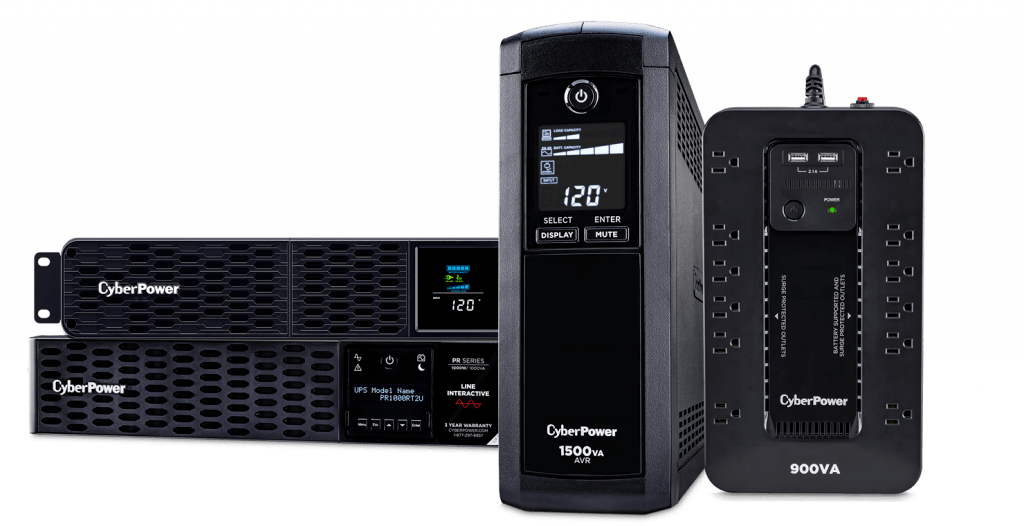
Brands like APC, CyberPower, and Eaton often appear in UPS lists. APC offers reliable models with good battery life. CyberPower provides smart features at competitive prices. Eaton is known for high-quality units with solid surge protection. These brands have strong support and parts availability.
Budget-friendly Options
For tight budgets, look at models like APC Back-UPS 600 or CyberPower EC650LCD. These units offer basic battery backup with enough power for Starlink. They keep your system online for short outages and protect against surges. Budget models are perfect for small setups or occasional power loss.
High-capacity Solutions
High-capacity UPS units suit users needing longer runtime or powering multiple devices. Models such as APC Smart-UPS 1500VA or CyberPower CP1500PFCLCD provide more battery power. These units support Starlink and additional networking gear. They ensure stable internet even during extended power failures.
Alternative Backup Options
Finding the right backup power for your Starlink setup ensures reliable internet during outages. While traditional UPS units work well, exploring alternative options can offer longer runtime and flexibility. These alternatives can suit different needs and budgets. Consider each option carefully to keep your Starlink online when power fails.
Portable Power Stations
Portable power stations provide a compact, rechargeable solution. They supply clean power with built-in batteries and multiple output ports. Many models support USB, AC, and DC connections. These stations are easy to move and can power Starlink and other devices. They recharge via wall outlets, car chargers, or solar panels.
They offer longer runtime than standard UPS units. Portable power stations also avoid noise and fumes. This makes them ideal for indoor use and outdoor adventures. Choose a model with enough watt-hours to cover your Starlink’s power needs.
Solar Battery Systems
Solar battery systems store energy collected from solar panels. They provide sustainable backup power during grid outages. These systems can power Starlink for extended periods without fuel. Solar setups require an initial investment and some installation work.
They reduce reliance on the electrical grid and lower energy costs over time. Solar batteries work best in sunny areas and for users wanting eco-friendly backup. Pair them with a charge controller and inverter for smooth power delivery.
Generator Integration
Generators offer reliable power by converting fuel into electricity. They can be connected to your Starlink system through an automatic transfer switch. This switch starts the generator when the power goes out.
Generators provide unlimited runtime as long as fuel is available. They suit users needing long-term backup and higher power capacity. Noise and fuel storage are important factors to consider. Regular maintenance keeps generators ready for use.
Troubleshooting Ups Issues
Troubleshooting UPS issues helps keep your Starlink system online. A UPS ensures uninterrupted power during outages. Problems can arise but many are easy to fix. Understanding common issues helps maintain smooth operation.
Common Problems
One frequent problem is the UPS not turning on. This may result from a loose power connection or a drained battery. Another issue is the UPS beeping continuously. This often signals overload or battery failure. Sometimes, the UPS may fail to provide backup power, indicating internal faults or worn-out components. Identifying the problem early avoids damage to your Starlink device.
Battery Replacement
UPS batteries wear out over time and need replacement. Signs include shorter backup time and frequent alarms. Always buy batteries that match your UPS model. Turn off and unplug the UPS before replacing the battery. Dispose of old batteries properly to protect the environment. Regular battery checks extend UPS life and reliability.
Monitoring Ups Performance
Monitoring your UPS helps catch issues early. Use the UPS software or built-in display to check status. Watch for warnings about battery health or overloads. Keep the UPS in a cool, dry place to avoid overheating. Regular testing under load confirms the UPS can support your Starlink during power cuts. Good monitoring prevents unexpected failures.

Credit: www.youtube.com
Safety And Best Practices
Choosing the right UPS battery backup for your Starlink system is crucial for safety and performance. Following safety guidelines helps protect your equipment and ensures reliable power during outages. Best practices also extend the life of your UPS and batteries. This section covers key safety tips and practical steps for using UPS with Starlink.
Avoiding Overload
Check the UPS capacity before connecting your Starlink device. Overloading the UPS can cause it to fail or shut down unexpectedly. Use a UPS that supports the total wattage of your Starlink and any other connected devices. Keep the load below the UPS’s rated limit to maintain stability and safety.
Proper Ventilation
Place the UPS in a well-ventilated area. Batteries and UPS units generate heat during operation. Poor ventilation may cause overheating and reduce battery life. Avoid placing the UPS near heat sources or in confined spaces. Keep vents clear to ensure airflow and cooling.
Regular Testing
Test your UPS regularly to confirm it works during power outages. Perform a full battery test every few months. This practice helps detect battery wear or faults early. Replace batteries as needed to keep your backup system reliable. Regular testing ensures uninterrupted Starlink service when power fails.
Frequently Asked Questions
What Is The Best Ups For Starlink?
The best UPS for Starlink is a reliable, pure sine wave model with at least 100W capacity. It protects against outages and surges. Choose one with enough runtime to keep your Starlink running during power interruptions. Solar generators also offer safe, eco-friendly backup options.
What Size Ups For Only Running Starlink?
Choose a UPS with at least 100-150 watts capacity to run Starlink equipment safely during outages. A 150VA to 300VA UPS works well.
How To Choose An Ups Battery Backup?
Select a UPS battery backup by matching its wattage to your device’s power needs. Choose one with surge protection and enough runtime. Prioritize reliable brands and consider battery type for longevity. Ensure compatibility with Starlink for uninterrupted internet during outages.
Can I Use Ups For Starlink?
Yes, you can use a UPS with Starlink to protect against power outages and surges. It keeps your connection stable and prevents equipment damage. Choose a UPS with sufficient capacity to run Starlink during outages for continuous internet access and device safety.
What Size Ups Battery Backup Is Best For Starlink?
A UPS with at least 1000 VA capacity works well for Starlink equipment. This size supports the router and modem during short outages. It ensures stable power without interruption.
Conclusion
Choosing the right UPS battery backup for Starlink keeps your internet stable. It protects your equipment from power surges and outages. Consider the UPS capacity to match Starlink’s power needs. Look for reliable brands with good reviews and warranty. A proper UPS ensures your connection stays live during blackouts.
This simple step helps avoid interruptions and keeps your devices safe. Take time to pick a UPS that fits your budget and usage. Stay connected and worry less about power problems.