
Is your Hisense dehumidifier showing the frustrating E9 error code? You’re not alone, and the good news is you don’t have to call for expensive repairs right away.
This error usually means there’s an issue with the humidity sensor or wiring, but with a few simple steps, you can often fix it yourself. Keep reading, and you’ll learn exactly how to identify the cause and get your dehumidifier working smoothly again—saving you time, money, and hassle.
Don’t let that E9 code ruin your comfort; let’s tackle it together!

Common Causes Of E9 Error
The E9 error on a Hisense dehumidifier signals a problem that stops the device from working properly. Understanding the common causes helps fix the issue faster. The E9 error often relates to problems with sensors, water tanks, circuit boards, or wiring. Each part plays a key role in the dehumidifier’s function.
Knowing these causes makes troubleshooting easier. It also helps prevent damage to the unit. Below are the main reasons behind the E9 error code.
Sensor Malfunction
The sensor checks humidity levels and temperature inside the dehumidifier. A faulty or dirty sensor can send wrong signals. This leads to the E9 error code. Sensors may fail due to dust, moisture, or age. Replacing or cleaning the sensor often solves the problem.
Water Tank Issues
The water tank collects moisture removed from the air. If the tank is full, missing, or not seated correctly, the dehumidifier shows an E9 error. The device cannot drain water properly. Checking the tank and emptying it regularly prevents this error. Make sure the tank fits snugly in place.
Circuit Board Problems
The circuit board controls the entire unit. It processes data from sensors and manages operations. A damaged or faulty circuit board can cause the E9 error. Power surges or moisture can harm the board. Inspecting and replacing the circuit board may be necessary.
Wiring And Connection Faults
Loose or damaged wiring disrupts communication between parts. This triggers error codes like E9. Wires can break, disconnect, or corrode over time. Checking all wiring and connections ensures they are tight and intact. Repairing or replacing wires often fixes the issue.
Basic Troubleshooting Steps
Resetting the Hisense dehumidifier often clears the E9 error code. This process helps the unit restart its system and fix minor glitches. There are simple ways to reset the device without any tools. Follow these easy steps to reset your dehumidifier safely.
Unplug And Wait Method
First, unplug the dehumidifier from the power outlet. Leave it unplugged for at least 10 minutes. This pause lets the internal system fully power down. After waiting, plug the unit back in. Turn it on and check if the error code is gone.
Using The Reset Button
Some Hisense models have a reset button on the control panel. Find this small button, often labeled “Reset.” Press and hold the button for 3 to 5 seconds. Release it and wait for the machine to restart. This quick reset can clear the error code.
Factory Reset Options
If the simple reset does not work, try a factory reset. This option restores the dehumidifier to its original settings. Look in the user manual for exact steps for your model. Usually, it involves holding specific buttons together for a few seconds. A factory reset clears all custom settings and errors.
Resetting The Dehumidifier
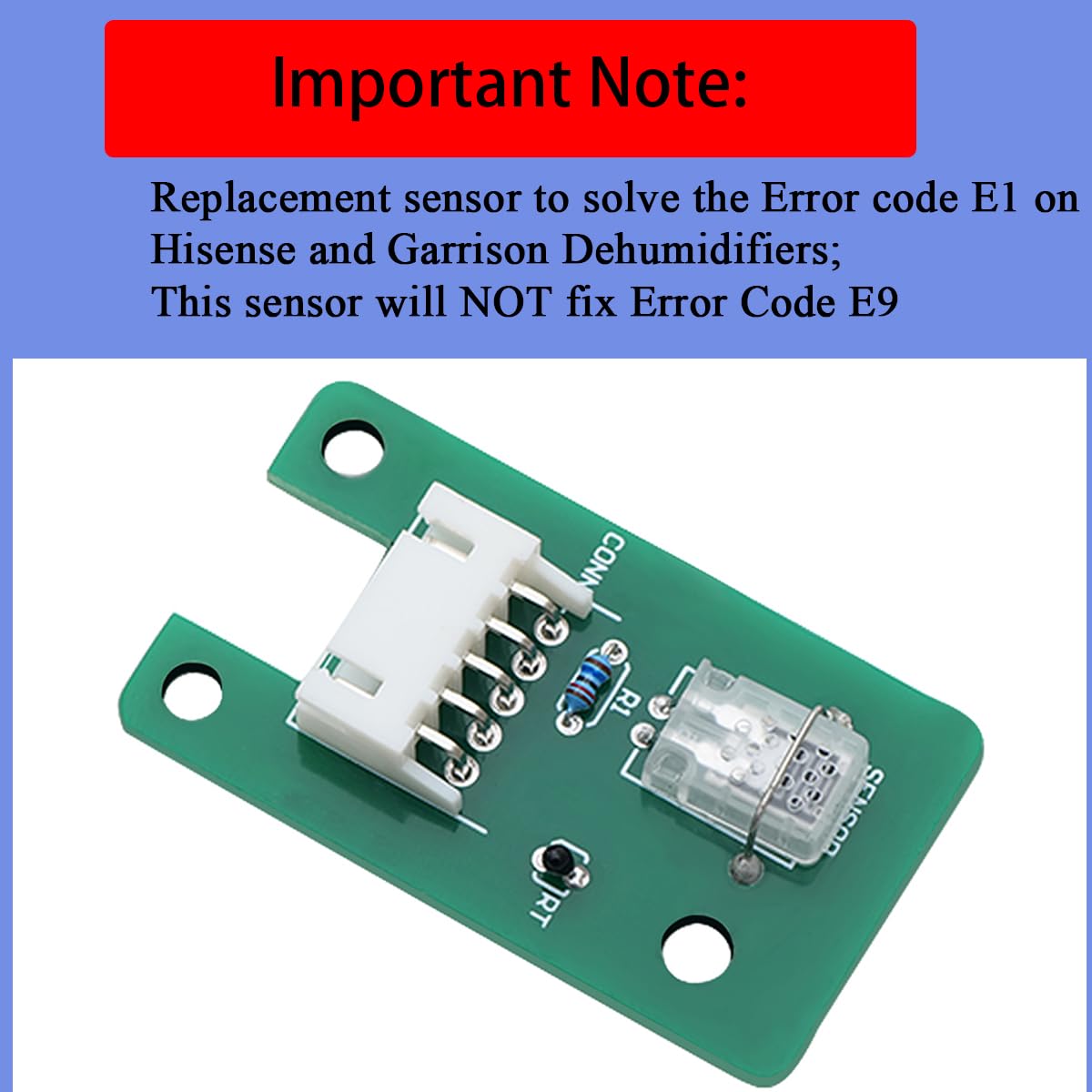
The humidity sensor plays a key role in your Hisense dehumidifier. It measures moisture levels and helps control the device’s operation. If error code E9 appears, the sensor might be faulty. Testing and replacing the humidity sensor can fix this issue. This section explains how to locate the sensor, test it with a resistor, and replace it if needed.
Locating The Sensor
The humidity sensor is inside the dehumidifier’s body. Usually, it sits near the air intake or inside the control panel. To find it, unplug the unit first for safety. Open the front or back cover carefully. Look for a small circuit board with two thin wires attached. The sensor often looks like a small metallic or plastic piece. Check your user manual for exact location details.
Using A Resistor For Testing
Testing the sensor requires a resistor. Unplug the dehumidifier and remove the sensor from its connector. Connect a resistor with the same resistance value as the sensor. This simulates the sensor’s signal to the control board. Plug the unit back in and turn it on. If the E9 error disappears, the sensor is likely faulty. If the error remains, the issue may be elsewhere.
Replacing The Sensor
After confirming the sensor is bad, order a replacement. Use the model number from your dehumidifier to find the right part. Unplug the unit before replacing anything. Remove the faulty sensor by disconnecting wires or clips. Install the new sensor by connecting wires firmly. Close the cover and plug the dehumidifier back in. Turn it on and check if the error code is gone.

Testing And Replacing The Humidity Sensor
Inspecting and repairing the circuit board is a crucial step in fixing the Hisense dehumidifier error code E9. The circuit board controls many functions of the dehumidifier, including the sensors that detect humidity levels. Problems on the board can cause the device to malfunction or show error codes. Knowing how to identify and fix issues on the circuit board can save time and repair costs.
Take care during inspection to avoid further damage. The circuit board is delicate and requires careful handling. Proper tools and a clean workspace help ensure a safe and effective inspection. If you feel unsure, consulting a professional is the best choice for a proper repair.
Signs Of Circuit Board Damage
Look for visible signs such as burnt marks, broken components, or corrosion on the board. Unusual smells like burning plastic may also indicate damage. Loose or disconnected wires can cause errors too. If the dehumidifier does not respond or keeps showing error code E9, the circuit board might be faulty.
Safe Inspection Techniques
Always unplug the dehumidifier before inspecting the circuit board. Use a soft brush or compressed air to clean dust gently. Avoid touching components with bare hands to prevent static damage. Use a multimeter to check for broken circuits or faulty parts carefully. Work in a dry area to protect the board from moisture.
Professional Repair Options
Some circuit board issues require expert attention. Professional technicians can diagnose complex problems with specialized tools. They can replace damaged parts or the entire board if needed. Using authorized repair services ensures the warranty stays valid. Professionals guarantee safe and long-lasting repairs for your dehumidifier.
Inspecting And Repairing The Circuit Board
Preventive maintenance helps avoid error codes like E9 on your Hisense dehumidifier. Small, regular steps keep your device working well. These tips save time and money by preventing issues before they start. Follow these simple practices to keep your dehumidifier in top shape.
Regular Cleaning
Clean your dehumidifier often to prevent dust buildup. Dust blocks airflow and affects sensor accuracy. Use a soft cloth to wipe the exterior and vents. Remove and wash the water tank regularly to stop mold growth. Clean or replace air filters as recommended in the manual. Clean parts help your dehumidifier run smoothly and avoid errors.
Proper Placement
Place your dehumidifier in a dry, well-ventilated area. Avoid spots near heat sources or direct sunlight. Keep it away from walls and furniture to allow airflow. Proper placement reduces strain on the machine. It also helps sensors detect humidity correctly. Good positioning lowers the chance of error codes like E9.
Routine Sensor Checks
Check sensors regularly for dirt or damage. Dirty sensors can cause wrong readings and trigger error codes. Gently clean sensors with a soft brush or cloth. Inspect sensor wires and connections for wear or looseness. Secure loose wires to maintain proper function. Routine checks ensure your dehumidifier senses humidity accurately and works without errors.
Preventive Maintenance Tips
Knowing when to call a professional for your Hisense dehumidifier is important. Some issues are easy to fix at home. Others need expert skills to avoid damage or safety risks. This section helps you decide when to seek help.
Complex Electrical Issues
Electrical problems can be dangerous. If your dehumidifier shows sparks or smells burning, stop using it. Issues inside the control board or wiring require a trained technician. Avoid opening the unit yourself as it may cause injury or worsen the problem.
Persistent Error Codes
An error code like E9 may clear after a reset. If it returns frequently, it indicates a deeper problem. Continuous errors affect performance and might cause other faults. A professional can diagnose and fix the root cause safely and correctly.
Warranty And Service Support
Your Hisense dehumidifier might still be under warranty. Attempting repairs yourself can void this coverage. Contact authorized service centers to keep warranty intact. Professionals offer proper parts and service to maintain your device’s lifespan.
Frequently Asked Questions
How To Fix E9 Code On Hisense Dehumidifier?
To fix the E9 code on a Hisense dehumidifier, unplug it for 10 minutes. Check and clean the humidity sensor. Replace the sensor if damaged. Restart the unit. Contact support if the error persists.
How To Fix E9 Error Code On Dehumidifier?
To fix the E9 error on a dehumidifier, unplug it and wait 10 minutes. Check and clean the humidity sensor. Replace the sensor if faulty. Restart the unit. Contact customer support if the error persists.
How Do I Reset My Hisense Dehumidifier?
Unplug your Hisense dehumidifier for 5 minutes. Plug it back in to reset. Press the power button to restart the unit.
What Does E9 Mean On A Hisense?
E9 on a Hisense indicates a humidity sensor error. Check sensor connections or replace the sensor to fix it.
What Does Error Code E9 Mean On Hisense Dehumidifier?
Error code E9 usually signals a problem with the humidity sensor. It may be faulty or disconnected. This stops the unit from reading humidity properly.
Conclusion
Fixing the Hisense dehumidifier error code E9 can be simple. Check the sensor and clean any dirt or dust. Restart the unit after inspecting all connections. Replace faulty parts if needed to avoid repeated errors. Regular maintenance keeps your dehumidifier working well.
Stay patient and follow each step carefully. Your device will run smoothly again soon.