
Replacing the battery in your Blink camera sounds simple, but it’s easy to make mistakes if you don’t know the right steps. Blink cameras are popular for their easy setup and wireless design, but battery issues are one of the most common complaints among users.
If your Blink camera stops working, starts missing alerts, or you see a low battery warning in the app, it’s time for a battery change. In this guide, you’ll learn everything about replacing Blink camera batteries, from the tools you need to common pitfalls to avoid, real-world tips, and even how different Blink models compare.
By the end, you’ll feel confident swapping batteries and keeping your camera running smoothly.
Understanding Blink Camera Battery Types
Before you open your Blink camera, it’s important to know which batteries it uses. Most Blink cameras use AA lithium batteries, but not all batteries are equal. Here’s what you need to know:
- Blink Indoor, Outdoor, and XT/XT2 models: Use two AA 1.5V lithium batteries.
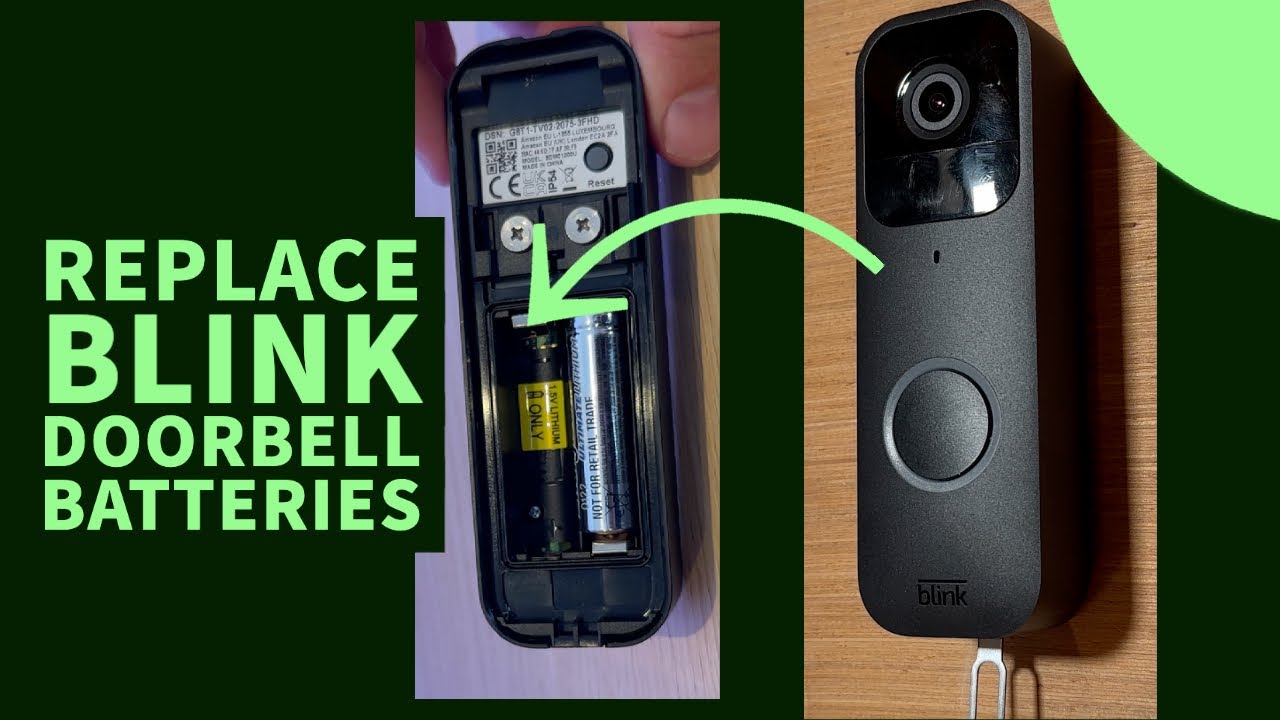
- Blink Video Doorbell: Uses two AA 1.5V lithium batteries.
- Blink Mini: Does not use batteries; it requires a wired connection.
You should never use alkaline or rechargeable batteries in these devices. Lithium batteries last longer and are more stable, especially in cold or hot weather. According to Blink, their cameras can run up to two years on a pair of lithium batteries. But real-world usage often shortens this to about 6–12 months, depending on how many motion alerts you get, how often you use live view, and the climate.
Why Battery Choice Matters
Choosing the right battery is not just about power. It affects your camera’s performance and safety. Lithium batteries are designed for high-drain devices, like wireless cameras. Alkaline batteries may fit, but they drain quickly and can cause your camera to shut down unexpectedly. Rechargeable batteries often have lower voltage (1.2V instead of 1.5V), so your Blink camera may not work at all or will constantly show a low battery warning.
Non-obvious insight: If you use off-brand or cheap batteries, your camera may stop working in extreme temperatures. Lithium batteries maintain performance even in cold winters or hot summers, which is critical for outdoor cameras.
Tools And Materials You Need
Before you start, gather these items:
- Fresh AA lithium batteries (Energizer Ultimate Lithium is recommended)
- Small screwdriver (for some models)
- Clean cloth (for wiping contacts)
- Blink app (to monitor battery status)
Optional but helpful:
- Gloves (if you want to avoid fingerprints or static)
- Flashlight (for dark corners)
- Battery recycling bag (for disposing old batteries responsibly)
Step-by-step Guide: Replacing Blink Camera Battery
Replacing the battery is easy if you follow the correct steps. The process is similar for most Blink cameras, but there are small differences depending on the model.
1. Prepare Your Work Area
Pick a clean, dry place to work. If you’re replacing batteries outdoors, avoid rainy or humid conditions. Lay out your tools and batteries so you don’t have to search for them mid-task. Make sure your camera is easy to reach.
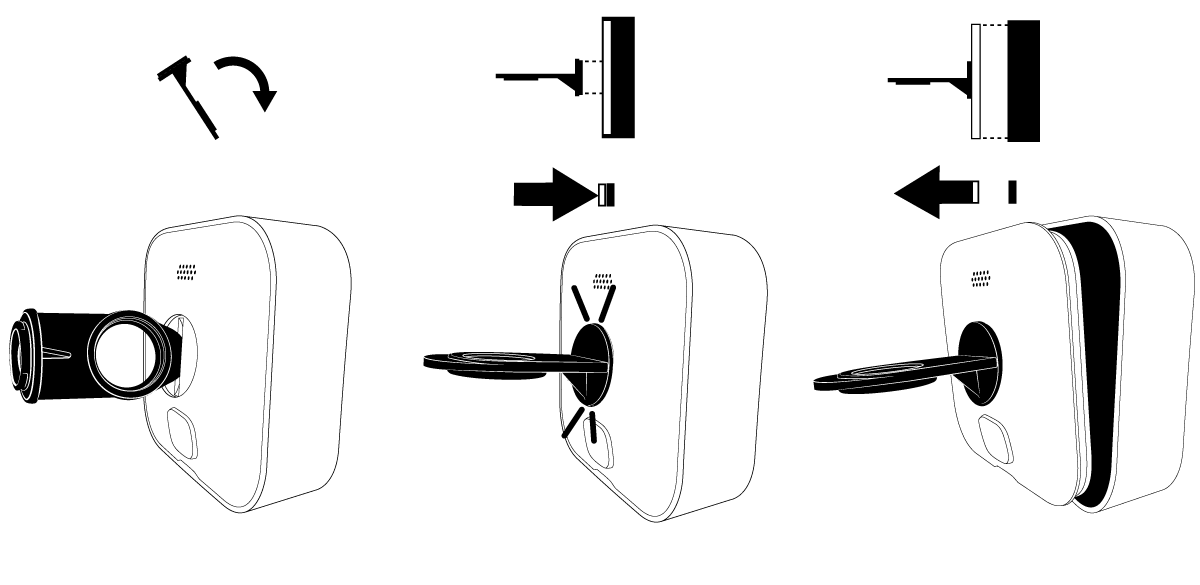
2. Remove The Camera From Its Mount
For Blink Outdoor and Indoor cameras, gently slide the camera off its mount. For XT and XT2, pinch the clips on the sides and pull the camera out. For the Video Doorbell, use the small screwdriver to unscrew the bottom, then lift the device off.
Tip: Never force the camera off the mount. You risk cracking the housing or damaging the electronics.
3. Open The Battery Compartment
Look for the back cover. Most Blink cameras have a release tab or a small screw. Press the tab or unscrew the cover to access the battery compartment. For XT and XT2, the cover slides open. For Blink Outdoor, you may need to turn a latch.
If you see dirt or moisture inside, wipe it gently with a dry cloth before proceeding.
4. Remove The Old Batteries
Pull out the old AA lithium batteries. Check for corrosion or leaks. If you see white powder, sticky residue, or rust, wear gloves and wipe the compartment with a clean cloth. Do not use water or cleaning sprays.
Practical insight: Some people forget to check battery orientation. Take a photo before removing the batteries if you’re unsure.
5. Insert New Batteries
Place the new AA lithium batteries into the compartment. Make sure the positive (+) and negative (-) ends line up with the markings inside. Incorrect placement can damage the camera.
Common mistake: Mixing old and new batteries. Always replace both at once, even if only one seems dead. This prevents uneven power and avoids damaging the battery contacts.
6. Close The Compartment
Replace the cover, snap or screw it back in place. Make sure it clicks securely. If the cover is loose, your camera may not be weatherproof anymore. For outdoor models, double-check the seal.
7. Remount The Camera
Put the camera back on its mount. For video doorbells, screw the bottom back in. Make sure the camera is facing the right direction and is tight enough that it won’t fall off.
8. Test The Camera
Open your Blink app and check the battery status. If the camera shows “Battery OK,” you’re done. If you see “Low Battery,” double-check the battery orientation and ensure you used fresh lithium batteries.
Try live view and trigger a motion alert to confirm the camera is working.
Troubleshooting: What To Do If Your Blink Camera Won’t Start
Sometimes, even after replacing batteries, your Blink camera doesn’t turn on or shows a warning. Here’s how to fix common issues:
- Camera won’t power up: Remove and reinsert the batteries. Make sure they are lithium, not alkaline or rechargeable.
- Low battery warning: Check the voltage; some lithium batteries are counterfeit and have lower voltage.
- Camera not connecting: Restart your WiFi router and sync module. Sometimes, network issues cause the camera to appear offline.
- Moisture in compartment: Dry the compartment thoroughly; moisture can short the contacts.
- Corroded contacts: Use a pencil eraser to gently clean battery contacts if they look rusty.
If your camera still doesn’t work, try a factory reset from the Blink app or contact Blink support.
Blink Camera Models: Battery Replacement Comparison
Blink makes several camera models, and the battery replacement steps are slightly different for each. Here’s a comparison to help you identify your device and avoid mistakes.
| Model | Batteries Used | Battery Life (Typical) | Compartment Access | Special Notes |
|---|---|---|---|---|
| Blink Outdoor | 2 AA Lithium | Up to 2 years | Latch/Tab | Weatherproof |
| Blink Indoor | 2 AA Lithium | 1–2 years | Tab/Screw | For indoor use only |
| Blink XT/XT2 | 2 AA Lithium | 1 year | Slide cover | Older models |
| Blink Video Doorbell | 2 AA Lithium | Up to 1 year | Screw | Screwdriver needed |
| Blink Mini | None (wired) | N/A | N/A | No battery, USB power |
Non-obvious insight: Many users confuse Blink Mini with other models and try to open it for battery replacement. The Mini does not use batteries at all.
Tips To Make Your Batteries Last Longer
Battery life depends not just on the battery brand, but also on how you use your camera. Here’s how you can get the most out of your Blink camera battery:
- Reduce motion sensitivity: Lower the sensitivity in the app to prevent false alerts.
- Limit live view usage: Live view drains batteries fast. Use it only when necessary.
- Optimize video clip length: Set shorter clip lengths for motion events.
- Turn off audio recording: If you don’t need it, audio uses extra power.
- Check WiFi strength: Poor signal makes the camera work harder, draining batteries.
- Avoid extreme temperatures: Place your camera in shaded areas or protected spots.
Example: If your camera is near a busy street, it will trigger often and drain the battery quickly. Moving it to a quieter spot can double battery life.
Battery Brands: Which Ones Work Best?
Not all lithium batteries perform the same. Blink recommends Energizer Ultimate Lithium. Here’s a comparison of popular brands:
| Brand | Type | Average Life (Blink Camera) | Cost (per pair) | Performance |
|---|---|---|---|---|
| Energizer Ultimate Lithium | Lithium | 12–24 months | $5–$6 | Excellent |
| Duracell Ultra Lithium | Lithium | 10–20 months | $6–$8 | Very good |
| Amazon Basics Lithium | Lithium | 8–16 months | $4–$5 | Good |
| Generic Lithium | Lithium | 6–12 months | $3–$4 | Variable |
| Alkaline | Alkaline | 2–6 months | $2–$3 | Poor |
Straight-to-the-point helper: Always use lithium, not alkaline. The small extra cost saves you hassle and prevents camera downtime.
How To Dispose Of Old Batteries
You should never throw old lithium batteries in the trash. They can leak chemicals and are dangerous for the environment. Most cities have battery recycling programs.
- Store old batteries in a bag or box.
- Take them to a recycling center or drop-off point.
- Never burn or crush batteries.
To find a recycling location near you, visit the official EPA battery recycling page: EPA Battery Recycling.
Common Mistakes And How To Avoid Them
Many people make small errors that cause their Blink camera to stop working or shorten battery life. Here are the most common mistakes:
- Using alkaline or rechargeable batteries: Only lithium batteries work reliably.
- Wrong battery orientation: Double-check the plus and minus signs.
- Forgetting to clean battery contacts: Dust or corrosion can block power.
- Mixing battery brands or types: Always use matching pairs.
- Not closing the compartment fully: Loose covers let in moisture.
Experience-based guide: If you move your camera often, check the compartment each time for loose batteries. A few seconds of checking prevents weeks of missed alerts.
Advanced Tips: For Maximum Battery Performance
If you want your Blink camera to perform at its best, consider these advanced tips:
- Firmware updates: Sometimes, Blink releases updates that improve battery efficiency. Check the app for updates regularly.
- Sync module placement: The sync module should be close to your cameras. If it’s far, cameras use more power to stay connected.
- Test batteries with a voltmeter: If you’re unsure about battery freshness, a voltmeter can help you spot weak batteries before installing them.
- Environmental covers: For outdoor cameras, use weatherproof covers to shield from rain or snow. This protects the battery compartment and extends life.
Non-obvious insight: Some users report that storing spare lithium batteries in the fridge keeps them fresh longer. However, only do this if the batteries are sealed and dry.
Signs Your Blink Camera Needs A New Battery
You don’t always need to wait for the app to tell you. Here are signs your camera battery is running low:
- Delayed motion alerts: If you start missing notifications, battery power may be low.
- Blinking red light: Many models flash a red LED when the battery is weak.
- Offline status: The camera appears offline, even with good WiFi.
- Shorter video clips: The camera may cut off recordings if power is low.
Friendly mentor: If you see these signs, replace batteries soon, even if the app hasn’t warned you yet. Waiting too long risks losing important footage.
Safety Precautions When Handling Batteries
Lithium batteries are safe if handled correctly, but improper use can be dangerous.
- Always check for leaks or swelling before installing.
- Never force batteries into the compartment.
- Keep batteries away from pets and children.
- Avoid mixing old and new batteries.
- If a battery leaks, use gloves and wash your hands after handling.
Calm expert: Treat batteries with respect. A small mistake can damage your camera or, in rare cases, cause overheating.
Real-world Examples: Battery Replacement Scenarios
Let’s look at a couple of situations to help clarify the process:
Example 1: Sarah uses her Blink Outdoor camera by her front door. She gets many alerts from passing cars. Her batteries last about 7 months. She always replaces both batteries at once and wipes the compartment clean. Sarah uses Energizer Ultimate Lithium, and she recycles her old batteries at the local store.
Example 2: Miguel has a Blink Video Doorbell. He forgot to use lithium batteries and installed alkaline ones. His doorbell stopped working after two months. After switching to lithium, the doorbell lasted 11 months. Miguel learned to check battery type before buying.
Example 3: Mei tried to replace batteries in her Blink Mini, but couldn’t find a compartment. She realized her device needed USB power, not batteries. Mei now checks the manual before attempting repairs.
Non-obvious insight: Real-world battery life is often shorter than manufacturer claims because of frequent alerts, weather, and WiFi issues.
How Often Should You Replace Blink Camera Batteries?
There’s no fixed schedule, but most users need to replace batteries every 6–12 months. If your camera is in a busy area or you use live view often, expect to change batteries more frequently.
- High activity: 4–7 months
- Normal use: 8–12 months
- Low activity: Up to 18 months
Straight-to-the-point helper: Don’t wait for a complete shutdown. Replace batteries at the first sign of weakness.
Environmental Impact Of Battery Usage
Lithium batteries are powerful, but they create waste. Each Blink camera user goes through 2–4 pairs per year on average. With millions of users, this adds up fast. Recycling batteries is important to avoid environmental harm.
According to the EPA, Americans throw away about 3 billion batteries each year. Lithium batteries contain metals and chemicals that can leak into soil and water if not disposed of properly.
Practical advisor: Always recycle, never toss batteries in the trash. Check local rules for safe disposal.
Smart Home Integration: How Battery Replacement Affects Your Security System
If your Blink camera is part of a larger smart home setup (like Alexa integration), battery issues can disrupt your whole system. A dead camera may cause Alexa routines to fail or miss security alerts.
When you replace batteries, always check that the camera reconnects to your smart home devices. If you notice problems, restart your sync module and refresh connections in your smart home app.
Non-obvious insight: Some smart home users set up automatic reminders every 6 months to check and replace batteries, avoiding gaps in their security.
Comparing Blink Battery Replacement To Other Brands
Blink cameras are known for their easy battery changes. But how do they compare to other brands?
| Brand | Battery Type | Replacement Difficulty | Average Battery Life | Notes |
|---|---|---|---|---|
| Blink | AA Lithium | Easy | 6–24 months | Tool-free for most models |
| Ring | Rechargeable pack | Moderate | 4–6 months | Requires charging |
| Arlo | CR123 Lithium | Moderate | 3–6 months | Small batteries, higher cost |
| Wyze | Built-in lithium | Hard | 6 months | Not user-replaceable |
Blink’s AA lithium system is simple, cost-effective, and reliable for most users.

Frequently Asked Questions
What Batteries Should I Use For My Blink Camera?
Always use AA lithium batteries for Blink cameras (except Blink Mini, which is wired). Brands like Energizer Ultimate Lithium are recommended. Never use alkaline or rechargeable AA batteries.
How Do I Know When To Replace Blink Camera Batteries?
Your Blink app will show a low battery warning. You may also notice delayed alerts, offline status, or a blinking red light. Replace batteries at the first sign of weakness.
Can I Use Rechargeable Batteries In Blink Cameras?
No. Rechargeable batteries usually have lower voltage (1.2V instead of 1.5V). Blink cameras require lithium AA batteries for reliable performance.
How Long Do Blink Camera Batteries Last?
Depending on usage, Blink camera batteries last between 6–24 months. High activity or frequent live view usage shortens battery life.
How Should I Dispose Of Old Blink Camera Batteries?
Take used lithium batteries to a recycling center or drop-off location. Never throw them in the trash. Check the EPA battery recycling website for locations.
Replacing your Blink camera battery is a small task, but it’s essential for keeping your home secure. By following these steps and tips, you’ll avoid common mistakes, keep your camera running smoothly, and protect both your device and the environment.
Remember to use quality lithium batteries, check the compartment for damage, and recycle responsibly. With this knowledge, your Blink camera will stay ready to capture every important moment, day or night.