
Is your Samsung refrigerator’s ice maker suddenly stopped working or making ice the way it used to? Before you rush to call a repair technician or consider expensive replacements, there’s a simple fix you can try yourself: resetting the ice maker.
Resetting your Samsung ice maker can often clear minor glitches and get it back to producing ice quickly. In this guide, you’ll learn exactly how to reset your Samsung refrigerator ice maker step-by-step, using easy-to-follow instructions anyone can handle. Stick with me, and you’ll have your ice maker working smoothly again in no time.
Let’s get started!
Locate Ice Maker Button
Find the ice maker button inside the ice tray compartment, usually on the right side. Press and hold it until you hear a chime to reset the ice maker. This simple step helps restart the ice-making process quickly.
Finding the ice maker button is the first step to reset your Samsung refrigerator ice maker. This button often controls the ice maker’s functions and allows you to reset it.
Look inside the freezer compartment on the side or near the ice maker assembly. The button is usually small and may be blue or black.
Some models label it as the “Test,” “Reset,” or “Ice Maker” button. Pressing this button helps clear errors or restarts the ice-making process.
Knowing the exact button location saves time and prevents confusion during reset.
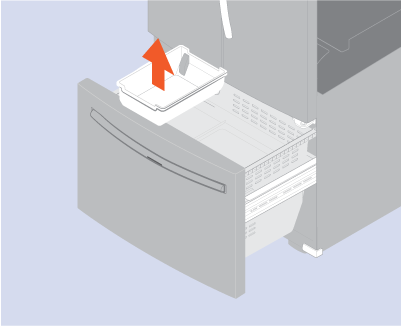
Remove Ice Bucket
Removing the ice bucket is the first step to reset your Samsung refrigerator ice maker. This allows you to access the ice maker components safely. It also makes the reset process easier and more effective.
Handle the ice bucket carefully to avoid spilling ice or water. Some models have different bucket designs, so check your user manual if unsure.
Locate The Ice Bucket
Open the freezer door gently. Look for the ice bucket inside the freezer compartment. It usually sits on a slide or a shelf that you can pull out.
Pull Out The Ice Bucket
Grip the ice bucket firmly on both sides. Pull it straight out towards you. Avoid tilting it to prevent ice from falling out.
Clear Ice Blockages
Check the bucket for any ice clumps or blockages. Remove any stuck ice to allow smooth operation. This helps the ice maker reset properly.
Place The Ice Bucket Back
Slide the ice bucket back into its original position. Make sure it fits securely and does not wobble. Close the freezer door gently after replacing the bucket.
Press And Hold Reset Button
The easiest way to reset your Samsung refrigerator ice maker is by pressing and holding the reset button. This button is usually located inside the ice maker compartment. Pressing it resets the ice maker’s system and clears any errors. This method helps fix common issues like no ice production or ice jams.
Hold the button long enough until you hear a chime or melody. The sound signals the reset process has started. After releasing the button, the ice maker will restart and begin making ice again. This quick step often solves problems without needing professional help.
Locate The Reset Button
Open the freezer door and find the ice maker inside. Look for a small blue or white button on the ice maker unit. This is the reset button. It may be labeled as “Test” or “Reset.”
Press And Hold The Button
Use your finger to press the reset button firmly. Keep holding it for about 10 seconds. You will hear a chime or melody, signaling the reset started. Do not release the button too soon.
Release And Wait
After hearing the sound, release the button. The ice maker will stop and then restart its cycle. Give it a few minutes to begin making ice again. The reset clears errors and refreshes the ice maker’s operation.
Listen For Chime
Press the blue button inside the ice maker until you hear a chime. This resets the Samsung refrigerator ice maker quickly. It helps fix common ice-making problems without tools.
Resetting the ice maker on your Samsung refrigerator often involves hearing a chime. This sound confirms that the reset process has started. Paying close attention to this chime helps ensure the ice maker resets properly.
The chime acts as an audio signal, letting you know the button press was successful. Without hearing it, the reset might not complete, and the ice maker may not work correctly.
When you press the reset button inside the ice maker compartment, hold it for a few seconds. Keep listening carefully for a clear chime or melody. This usually means the ice maker has entered reset mode.
After the chime, wait a few minutes for the ice maker to restart. You might hear water filling the ice tray or see the ice maker begin its cycle again.
Not hearing the chime could mean the button was not pressed long enough or the ice maker has a deeper issue. Try pressing the button again, making sure to hold it steady until you hear the sound.
Wait For Water Refill
Allow time for the water to refill the ice maker after resetting. This pause ensures the ice maker refills properly before producing ice again. Patience helps avoid errors during the reset process.
After resetting your Samsung refrigerator ice maker, the next step is to wait for the water refill. The ice maker needs water to start producing ice again. Without water, the ice maker cannot function properly.
The refill process usually takes a few minutes. During this time, the water valve opens to allow water into the ice mold. You might hear some sounds of water flowing inside the fridge.
Check Water Supply
Make sure the water supply line is connected and turned on. A closed or blocked line will stop water from reaching the ice maker. If the water flow is weak or stopped, the refill will not happen.
Listen For Water Filling
Listen carefully for the water filling sound. This confirms that water is entering the ice maker. If you do not hear any water flow within 10 minutes, inspect the water valve or supply line for issues.
Allow Time For Ice Production
After the water refill, the ice maker needs time to freeze the water. This freezing cycle can take several hours. Avoid opening the freezer door often during this time to keep the temperature steady.
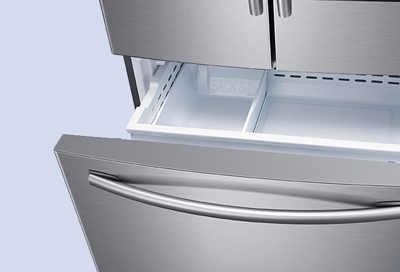
Defrost Frozen Ice Maker
Frozen ice makers stop ice production and cause blockages. Defrosting removes ice buildup inside the ice maker. This process restores proper function quickly. Follow these simple steps to defrost your Samsung refrigerator ice maker safely.
Unplug The Refrigerator
Disconnect the power to prevent any electrical hazards. Unplugging stops the ice maker and cooling system.
Remove The Ice Bucket
Take out the ice bucket carefully. Clearing the bucket allows better access to the ice maker area.
Open The Freezer Door Fully
Keep the freezer door open to let warm air reach the ice maker. This speeds up the melting of ice.
Use A Hair Dryer On Low Heat
Gently warm the ice maker with a hair dryer. Hold it a few inches away to avoid damage.
Wipe Away Melted Ice
Use a soft cloth to remove water and ice pieces. Keep the area dry to prevent refreezing.
Wait For Complete Defrosting
Allow all ice to melt naturally if you avoid using heat. This may take several hours.
Plug The Refrigerator Back In
Reconnect power once the ice maker is fully defrosted. The ice maker will reset and start working.
Check For Error Codes
Start by checking the refrigerator’s display for any error codes. These codes help identify specific issues with the ice maker. Understanding the error can guide you on the next steps to reset the ice maker properly.
Samsung refrigerators have a built-in system that shows error codes. These codes tell you what might be wrong with the ice maker. Checking these codes helps you know if a reset is needed or if there is a bigger problem.
Error codes appear on the refrigerator’s display panel. Some models show codes on a small screen inside the fridge. The codes use letters and numbers to point out specific issues.
Locate The Error Code On The Display
Look at the refrigerator’s main control panel. The error code usually flashes or stays on the screen. Take note of the code shown. You can find the meaning in your user manual or Samsung’s website.
Interpret Common Ice Maker Error Codes
Common error codes include “Ice Jam,” “Water Supply,” and “Motor Error.” Each code relates to a part of the ice maker system. Knowing the code helps you decide the next step.
Clear Error Codes Before Reset
Sometimes, error codes stay even after fixing the problem. Clearing them before resetting the ice maker is important. Use the control panel buttons to clear the code as explained in the manual.
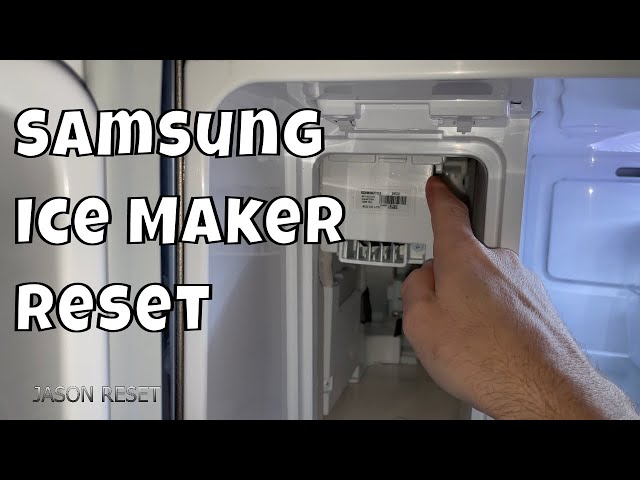
When To Contact Support
Contact support if the ice maker won’t reset after pressing the reset button several times. Also reach out when ice production stops or water leaks occur. Persistent errors or unusual noises may need professional help.
Signs That Indicate You Should Contact Support
Your Samsung ice maker may need professional help if resets fail.
If the ice maker does not produce ice after multiple resets, call support.
Strange noises or leaks around the ice maker are also warning signs.
Visible damage or broken parts mean you should contact Samsung support.
Persistent Error Codes On The Display
Error codes can indicate complex issues beyond basic troubleshooting.
When error codes stay on the screen after resetting, seek expert help.
Support can guide you through detailed diagnostics or arrange repairs.
Water Supply Problems Or Freezing Issues
If water supply to the ice maker is inconsistent, contact support.
Ice maker freezing inside or not filling with water needs professional service.
These problems often require technical adjustments or part replacements.
Unresponsive Ice Maker Controls
When buttons or control panels do not respond after reset, get assistance.
Support can help troubleshoot electronic control failures or software glitches.
Ignoring unresponsive controls can lead to further damage and costs.
Frequently Asked Questions
How Do I Manually Reset My Ice Maker?
To manually reset your ice maker, locate and press the reset button until you hear a chime. Wait for water to refill and ice production to restart. Defrost the ice maker if frozen before resetting.
Will Unplugging My Samsung Fridge Reset It’s Ice Maker?
Unplugging your Samsung fridge does not reset the ice maker. Use the reset button inside the ice maker compartment instead.
Why Has My Samsung Refrigerator Stopped Making Ice?
Your Samsung refrigerator may stop making ice due to a frozen ice maker, water supply issues, or a need for a reset. Press and hold the reset button inside the ice compartment until you hear a chime. Defrost the ice maker if frozen, and check for error codes on the display.
What Is The Blue Button On The Side Of A Samsung Ice Maker?
The blue button on a Samsung ice maker resets the unit. Press and hold it until you hear a chime to restart ice production.
How Do I Reset The Samsung Refrigerator Ice Maker?
Press and hold the blue reset button inside the ice maker until you hear a chime. This resets the ice maker and restarts ice production.
Conclusion
Resetting your Samsung refrigerator ice maker is simple and quick. Just press the reset button until you hear the chime. This action restarts the ice maker and fixes common problems. Regular resets can keep your ice maker working smoothly. Remember to follow the steps carefully for best results.
Now, enjoy fresh ice without any hassle.