
Mounting a TV on the wall can transform your living space and save valuable floor area. But if you’ve never installed a TV mount before, you might not know about spacers—small but essential parts that can make or break your installation. Spacers are often included in TV mounting kits, but their purpose isn’t always clear. Using them incorrectly can lead to poor alignment, unstable mounting, or even a damaged TV. This guide will explain, in clear and simple language, everything you need to know about how to use spacers on TV mount setups, so you can complete your installation with confidence and avoid common mistakes.
Why Spacers Matter In Tv Mounting
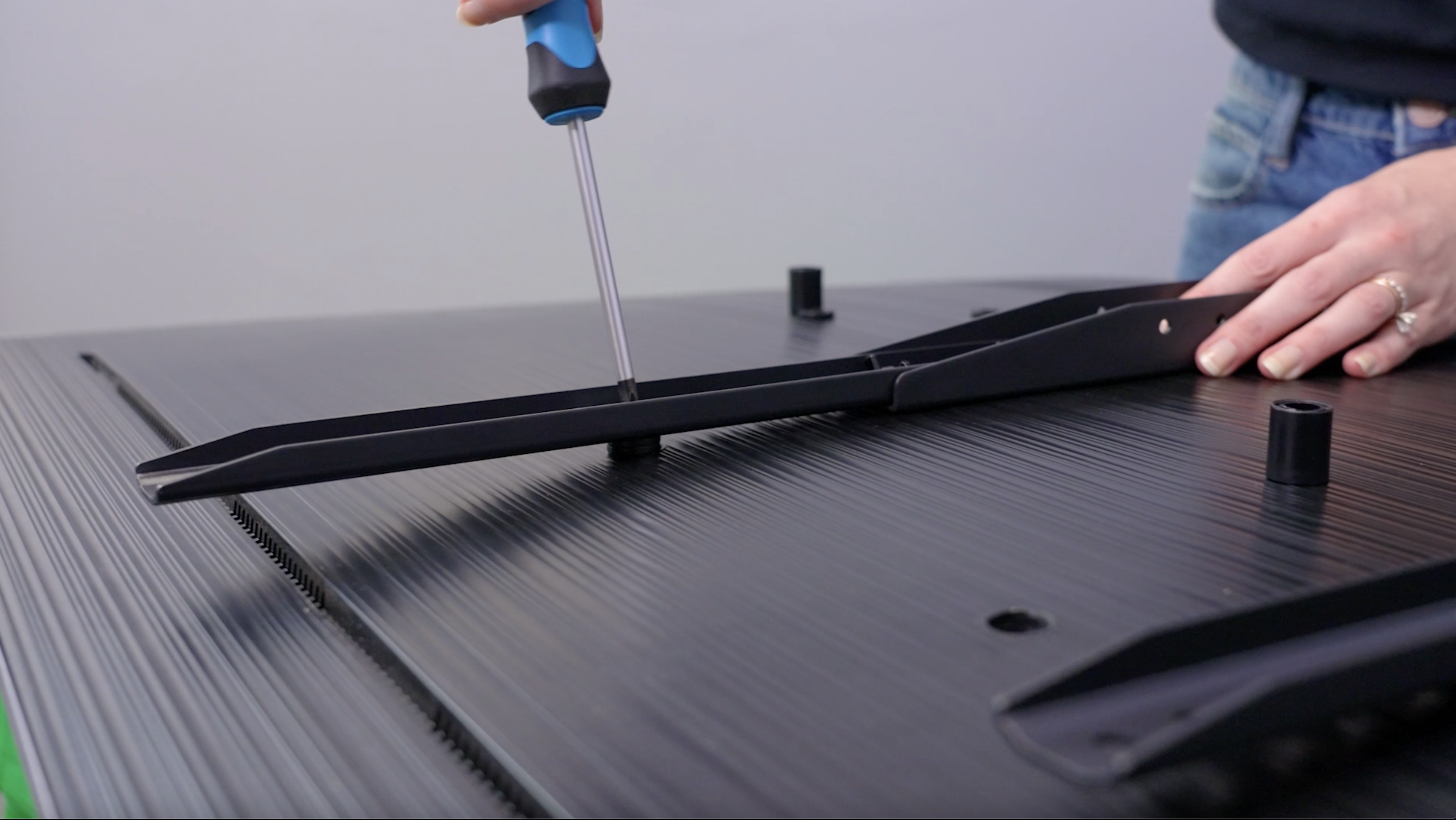
Spacers are small cylindrical or square pieces, often made from plastic or metal, that fit between the TV’s mounting holes and the bracket. Their main job is to create space—usually just a few millimeters—between the TV and the bracket. This gap can be crucial for several reasons:
- Protects the TV: Some TVs have a curved back, protruding ports, or uneven surfaces. Spacers prevent pressure points and keep the mount from pressing directly against sensitive areas.
- Allows cable clearance: HDMI, power, and other cables sometimes need room to fit behind the TV. Spacers provide extra space so wires are not pinched or bent.
- Ensures stability: When used correctly, spacers help the screws hold the TV firmly without tilting or wobbling.
Many beginners don’t realize how important spacers are until they face issues like blocked ports or insecure mounting. If you want your TV to hang straight and stay safe, knowing how to use spacers is essential.
Understanding Tv Mount Spacers
Before you begin, it’s helpful to know the different types of spacers and when each is used. Not all TVs or mounts require spacers, but many do—especially newer, thinner, or curved TVs.
Types Of Spacers
- Plastic spacers: The most common, usually included in mounting kits. They are lightweight and easy to handle.
- Metal spacers: Less common, but offer extra strength. Often used for heavier TVs or commercial installations.
- Flat washers: Sometimes used as spacers for small adjustments. They are thinner and can help fine-tune the gap.
When Are Spacers Needed?
You will need spacers if:
- The TV back is not flat (curved or with bulges).
- The mounting holes are recessed.
- The TV’s ports or power plug would be blocked by the bracket.
- The screws are longer than the depth of the TV’s mounting holes (to avoid over-tightening).
Not every installation needs spacers. Some TVs have flat backs and accessible ports, so you can attach the mount directly. But if you’re unsure, it’s better to check than to risk damaging your TV.
Tools And Materials You’ll Need
A successful installation starts with the right tools and materials. Here’s what you’ll need for mounting a TV with spacers:
- TV wall mount kit (with included spacers and screws)
- Screwdriver or drill
- Stud finder
- Level
- Measuring tape
- Pencil or marker
- Socket wrench (optional, for larger bolts)
- Soft cloth (to protect TV surface)
- Manuals for both your TV and the mount
Tip: Keep all spacers, washers, and screws organized. Mixing them up can make installation harder.
Step-by-step Guide: How To Use Spacers On Tv Mount
Mounting a TV with spacers involves several steps. Each step matters—take your time and double-check your work. Here’s a detailed walkthrough:
1. Read The Manuals Carefully
Every TV and mount is different. Start by reading both manuals. Look for any notes about using spacers. Some TV brands, like Samsung or LG, mention specific spacer sizes.
2. Prepare Your Workspace
Clear an area large enough to lay your TV face-down on a soft cloth. This prevents scratches. Gather all tools and hardware.
3. Identify The Mounting Holes
Find the VESA holes (standard screw holes) on the back of your TV. Most TVs have four holes in a square or rectangle pattern.
If the holes are recessed, or the back is not flat, you will likely need spacers.
4. Test Fit The Screws
Gently insert the mounting screws (without the bracket or spacers) to check the depth. They should fit snug but not go in too deep. If the screw sticks out or the bracket doesn’t sit flat, spacers are necessary.
5. Select The Correct Spacers
Pick spacers that fill the gap between the TV back and the bracket. The spacer should be thick enough to keep the bracket from pressing on curved surfaces but not so thick that the screws cannot reach the holes.
6. Attach Spacers To The Screws
Place a spacer over each screw. The order should be:
- Screw head
- Mounting bracket
- Spacer
- TV back
In some cases, you may need to use a washer as well, especially if the screw head is small.
7. Secure The Bracket To The Tv
Line up the bracket with the holes. Insert the screws (with spacers) and tighten them by hand first. Then use a screwdriver to finish, but don’t over-tighten. The bracket should feel secure, with no wobble.
8. Mount The Bracket On The Wall
Follow the mount’s manual to attach the wall bracket. Use a stud finder for safety, and make sure the bracket is level.
9. Hang The Tv
With help, lift the TV and hook it onto the wall bracket. Double-check the stability and make sure there’s enough space for cables.
10. Connect Cables And Test
Plug in power, HDMI, and other cables. If spacers are the correct size, you should have enough room for all connections.
Step Summary Table
Here’s a quick reference for the installation process:
| Step | Action | Purpose |
|---|---|---|
| 1 | Read manuals | Understand TV and mount requirements |
| 2 | Prepare workspace | Protect TV and organize tools |
| 3 | Identify holes | Check if spacers are needed |
| 4 | Test fit screws | Choose correct screw length |
| 5 | Select spacers | Match gap for safe mounting |
| 6 | Attach spacers | Prevent pressure on TV |
| 7 | Secure bracket | Ensure stability |
| 8 | Mount on wall | Follow safety steps |
| 9 | Hang TV | Check for proper fit |
| 10 | Connect cables and test | Verify space and function |

Common Mistakes When Using Spacers
Even experienced DIYers can make mistakes with spacers. Here are errors to watch for:
- Choosing the wrong size: If the spacer is too thick, the screw won’t reach the hole. If too thin, the bracket might press on the TV or block ports.
- Skipping spacers: Some people skip them, thinking they are not important. This can bend the TV’s back or break it over time.
- Over-tightening screws: Tightening too much can crack the TV’s plastic or strip the threads.
- Mixing up hardware: Using the wrong screws or washers can lead to instability.
- Not checking cable clearance: After mounting, some realize they can’t plug in cables. Always test cable space before final installation.
One non-obvious mistake is not checking the manufacturer’s recommendations. Some TVs, especially high-end models, require specific spacers to avoid voiding warranties.
How To Choose The Right Spacers
Finding the correct spacer size is key. Here’s how to select the best fit for your TV and mount:
Measure The Gap
Lay the TV face-down. Place the bracket against the back and measure the distance between the bracket and the TV’s mounting hole. This is your spacer thickness.
Match Screw Length
The screw should go through:
- The bracket
- The spacer
- The TV’s mounting hole
But it should not go so far in that it damages the TV. Most mounting kits include several screw lengths—choose the one that, with the spacer, fits snugly.
Use The Manufacturer’s Guide
If your TV brand recommends a specific spacer, use it. For example, Samsung often provides a “Spacer Chart” in their manuals.
Spacer Size Comparison Table
To help you visualize, here’s a sample comparison of common spacer sizes and screw lengths:
| TV Type | Spacer Thickness | Screw Length | Notes |
|---|---|---|---|
| Flat-back TV | 2 mm | 14-16 mm | Often does not need spacers |
| Curved-back TV | 5 mm | 18-20 mm | Spacers usually required |
| Recessed holes | 10 mm | 22-25 mm | Longer screws and spacers needed |
Real-world Example: Mounting A Curved Tv
Let’s say you have a Samsung 55-inch curved TV. You open the mounting kit and see several plastic spacers. The TV’s manual says to use 5 mm spacers for the top holes and 10 mm for the bottom. Why? The TV’s back is thinner at the top, so the bracket would press too hard without spacers. At the bottom, the curve is deeper, so a thicker spacer is needed.
If you use the same size spacer for all holes, the TV will tilt forward or backward. Always measure and match each hole.
After installation, check that all HDMI and power ports are accessible. With correct spacers, you’ll have enough space for even large plugs.
Advanced Tips For A Strong, Safe Mount
Some insights that even many DIYers miss:
- Check for hidden ports: Some TVs have side or downward-facing ports. Without enough spacer thickness, cables may not fit or may bend sharply.
- Mix and match spacers: Sometimes, you need different spacer sizes for top and bottom. Don’t be afraid to use what works, as long as the mount is level and secure.
- Recheck tightness after a week: Sometimes, screws settle, especially in new installations. A gentle retightening (by hand, not power tools) can prevent wobble.
When To Use Washers With Spacers
Washers are thin metal discs that spread force from a screw head. When used with spacers, they help prevent the screw from pulling through the bracket or damaging the spacer.
- Use washers if the screw head is smaller than the spacer.
- Always place the washer between the screw head and the bracket—not between the spacer and the TV.
This small detail can make a big difference in long-term safety.
Spacer Materials: Plastic Vs Metal
You might notice both plastic and metal spacers in different kits. Which is better?
Plastic spacers are lighter and less likely to scratch the TV. They’re fine for most home TVs under 60 inches.
Metal spacers are stronger and used for large or commercial displays. They won’t compress over time.
Pro tip: Never substitute random household objects (like coins or wood pieces) for spacers. Only use hardware from the kit or approved by the manufacturer.
Spacer Safety And Tv Warranties
Incorrect use of spacers can void your TV’s warranty. Many brands require using the right hardware for wall mounting. If you have any doubt, check the manual or contact support.
Some brands, like Sony and LG, have online guides for proper mounting. If you lose your manual, you can find most on the manufacturer’s website or trusted sources like CNET.
Spacer Alternatives: When You Don’t Have The Right Hardware
Sometimes, mounting kits are missing spacers or don’t fit your TV. Here’s what you can do:
- Buy a universal spacer kit: Many hardware stores sell kits with multiple sizes.
- Order from the TV brand: Official spacers are best for warranty protection.
- Never use makeshift spacers: Items like rubber grommets, cardboard, or coins are not safe.
If you must mount your TV before getting the correct spacers, wait. It’s better to delay than risk damage.

Troubleshooting: Common Spacer Problems
If you run into issues during mounting, here’s how to solve them:
The Screw Won’t Reach The Hole
- Try a thinner spacer.
- Use a longer screw (from the kit).
- Make sure the bracket is sitting flat.
The Tv Is Wobbly After Mounting
- Check that all screws are tight.
- Make sure spacers are the same thickness on each side.
- Double-check that the mount is level.
Cables Don’t Fit Behind The Tv
- Use thicker spacers.
- Re-route cables to side ports if available.
- Use right-angle adapters for HDMI or power.
The Bracket Blocks Tv Ports
- Adjust spacer size to tilt the bracket slightly, if allowed.
- If not, consider a different mount design.
Table: Spacer Use By Tv Brand
Different brands have different spacer needs. Here’s a quick comparison:
| Brand | Typical Spacer Size | Special Notes |
|---|---|---|
| Samsung | 5-10 mm | Curved models need specific spacers |
| LG | 4-8 mm | Flat and curved models differ |
| Sony | 6 mm | Check manual for OLEDs |
| Vizio | Varies | Flat models rarely need spacers |
| TCL | 4-6 mm | Depends on model year |
Helpful Practices For A Cleaner Install
- Label your screws and spacers: This makes future removal or remounting easier.
- Keep extra spacers: If you upgrade your TV or change mounts, extras can save a trip to the store.
- Take pictures: Photograph the mounting process, especially the back of the TV, in case you need to troubleshoot later.
Why Not All Tvs Need Spacers
Some modern TVs have completely flat backs and surface-level mounting holes. These can often be mounted without spacers. However, even in these cases, using a thin washer can help spread the force and prevent cracks.
If you’re unsure, use the “test fit” method—attach the bracket gently and see if it sits flat and stable. If not, add spacers until it does.
Maintenance And Rechecking Spacers
Mounts can loosen over time, especially if the TV is adjusted or moved. Every 6-12 months:
- Check all screws for tightness.
- Inspect spacers for cracks or compression.
- Listen for unusual noises when adjusting the TV.
This simple maintenance can prevent accidents and extend the life of your mount.
Environmental Factors And Spacer Wear
If your TV is mounted in a humid area (like near a kitchen or bathroom), plastic spacers can degrade faster. Metal spacers are better in these environments.
Direct sunlight or heat can also weaken plastic spacers over time. Always inspect hardware if moving the TV to a new location.
Summary: Spacer Dos And Don’ts
To recap the most important points:
- Do use spacers if your TV back is curved, has recessed holes, or if the mount blocks ports.
- Do select the correct spacer thickness for a tight, level fit.
- Don’t use makeshift spacers or force screws that don’t fit.
- Do check your TV and mount manuals for specific instructions.
- Don’t forget to allow space for cables and ports.
A careful, spacer-aware installation protects your TV, keeps your wall mount secure, and makes watching TV more enjoyable.
Frequently Asked Questions
What Are Tv Mount Spacers Used For?
Spacers are small parts that create space between the TV’s back and the mounting bracket. They help avoid pressure points, allow for cable clearance, and ensure a stable, level mount. Without spacers, the bracket might press on curved surfaces or block ports.
How Do I Know If My Tv Needs Spacers?
Check if your TV has a curved back, recessed mounting holes, or ports that might be blocked by the bracket. If the bracket does not sit flat against the TV, or if the screws are too long, you’ll need spacers.
Can I Use Any Object As A Spacer?
No, you should only use spacers from your mounting kit or those recommended by your TV or mount brand. Using random objects like coins or wood can damage your TV or cause it to fall.
What Size Spacers Should I Use?
The correct spacer size depends on your TV’s shape and mounting hole depth. Measure the gap between the TV and bracket, then select a spacer that fills the gap without making the screw too short or too long. Check your TV or mount manual for guidance.
Are Metal Or Plastic Spacers Better?
Plastic spacers are fine for most home TVs and are less likely to scratch. Metal spacers are stronger and better for heavy or commercial displays. Always use the type included in your mounting kit or recommended by the manufacturer.
Mounting a TV with spacers may seem tricky at first, but once you understand their role and how to use them, you’ll get a safe, professional-looking result. Take your time, follow the steps, and enjoy your new TV setup with peace of mind.