
Is your Keurig coffee maker giving you trouble right when you need your morning cup the most? You’re not alone.
Many Keurig users face frustrating problems like machines that won’t brew, won’t turn on, or make weak coffee. But don’t worry—these issues don’t have to ruin your day or your coffee routine. You’ll discover simple, effective solutions to the most common Keurig coffee maker problems.
Whether your machine is clogged, leaking, or just acting up, we’ll guide you step-by-step to get it back in perfect working order. Keep reading, and you’ll be enjoying your favorite brew again in no time.

Power Issues
Power issues are common problems that can stop your Keurig coffee maker from working. These issues can cause the machine to fail to turn on or suddenly shut down. Understanding the reasons behind power problems helps you fix them quickly. This saves time and avoids unnecessary expenses.
Keurig Won’t Turn On
Sometimes, your Keurig may not turn on at all. Check if the machine is properly plugged into a working outlet. Make sure the power switch is in the “on” position. Look for any visible damage to the power cord. A loose or damaged cord can stop power from reaching the machine.
Try plugging the Keurig into a different outlet. This can help identify if the problem is with the outlet or the coffee maker. If the machine still does not turn on, the issue may be internal.
Resetting Your Keurig
Resetting your Keurig can solve many power-related problems. Unplug the machine from the power source. Wait for about 5 minutes to let it cool down and reset. Plug the Keurig back in and try turning it on again.
This simple step clears any temporary errors. It often restores normal function. For some models, you might need to press and hold the power button for a few seconds to complete the reset process.
Blown Fuses And Overheating
A blown fuse inside the Keurig can cause it to lose power. Fuses protect the machine from electrical damage. If the fuse is blown, the machine will not turn on. This may happen after overheating or a power surge.
Overheating can occur if the machine runs too long without a break. It can also happen if the internal parts get clogged or dirty. Let the machine cool down before trying to use it again.
Fixing a blown fuse may require professional help. If your Keurig overheats often, clean it regularly and avoid continuous use for long hours.
Brewing Problems
Brewing problems with your Keurig coffee maker can ruin your morning routine. These issues affect how your coffee flows and tastes. Knowing common brewing problems helps fix them fast.
Below are some typical brewing troubles many users face. Each problem has simple checks and solutions.
Machine Not Brewing Coffee
Sometimes the Keurig won’t brew at all. This may happen if the machine is clogged or not getting power. Start by checking if the water reservoir has enough water. Make sure the machine is plugged in and turned on.
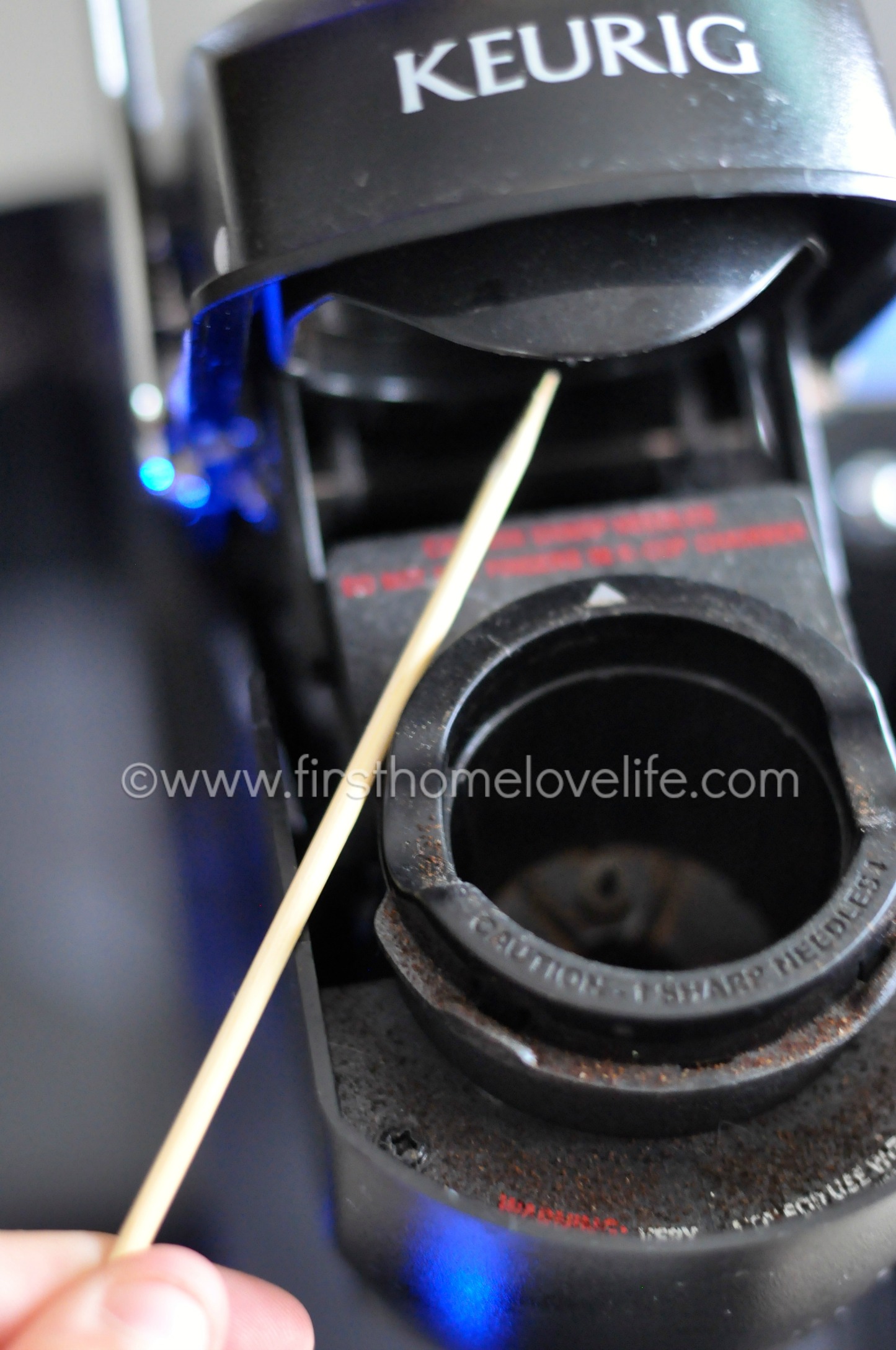
The needles that puncture the K-cup can get blocked. Clean the needles gently using a paperclip or a needle cleaning tool. Descaling the machine removes mineral build-up that can stop brewing.
Slow Or Dripping Brew
If your Keurig brews slowly or drips coffee, the needles might be partially clogged. Clean the needles carefully. Also, check for air bubbles in the water line. These bubbles can slow down the water flow.
Use fresh water and descale the machine regularly. Old water or mineral buildup can cause slow brewing. Keep the water reservoir clean and free of debris.
Short Cups
Getting less coffee than usual is common. This happens if the water flow is blocked or the K-cup is not placed correctly. Remove and reinsert the K-cup to ensure it fits well.
Check the water reservoir level. Low water means short cups. Clean the needle area to avoid blockages. Regular maintenance helps your Keurig pour the right amount every time.
Clogging And Blockages
Clogging and blockages are common problems that affect Keurig coffee makers. These issues can stop your machine from brewing properly. Water may not flow through the K-Cup, or coffee may taste weak. Regular cleaning helps avoid these problems and keeps your coffee fresh and hot.
Cleaning The Exit Needle
The exit needle pokes holes in the K-Cup to let coffee flow. It often gets blocked by coffee grounds. Use a paperclip or needle to clear it. Turn off the machine before cleaning. Push the needle carefully to remove any debris. This simple step improves water flow and brewing quality.
Removing K-cup Residue
K-Cup residue can clog the coffee chamber. Open the lid and remove the used pod. Wipe the area with a damp cloth to clear any leftover coffee grounds. Check the pod holder for stuck pieces. Clean this part regularly to avoid buildup that blocks brewing.
Clearing Water Line Blockages
Water line blockages stop water from reaching the K-Cup. Mineral deposits from hard water cause these blockages. Run a descaling solution through the machine to clear them. Follow the manufacturer’s instructions for descaling. This process removes buildup inside the water lines and keeps water flowing smoothly.
Water Issues
Water issues are common problems with Keurig coffee makers. They can stop the machine from brewing or cause leaks. Understanding these issues helps you fix your Keurig quickly. This section covers common water problems and how to solve them.
Leaks And Water Line Problems
Leaks often happen around the water reservoir or inside the machine. A cracked reservoir or loose connection causes water to drip. Check the water line for cracks or blockages. Replace damaged parts to stop leaks. Clean the area to prevent mold and damage.
Incorrect Water Sensor Readings
The water sensor tells the machine if there is enough water. Sometimes it gives wrong readings, stopping the brew cycle. Dirt or mineral buildup can block the sensor. Clean the sensor gently with a soft cloth. Reset the machine to clear errors and try again.
Checking Water Reservoir Placement
Proper placement of the water reservoir is key. If it is not seated correctly, water will not flow into the machine. Remove the reservoir and place it back firmly until you hear a click. Check the seals for dirt or damage. A secure fit ensures the machine draws water properly.
Heating Problems
Heating problems are common issues with Keurig coffee makers. They stop the machine from brewing hot coffee. These problems can make your coffee cold or lukewarm. Understanding the causes helps fix the issue quickly. Below are key heating problems and simple fixes.
Keurig Not Heating Water
When your Keurig does not heat water, the coffee will be cold. This issue happens if the heating element fails or the machine’s sensors malfunction. Sometimes, the water pump works but the heater does not activate. Check if the machine powers on and sounds normal. If it does, the heating part might be broken or disconnected. Replacing or repairing the heating element may solve the problem.
Overheated Heating Element
The heating element can overheat and cause the machine to shut down or work poorly. Overheating happens if the machine runs too long or the internal thermostat fails. This can damage the heating coil or cause safety switches to trip. Let the machine cool down before using again. Cleaning the machine and ensuring proper ventilation helps avoid overheating. If overheating continues, the heating element or thermostat may need replacement.
Descaling For Better Heating
Mineral build-up affects the heating process in your Keurig. Hard water leaves deposits inside the water lines and heating chamber. These deposits stop water from heating evenly or quickly. Descaling removes mineral buildup and restores heating performance. Use a descaling solution or vinegar in the water reservoir. Run the machine through several cycles without coffee pods. Regular descaling improves heating and extends your Keurig’s life.
Maintenance Tips
Keeping your Keurig coffee maker in top shape requires regular maintenance. Proper care stops common problems before they start. It ensures your machine brews great coffee every time. Follow these simple tips to extend your Keurig’s life and improve performance.
Regular Cleaning Routine
Clean your Keurig weekly to avoid clogs and bad taste. Remove and wash the drip tray and water reservoir with warm, soapy water. Wipe down the exterior with a damp cloth. Use a paperclip or needle to clear the entrance and exit needles gently. This stops coffee grounds from blocking the flow.
Descaling Frequency
Descale your Keurig every three to six months. Minerals from water build up inside and affect heating and brewing. Use a descaling solution or white vinegar to flush the system. Run several water-only cycles afterward to rinse out any residue. This keeps your machine running smoothly and prevents errors.
Replacing Worn Parts
Check parts like the water filter, needles, and seals regularly. Replace water filters every two months or as needed for fresh taste. Inspect needles for damage or clogging and clean or replace them if necessary. Worn seals can cause leaks or weak pressure. Change seals to maintain proper brewing function.
Warranty And Replacement
Understanding the warranty and replacement process for your Keurig coffee maker helps save time and money. Keurig offers a limited warranty that covers defects in materials and workmanship. This means some problems with your machine might be fixed or replaced at no extra cost.
Knowing how to register your product, request a replacement, and when to contact customer support can make dealing with issues easier. Below are key steps to help you manage warranty and replacement matters effectively.
Registering Your Keurig
Register your Keurig soon after purchase. Visit the official Keurig website to complete registration. You will need the serial number and purchase date. Registration helps track your warranty and speeds up service requests. It also ensures you get updates about your model.
How To Get A Free Replacement
If your Keurig has a covered defect, you may qualify for a free replacement. Keep your purchase receipt as proof. Submit a warranty claim on Keurig’s website or mail the warranty card included with the machine. Keurig will review your claim and may ask for the defective unit back. Approved claims usually result in a replacement shipped to you at no charge.
When To Contact Customer Support
Contact customer support if your machine does not work properly and troubleshooting fails. They can guide you on warranty coverage and next steps. Support can help with repairs, replacements, or provide additional tips. Have your model number and purchase details ready for faster service.

Frequently Asked Questions
How Do I Reset A Keurig Machine?
Unplug the Keurig, wait 5 minutes, then plug it back in to reset. Clean needles and descale regularly to improve function.
What Is The Life Expectancy Of A Keurig Coffee Maker?
A Keurig coffee maker typically lasts three to five years. Proper cleaning and maintenance can extend its lifespan.
What Are The Common Keurig Problems?
Common Keurig problems include clogged needles, water leaks, heating failures, inaccurate water sensors, and automatic shutdowns. Regular cleaning and descaling prevent most issues.
How Do I Get A Free Keurig Replacement?
Register your Keurig at Keurig. com or return the warranty card with proof of purchase. Keurig may repair or replace your brewer free.
Why Is My Keurig Not Brewing Coffee Properly?
Your Keurig may have clogged needles or buildup inside. Clean the needles and descale the machine regularly. This helps maintain proper water flow and brewing.
Conclusion
Keurig coffee maker problems can feel frustrating and annoying. Simple fixes often solve common issues quickly. Regular cleaning and maintenance keep your machine working well. Check water levels, clean needles, and descale when needed. Small steps save time and money on repairs.
Stay patient and follow easy troubleshooting tips. Enjoy fresh coffee without stress or hassle every day.