
When you settle in to watch your favorite show, the last thing you expect is a distracting noise from your TV. Yet, many owners of Panasonic Plasma TVs have noticed a buzzing sound that can ruin the viewing experience. This issue, often known simply as “plasma buzzing,” has sparked countless online discussions and left users searching for answers. If your Panasonic Plasma TV is buzzing, you’re not alone—and you’re not powerless.
This article explores everything you need to know about Panasonic Plasma TV buzzing. We’ll dive into why it happens, what the buzz really means, practical ways to reduce or fix it, and how to decide if repair or replacement makes sense. You’ll also learn about the experiences of other owners, get troubleshooting tips, and understand how plasma technology works. By the end, you’ll be equipped to deal with buzzing—confidently and calmly.
What Causes Panasonic Plasma Tv Buzzing?
Buzzing in Panasonic plasma TVs isn’t random. Several factors can trigger or worsen this noise. Understanding the cause is the first step to finding the right solution.
The Role Of Plasma Technology
Plasma TVs work differently from LED or LCD TVs. Instead of a backlight, plasma screens use thousands of tiny cells filled with gas. When electricity passes through, the gas turns into plasma, producing light. Each cell acts like a tiny fluorescent lamp.
Buzzing comes from the electrical parts that drive these plasma cells. When the TV is on, high-voltage circuits control the plasma discharge. This can create a faint, sometimes noticeable, buzzing or humming sound. This is called electromagnetic vibration.
Common Internal Causes
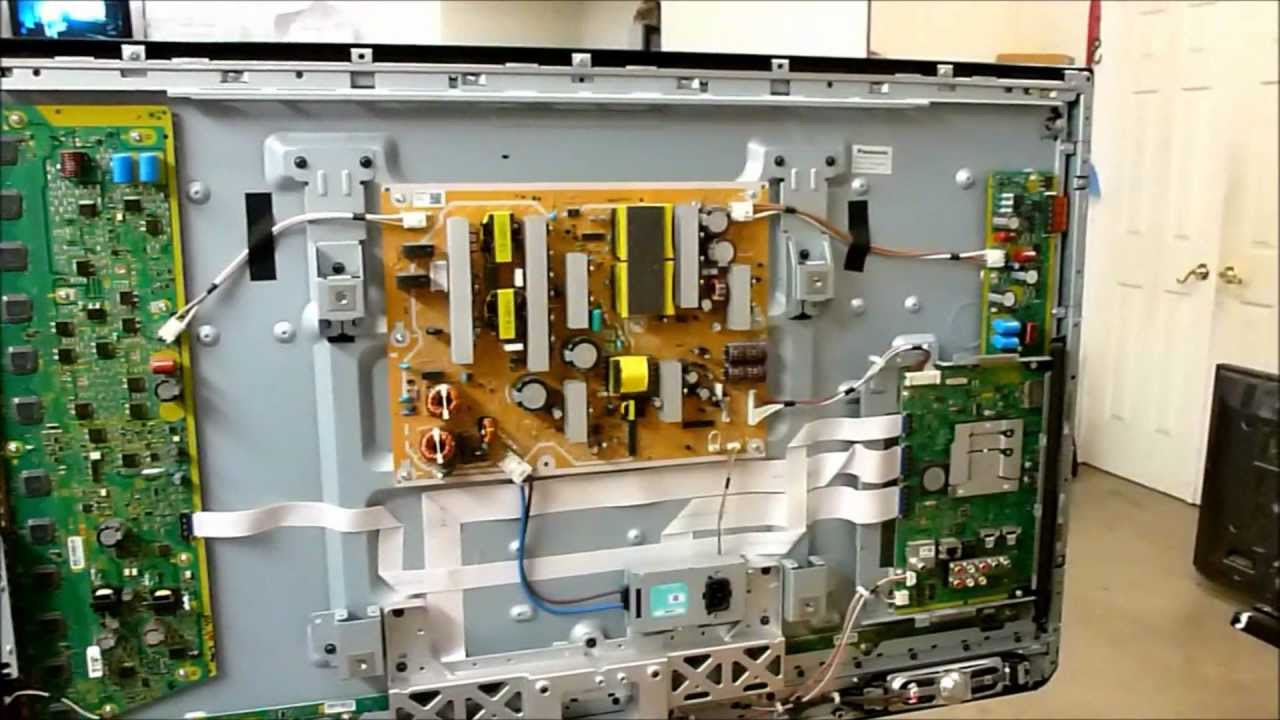
- Power Supply Board: The power supply sends electricity to the whole TV. When it works hard, especially at higher brightness, it can vibrate and buzz.
- Y-Sustain and Z-Sustain Boards: These control the vertical and horizontal signals for the plasma cells. They often produce a high-pitched buzz.
- Transformers and Coils: These parts can vibrate (a process called magnetostriction) and emit noise.
- Screen Brightness and Contrast: Higher settings require more power, which increases the buzzing.
External Factors That Worsen Buzzing
- Wall Mounting: Mounting your TV on a wall can amplify vibrations, making the buzz sound louder.
- Room Acoustics: Hard surfaces like bare walls or floors reflect sound, increasing the perceived noise.
- Nearby Electronics: Other devices or poor power supply can interfere and make buzzing worse.
Non-obvious Insight
Many users do not realize that the buzzing can change depending on the image displayed. Bright scenes or high-contrast visuals draw more power, which can temporarily increase the noise. This is why some people notice their TV is quiet on dark scenes but buzzes during bright commercials.
How Loud Is Normal? Understanding Acceptable Buzzing Levels
A small amount of buzzing is normal for plasma TVs, especially when you sit close or when the room is silent. But how much is too much?
Typical Buzzing Levels
- Normal: A faint hum or buzz only heard when the room is quiet or your ear is near the screen.
- Noticeable: You can hear it from your usual viewing spot, especially during bright scenes.
- Excessive: The buzz is loud enough to distract you, even over normal TV volume.
Data From Owners
Surveys of Panasonic plasma TV owners show that about 25-30% notice some buzzing, but only 5-7% find it very bothersome. Most describe it as a background noise, but a small group reports it is loud enough to hear during movies or sports.
Table: Buzzing Experience By User Type
| User Type | Buzzing Level | Impact on Viewing |
|---|---|---|
| Casual Viewer | Faint hum | Rarely noticed |
| Critical Listener | Moderate buzzing | Sometimes distracting |
| Home Theater Enthusiast | Variable (scene-dependent) | Noticeable, can be annoying |
| Power User (gamer) | Louder during bright images | Can be a problem in quiet rooms |
When To Worry
If the buzzing gets suddenly louder, is present even when the TV is muted, or has changed in pitch, it could indicate a failing part. In rare cases, a very loud buzz could mean an electrical problem that needs prompt attention.
Diagnosing The Buzz: Step-by-step Troubleshooting
Before reaching for tools or calling a technician, you can run some simple checks to figure out what’s causing the buzzing.
1. Identify The Sound
- Is it a hum, buzz, or crackle? Buzzing is steady and electrical; crackling may signal a loose wire.
- Where is it loudest? Move around the TV. Is the sound from the center, side, or back?
2. Check Tv Settings
- Lower the brightness and contrast. Does the buzzing get quieter?
- Switch between inputs (HDMI, AV, etc.). If the buzzing stays, it’s likely internal.
3. Change The Volume
- Mute the TV. If buzzing continues, it’s not from the speakers.
4. Test In A Different Room
- Plug the TV into another outlet. Poor electrical grounding can cause or amplify buzzing.
5. Remove Other Devices
- Disconnect any sound system, game console, or DVD player. See if the buzz changes.
Non-obvious Insight
Many users overlook that adding a power conditioner or surge protector can sometimes reduce buzzing by cleaning up “dirty” electricity. This is especially true in older homes with unstable wiring.
How To Reduce Or Fix Panasonic Plasma Tv Buzzing
Now that you know where the buzz might come from, let’s explore ways to reduce or stop it. Solutions range from quick fixes to more advanced repairs.
Easy Solutions Anyone Can Try
1. Adjust Picture Settings
Lower the brightness, contrast, and sharpness. Plasma TVs buzz more when working harder, especially on bright scenes.
2. Change Power Source
Try a different wall socket or use a surge protector. Make sure your home’s electrical wiring is grounded properly.
3. Move The Tv
If the TV is wall-mounted, try placing it on a stand. Wall mounts can amplify internal vibrations.
4. Add Soft Materials Around Tv
Rugs, curtains, and soft furniture can absorb sound, making the buzz less noticeable.
More Advanced Fixes
1. Tighten Mounting Screws
Loose screws in the TV’s case can vibrate. Carefully tighten screws on the back panel.
2. Check For Loose Internal Parts
If you’re comfortable opening the TV (unplug it first! ), you might find loose clips or panels. Gently secure them.
3. Replace Or Repair Internal Boards
The most common source is the Y-Sustain or Z-Sustain boards. These can be replaced by a skilled technician.
4. Use Dampening Pads
Some users place thin foam or felt pads inside the case to reduce vibrations. This requires technical skill.
Table: Fixes And Their Effectiveness
| Solution | Difficulty | Effectiveness | Risk |
|---|---|---|---|
| Lowering brightness/contrast | Easy | Moderate | None |
| Changing power outlet | Easy | Low to moderate | None |
| Tightening screws | Medium | Moderate | Low |
| Replacing internal boards | Hard | High (if buzzing is from these parts) | High |
| Adding dampening pads | Medium | Moderate | Medium |
When To Call A Professional
If the buzz is very loud, persistent, or you see other problems (such as flickering, no picture, or a burning smell), stop using the TV and call a qualified repair service. Attempting to fix internal boards without experience can be dangerous and may void your warranty.
How Plasma Tvs Compare To Other Tv Types
Buzzing is a unique issue for plasma TVs. LED, LCD, and OLED sets work differently and rarely have this problem.
Table: Plasma Vs. Lcd Vs. Oled (buzzing And Noise)
| TV Type | Typical Noise | Noise Cause | Commonness |
|---|---|---|---|
| Plasma (e.g., Panasonic) | Buzz/Hum | High-voltage circuits, sustain boards | Moderate |
| LCD/LED | Very quiet | Rare, sometimes power supply whine | Low |
| OLED | Silent | N/A (no buzzing parts) | Very low |
Why Not All Plasma Tvs Buzz
Not every Panasonic plasma TV buzzes the same way. Manufacturing differences, age, and even small design changes can affect how much noise you hear. Some models are known for being quieter than others. Also, newer plasma TVs (from the last few years of production) often have improved components with less buzzing.
Real-world Owner Experiences
Reading about buzzing is one thing; living with it is another. Here are some real stories and insights from Panasonic plasma TV owners:
- Mike, Seattle: “My 50-inch Panasonic started buzzing louder after I moved it to a wall mount. Switching to a padded stand cut the noise in half.”
- Karla, Houston: “At first, I thought my speakers were broken. The buzz was only on bright scenes. Lowering brightness helped, but it’s still there.”
- Jin, Toronto: “I bought a used plasma TV because of the picture quality. The buzz is quiet unless I’m watching with the sound very low. Not a big deal for me.”
- Eli, London: “I tried everything—different outlets, foam pads, power conditioner. What worked best was using a surge protector and keeping the TV away from other electronics.”
Common Themes
- Many owners accept a low level of buzzing as a trade-off for great picture quality.
- Those who use surround sound or play TV at normal volume often do not notice the buzz.
- Owners with open, empty rooms or wall-mounted TVs report louder buzzing.
Should You Repair, Live With, Or Replace A Buzzing Panasonic Plasma Tv?
You’ve tried the easy fixes, but the buzzing remains. Now you need to decide: Fix it, live with it, or upgrade?
Repair
- Cost: Replacing sustain boards or power supply can cost $100–$300 for parts and labor. Older TVs may not be worth the cost.
- Availability: Many repair shops still service Panasonic plasmas, but parts are getting harder to find.
- When Repair Makes Sense: If you love the TV’s picture quality and the fix is affordable.
Live With It
- If the buzzing is faint and only noticed at low volume or in quiet rooms, many owners simply ignore it.
- Solutions like soft furnishings, better speaker volume, or even background music can make buzzing less noticeable.
Replace
- If the buzzing is loud, annoying, or your TV has other problems (color issues, screen burn-in), replacing the TV may be best.
- Modern OLED TVs offer great picture quality with no buzzing.
Comparison: Repair Vs. Replacement
- Repair is best for those who value plasma’s unique picture and have moderate buzzing.
- Replacement is better for users bothered by noise, or if the TV is over 10 years old.
How Panasonic Handled Buzzing: Warranty And Support
Panasonic was aware that some plasma TVs buzzed more than others. In many cases, they considered a faint buzz normal and not a defect.
Warranty Coverage
- Standard Warranty: Covered failed parts but not normal buzzing.
- Extended Warranty: Some plans covered excessive buzzing, especially if it appeared suddenly.
- Service Calls: Technicians sometimes replaced boards or adjusted mounting, but often said mild buzzing was “within spec.”
Support Tips
Panasonic support often recommended:
- Lowering brightness and contrast
- Ensuring proper mounting
- Checking power source
If your TV is still under warranty, report the issue as soon as possible. Keeping a record of when the buzzing started and how it changed can help your claim.

Credit: www.youtube.com
The Future: Plasma Tvs And Buzzing Issues
Panasonic stopped making plasma TVs in 2013. As parts age, more owners may notice buzzing as boards wear out. While repair is still possible, it will get harder as supplies shrink.
If you love plasma’s deep blacks and motion handling, you may accept a little buzzing. Otherwise, newer technologies like OLED offer quiet, high-quality viewing.
Frequently Asked Questions
Why Does My Panasonic Plasma Tv Only Buzz During Bright Scenes?
Bright scenes require more power from the TV’s internal circuits. This increased load causes more vibration in the power supply and sustain boards, making the buzzing louder. Lowering brightness or contrast can reduce this effect.
Is Plasma Tv Buzzing Dangerous?
In most cases, buzzing is not dangerous. It’s a normal result of how plasma technology works. However, if the buzzing is very loud, changes suddenly, or is accompanied by burning smells or smoke, turn off the TV and seek professional repair. This may signal a failing component.
Can I Completely Eliminate Buzzing From My Panasonic Plasma Tv?
It’s rare to remove all buzzing. You can reduce it by lowering brightness, changing power outlets, tightening screws, and using soft room materials. If the buzzing is caused by aging parts, only replacing those boards will help, and even then, a faint hum may remain.
Does Buzzing Mean My Tv Will Fail Soon?
Not always. Mild buzzing is normal for plasma TVs and does not predict failure. But if the buzz gets suddenly louder, changes pitch, or comes with other problems (like flickering or power issues), it could mean a part is failing.
Are Newer Tvs Free From Buzzing Problems?
Most modern LED and OLED TVs are almost silent. They use different technology and do not rely on high-voltage plasma cells, so buzzing is not a common problem. If silence is very important to you, consider upgrading to a newer model.
Living with a Panasonic plasma TV buzzing is a unique challenge that comes with owning a piece of television history. While the sound can be annoying, most buzzing is harmless and manageable with simple fixes. For those who love plasma’s picture, a little buzz is a fair trade-off. If you want to learn more about plasma technology and how it compares to newer TVs, visit the Plasma display Wikipedia page for a deeper dive.
With the right approach, you can minimize buzzing and keep enjoying your Panasonic plasma TV for years to come—or make a confident decision about what comes next.