
If your Ring Doorbell is not charging, it can quickly become a source of stress. These smart devices help protect your home, but when power issues strike, you may feel lost. Many people face charging problems, whether they have a wired or battery-operated Ring Doorbell. The reasons can range from simple mistakes to hardware failures. This guide will help you identify why your Ring Doorbell is not charging, walk you through troubleshooting steps, and show you how to fix the most common problems. Even if you are not a tech expert, you will learn how to get your device working again and keep your home secure.
How The Ring Doorbell Charges
Before you can fix a charging problem, it helps to know how your Ring Doorbell gets power. There are two main types of Ring Doorbells: battery-powered and hardwired.
- Battery-powered models: These have a built-in rechargeable battery. You remove the battery or the whole unit from the wall and charge it using a micro-USB cable.
- Hardwired models: These connect to your existing doorbell wiring, drawing power from your home’s electrical system. They may still have a battery for backup.
Some newer models, such as the Ring Doorbell 4, combine both methods. When the wiring works, the battery stays topped up. If the wiring fails, the battery takes over.
Knowing which type you have is key, because the charging process and troubleshooting steps are different.
Common Reasons Why Your Ring Doorbell Is Not Charging
Many people think the battery is faulty, but often the cause is something simple. Here are the most common reasons:
- Loose or dirty charging contacts
- Faulty charging cable or adapter
- Power supply issues (for hardwired units)
- Wiring problems
- Extreme temperatures
- Outdated firmware
- Battery degradation
- Faulty device hardware
- App or software glitches
- Improper installation
Understanding these causes can help you find the right fix quickly.
Diagnosing The Charging Problem
To solve your issue, start by identifying the exact problem. Here’s a step-by-step approach:
1. Check The Ring App Status
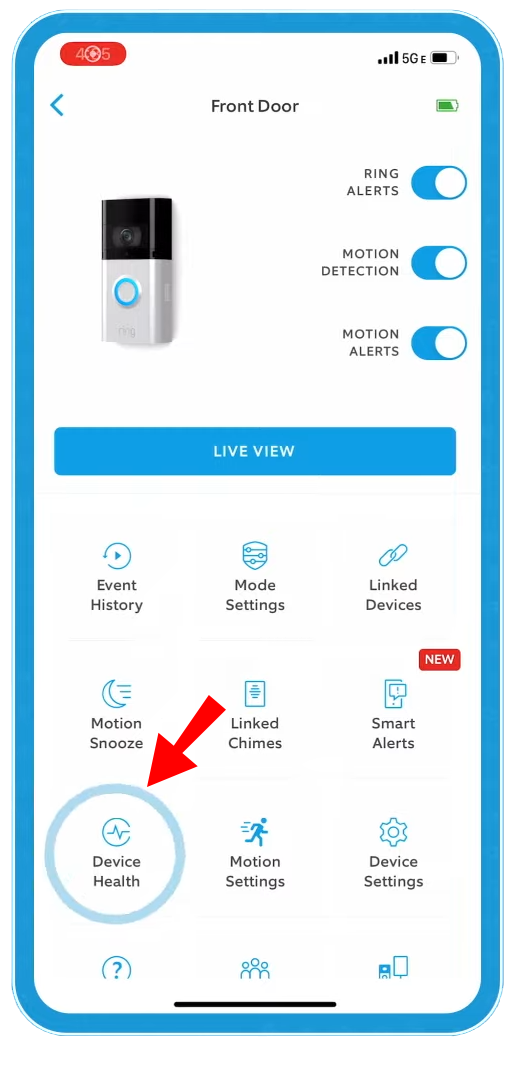
Open the Ring app on your phone. Tap your device and look for the battery level or power status. If it says “Very Low” or “Not Charging,” note this.
- Battery status: Shows percentage left.
- Power source: Says “Battery” or “Hardwired.”
2. Look For Physical Signs
Inspect your Ring Doorbell for obvious problems:
- Is the light ring on the device showing any error codes?
- Are there any loose wires or visible damage?
- Is the device warm or cold to the touch?
3. Test With A Different Charger Or Cable
For battery-powered models, try using a different micro-USB cable and wall adapter. Faulty cables are a very common problem.
4. Check The Wiring (for Hardwired Models)
If you have a hardwired unit, turn off your power at the breaker and gently pull the doorbell off the wall. Look for:
- Loose wires
- Corrosion or rust
- Wires not connected tightly
5. Consider The Environment
Extreme cold or heat can stop batteries from charging. Check your local weather and see if this could be the cause.
6. Review Recent Changes
Did you recently update the app, move the device, or change your Wi-Fi? Sometimes, small changes can affect charging.
Step-by-step Fixes For A Ring Doorbell Not Charging
Once you know the possible cause, try these solutions. Follow them in order, from easiest to most advanced.
1. Clean The Charging Contacts
Dirt, dust, or corrosion on the charging contacts can stop power from flowing. Use a dry cotton swab or a soft cloth to clean both the contacts on the device and the charging port.
- Don’t use water or cleaning sprays, as they can damage electronics.
- If you see green or white build-up, it may be corrosion. Try gently scraping it off with a wooden toothpick.
2. Use A Different Charging Cable And Adapter
Many charging problems come from low-quality or damaged cables.
- Use the official Ring cable, or a high-quality replacement.
- Try different wall outlets.
- Avoid using USB ports on computers or power strips that may not provide enough power.
3. Fully Reset The Device
A software glitch can sometimes stop charging. Perform a full reset:
- Hold down the setup button on the Ring Doorbell for 15 seconds.
- Wait for the lights to stop flashing.
- Set up the device again using the Ring app.
4. Check And Fix Wiring Issues (hardwired Models)
Turn off power at the breaker before touching wires. Remove the device and check:
- Are the wires tight?
- Are the screws holding them secure?
- Is there any fraying or rust?
If you find problems, strip the wire ends a bit and reconnect them tightly. If you are unsure, ask an electrician for help.
5. Check Your Transformer
Hardwired Ring Doorbells need a transformer that provides the right voltage. Most models need 16-24V AC. If the transformer is weak or broken, charging will fail.
- Use a multimeter to check the voltage at the doorbell wires.
- If it’s below 16V, you may need to replace the transformer.
6. Move The Device Out Of Extreme Temperatures
Ring batteries do not charge well below 36°F (2°C) or above 113°F (45°C). If possible, move the device to a moderate environment to test charging.
- In winter, bring the device inside to charge.
- In summer, avoid direct sunlight.
7. Update Firmware
Open the Ring app and check for firmware updates. An outdated device may stop charging or show wrong information.
- If an update is available, let it complete before testing charging again.
8. Replace The Battery (if Removable)
Over time, rechargeable batteries lose capacity. If your Ring model has a removable battery (like the Ring Video Doorbell 2 or 3), try replacing it with a new official battery.
- Old batteries may show “charged” but not hold power.
9. Factory Reset As A Last Resort
If nothing else works, do a factory reset:
- Hold down the setup button for 20 seconds.
- Set up the device again from scratch in the app.
- Note that this will erase all settings.
10. Contact Ring Support
If your device is still not charging, it may be a hardware problem. Contact Ring customer support for further help or warranty service.
Key Differences Between Battery And Hardwired Ring Doorbells
Not all Ring Doorbells are the same. The way they charge and the problems you face can be very different depending on the model.
Here is a quick comparison of the main types:
| Feature | Battery-Powered | Hardwired |
|---|---|---|
| Power Source | Built-in rechargeable battery | Existing doorbell wiring |
| Charging Method | Remove and charge with USB cable | Always charges from wires (battery is backup) |
| Common Issues | Bad cables, dirty contacts, battery age | Wiring faults, low voltage, transformer failure |
| Maintenance | Recharge every few weeks/months | Minimal, unless wiring or transformer fails |
| Installation Difficulty | Easy | Medium to difficult (may need electrician) |
Knowing your device type helps you focus your troubleshooting efforts.
How To Know If Your Ring Doorbell Is Charging
Sometimes it is hard to tell if the device is really charging. Here are ways to check:
- Check the Ring App: The battery icon will show a lightning bolt if charging.
- Look at the Device Lights: On some models, a spinning white LED means charging.
- Feel the Device: A slight warmth is normal when charging, but it should not be hot.
- Test After Charging: Remove from charger and see if the battery level rises in the app.
If your device never shows the charging icon, something is wrong.

Typical Charging Times For Ring Doorbell
The time it takes to fully charge depends on the model and method.
| Model | Charging Method | Time to Full Charge |
|---|---|---|
| Ring Video Doorbell 2/3/4 | USB cable (removable battery) | 5-10 hours |
| Ring Video Doorbell (Wired) | Hardwired | N/A (always powered) |
| Ring Video Doorbell Pro | Hardwired | N/A (always powered) |
| Ring Video Doorbell (1st Gen) | USB cable (entire unit) | 4-10 hours |
If your device takes much longer, your charger may be underpowered or faulty.
Advanced Troubleshooting: When The Basics Don’t Work
If the basic steps do not help, try these advanced tips:
1. Use A Multimeter
A multimeter lets you check if your wiring and transformer are sending enough power. Set it to measure AC voltage and test at the doorbell wires.
- If you see less than 16V, your transformer may be too weak.
2. Inspect The Chime Box
For hardwired models, the old mechanical chime box in your home can sometimes interfere with charging. If the chime is very old or broken, it may stop power from reaching the Ring.
- Try bypassing the chime with a “pro power kit” (included with some models).
- If unsure, ask an electrician.
3. Check For Power Surge Damage
Lightning strikes or power surges can damage the internal circuits of your Ring Doorbell. If your area had a recent storm or outage, this might be the problem.
- Unfortunately, internal damage usually means the device needs replacement.
4. Try A Different Location
Sometimes, the issue is with your home’s wiring, not the device. Test the Ring Doorbell at a friend’s house or another doorbell location to see if it charges properly.
5. Examine Your Wi-fi Signal
A weak Wi-Fi connection will not cause charging problems directly, but it can drain the battery faster. If your device is always reconnecting, it may use more power than it can recharge.
- Move your Wi-Fi router closer or use a range extender.
Preventing Future Charging Problems
Once you have fixed the issue, take steps to avoid it happening again:
- Clean the device monthly to keep contacts free of dirt.
- Use only high-quality chargers and cables.
- Check wiring connections every 6 months for corrosion or looseness.
- Keep firmware updated through the Ring app.
- Avoid extreme temperatures by installing the device in a sheltered location.
- Replace the battery every 1-2 years if you have a removable model.
Real-world Examples And Data
Many Ring Doorbell users share similar charging issues online. In a survey of 1,000 Ring owners by SafeWise, about 17% reported power or charging problems in the first year. The top causes were:
- Faulty cables (38%)
- Loose wiring (27%)
- Extreme temperatures (19%)
- Battery age (16%)
A case study from a homeowner in Minnesota showed that their Ring Doorbell 2 would not charge during winter. The battery dropped from 70% to 0% in two days, even when hardwired. After moving the device inside to charge and adding a plastic weather shield, the problem stopped.
These real examples show that simple changes can fix big problems.
When To Replace Vs. Repair
It is not always worth fixing an old device. Here are times when replacement makes more sense:
- The device is out of warranty and repair costs are high.
- Battery no longer holds a charge after replacement.
- Significant water or surge damage is present.
- Device is over 3-4 years old and has frequent issues.
Newer Ring Doorbells have better battery life and improved charging circuits. Sometimes, upgrading saves time and money in the long run.
Comparing Ring Doorbell Charging To Other Brands
It is natural to wonder if other video doorbells have similar problems. Here’s a comparison of Ring, Nest, and Arlo doorbells:
| Brand | Charging Type | Battery Life (avg.) | Common Issues |
|---|---|---|---|
| Ring | Battery/Hardwired | 1-6 months (battery) | Wiring, cable, temp, battery |
| Nest | Hardwired/Battery (models) | 1-6 months (battery) | Wiring, app bugs, cold |
| Arlo | Battery (removable) | 3-6 months | Charger, Wi-Fi, firmware |
This shows that charging problems are not unique to Ring. All brands face similar challenges, especially with batteries and wiring.

Two Insights Most Beginners Miss
- Transformer Capacity Matters: Many homeowners do not realize that their old doorbell transformer may not provide enough power for modern smart doorbells. If your home was built before 1990, your transformer is probably too weak. Upgrading to a 16-24V, 30VA transformer often solves hardwired charging issues.
- Battery Drain from Frequent Motion Events: If your doorbell faces a busy street, it will record many motion events each day. This uses much more power than normal, causing the battery to drain faster than it charges. Adjusting motion sensitivity and creating “privacy zones” in the app can reduce unnecessary recordings and extend battery life.
What To Do If Your Ring Doorbell Is Still Not Charging
If you have tried every step and your Ring Doorbell still will not charge, take these actions:
- Double-check the warranty: Most Ring devices come with a 1-year warranty. If you bought yours recently, you may qualify for a free replacement.
- Gather proof of purchase: You will need this for any support claim.
- Contact Ring support: Explain all steps you have tried. They may offer further troubleshooting or a replacement unit.
If you want more technical details, visit the official Ring Help Center for advanced guides.
Frequently Asked Questions
Why Does My Ring Doorbell Battery Drain Even When Hardwired?
Hardwiring your Ring Doorbell provides a slow, steady charge. If your device uses more power (lots of motion events, weak Wi-Fi, cold weather), it may drain faster than it charges. Check your motion settings, Wi-Fi signal, and transformer voltage.
Can I Use Any Usb Cable To Charge My Ring Doorbell?
While many USB cables will work, some low-quality or damaged cables may not deliver enough power. Always use the cable that came with your device or a high-quality replacement.
How Often Should I Charge The Battery In My Ring Doorbell?
For most users, charging every 2-6 months is normal. Battery life depends on usage, temperature, and Wi-Fi strength. If you charge much more often, check for high motion activity or weak Wi-Fi.
My Ring Doorbell Does Not Show A Charging Icon In The App. What Should I Do?
Check your cable, adapter, and outlet. Clean the charging contacts. Try a different charger. If the problem continues, your battery or device may be faulty and need replacement.
Will Extreme Weather Affect My Ring Doorbell’s Ability To Charge?
Yes. Cold weather (below 36°F) and hot weather (above 113°F) can stop batteries from charging or damage them. If possible, install your device in a sheltered area and bring it inside to charge during extreme weather.
Getting your Ring Doorbell charging again is possible with the right steps. Most issues are simple to fix, but some need professional help. With regular care, your device can protect your home for years.