
If you own a Panasonic TV and suddenly see a blinking red light flashing exactly 10 times, it can feel worrying. Many people wonder if their TV is completely broken or if there is a way to fix it at home. This red light is not just a random signal—it’s your TV’s way of telling you something is wrong inside. Understanding what this light means, what causes it, and how to solve it can save you time, money, and stress.
In this guide, you’ll learn everything about the Panasonic TV blinking red light 10 times problem. We’ll explain why it happens, how to diagnose the issue, and all possible solutions. We’ll also cover what each of the 10 flashes indicates, give you step-by-step troubleshooting advice, and help you decide when to call a professional. Even if you are not a technical expert, you’ll find clear, simple explanations to help you take action.
What Does The Panasonic Tv Blinking Red Light 10 Times Mean?
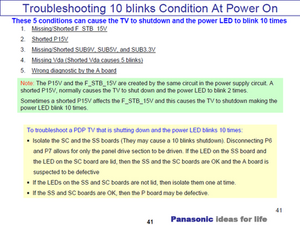
When your Panasonic TV’s standby light blinks 10 times, it’s not random. The TV uses these blinking codes to show a self-diagnosis error. The 10 blink code usually points to a specific hardware problem, most often with the main board or power supply board. In many Panasonic models, the 10 blinks signal that the TV is protecting itself from serious electrical damage.
The TV won’t turn on because it has detected a fault that could cause further harm if ignored. This safety feature helps prevent bigger failures or even fire risks. The number of blinks is important—different numbers mean different issues. Ten blinks is one of the more complex errors, so it’s important to approach the solution carefully.
Common Causes Of The 10 Blinking Red Light Error
Several issues can trigger the 10-blink code in Panasonic TVs. Here are the most common reasons:
1. Main Board Failure
The main board is like the TV’s brain. If it fails, the TV cannot operate. Bad capacitors, overheating, or electrical surges often damage this board.
2. Power Supply Board Issues
This board converts electricity for the TV’s parts. If it fails, the TV cannot get the right power and signals the error.
3. Shorted Components
Burned or damaged parts, like transistors or diodes, cause electrical shorts that the TV detects and stops working for safety.
4. Loose Or Broken Cables
Sometimes, internal cables become loose or break, especially after moving the TV.
5. Failed Firmware Update
A failed or interrupted software update can lead to hardware errors and blinking codes.
6. Heat Damage
TVs placed near heat sources or in poorly ventilated areas can have overheated parts, causing board failure.
7. Faulty T-con Board
The Timing Control (T-Con) board manages the image signal. If it fails, it can trigger the error.
8. Panel Failure
In rare cases, the TV’s display panel itself fails, causing the system to stop working.
9. Power Surges
Sudden increases in electrical voltage damage sensitive TV components.
10. Aging Components
Over time, parts wear out and can eventually cause critical errors.
Most 10-blink errors come from the main board or power supply board, but checking all possible causes is important for a complete fix.
How The Panasonic Red Light Error System Works
Panasonic TVs use a self-diagnosis system. If something is wrong inside, the TV won’t turn on. Instead, the standby light blinks a specific number of times, pauses, then repeats. Each number tells you which part might be faulty.
For example:
- 1 blink: Power supply problem
- 7 blinks: SC board issue
- 10 blinks: Main board or power supply board
By counting the blinks, you get a valuable clue. But the blink code only points to a general area—it doesn’t tell you the exact component. Further testing is needed to find the real problem.
Diagnosing The 10 Blinking Light: Step-by-step
If you see the 10-blink code, follow these steps to diagnose the problem:
1. Confirm The Blink Code
Carefully watch the standby light. Count the number of red flashes before it pauses. Make sure it’s exactly 10, as different numbers mean different issues.
2. Unplug And Reset The Tv
Disconnect the TV from power for at least 10 minutes. This resets the system and sometimes clears temporary errors. Plug it back in and check if the blinking continues.
3. Remove All Accessories
Disconnect all HDMI devices, USB drives, and other cables. Sometimes, a faulty external device can cause errors. Try turning on the TV with nothing connected.
4. Check For Overheating
Feel the back of the TV. If it’s very hot, let it cool for 30 minutes, then try again. Overheating can temporarily trigger protection errors.
5. Try A Different Power Outlet
Plug the TV directly into a different wall outlet. Avoid power strips or surge protectors, as these can sometimes cause issues.
6. Listen For Clicking Noises
When you try to turn the TV on, listen for clicks from inside. Repeated clicks with no picture often point to power supply issues.
7. Inspect For Visible Damage
Look at the TV’s vents and back panel. Are there burnt smells or visible damage? Dark marks or melted plastic suggest an internal failure.
8. Check The Warranty
If your TV is still under warranty, do not open it. Contact Panasonic support for repair or replacement.
If the problem continues after these steps, you may need to open the TV (only if you feel safe and the warranty is expired) or call a technician.
The 10 Main Causes Explained In Detail
Each of the 10 main reasons for the Panasonic TV blinking red light 10 times deserves a closer look. Understanding each cause helps you decide if you can fix it yourself or need professional help.
1. Main Board Failure
The main board (sometimes called the motherboard) controls everything in your TV. It processes video, audio, and all commands. If the main board fails, your TV simply will not start.
Common signs:
- The red light blinks 10 times after you try to power on.
- There is no picture or sound.
- The TV may click, but the screen stays black.
Main board failure often happens due to:
- Bad capacitors (they can leak or bulge).
- Electrical surges from storms or poor wiring.
- Overheating after long use.
Fixing this usually means replacing the main board. This is not easy for beginners, as it requires opening the TV and handling sensitive parts.
2. Power Supply Board Issues
The power supply board changes electricity from your wall into the right voltage for the TV. If this board fails, the TV’s safety system will stop it from turning on.
Symptoms:
- The 10-blink code appears.
- No image or sound.
- Sometimes you hear a clicking noise.
Common causes:
- Worn-out capacitors (the most frequent issue).
- Burned fuses or resistors.
- Damage from power surges.
Replacing the power supply board is sometimes easier than repairing it. However, you must use the exact replacement part for your model.
3. Shorted Components
If any part inside the TV is shorted (meaning electricity flows where it shouldn’t), the system will detect it and show an error.
Signs of a shorted part:
- The 10-blink code.
- Burnt smell from the TV.
- Black or brown marks on the circuit boards.
Finding the short requires careful inspection and, sometimes, testing with a multimeter. This is a job for advanced DIYers or professionals.
4. Loose Or Broken Cables
Inside your TV, many cables connect the boards. If a cable becomes loose (maybe after a move or bump), the TV can’t communicate properly.
What to check:
- Look for cables that seem unplugged or half-inserted.
- Check ribbon cables between boards.
Gently reseating these cables can sometimes solve the problem. Always unplug the TV before opening it to check.
5. Failed Firmware Update
If your Panasonic TV lost power during a firmware update, the software on the main board may be corrupted. This can trigger hardware errors, even if the parts themselves are okay.
Signs:
- The TV does not start after an update.
- The red light blinks 10 times.
Sometimes, re-flashing the firmware can solve this, but it often requires special tools and is best left to a technician.
6. Heat Damage
Overheating is a silent killer for TVs. If your TV sits near a heater, in direct sunlight, or has blocked vents, the electronics can get too hot.
What happens:
- Parts like capacitors or chips fail over time.
- The main board or power board stops working.
Prevention:
- Keep the TV in a cool, open space.
- Clean dust from vents regularly.
If damage is done, replacing the damaged boards may be the only option.
7. Faulty T-con Board
The T-Con board processes image data. If it fails, the TV might not show a picture, and the error system can trigger the 10-blink code.
Symptoms:
- No display, but sometimes sound works (rare with 10 blinks).
- The screen stays black.
Replacing the T-Con board is cheaper than the main board but still requires opening the TV.
8. Panel Failure
The display panel is the most expensive part. If it fails, the TV may give up and show the 10-blink error.
Indications:
- The screen has lines or blotches before failing completely.
- The TV won’t start, and the red light blinks.
Sadly, panel failures are often not worth repairing due to high cost.
9. Power Surges
A sudden power surge—for example, during a lightning storm—can damage multiple components at once.
Results:
- The TV does not power on.
- The 10-blink error appears.
If you live in an area with frequent surges, use a good surge protector.
10. Aging Components
All electronics wear out over time. Capacitors dry out, solder joints crack, and chips lose reliability. If your Panasonic TV is over 7-10 years old, age alone can trigger the error.
When this happens, weigh the cost of repair against the price of a new TV.
Step-by-step Troubleshooting Process
If you want to fix the 10-blink issue yourself, follow these steps. Remember, if your TV is under warranty or you are unsure, call a professional.
1. Unplug And Power Cycle
- Unplug the TV from the wall.
- Wait 10-15 minutes.
- Press and hold the power button on the TV (not the remote) for 30 seconds.
- Plug the TV back in and try turning it on.
Sometimes, this simple step resets the system and clears errors.
2. Remove All External Devices
- Unplug all HDMI, USB, and other devices from the TV.
- Try to power on with nothing attached.
A faulty device can sometimes cause the TV to protect itself.
3. Try A Different Wall Outlet
- Plug the TV directly into another outlet.
- Avoid power strips or extension cords.
This tests if the problem is in the wall power supply.
4. Check For Physical Damage
- Carefully examine the back and sides of the TV.
- Look for cracked panels, melted areas, or a burning smell.
Visible damage suggests a hardware failure inside.
5. Open The Back Panel (if Safe)
If you feel comfortable and the warranty is expired:
- Lay the TV face down on a soft surface.
- Remove screws and take off the back panel.
- Look for bulging capacitors (they look swollen at the top).
- Check for loose cables or burnt areas.
If you find a simple loose cable, carefully reseat it. For board damage, you’ll likely need a replacement part.
6. Test The Power Supply Board
- Use a multimeter to check if the board sends the correct voltage.
- If not, the power supply board may need to be replaced.
Testing requires some electrical knowledge. If you are unsure, ask a technician.
7. Replace Suspect Boards
If you have identified the main board or power supply as the problem:
- Order the exact replacement for your TV model.
- Replace the board, matching all cables and screws.
Be careful with static electricity—use an anti-static wrist strap if possible.
8. Reassemble And Test
- Reattach the back cover.
- Plug in the TV and test if it powers on.
If it works, you have solved the problem. If not, the issue may be deeper, or another board is involved.
When To Call A Professional
Not everyone is comfortable opening electronics. Here are signs you should call a repair expert:
- The TV is still under warranty.
- You see burnt components.
- You do not own the tools or knowledge to test boards.
- The problem came after a lightning strike or power surge.
- You have tried all basic troubleshooting with no result.
A technician can diagnose the problem quickly and safely. They also have access to spare parts and can test for faults you might miss.
Cost Comparison: Repair Vs. Replacement
Wondering if fixing your Panasonic TV is worth it? Here’s a comparison to help you decide:
| Repair Type | Average Cost | When to Choose |
|---|---|---|
| Power Supply Board | $75 – $200 | If TV is under 5 years old and in good shape |
| Main Board | $100 – $300 | If the TV is high-end or large screen |
| Panel Replacement | $400 – $800 | Rarely worth it, better to replace TV |
| Professional Diagnosis | $50 – $100 | If you want a clear answer before deciding |
| New 55″ TV | $300 – $700 | If your TV is old or repair is costly |
Tip: If the repair cost is over half the price of a new TV, buying new often makes more sense.
Real-world Example: Solving A 10-blink Error
Let’s look at a common case. A Panasonic Viera plasma TV suddenly won’t start, and the red light blinks 10 times. The owner:
- Unplugs the TV for 15 minutes (no luck).
- Removes all devices (no change).
- Opens the back and finds two bulging capacitors on the power board.
- Orders a replacement power supply board online for $120.
- Installs the new board, reassembles the TV, and it works again.
In this example, knowing how to spot failed capacitors and being willing to do a DIY repair saved the owner hundreds of dollars.
Key Differences: 10 Blinks Vs. Other Blink Codes
It’s important to confirm you have the 10-blink error and not another code. Here’s a comparison:
| Blink Count | Common Cause | Repair Difficulty |
|---|---|---|
| 3 | 12V line error | Medium |
| 7 | SC/SS board failure | Hard |
| 8 | Fan/temperature issue | Easy |
| 10 | Main/power board error | Medium to Hard |
Insight: Lower blink counts often mean simpler issues. 10 blinks is usually a sign of a major board problem.

Common Mistakes To Avoid
When trying to fix your Panasonic TV’s 10-blink error, avoid these beginner mistakes:
1. Ignoring The Blink Count
Always count the flashes before starting repairs. The wrong count leads to wasted time and money.
2. Forcing The Tv To Turn On
Repeatedly pressing buttons or trying to bypass the error can cause more damage.
3. Using Incorrect Parts
Each TV model needs specific parts. Always check the model number before ordering.
4. Skipping Safety Steps
Always unplug the TV before opening it. Capacitors can hold a charge even when unplugged.
5. Overlooking Simple Fixes
Sometimes, reseating a loose cable or letting the TV cool can fix the problem without major repair.
Preventing Future 10-blink Errors
You can reduce the risk of seeing the Panasonic TV blinking red light 10 times again by following these tips:
- Use a surge protector to guard against electrical spikes.
- Keep the TV cool by placing it in a well-ventilated area and cleaning dust from vents.
- Avoid power cycling (turning the TV on/off rapidly), which stresses components.
- Update firmware only when the TV is stable and do not interrupt the process.
- Unplug during storms if you live in an area with frequent lightning.
When Repair Is Not Worth It
Sometimes, the cost or effort of repair is too high. Here’s when it’s better to buy a new TV:
- The panel is damaged (very expensive to fix).
- Your TV is over 8 years old and parts are hard to find.
- The repair cost is more than half the price of a new TV.
- Multiple boards are damaged (main and power supply together).
Modern TVs use less power, have better features, and come with warranties—so replacement is a smart choice for older units.
Professional Repair Or Diy?
Making the right choice depends on your experience, tools, and the value of your TV.
| Option | Pros | Cons |
|---|---|---|
| DIY Repair | Lower cost, satisfying if successful | Risk of damage, safety concerns, needs tools |
| Professional Repair | Expert help, warranty on work | Higher cost, possible delays |
If you are not confident, a technician can save time and prevent further damage.
Where To Find Help And Parts
If you decide to repair the TV yourself, get parts from reliable sources:
- Official Panasonic parts suppliers
- Trusted electronics websites
- Local repair shops
For guidance, forums like AVS Forum and sites like iFixit offer step-by-step advice from experienced users.
Frequently Asked Questions
Why Does My Panasonic Tv Blink Red 10 Times?
The 10-blink code means your TV has found a serious hardware problem, usually with the main board or power supply board. The TV enters protection mode to avoid further damage.
Can I Fix The 10-blink Error Myself?
If you have basic tools and experience, you can try checking cables, replacing boards, or reseating connectors. However, board replacement is not simple and may require professional help.
How Much Does It Cost To Fix The 10-blink Error?
Repair costs range from $75 to $300 for common board replacements. If the display panel is broken, repairs can be much more expensive and often not worth it.
Will A Factory Reset Fix The 10-blink Red Light?
No, because this error is almost always a hardware issue. A factory reset only fixes software problems, not damaged components.
Is The 10-blink Error Covered By Warranty?
If your TV is still under the manufacturer’s warranty, most 10-blink errors caused by hardware failure are covered. Contact Panasonic support before trying any repairs.
A Panasonic TV showing the blinking red light 10 times can be stressful, but understanding what it means and how to respond puts you in control. By following the steps here, you can often diagnose the cause, avoid common mistakes, and choose the best solution—whether that’s a DIY repair, professional service, or a new TV. With the right approach, your TV can be up and running again or replaced with confidence.