
When you see a light blinking on your TCL TV, it’s easy to feel frustrated or confused. Many people worry that their TV is broken, but most blinking lights actually serve a purpose. They are trying to tell you something important about the TV’s status. Whether you have a TCL Roku TV, Android TV, or a basic TCL smart TV, understanding what these lights mean can help you solve problems quickly and avoid unnecessary repair costs.
This guide will help you understand why your TCL TV light is blinking, what each pattern means, and how to fix common problems yourself. You’ll learn how to read the signals, when to try a simple reset, and when it’s time to call for professional help.
By the end, you’ll feel more confident managing your TCL TV, even if you’re not a tech expert.
Why Does The Tcl Tv Light Blink?
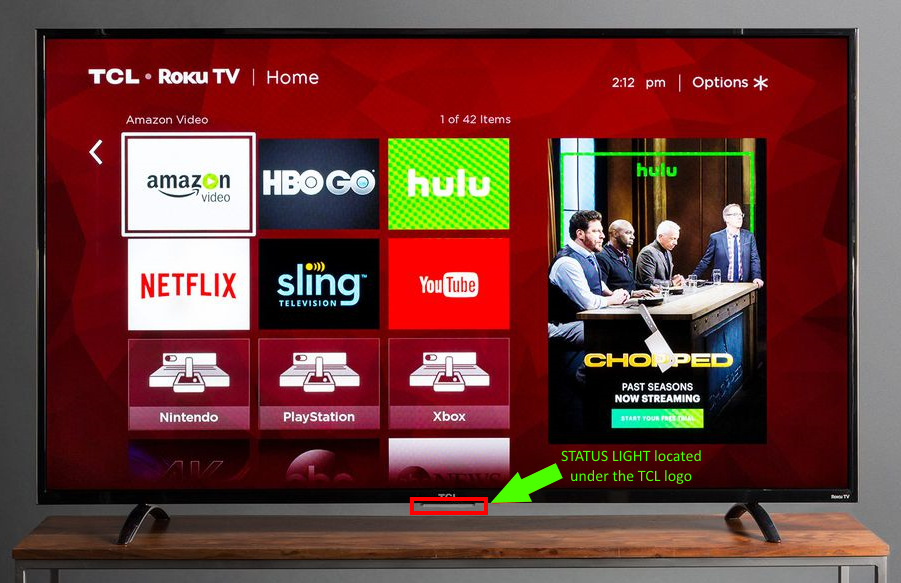
The blinking light on a TCL TV is not just a random event. It’s a system built into the TV to help you diagnose issues without special tools. Most TCL TVs use a small white, red, or orange LED near the power button or on the bottom edge. This light can blink in different patterns or colors to show different problems or statuses.
Common Reasons For Blinking
- Startup or Booting: When you turn on your TV, the light may blink as the system starts up.
- Software Update: During a firmware or software update, the light can blink to show the process is happening.
- Error Code: If there is a problem, the TV might use a blinking pattern to show an error code.
- Standby Mode: The light often blinks or stays on when the TV is in standby mode.
- Power Issues: If there is a problem with the power supply, the light may blink or flash in a special way.
Many beginners assume a blinking light always means a broken TV. In reality, some blinking is normal. The blinking becomes a problem if it keeps happening, if the TV won’t turn on, or if the light flashes in a repeating pattern.
Understanding Tcl Tv Blinking Light Patterns
Different blinking patterns can mean different things. It’s important to count the blinks and note the color. Most TCL TVs use red, white, or orange lights. Let’s look at the most common patterns and what they mean.
Single Slow Blink
If your TCL TV light blinks slowly one time, then stops, it usually means the TV is in standby mode. This is normal. The TV is off, but still plugged in and ready to turn on.
Steady Blinking While Starting
A steady, regular blinking while you turn on the TV often means the TV is booting up. This is normal, and the light should stop blinking once the TV is on.
Fast Repeated Blinking
Fast, repeated blinking, especially with no picture or sound, often means there is a power issue. The TV may be having trouble starting.
Blinking In Groups (e.g., 2 Or 3 Blinks, Pause, Repeat)
If the light blinks in a group (like 2 blinks, then pause, then 2 blinks again), this usually means there is a specific error code. The number of blinks can help you figure out what is wrong.
White Light Vs Red Light
- White Light: Often used for regular status or to show the TV is working.
- Red Light: Usually means standby or a problem.
Some TCL TVs, especially newer models, may use orange or yellow for certain signals.
What Each Blinking Pattern Means
The meaning of each blinking pattern can vary depending on the TCL TV model. Below is a general guide, but always check your TV’s manual for model-specific codes.
| Blinking Pattern | Possible Meaning | What to Do |
|---|---|---|
| 1 slow blink | Standby mode | Normal, nothing to fix |
| 2 blinks, pause | Power supply problem | Check power cable and outlet |
| 3 blinks, pause | Main board issue | Try a reset, contact support if needed |
| Continuous fast blinking | Firmware crash or update | Wait or try a forced reset |
| No blinking, always on | TV is on or in standby | Normal, depends on usage |
Keep in mind, some older TCL TVs might have different codes. If you see a unique pattern, check the user manual or the TCL support site.
Step-by-step: How To Fix Tcl Tv Light Blinking
Many problems that cause the TCL TV light blinking can be solved at home. Here are step-by-step solutions for the most common issues.
1. Power Cycle The Tv
The first thing to try is a power cycle. This simple process can fix many minor errors.
- Turn off the TV using the remote or power button.
- Unplug the TV from the wall outlet.
- Wait at least 60 seconds. (Many people plug it back too quickly—waiting a full minute helps drain all power.)
- Plug the TV back in.
- Turn the TV on.
This resets the main board and clears temporary errors.
2. Check Power Supply And Cables
A loose or faulty power cable is a common cause of blinking lights.
- Make sure the power cord is plugged in tightly on both ends.
- Try plugging the TV into a different wall outlet.
- Avoid using cheap or damaged extension cords.
- If possible, try a different power cable.
If the light stops blinking, the problem was with the power supply.
3. Reset The Tv (soft Reset)
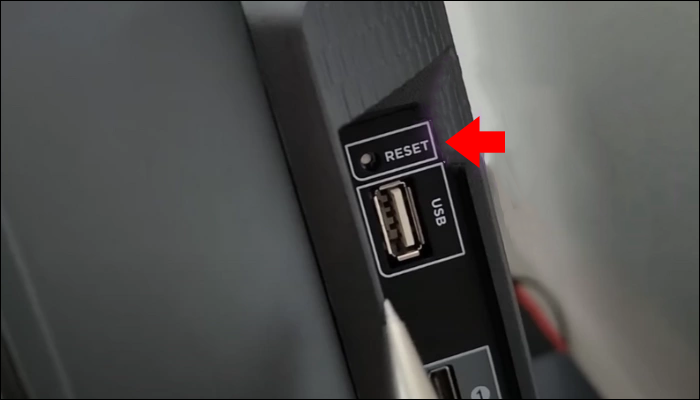
Most TCL TVs have a reset button. Here’s how to use it:
- Look for a small hole labeled “Reset” on the back or side of the TV.
- Use a paperclip to press and hold the button for 15-30 seconds.
- Release the button and wait for the TV to restart.
A soft reset clears most software problems without erasing your personal data.
4. Check For Software Updates
Sometimes, a failed or interrupted software update can cause the light to blink.
- If the TV turns on, go to Settings > System > Software Update.
- Make sure you have the latest update installed.
- If the update fails, try updating using a USB stick (follow instructions on the TCL support site).
5. Disconnect All Devices
External devices, like game consoles, streaming sticks, or soundbars, can cause problems.
- Unplug all devices from the TV (HDMI, USB, antenna, etc. ).
- Restart the TV.
- If the blinking stops, one device may be causing the problem.
- Reconnect devices one at a time to find the faulty one.
6. Factory Reset (hard Reset)
If other solutions don’t work, a factory reset might help. This erases all data and returns the TV to original settings.
- Use the physical reset button as above, but hold it for 30 seconds.
- Or, if the TV is on, go to Settings > System > Advanced System Settings > Factory Reset.
Warning: You will lose all settings and apps. Only do this as a last resort.
7. Look For Signs Of Hardware Failure
If none of the above fixes work, the problem may be hardware-related.
- Listen for unusual sounds (clicking, buzzing) from the TV.
- Smell for burning or chemical odors.
- Check if the screen shows faint images when the room is dark.
If you notice these signs, stop using the TV and contact TCL support or a qualified repair service.
Special Cases: Tcl Roku Tv, Android Tv, And Google Tv
Different TCL smart TV platforms have some unique blinking patterns and solutions.
Tcl Roku Tv
- Red blinking light: Often means a firmware or power issue.
- White blinking light: Sometimes used for pairing a remote or during updates.
- If the TV is stuck with a blinking light and won’t start, try a forced reset by holding the reset button for 30 seconds.
Tcl Android Tv & Google Tv
- Orange or yellow blinking: May appear during a software update or recovery mode.
- If the TV keeps blinking and won’t turn on, try unplugging for 2 minutes, then plug back in while holding the power button.
Consult the user manual for specific codes. Each system may have its own pattern.
When To Call For Professional Help
Sometimes, the blinking light means there’s a serious problem that you can’t fix at home. Here are signs you need professional help:
- Blinking pattern continues after all resets and troubleshooting.
- TV won’t turn on at all (no sound, no picture, only blinking light).
- You see or smell signs of electrical damage.
- The blinking code matches a “main board” or “power board” failure in your manual.
If your TV is still under warranty, contact TCL’s support. If not, look for a reliable TV repair service in your area. Trying to open the TV yourself can void your warranty or cause more damage.
Real-world Examples And User Mistakes
Many TCL TV owners share their experiences online, and these examples can help you avoid common mistakes.
- Skipping the Wait: Some people unplug and replug the TV too quickly when power cycling. Always wait at least 60 seconds.
- Ignoring Cables: A surprising number of issues come from loose or broken power cords.
- Wrong Reset Button: Some users confuse the TV’s reset button with buttons on their remote or other devices. The physical button is usually on the back or side of the TV.
- Not Noting the Pattern: People often say “my TV light is blinking” but don’t count the number of blinks or notice pauses. This information is critical for diagnosis.
Understanding these details can save you time and money.
How To Prevent Blinking Light Problems In The Future
Prevention is better than cure. Here’s how you can reduce the chance of seeing a blinking light problem in the future:
- Use a Surge Protector: Power surges can damage the TV’s power supply.
- Update Software Regularly: Set your TV to auto-update if possible.
- Keep TV Vents Clean: Dust can cause overheating and hardware failures.
- Unplug During Storms: Lightning can cause power issues even if your TV is off.
- Use Quality Accessories: Cheap HDMI cables or adapters can cause problems.
These simple habits can help your TCL TV last longer with fewer issues.
Comparing Tcl Tv Blinking Codes With Other Brands
TCL is not the only brand that uses blinking lights for error codes. Here’s a quick comparison with other popular TV brands:
| Brand | Light Color | Common Blink Codes | Typical Meaning |
|---|---|---|---|
| TCL | Red, White, Orange | 1-4 blinks, groups, fast blinking | Standby, power, main board, firmware |
| Sony | Red, Green, Orange | 2-8 blinks, repeating | Main board, power, overheating |
| Samsung | Red | Steady or blinking | Power, standby, main board |
| LG | Red | Steady or blinking | Standby, main board, power |
TCL codes are similar to other brands, but always check your specific model’s guide.
Non-obvious Insights About Tcl Tv Light Blinking
Many beginners miss these two important facts:
- Timing Matters: How long you wait during a power cycle can make a big difference. Some chips inside the TV need a full minute with no power to reset.
- Not All Blinking Means Error: Sometimes the light blinks during normal updates or when pairing a remote. Not every blink is a problem.
If you see a blinking light, don’t panic. Take a moment to watch the pattern, check the manual, and follow the steps above.
Cost Of Repairs For Blinking Light Problems
If you need to repair your TCL TV, here’s what you might expect to pay:
| Problem | Estimated Repair Cost (USD) | Repair or Replace? |
|---|---|---|
| Power Board Replacement | $60 – $120 | Usually repair |
| Main Board Replacement | $100 – $200 | Repair if under warranty; replace if old |
| Firmware/Software Reset | Free (DIY) or $30 – $50 (service) | Repair |
| Screen/Panel Failure | $200 – $500+ | Usually replace TV |
If your repair cost is close to the price of a new TV, it’s usually better to replace the TV.
Where To Find Reliable Tcl Tv Support
If you still have questions, check the official TCL support site or the community forums. For technical manuals and software downloads, visit the TCL Support Center.
Frequently Asked Questions
Why Is My Tcl Tv Light Blinking But The Tv Won’t Turn On?
A blinking light with no picture usually means a power or main board problem. Try unplugging the TV for 60 seconds, then plug it back in. If it still won’t turn on, you may need a repair.
What Does A Red Blinking Light Mean On A Tcl Tv?
A red blinking light often means an error or power issue. Count the number of blinks and check your manual. One or two blinks usually mean standby or power problems.
Can I Fix A Blinking Light On My Tcl Tv Myself?
Yes, you can often fix it by power cycling, checking cables, or doing a reset. If these steps don’t work, the problem may need professional repair.
Is A Blinking White Light Normal On Tcl Roku Tv?
A blinking white light can be normal during updates or when pairing a remote. If it keeps blinking and the TV won’t start, try a forced reset.
How Do I Know If My Tcl Tv Needs To Be Replaced?
If the blinking light is caused by a main board or screen failure, and repair costs are high, it may be better to buy a new TV—especially if your TV is more than five years old.
Taking the time to understand your TCL TV’s blinking light can save you from stress and unnecessary expenses. Most blinking issues are easy to fix with basic troubleshooting. If you follow these steps and use your TV carefully, you’ll keep it running smoothly for years.