
Many people struggle to find the power button on their Vizio TV. You may have just bought a new Vizio, moved to a new home, or lost your remote, and now you’re searching for that simple switch. But Vizio TVs are designed differently from other brands, and sometimes the power button is hidden in places you wouldn’t expect. This guide will help you locate the power button on any Vizio TV model, explain why it’s sometimes hard to find, and show you what to do if the button is broken or missing. You’ll also learn how to turn on your TV without a remote, what to do if the power button doesn’t work, and how to make your TV easier to use for everyone in your household.
Let’s explore where the power button is on Vizio TVs, step-by-step, with real examples and practical advice. By the end, you’ll never have to hunt for that button again.
Why Is The Power Button Hard To Find On Vizio Tvs?
The power button is often hidden or disguised on Vizio TVs. Unlike older TVs, where the button was large and easy to see, modern Vizio TVs have slim designs and minimal controls. Here are some reasons:
- Slim bezels: Vizio TVs have thin frames, so buttons are not placed on the front.
- Design choices: Vizio prefers clean, modern looks. Buttons are put on the sides or back.
- Fewer controls: Some models have only one button for power, while others have several for volume and input.
- Remote-first philosophy: Vizio expects most users to control their TV with the remote, not the buttons.
These design choices create confusion, especially for new users or those who have lost their remote. But don’t worry—the power button is always there, just hidden.
Common Locations Of The Vizio Tv Power Button
Vizio TVs come in different sizes and shapes, but the power button is usually in one of three places. Let’s look at each location in detail, with tips to help you find it quickly.
1. Bottom Edge (usually Front-left Or Front-right)
On many Vizio TVs, the power button is placed underneath the front edge. You’ll need to reach under the TV’s frame and feel for the button. Here’s how:
- Stand in front of your TV.
- Run your fingers under the bottom edge, starting at the left corner.
- If you don’t find anything, try the right corner.
You’ll usually feel a small, rubber button. Press it gently. If the TV turns on or off, you’ve found the power button.
Example: The Vizio D-Series (2018-2020) often has the power button on the front-left underside.
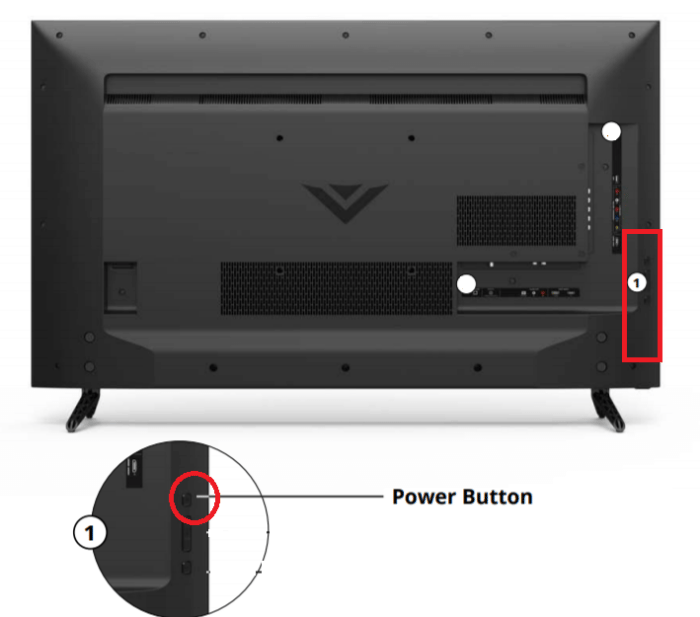
2. Back Panel (near Hdmi Or Usb Ports)
Some Vizio TVs have the power button on the back, near the input ports. This is common for larger TVs (50” and above). Here’s how to find it:
- Move to the back of your TV.
- Look for a cluster of ports (HDMI, USB).
- Check just above or below these ports for small buttons.
These buttons are sometimes grouped together—one for power, others for volume or input. On some models, the buttons are labeled, but on others, they are not.
Example: The Vizio P-Series and M-Series (2017-2022) often have the power button and other controls on the back-right side.
3. Side Panel (left Or Right Edge)
A few Vizio models place the power button on the side, near the back. It’s usually on the right edge when facing the TV. Here’s what to do:
- Stand next to your TV.
- Look at the right side near the back.
- Feel for a small row of buttons.
If you find a row, the top or bottom button is usually the power button. On some models, the buttons are flush with the surface, so they can be hard to see.
Example: The Vizio E-Series (2016-2018) sometimes places the power button on the side.

How To Identify The Power Button Among Other Buttons
Vizio TVs may have several buttons—power, volume, input, menu. The buttons look similar, so you need to know which one is for power. Here’s how to tell:
- Shape: The power button may be slightly larger or have a different feel.
- Symbol: Look for a small circle with a line through the top (power icon).
- Position: If there are multiple buttons, the power button is often the top or bottom one.
- Labels: Some models have tiny labels next to the button. Use a flashlight to check.
If you’re unsure, press each button and see what happens. The power button will turn the TV on or off; the others will change volume, input, or menu.
Vizio Tv Power Button Locations By Model (with Data Table)
Different Vizio TV models have different button placements. Here is a comparison of common models and where you can find the power button:
| Vizio TV Series | Year Range | Power Button Location | Other Notes |
|---|---|---|---|
| D-Series | 2018–2020 | Front-left underside | Easy to reach; only one button |
| P-Series | 2017–2022 | Back-right panel | Grouped with volume/input buttons |
| M-Series | 2017–2022 | Back-right panel | May be unlabeled |
| E-Series | 2016–2018 | Side-right edge | Row of 3-4 buttons |
| V-Series | 2019–2023 | Front-right underside | Small single button |
| Older Vizio CRT | 2007–2012 | Front, visible panel | Multiple labeled buttons |
This table helps you identify your model and find the button faster. If you don’t know your TV’s series, check the model number on the back label.
Why Do Some Vizio Tvs Have Only One Button?
Many modern Vizio TVs have just one button on the frame. This button does more than just turn the TV on or off. It can also control basic functions:
- Short press: Power on/off
- Long press: Opens menu or changes input
- Multiple presses: Cycles through volume or input
The single-button design is meant to simplify the TV’s look. But it can confuse users who expect separate buttons for power and volume.
Non-obvious insight: On some Vizio TVs, holding down the power button for more than five seconds can trigger a factory reset. Always check your manual before doing this.
What To Do If The Power Button Is Missing Or Broken
Sometimes, the power button is damaged or missing. This happens if the TV is dropped, cleaned with force, or used for many years. If you can’t find or use the button, here are solutions:
- Use the remote: If you have the remote, use it to turn the TV on/off.
- Universal remote: Buy a universal remote. Many work with Vizio TVs.
- Smartphone app: Download the Vizio SmartCast app and connect to your TV. The app lets you control power, volume, and more.
- Smart plug: Use a smart plug to turn the TV on/off remotely.
- Repair: Contact Vizio support or a TV repair shop if the button is physically broken.
Non-obvious insight: Vizio TVs can sometimes turn on automatically when you plug them into power. If your button is broken, unplug and replug the TV to turn it on.
How To Turn On Your Vizio Tv Without The Power Button
If your power button is broken or hidden, you have several ways to turn on your TV:
- Remote control: The easiest way. If lost, order a replacement.
- SmartCast app: Works on iOS and Android. Connects via Wi-Fi.
- Universal remote: Brands like RCA, GE, Logitech work with Vizio.
- HDMI-CEC: If your TV is connected to a device (like Roku or PlayStation) via HDMI, turning on the device may turn on the TV automatically.
Here’s a quick comparison of options:
| Method | Requirements | Pros | Cons |
|---|---|---|---|
| Remote control | Original or compatible remote | Easy, reliable | Needs batteries, can be lost |
| SmartCast app | Smartphone, Wi-Fi | Free, multi-function | Needs app setup |
| Universal remote | Compatible brand | Works on many TVs | Needs programming |
| HDMI-CEC | Connected device | Automatic control | Not always reliable |
If you want to avoid searching for the power button, these options are smart and convenient.
Why Vizio Tvs Rely More On Remotes Than Buttons
Vizio designs its TVs to be controlled mainly by remote or app. Here’s why:
- Smart TV features: Most functions are only available through the remote.
- Minimal design: Reduces clutter and improves style.
- Cost savings: Fewer physical buttons mean lower manufacturing costs.
But this can be a problem if the remote is lost or batteries die. That’s why knowing where the power button is can save you in emergencies.
Non-obvious insight: Vizio remotes use infrared (IR), so you need a direct line of sight. If your remote isn’t working, check for obstructions or try a universal remote.
Vizio Tv Button Layouts: Explained
Button layouts change from model to model. Some TVs have multiple buttons, while others have just one. Here’s what you might see:
- Single button: Just power. Press and hold for menu.
- Three buttons: Power, volume up, volume down.
- Four buttons: Power, input, volume up, volume down.
- Labeled row: Older models may have clear text labels.
Look for tiny symbols or raised bumps. If your buttons are not labeled, use trial and error to find the power button.
Vizio Tv User Manual: How It Helps
If you have your Vizio TV’s user manual, it can show exactly where the power button is. Manuals include diagrams and button descriptions. If you lost your manual, you can download it from the Vizio website by searching your model number.
Reading the manual can help you:
- Find button location
- Learn button functions
- Understand how to use the TV without a remote
Manuals often include troubleshooting tips if your TV won’t turn on.
How Vizio’s Power Button Location Compares To Other Brands
Vizio’s power button placement is unique. Here’s a comparison with other popular brands:
| Brand | Typical Power Button Location | Ease of Access |
|---|---|---|
| Vizio | Back, underside, or side | Hidden, can be hard to find |
| Samsung | Front or side, visible | Easy to find |
| LG | Bottom-center or rear | Medium |
| Sony | Side or back panel | Medium |
| TCL | Back or side | Medium |
Vizio’s hidden placement is less user-friendly but creates a sleek look.
What To Do If Your Vizio Tv Doesn’t Turn On
If you press the power button and nothing happens, try these steps:
- Check power cable: Make sure it’s plugged in securely.
- Try a different outlet: Sometimes outlets fail.
- Reset the TV: Unplug for 60 seconds, then plug back in.
- Check remote batteries: Dead batteries won’t turn the TV on.
- Look for indicator lights: If the light is off, the TV is not getting power.
- Test power button: Try pressing and holding for five seconds.
If your TV still won’t turn on, contact Vizio support or a qualified technician.

How To Make Your Vizio Tv Easier To Use For All Ages
If older family members or children struggle to find the power button, you can make your TV easier to use:
- Label the button: Use a small sticker or marker to highlight the button.
- Keep the remote nearby: Use a holder or tray to avoid losing it.
- Smart plug: Install a smart plug that can turn the TV on/off by voice.
- Teach family members: Show them where the button is and how to use the remote.
These tips help everyone enjoy the TV without frustration.
Vizio Smartcast App: Power Control Without The Button
The Vizio SmartCast app allows you to control your TV from your phone. This is helpful if you can’t find the power button or lost the remote. The app works with most Vizio TVs made after 2016.
To use SmartCast:
- Download the app from the App Store or Google Play.
- Connect your phone and TV to the same Wi-Fi.
- Open the app and select your TV.
- Use the on-screen controls to turn the TV on/off.
SmartCast is free and offers extra features like volume, input, and streaming.
How To Find Your Vizio Tv Model Number
Finding your TV model number helps you locate the power button. Here’s how:
- Back label: Look for a sticker on the back of your TV. It will say “Model No.”
- Menu settings: On the remote, press “Menu,” then “System” > “Information.”
- User manual: Check the cover or first page.
Once you have the model number, search online for button placement or download the manual.
Practical Tips For Locating The Power Button
If you’re still struggling, try these practical tips:
- Use a flashlight: Shine under the edges or behind the TV.
- Feel for bumps: Run your fingers along the underside or back.
- Ask for help: Two people can make it easier—one lifts, one checks.
- Check online videos: YouTube has guides for most Vizio models.
If you use these tips, you’ll find the power button faster and save time.
Vizio Tv Accessibility Features
Vizio TVs include accessibility features to help users with disabilities. These features can help if the power button is difficult to use:
- Voice control: Some models work with Alexa, Google Assistant, or Apple HomeKit.
- Large remote buttons: Buy a universal remote with larger buttons.
- SmartCast app: Use your phone for easy control.
If accessibility is important, check your model’s features or visit Vizio’s official support page.
Vizio Tv Power Button Myths And Facts
Many myths surround the power button on Vizio TVs. Let’s clear up the facts:
- Myth: Vizio TVs don’t have a physical power button.
- Fact: All Vizio TVs have a power button. It’s just hidden.
- Myth: Pressing the power button erases your settings.
- Fact: Short presses do not affect settings. Only factory reset changes settings.
- Myth: Only the remote can turn on the TV.
- Fact: The button works even if the remote is lost.
- Myth: Power button location is the same for all models.
- Fact: Location changes by model and year.
Knowing the facts helps you avoid mistakes and confusion.
How Vizio Tvs Handle Power During Power Outages
If your area has frequent power outages, your Vizio TV may behave differently:
- Automatic power-on: Some models turn on when power returns.
- Standby mode: Others stay off until you press the button or use the remote.
- Settings reset: Rarely, settings may reset if outage is long.
If you want to protect your TV, use a surge protector and unplug during storms.
Troubleshooting: Power Button Not Working
If your power button doesn’t work, try these steps:
- Clean the button: Dust or debris may block it.
- Check for damage: Look for cracks or missing parts.
- Try the remote/app: If these work, the issue is with the button.
- Power cycle the TV: Unplug for 60 seconds, then try again.
- Reset to factory: If nothing works, reset the TV (check manual).
If the button is broken, contact Vizio support or a technician.
Upgrading Your Vizio Tv Remote For Better Power Control
If your remote is old or unreliable, consider upgrading:
- Universal remote: Works on many brands and models.
- Smart remote: Some work with voice commands.
- Replacement remote: Order official Vizio remotes online.
Upgraded remotes can make power control easier and improve your TV experience.
Tips For New Vizio Tv Owners
If you just bought a Vizio TV, here’s how to quickly find the power button:
- Check the manual: Look for diagrams.
- Inspect the frame: Feel under the bottom or back.
- Use the remote: Test power and other functions.
- Set up SmartCast: Download the app for backup control.
- Label the button: If you’ll use it often, mark it.
These steps help you avoid frustration and enjoy your TV from day one.
Frequently Asked Questions
Where Is The Power Button On My Vizio Tv?
The power button is usually under the bottom edge, on the back panel near the ports, or on the side edge of your TV. Check the front-left or front-right underside, or look on the back-right near the HDMI/USB ports.
Can I Turn On My Vizio Tv Without The Remote?
Yes, you can use the physical power button, the Vizio SmartCast app on your phone, or a universal remote. Some TVs can also turn on automatically via HDMI-CEC if connected to certain devices.
What If My Vizio Tv Power Button Is Broken?
Try turning on the TV with the remote, SmartCast app, or universal remote. If none of these work, contact Vizio support or a repair shop.
How Do I Find My Vizio Tv Model Number?
Look at the sticker on the back of your TV or in the settings menu under “System Information. ” The model number helps you locate the power button and find the manual.
Does Every Vizio Tv Have A Physical Power Button?
Yes, all Vizio TVs have a power button, but it may be hidden under the frame, on the back, or on the side. If you can’t find it, check the manual or search your model number online for guidance.
Finding the power button on your Vizio TV may seem difficult, but with the right information, it’s easy. Whether your button is hidden underneath, on the back, or on the side, you now know how to locate and use it.
If the button is broken or you prefer remote control, there are plenty of options—from SmartCast apps to universal remotes. Remember to check your model number, use practical tips, and label the button for easier use. With this guide, you’ll never be confused about powering your Vizio TV again.