
Are the lights on your Breville espresso machine flashing and leaving you puzzled? You’re not alone.
When those blinking signals start, it usually means your machine is trying to tell you something important—like it needs cleaning, descaling, or a simple reset. Ignoring these flashing lights can affect the taste of your coffee and even damage your machine over time.
But don’t worry, you can fix this quickly with a few easy steps. Keep reading, and you’ll learn exactly what those flashing lights mean and how to get your Breville espresso machine back to perfect brewing in no time.
Common Causes Of Flashing Lights
Flashing lights on your Breville espresso machine often signal specific issues. These alerts help you keep the machine in good working order. Identifying the cause of flashing lights can save time and prevent damage.
Understanding common reasons behind flashing lights makes troubleshooting easier. Most causes relate to maintenance, controls, or parts alignment.
Cleaning And Maintenance Alerts
Flashing lights often mean the machine needs cleaning. The “Clean” or “Descale” light flashes when buildup affects performance. Regular cleaning removes oils and coffee residue. Ignoring these alerts may cause poor taste or machine damage. Use the recommended cleaning tablets and follow the backflush process.
Knob And Button Position Issues
Lights can flash if knobs or buttons are not set correctly. The steam or hot water knob might be left open. This stops the machine from working properly. Check that all controls are in the correct position before brewing. Proper knob settings ensure smooth operation.
Water And Steam Control Problems
Flashing lights may signal low water levels or steam issues. The machine needs enough water to make espresso. Steam pressure problems also cause alerts. Refill the water tank and check for blockages in the steam wand. Proper water and steam control keep the machine running well.
Bean Hopper And Grinder Errors
Errors with the bean hopper or grinder can trigger flashing lights. The hopper might be empty or jammed. Grinder settings that are too fine or coarse may cause problems. Clean the hopper and grinder regularly. Adjust grind size to avoid jams and ensure consistent coffee grounds.

Identifying Light Patterns
Breville espresso machines use light signals to communicate their status. Understanding these light patterns helps you keep your machine in top shape. Each flashing or solid light means a specific action is needed. Recognizing these signals can save time and avoid damage.
Blinking Clean Light
A blinking clean light means the group head needs cleaning. It signals the need for a backflush cleaning cycle. Use a cleaning tablet in the portafilter basket. Run the backflush cycle to remove coffee oils and residue. This keeps your espresso tasting fresh and your machine working well.
Solid Descale Light
A solid descale light means the machine requires descaling. Hard water deposits build up inside and affect performance. Use a descaling solution recommended by Breville. Follow the machine’s instructions to complete the process. Regular descaling extends your machine’s lifespan and improves coffee flavor.
Rapid And Alternating Button Flashes
Rapid or alternating flashes usually indicate a problem or error. This can happen if a knob is in the wrong position. It may also show a mechanical or electrical fault. Check that all knobs are correctly positioned. Refer to your manual for error codes and steps to fix the issue quickly.
Backflushing Your Machine
Backflushing your Breville espresso machine is essential for keeping it clean and working well. This process removes coffee oils and residue from the machine’s group head. Regular backflushing helps prevent flashing lights that warn you about cleaning needs. It also improves the taste of your espresso and extends your machine’s life.
Preparing For Backflush
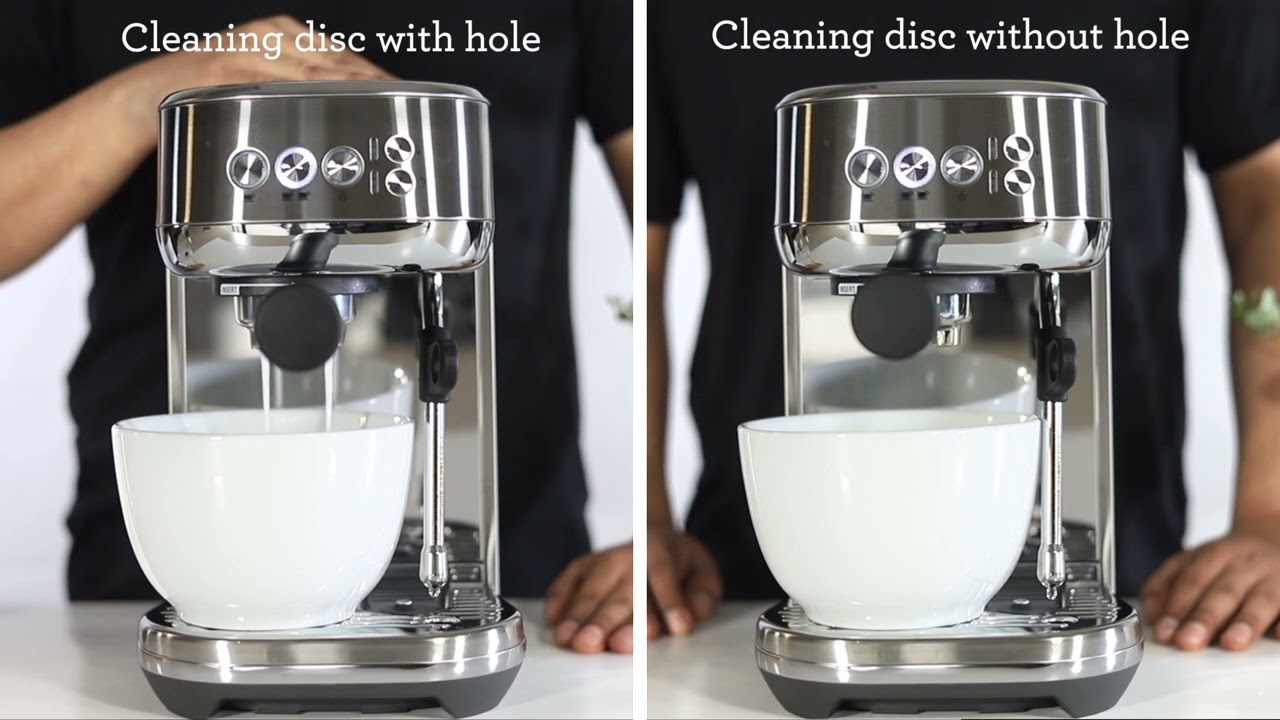
Start by turning off the machine and letting it cool down. Remove the portafilter and clean it thoroughly. Insert a blind filter or blanking disc into the portafilter. Make sure the disc fits tightly. Place the portafilter back into the group head securely.
Using Cleaning Tablets
Use only cleaning tablets made for espresso machines. Place one cleaning tablet into the blind filter basket. These tablets help dissolve coffee oils and buildup inside the machine. Do not use regular soap or detergent, as these can damage your machine.
Running The Backflush Cycle
Turn on the machine and activate the backflush cycle. This usually involves pressing the brew button several times. The machine will pump water through the blind filter, cleaning the group head. Repeat the cycle as needed, following your machine’s instructions. After the cycle, remove the portafilter and rinse it well.
Resetting The Machine After Cleaning
After backflushing, reset your Breville espresso machine to clear the cleaning alert. This may require holding down specific buttons or following a reset procedure in the user manual. Resetting stops the flashing lights and returns the machine to normal operation. Your machine is now ready for use.
Descaling Steps
Descaling keeps your Breville espresso machine working well. It removes mineral build-up inside the machine. This build-up can cause flashing lights and affect coffee taste. Follow these descaling steps to fix the issue and keep your machine in good shape.
When To Descale
Descale when the machine shows a “Descale” light or flashing signals. Also, descale if coffee flow slows down or tastes bitter. Regular descaling every 2 to 3 months is good. Hard water areas may need more frequent descaling.
Choosing The Right Descaling Solution
Use a descaling solution made for espresso machines. Avoid harsh chemicals or bleach. Many brands sell safe descalers for Breville machines. You can also use a mixture of white vinegar and water. Check the manual for recommended solutions.
Descaling Procedure
Start with an empty water tank. Fill it with the descaling solution or vinegar mix. Turn on the machine and let it heat up. Run the solution through the brew cycle without coffee. Use the steam wand to flush the solution as well. Repeat until the tank is empty. Rinse the tank and fill with fresh water. Run fresh water through the machine twice to rinse out any residue.
Post-descale Maintenance
Clean the portafilter and group head after descaling. Wipe the steam wand with a damp cloth. Run a few water-only cycles to clear any leftover solution. Check for any flashing lights after maintenance. Regular cleaning helps avoid future flashing light warnings.
Fixing Steam And Water Issues
Steam and water issues can stop your Breville espresso machine from working properly. These problems often cause the lights to flash. Fixing them can help your machine run smoothly again. Follow these simple steps to solve common steam and water problems.
Checking Steam Knob Position
The steam knob controls steam flow. Make sure it is fully turned off when not in use. A partially open steam knob can cause the lights to flash. Turn the knob completely clockwise to close it. Check if the flashing stops after adjusting the knob.
Clearing Water Line Blockages
Water blockages can stop steam and water from flowing. Check the water line for clogs or mineral buildup. Use a small brush or a pin to clear any blockages gently. Run a cleaning cycle with a descaling solution to remove stubborn deposits. This keeps water moving freely inside the machine.
Resetting Steam Controls
Sometimes the steam controls need a reset to work right. Turn off the machine and unplug it from the power source. Wait for one minute before plugging it back in. Turn the machine on and try using the steam function again. This simple reset can clear errors causing the flashing lights.

Troubleshooting Grinder And Bean Hopper
Troubleshooting the grinder and bean hopper on your Breville espresso machine helps fix flashing light issues. These parts play a key role in brewing fresh coffee. Problems often arise from loose or dirty components. Proper care can stop the blinking lights and improve machine performance.
Securing The Bean Hopper
Check that the bean hopper is firmly attached. A loose hopper can cause the machine to flash warning lights. Remove the hopper and place it back carefully. Make sure it locks into place with a slight twist. Avoid overfilling the hopper, as this may also trigger alerts.
Cleaning The Grinder
Dirty grinders block coffee beans and cause flashing lights. Unplug the machine before cleaning. Remove the bean hopper and brush out leftover grounds. Use a soft brush or cloth to clean the grinder blades gently. Regular cleaning prevents jams and keeps your coffee fresh.
Resetting Grinder Settings
Incorrect grinder settings can confuse the machine and make lights flash. Adjust the grind size knob to a medium setting. Turn the machine off and back on to reset the grinder. This simple step recalibrates the grinder for smooth operation. Test with a small amount of beans to confirm the fix.
Bypassing Flashing Lights Temporarily
Bypassing flashing lights temporarily on your Breville espresso machine can help you keep brewing. The machine uses these lights to warn about cleaning or maintenance needs. Sometimes, you might want to delay these alerts to finish your coffee.
This guide explains how to override flashing lights briefly. It also covers the risks and when to use this method safely.
Using Steam Button Override
Press and hold the steam button for about 3 to 5 seconds. Release the button once the lights stop flashing. This action temporarily bypasses the alert. You can now make your espresso without interruption. The machine will remind you again after the next cycle.
Risks Of Bypassing Alerts
Ignoring flashing lights means skipping important cleaning. This can cause buildup inside the machine. Buildup affects taste and machine performance. Long delays increase the risk of damage. Use this override only for short delays.
When To Use This Method
Use this method only if you need one last shot before cleaning. If you are in a rush or have no cleaning supplies nearby. Avoid bypassing if the machine has been signaling for a long time. Regular maintenance is key to a good espresso machine life.
Resetting Your Breville Espresso Machine
Resetting your Breville espresso machine can fix flashing light issues quickly. It helps clear errors and refresh the system. This step is often the first fix before deeper troubleshooting.
Some resets are simple and fast, while others restore factory settings. Knowing which reset to use saves time and prevents data loss. Follow these easy steps to reset your machine safely.
Basic Reset Steps
Turn off your Breville espresso machine. Unplug it from the power outlet. Wait for 10 to 15 seconds to let it fully power down.
Plug the machine back in. Turn it on and check if the flashing lights stop. This simple reset clears minor glitches.
If lights still flash, try pressing and holding the main power button for 5 seconds. Release and restart the machine.
Factory Reset Options
Factory reset clears all settings and returns the machine to original condition. Use this only if basic reset does not work.
To perform a factory reset, check your model’s user manual. Usually, it involves pressing specific buttons together while powering on.
Follow the exact button sequence shown in the manual to avoid errors. After reset, you may need to reconfigure your preferences.
When To Contact Support
If flashing lights continue after resets, there may be a hardware issue. Contact Breville customer support for help.
Prepare your machine model number and a description of the problem. Support can guide you through advanced fixes or service options.
Do not attempt to open or repair the machine yourself. This can void warranties or cause damage.
Preventive Care Tips
Preventive care helps keep your Breville espresso machine running smoothly. It reduces flashing light issues and extends machine life. Small daily habits make a big difference. Follow these tips to avoid common problems and enjoy perfect coffee every day.
Regular Cleaning Schedule
Clean your machine often to stop buildup and blockages. Wipe the group head, steam wand, and drip tray after each use. Perform a backflush cleaning weekly with a cleaning tablet. This removes coffee oils and residue inside the machine. Regular cleaning prevents flashing lights from alerting you.
Water Quality Management
Use fresh, filtered water to protect your machine’s parts. Hard water causes mineral buildup that triggers flashing lights. Change water filters as recommended by Breville. Avoid tap water with high mineral content. Good water quality helps maintain the machine’s sensors and heating elements.
Proper Use And Handling
Handle your machine gently to avoid errors and flashing lights. Turn knobs and buttons carefully and do not force them. Use the correct accessories and avoid overfilling the portafilter. Follow the manufacturer’s instructions for brewing and steaming. Proper use prevents damage and keeps your machine alert-free.
Credit: www.youtube.com
Resources And Support
Finding answers for Breville espresso machine lights flashing is easier with the right resources. Support materials help you understand what the flashing lights mean. They guide you through simple fixes or maintenance steps. Reliable resources save time and reduce frustration. Here are some trusted places to find help.
Official Breville Guides
Breville offers detailed manuals for each espresso machine model. These guides explain light signals clearly. They include step-by-step instructions for cleaning and resetting. You can download them from Breville’s official website. The guides cover troubleshooting tips for common problems. Always check your model’s specific guide for accurate info.
Helpful Video Tutorials
Videos show exactly how to handle flashing lights on Breville machines. Many creators post clear, short tutorials online. These videos demonstrate cleaning, descaling, and button resets. Watching the process can make it easier to follow. Search for your machine model plus “flashing lights fix.” Videos offer a quick visual solution.
Community Forums And Faqs
User forums are full of shared experiences and advice. Many owners discuss flashing light issues and solutions. FAQs on coffee and appliance sites answer common questions simply. You can ask specific questions and get replies from experts or users. Forums provide real-world tips that manuals might miss. Join discussions to learn practical fixes and insights.
Frequently Asked Questions
Why Is My Breville Espresso Machine Flashing Lights?
Your Breville espresso machine’s flashing lights signal it needs cleaning or descaling. Backflush the group head using a cleaning tablet. Ensure knobs are correctly positioned and water tank is full. This routine maintenance keeps your machine working smoothly.
What Is The Life Expectancy Of A Breville Espresso Machine?
A Breville espresso machine typically lasts 5 to 10 years with regular maintenance and proper care.
How To Bypass Flashing Lights In Breville Bambino?
Hold the steam button for a few seconds, then release it. This bypasses the flashing light temporarily, allowing you to pull a shot.
How Do I Reset My Breville Espresso Machine?
To reset your Breville espresso machine, perform a backflush using a cleaning tablet in the portafilter. Lock it in, ensure the water tank is full, then run the cleaning cycle. This clears maintenance alerts and resets the machine’s lights.
Why Are My Breville Espresso Machine Lights Flashing?
Flashing lights usually mean the machine needs cleaning or descaling. Sometimes, a knob might be in the wrong position. Check the machine’s manual for specific light codes.
Conclusion
Breville espresso machine lights flashing often signal routine care is needed. Cleaning or descaling keeps your machine working well. Follow the steps carefully for best results. Regular maintenance prevents bigger problems later. Stay attentive to your machine’s signals. This simple habit saves time and money.
Enjoy great coffee with a well-kept machine. Keep your Breville running smoothly every day.