
Losing your AirPods case can feel frustrating. The case is small, easy to misplace, and without it, your AirPods can’t charge or connect to your devices. Many people panic when they realize their case is missing, but there are practical ways to search, some smart tools, and even a few unexpected tricks that can help. This guide will show you how to find your AirPods case, step-by-step, and explain what to do if you can’t locate it. Whether you lost your case at home, outside, or somewhere in between, you’ll find clear advice here.
Understanding Airpods Case Tracking
Apple added tracking features for AirPods, but the AirPods case itself has limited options. If you own AirPods Pro (2nd generation) or newer, your case has its own tracking chip. Older models don’t. This difference matters for your search.
Which Airpods Cases Can Be Tracked?
AirPods Pro (2nd Gen) cases include Find My network support. Standard AirPods and first-gen Pro cases lack this feature. If you’re not sure which model you own, check the underside of your case lid. Newer cases mention “MagSafe” or “Find My.”
Here’s a quick comparison:
| Model | Can Track Case? | Tracking Method |
|---|---|---|
| AirPods Pro (2nd Gen) | Yes | Find My network |
| AirPods (1st/2nd/3rd Gen) | No | Find My (AirPods only) |
| AirPods Pro (1st Gen) | No | Find My (AirPods only) |
If your case supports tracking, you have extra tools. Otherwise, you’ll use classic searching methods.
It’s important to know that even among compatible cases, features can differ. For example, some MagSafe charging cases (sold separately) support precision finding, while older wireless charging cases do not. If you recently bought your AirPods or case, double-check the product details in your Apple account or on the Apple website.
Also, if you bought your AirPods secondhand or received them as a gift, check if the serial number matches the model listed in your device settings. Sometimes, replacement cases look similar but do not have tracking features. This confusion is common and can affect your search.
Using Apple’s Find My App
The Find My app is Apple’s main tool for tracking lost devices. Let’s break down how to use it:
Step-by-step For Supported Cases
- Open the Find My app on your iPhone, iPad, or Mac.
- Tap Devices and select your AirPods.
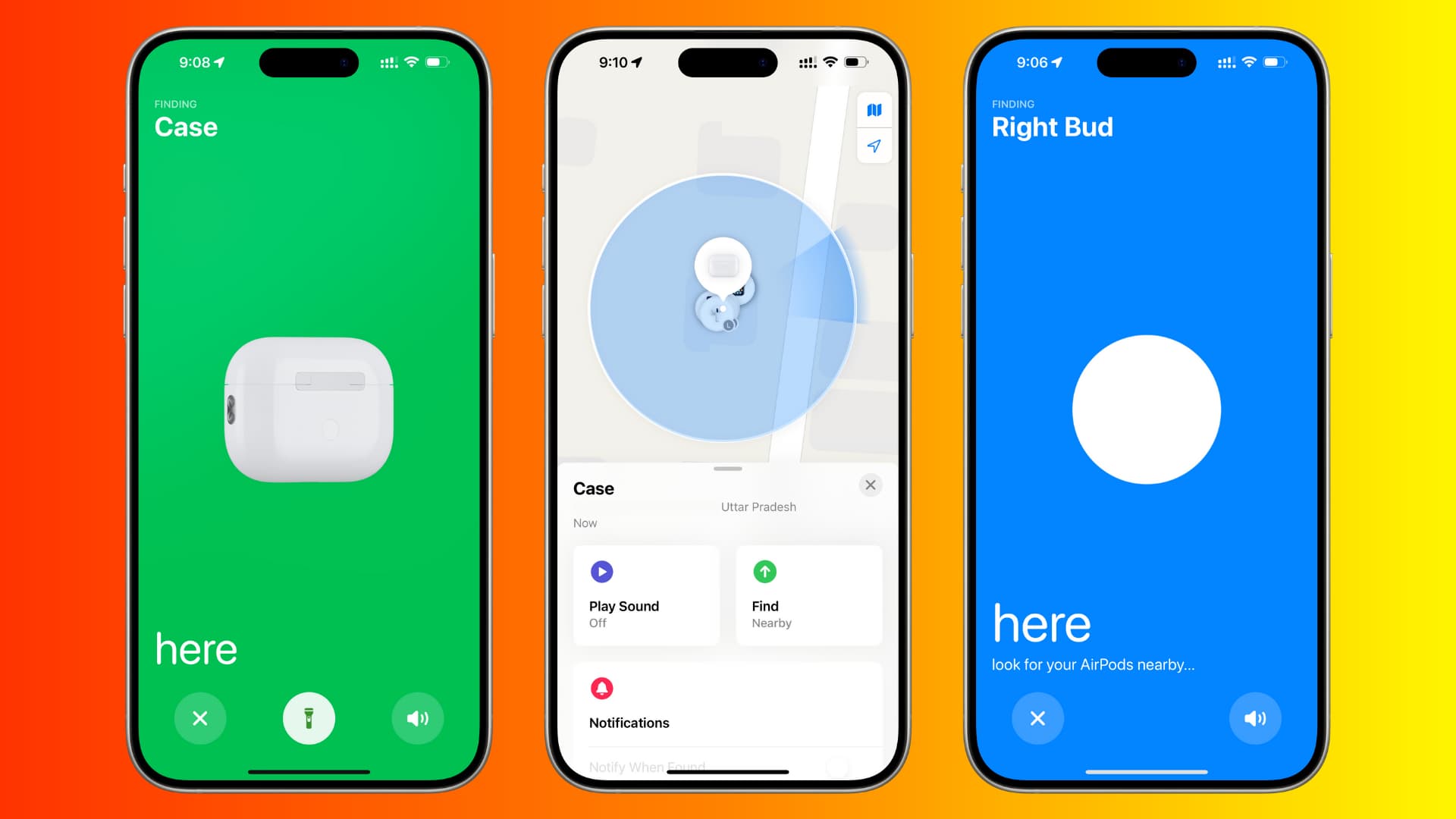
- If your case is trackable, you’ll see its location.
- Tap Play Sound to ring the case (works for AirPods Pro 2nd Gen).
- Follow the map, listen for the sound, and check nearby spots.
Find My uses Bluetooth and Apple’s network of devices to locate your AirPods case within about 30 feet indoors, farther outdoors. If the case moved, you’ll see its last known location.
One useful detail: If you’re in a large home or office, the precision finding feature (on newer iPhones) can guide you to the exact spot. The app shows an arrow and distance as you walk around. If you have trouble hearing the sound, try searching during a quiet time or ask someone else to listen too.
If you see a “No Location Found” message, it means your case is either out of battery, offline, or out of range of any Apple devices. In these situations, move on to physical search methods.
What If Your Case Isn’t Trackable?
Older cases don’t show up individually in Find My. The app tracks AirPods themselves, but not the case. If your AirPods are inside the case, they appear as “Offline.” Still, you can:
- Check last connected location.
- Use this to narrow your search.
Many beginners miss this: The last known location is only where your AirPods were connected, not necessarily where you lost the case.
Another detail: The Find My app sometimes updates the location only when your AirPods connect to a device. So, if you took your AirPods out in a café, but lost the case later, the map may not help. Still, it’s a good starting point, especially if you visited only a few places.
If you use Family Sharing or have other Apple devices, check their Find My apps as well. Sometimes, a different device will show a more recent location.
Physical Search Techniques
If digital tools don’t help, it’s time to search. The right method depends on where you lost the case.
At Home
Most AirPods cases are lost at home. Here’s a practical approach:
- Retrace your steps: Think about where you last used your AirPods. Bedroom, couch, kitchen?
- Check common hiding spots:
- Under couch cushions
- Inside pockets of jackets or bags
- Between car seats
- Laundry basket
- Desk drawers
- Under pillows
- Use a flashlight: The shiny white case reflects light, making it easier to spot.
- Listen for a sound: If your AirPods are inside and charged, tap the Find My app to play a sound.
Don’t forget to check places you don’t usually use—like under the bed, inside shoes by the door, or even in the fridge (it happens more often than you think!). Children and pets sometimes move things, so check their rooms or play areas.
If you have a robot vacuum, check its dustbin. Some people have found their missing AirPods cases this way!
At Work Or School
Busy places mean more distractions:
- Ask colleagues or friends if they’ve seen the case.
- Check meeting rooms, lockers, lunch areas.
- Visit lost-and-found desks.
If your workplace has security cameras, ask if it’s possible to review footage. Sometimes, you can spot yourself putting the case down somewhere unexpected.
In schools, teachers or cleaning staff often find small electronics and turn them in. Leave your contact information at the front desk or with the janitorial staff. Describe your case clearly—mentioning color, stickers, or any unique marks helps.
Outdoors
If you dropped your case outside:
- Go back to the area quickly, before someone else finds it.
- Look for obvious spots: Benches, grass, sidewalks.
- If possible, ask local staff (park workers, store clerks).
If it rained or snowed recently, look around drains, puddles, or bushes where the case could have been washed or kicked. If it’s a popular area, ask people nearby if they saw something. Sometimes, people leave lost items on benches or fences for others to find.
In Your Car
Cars are common for lost AirPods cases:
- Search between and under seats.
- Check cup holders, glove compartment, door pockets.
- Use a small flashlight for dark corners.
Move your seats forward and backward to reveal gaps. If you have car seat covers, check underneath them. Sometimes the case slides under floor mats or gets wedged in tight spaces.
Ask passengers if they remember seeing the case. Kids, especially, might pick it up or move it without saying.
Smart Tech Solutions
Technology can help, even if your case isn’t trackable.
Bluetooth Scanners
Some apps scan for Bluetooth signals. They can detect your AirPods if they’re out of the case and charged. Examples include “Bluetooth Finder” or “Find My Headphones. ” Beginners often miss that the AirPods themselves must be outside the case and powered on.
If you hear a faint connection beep on your phone, it means the AirPods are nearby. Walk slowly around your home or office with the scanner running. The signal strength will increase as you get closer. This can be very useful for finding an AirPod that fell out of the case and rolled under furniture.
Airtag For Future Protection
If you lose your AirPods case often, attach an AirTag to your case. AirTags use Apple’s Find My network and can be tracked almost anywhere. There are special AirPods case covers that hold an AirTag.
Some people use bright-colored AirTag holders to make the case stand out visually and for tracking. Remember, AirTags themselves need a working battery, so replace it every year or when you get a low-battery warning.
Third-party Tracking Devices
Some companies make small trackers for cases. These aren’t as reliable as AirTags, but they add extra security. Look for brands with good reviews and easy app support.
Popular brands include Tile and Chipolo. These trackers use Bluetooth and their own apps. They often beep when you tap “find” in the app and show the last known location. If you use Android devices or share your AirPods with others who don’t have iPhones, third-party trackers can be a useful backup.
Organizing Your Search
Searching can feel overwhelming. Here’s how to stay organized:
- Write down places you’ve checked. Avoid repeating and wasting time.
- Ask others: Sometimes, someone else picked up your case and forgot to tell you.
- Set a time limit: If you don’t find your case within 30 minutes, move to digital tools or consider replacement options.
A simple checklist or notes app can help you keep track. Mark each location as you search. This method prevents you from missing spots or checking the same place multiple times.
If you live with others, send a group message or leave a note asking for help. More eyes can speed up the process.
If you think you lost the case in a public place, call lost-and-found desks as soon as possible. Some places only keep lost items for a few days before donating or discarding them.
Special Tips For Hard-to-find Cases
Some cases seem impossible to find. Try these advanced methods:
Use Your Phone’s Flashlight In Different Angles
Lighting from different directions can reveal the case’s shine in places you missed.
Check Unusual Spots
- Inside shoes
- Behind appliances
- Under stacks of paper
- In toy boxes (if you have kids)
Don’t forget to shake blankets, check laundry baskets, and inspect trash bins before taking them out. Sometimes, the case gets wrapped in clothes or thrown away by mistake.
Listen For Rattling
Shake bags, purses, or jackets gently. If your AirPods are inside, you might hear a faint rattle.
Sometimes, the case can slip into the lining of a bag or under a car mat. If you hear something moving but can’t see it, turn the bag or mat upside down.
Clean Up
Tidying your room or workspace often reveals lost items. Move objects slowly and check as you go.
Take breaks if you get frustrated. A clear mind helps you remember places you haven’t checked.
What If You Can’t Find Your Case?
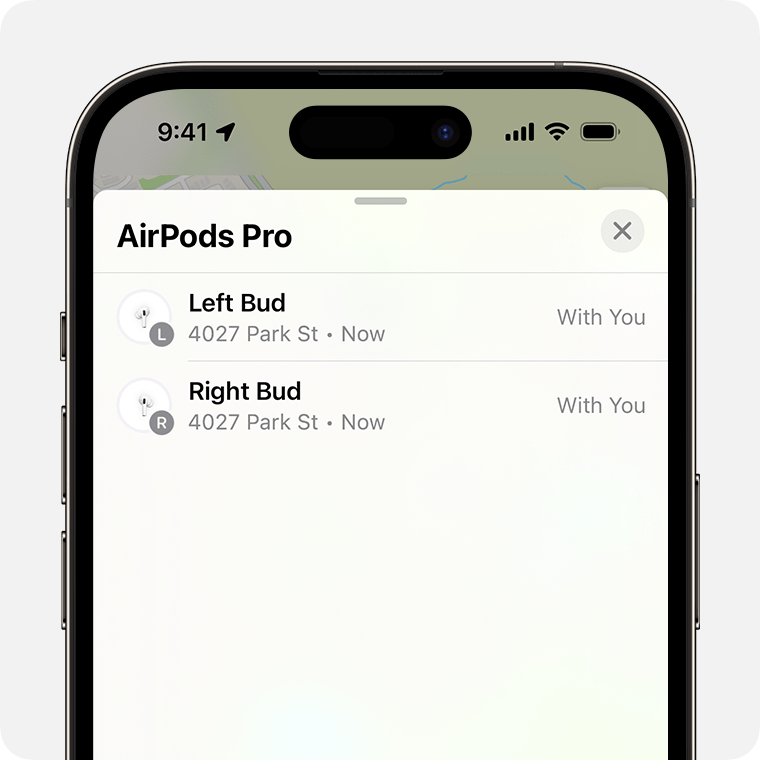
Sometimes, you just can’t find it. Here’s what to do next.
Buying A Replacement Case
Apple sells replacement cases. Prices vary by model:
| AirPods Model | Replacement Case Price (USD) | Where to Buy |
|---|---|---|
| AirPods Pro (2nd Gen) | $99 | Apple Store |
| AirPods (3rd Gen) | $89 | Apple Store |
| AirPods (1st/2nd Gen) | $59 | Apple Store |
Third-party sellers offer cheaper cases, but they may not work as well. Apple’s official cases guarantee compatibility.
If you buy from a third-party, make sure the case supports charging and pairing. Check user reviews before buying. Many off-brand cases work only for charging and not for pairing, causing more problems later.
What To Check Before Buying
- Your AirPods model (check settings or serial number)
- Warranty status (AppleCare+ covers lost cases for a fee)
- Compatibility: Not all cases fit every AirPods generation.
Beginners Often Buy The Wrong Case. Double-check Your Model!
If you have AppleCare+, ask about replacement options. Some plans allow one or more lost-item claims for a reduced fee. You may need your AirPods serial number and proof of purchase.
Preventing Future Loss
Losing your AirPods case once is bad enough. Here’s how to prevent it from happening again.
Everyday Habits
- Always store your case in the same spot.
- Avoid putting it in random pockets or bags.
- Charge it regularly—running out of battery means no tracking.
Set up a “home” for your AirPods. For example, use a small bowl or tray near your door or on your nightstand. Returning the case to the same spot every time builds muscle memory.
Accessories That Help
- AirPods case cover with a clip: Attach to your bag or keychain.
- AirTag holder: Track your case easily.
- Bright colored covers: Make your case stand out.
You can buy covers with glow-in-the-dark designs or reflective stickers, making the case easier to spot in low light. Some people add a lanyard or wrist strap for extra security.
Use Reminders
Set a daily reminder to check you have your AirPods and case before leaving home or work.
You can also make a quick checklist in your phone’s notes app. Before leaving a place, review your checklist: phone, wallet, keys, AirPods case.
Common Mistakes When Searching
Many people make simple errors when looking for their AirPods case.
- Only checking obvious spots: The case can hide in unusual places.
- Ignoring last known location: Use the Find My app for hints.
- Searching in a rush: Slow down. Careful searching is more effective.
- Forgetting to ask others: Someone may have found your case.
Some people also forget to check bags or jackets they haven’t used in a few days. If you travel often, check suitcases or travel pouches. Memory can play tricks—review your week’s activities if you’re stuck.
Data On Lost Airpods Cases
According to a survey by SellCell, almost 20% of AirPods owners have lost their case at least once. Of those, 60% said they lost it at home, 25% at work or school, and 15% outdoors. More than half said they found their case after searching for more than one hour. Replacement cases cost Americans over $300 million per year.
These numbers show you’re not alone. Many people lose their cases, but most recover them with patience.
A surprising insight: People who use a dedicated storage spot or case accessory are 40% less likely to lose their AirPods case again. Simple changes to daily habits really help.
Practical Examples
Let’s look at two real examples:
Example 1: Lost At Home
Anna lost her AirPods case after a party at home. She used the Find My app but saw only her AirPods offline. She retraced her steps, checked her couch, and then found the case inside a jacket pocket. The key was remembering where she last used her AirPods.
If Anna had not checked her jackets, she might have spent hours searching other rooms. Focusing on where she changed clothes made the difference.
Example 2: Lost Outdoors
Tom dropped his case while jogging. He checked the Find My app, saw the last location near a park, and rushed back. He found the case hidden under a bench. Acting fast helped him recover it.
Tom’s story also shows another tip: If you lose something in a public place, return quickly and look carefully in less visible spots. Benches, bushes, and low ledges are common places for dropped items to land or get kicked out of sight.
Comparing Tracking Solutions
You might wonder which tracking solution is best. Here’s a comparison:
| Tracking Method | Accuracy | Works for All Cases? | Cost |
|---|---|---|---|
| Find My app | High (if supported) | No | Free |
| AirTag | High | Yes (with holder) | $29 |
| Bluetooth scanner app | Medium | No (AirPods only) | Free/$5 |
| Third-party tracker | Medium | Yes | $15–$30 |
If you lose your case often, AirTag is the most reliable solution.
Another detail: If you use an AirTag or third-party tracker, test it regularly to make sure it’s working. Don’t wait until you lose your case to find out the battery is dead or the app isn’t set up.
Extra Insight: Battery Status Matters
Many people overlook that the battery status of the case affects tracking. If the battery is dead, Find My can’t locate it. Always keep your case charged if you want to use tracking tools.
Another hidden tip: If you use multiple devices (iPhone, iPad, Mac), check Find My on each. Sometimes, one device shows a fresher location.
If you have a habit of letting the case battery run low, set a charging reminder every few days. This small habit makes a big difference if you ever need to track your case.
What To Do If Someone Else Finds Your Case
If your AirPods case turns up in a public place, others may pick it up. Put up a notice or ask at local lost-and-found. If you have Find My tracking, you can mark your case as lost, which displays your contact info for anyone who finds it.
Add your phone number or email to your Find My message. Also, check community forums or groups for lost and found posts. In offices or schools, sometimes items are held for only a week before being discarded.
If you use a case with stickers, marks, or a unique cover, describe it clearly in your lost-and-found notice. A photo can help staff match the item faster.
When To Give Up Searching
If you’ve searched everywhere, checked tracking, and asked others with no luck, consider replacing your case. Waiting too long means your AirPods can’t charge and will become useless. Replacement is sometimes the best option, especially if you need your AirPods daily.
Before buying, double-check your AirPods model and warranty. If you find your old case later, you can keep it as a spare.
Frequently Asked Questions
How Does Find My App Work For Airpods Cases?
The Find My app tracks AirPods Pro (2nd Gen) cases using Apple’s network. It shows the location on a map and lets you play a sound. For older models, it only tracks AirPods, not the case.
Can I Track My Airpods Case If It’s Dead?
No. If your case battery is empty, tracking tools can’t connect. Try charging your AirPods and check again.
What Should I Do If I Lost My Airpods Case Outdoors?
Go back to the last known location quickly. Use the Find My app for clues. Ask local staff, and check benches, grass, and sidewalks.
Is It Safe To Buy A Third-party Replacement Case?
Some third-party cases work, but Apple’s official cases guarantee fit and charging. Check reviews and compatibility before buying.
How Can I Prevent Losing My Airpods Case Again?
Use an AirTag holder, keep your case in the same spot daily, and use a bright-colored cover. Set reminders to check you have your case before leaving.
Finding your AirPods case can feel stressful, but with careful searching, technology, and a few smart habits, you can increase your chances. If you need to replace your case, check compatibility and use trusted sellers. For more details on AirPods tracking, visit Apple Support. Stay calm, follow the steps here, and you’ll be back to enjoying your AirPods soon.