
Is your Kobalt battery charger not working when you need it most? It can be frustrating when your tools suddenly stop charging, leaving you stuck and unable to finish your project.
But don’t worry—you’re not alone, and this problem often has simple fixes you can try right away. Whether your charger’s lights are blinking oddly, or your battery just won’t charge at all, understanding what’s going wrong is the first step to getting back on track.
Keep reading to learn easy troubleshooting tips and quick solutions that will help you power up your Kobalt battery and keep your tools running smoothly.

Common Issues
Troubleshooting a Kobalt battery charger often starts with identifying common issues. These problems usually block the charger from working properly. Understanding these helps fix the charger faster. Simple checks can save time and money.
Charger Led Signals
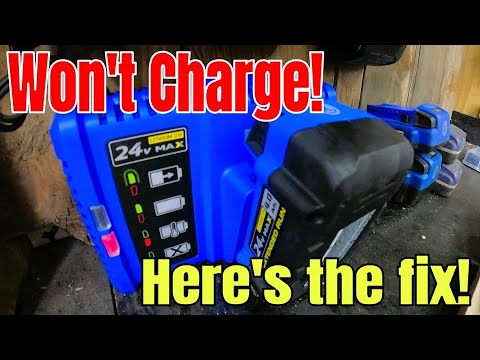
The charger has LED lights that show its status. A blinking red or green light means a charging fault or bad connection. A steady light usually means normal charging. No light can indicate no power or a dead charger. Watch the lights closely to know the problem.
Dirty Battery Terminals
Battery terminals can get dirty or corroded over time. Dirt stops the charger from connecting with the battery. Unplug the charger before cleaning. Use sandpaper or a cloth to clean the metal contacts. Clean terminals help the charger work well.
Temperature Effects
Battery charging depends on temperature. Too hot or too cold batteries will not charge. Lithium-ion batteries have safety features to stop charging if the temperature is unsafe. Keep the battery at room temperature before charging. This helps the charger work properly.
Power Source Check
Check the power source if the charger does not start. Plug a lamp or small device into the outlet to test it. The circuit might have tripped or power could be out. Ensuring power is available is the first step in fixing the charger.
Quick Fixes
Quick fixes often solve common problems with Kobalt battery chargers. These simple steps require no special tools and save time. Start with basic checks before considering more complex repairs. Follow these methods to get your charger working again quickly.
Cleaning Contacts
Dirty or corroded contacts block charging. Unplug the charger first to stay safe. Use fine-grit sandpaper or a soft cloth. Gently clean the metal prongs on the charger and inside the battery port. Remove all dust, dirt, and corrosion. Clean contacts improve connection and charging efficiency.
Adjusting Battery Temperature
Kobalt batteries stop charging if too hot or cold. Remove the battery from the charger. Let it reach room temperature, about 68°F to 77°F (20°C to 25°C). Avoid placing the battery near heaters or in cold areas. Charging at the right temperature ensures safety and proper function.
Resetting Power Source
Check the power outlet for proper function. Plug in a lamp or small device to test the socket. If the power is off, reset the circuit breaker or replace blown fuses. After restoring power, reconnect the charger. A working power source is essential for charging.
Advanced Fixes
Advanced fixes for a Kobalt battery charger not working involve more hands-on steps. These methods help when basic troubleshooting fails. They focus on the battery’s condition and its voltage levels. Safety is important. Always work in a dry area and use insulated tools.
Jump-starting A Dead Battery
A battery left unused can lose charge completely. The charger may not detect it because the voltage is too low. Jump-starting can revive this battery. Use a power supply or a compatible charger with a boost feature. Connect the battery carefully and monitor the voltage rise. This may take several minutes. Avoid forcing connections or applying too much current. The battery should warm slightly as it accepts charge. Stop if you see swelling or leakage.
Testing Battery Voltage
Testing battery voltage helps find hidden problems. Use a multimeter set to DC volts. Connect the probes to the battery terminals. A healthy fully charged battery reads about 20 volts for a 20V model. Values significantly lower show a weak or damaged battery. Test both before and after charging attempts. Voltage that does not increase means the battery might not hold a charge. This test also helps check if the charger delivers power.
When To Replace Or Repair
Deciding between replacing or repairing depends on the battery’s condition. If the battery shows physical damage, replace it immediately. Repair attempts on swollen or leaking batteries can be dangerous. For voltage issues with no visible damage, professional repair might work. Check warranty status before repair. Repair can be cost-effective for expensive packs. Replacement is best if the battery fails multiple tests or ages beyond normal life.
Preventive Tips
Keeping your Kobalt battery charger working well requires some simple care steps. Follow these preventive tips to avoid common issues and extend your charger’s life. Small habits can make a big difference in performance and reliability.
Proper Battery Storage
Store batteries in a cool, dry place away from direct sunlight. Avoid leaving batteries inside the charger for long periods after charging. Remove batteries from the tool if you do not plan to use them soon. Keep them on a shelf or in a container designed for battery storage. This prevents damage and maintains battery health.
Regular Maintenance
Clean the charger and battery terminals regularly. Dirt and corrosion can block the charging process. Use a dry cloth or soft brush to remove debris from contacts. Check the charger for any cracks or loose parts. Replace or repair damaged components immediately. Routine checks help spot problems early.
Avoiding Extreme Temperatures
Never charge batteries in very hot or cold conditions. Extreme temperatures affect battery performance and safety. Charge batteries at room temperature, between 50°F and 85°F. If batteries get too cold or hot, let them return to room temperature before charging. This protects the battery and charger from damage.
Frequently Asked Questions
Why Is The Battery Charger Not Working?
The battery charger may not work due to dirty terminals, extreme battery temperature, low battery voltage, or a faulty power source. Clean contacts, ensure room temperature, check outlet power, and inspect indicator lights for faults. If issues persist, contact Kobalt support or consider warranty repair.
How Do I Know If My Kobalt Battery Is Charging?
A solid green light on your Kobalt charger shows full charge. A blinking red or green light means charging is in progress or there’s a fault. Check the battery and charger contacts for cleanliness and ensure the battery is at room temperature for proper charging.
Can You Reset A Kobalt 24v Battery?
You cannot reset a Kobalt 24V battery manually. Try cleaning terminals and ensuring proper temperature for charging.
How Do I Reset A Battery Charger?
To reset a battery charger, unplug it, wait 5 minutes, clean the terminals, and plug it back in. Check indicator lights for status.
Why Is My Kobalt Battery Charger Not Charging The Battery?
Check the charger’s indicator lights and battery temperature first. Dirt on contacts or extreme temperatures often cause charging failure.
Conclusion
Troubleshooting a Kobalt battery charger takes patience and care. Check connections, clean contacts, and test power sources first. Keep the battery at room temperature for best results. Sometimes, the battery needs a jump-start if fully drained. Follow simple steps to identify the issue quickly.
If problems persist, consider warranty service or professional help. Taking these steps helps keep your tools ready and working. Don’t ignore small signs—they often lead to easy fixes. Stay calm and methodical for the best outcome.