
Have you ever closed your microwave door, only to be startled as it suddenly turns on by itself? This unexpected behavior isn’t just confusing—it can be dangerous.
If your microwave starts running without you pressing any buttons, it could be a sign of a serious electrical issue that needs immediate attention. You might wonder what’s causing this strange problem and how to fix it safely. You’ll discover the common reasons why your microwave might turn on on its own, the risks involved, and the best steps to take to protect your home and family.
Keep reading to learn how to handle this alarming issue before it turns into a bigger problem.
Common Causes
A microwave turning on by itself is a serious safety risk. It can cause fires or damage to the appliance. Understanding the common causes helps you identify the problem quickly. This knowledge can prevent accidents and costly repairs.
Several electrical or mechanical faults often lead to this issue. These faults disrupt the normal functioning of the microwave’s controls. Below are the main reasons why a microwave might start running without warning.
Faulty Door Switches
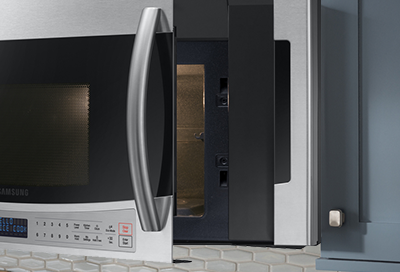
Door switches tell the microwave if the door is closed. A faulty switch may think the door is shut even when open. This mistake can make the microwave start heating unexpectedly. Often, the switch fuse gets stuck or damaged. Replacing the door switch usually solves the problem.
Control Board Failures
The control board manages the microwave’s functions. If it shorts or fails, it can send wrong signals. This error can cause the microwave to turn on by itself. Moisture or heat can damage the control board over time. Repair or replacement of the board might be necessary.
Damaged Touchpad Buttons
The touchpad buttons control the microwave’s settings. Sticky or damaged buttons can cause false commands. This issue may trigger the microwave to start without input. Cleaning or replacing the touchpad often fixes this problem. Avoid pressing the buttons hard to prevent damage.
Vent Fan Activation
Some microwaves turn on the vent fan automatically. This activation may seem like the microwave is running. The fan helps cool down the appliance during or after use. If the fan turns on unexpectedly, it may be a control issue. Checking the fan and control system helps find the cause.
Credit: www.samsung.com
Safety Hazards
A microwave turning on by itself poses serious safety hazards. This unexpected behavior can lead to dangerous situations inside your home. Understanding these risks helps you take quick action. It can prevent harm to your family and property.
Fire Risks
Microwaves generate heat using high power. If the appliance runs without supervision, it can overheat. Overheated parts or food inside may catch fire. Faulty wiring or control boards can spark flames. Always unplug the microwave immediately if it turns on alone. Leaving it on can cause a house fire.
Electrical Shock Dangers
Microwaves use high voltage electricity. A malfunctioning microwave that turns on by itself can expose live wires. Touching these wires can cause a severe electric shock. Damaged door switches or control panels raise this risk. Avoid using the microwave until a professional checks it. Safety must come first to prevent injury.
Radiation Exposure Concerns
Microwaves emit non-ionizing radiation to cook food. The microwave’s door has safety locks to block radiation from escaping. If these locks fail and the microwave runs with the door open, radiation may leak. Prolonged exposure can be harmful to your health. Never operate the microwave if the door does not close properly. Get repairs done quickly to avoid radiation risks.
Troubleshooting Steps
A microwave turning on by itself is a serious safety risk. Take immediate action by unplugging the microwave or switching off its circuit breaker. Common causes include faulty door interlock switches, a damaged control board, or a sticky touchpad. Follow these troubleshooting steps to find the problem and fix it safely.
Checking Door Interlock Switches
Door interlock switches stop the microwave from running when the door opens. If these switches fail or get stuck, the microwave may start on its own. Inspect the switches for damage or wear. Use a multimeter to check if they work properly. Replace any broken switches to prevent hazards.
Inspecting The Control Board
The control board controls the microwave’s functions. A short circuit or damage here can cause it to turn on randomly. Look for signs of burnt components or melted wires. Test the board with a multimeter for electrical faults. Replace the control board if it shows any faults.
Testing The Touchpad
The touchpad sends commands to the control board. A sticky or broken button can send false signals. Clean the touchpad gently with rubbing alcohol to remove dirt. Press each button and listen for clicks. Replace the touchpad if buttons remain stuck or unresponsive.
Resetting The Microwave
Resetting the microwave can clear minor errors in the system. Press and hold the Clear or Cancel button for a few seconds. Wait until the display clears or shows a reset message. Release the button and test the microwave. Resetting may fix temporary glitches causing the issue.

Credit: www.youtube.com
Repair And Replacement
Repair and replacement are crucial steps when a microwave turns on by itself. This issue can pose safety risks and disrupt daily routines. Understanding when to seek professional help and how to address faulty parts helps maintain your appliance’s safety and functionality.
When To Call A Technician
Call a technician if the microwave powers on without pressing any buttons. This behavior signals an electrical or mechanical fault. Avoid using the microwave until a professional inspects it. Technicians have the tools to test door switches and control boards safely.
Unexpected starts may involve complex wiring problems. Attempting a DIY fix can increase risks. A licensed technician ensures accurate diagnosis and safe repairs.
Replacing Faulty Parts
Faulty door switches often cause microwaves to turn on alone. Replacing these switches can solve the problem. Control boards may also fail and need replacement. Touchpads that stick or send false signals require new parts.
Use parts recommended by the manufacturer. Incorrect components can worsen the issue or void warranties. Proper installation is key to restoring safe operation.
Considering A New Microwave
Sometimes repair costs exceed the value of the microwave. Frequent malfunctions or older models may need replacement. New microwaves offer improved safety features and energy efficiency.
Compare repair estimates and new appliance prices. Choose a microwave that fits your needs and budget. A new unit can provide peace of mind and reliable performance.
Preventive Tips
Preventing your microwave from turning on by itself is essential for safety and appliance longevity. Simple steps can reduce the risk of malfunctions and hazards. These preventive tips help maintain your microwave’s proper function and keep your kitchen safe.
Regular Cleaning And Maintenance
Clean your microwave often to avoid dirt buildup. Wipe the interior with a damp cloth after every use. Remove food particles from the door seals and control panel. Dust and grime can cause buttons to stick or electrical parts to fail. Check the door latch and switches regularly. Replace any worn or broken parts promptly. Regular maintenance keeps your microwave running smoothly and prevents unexpected starts.
Avoiding Moisture Damage
Keep your microwave dry inside and out. Moisture can cause short circuits and electrical damage. Avoid placing wet items on the control panel or near the vents. Use a cover on food to reduce steam inside the microwave. If moisture builds up, wipe it away quickly. Protecting against moisture helps prevent electrical faults that make the microwave turn on by itself.
Proper Usage To Extend Lifespan
Use the microwave according to the manufacturer’s instructions. Do not slam the door or press buttons too hard. Avoid running the microwave empty, which can damage internal parts. Use microwave-safe containers only. Do not block vents or cover the microwave’s exterior. Proper usage minimizes wear and tear. This reduces the chance of malfunctions and sudden starts, keeping your appliance safe and reliable.
Credit: www.appliancepartspros.com
Frequently Asked Questions
How To Reset Microwave Sensor?
To reset a microwave sensor, press and hold the Clear or Cancel button on the control panel. Release when the display clears or shows a reset. This restarts the sensor and control system.
What Are Signs Of A Failing Microwave Capacitor?
Signs of a failing microwave capacitor include bulging or leaking casing, frequent fuse blows, unusual noises, overheating, and power issues.
How Do I Test If My Microwave Is Leaking Radiation?
Test microwave radiation leakage using a microwave leakage detector near door seals. Avoid DIY methods; professional testing ensures safety and accuracy.
Why Is My Microwave Working When The Door Is Open?
Your microwave works with the door open due to faulty door switches, a shorted control board, or a damaged touchpad. Unplug it immediately to avoid fire hazards.
Why Does My Microwave Turn On By Itself?
A microwave can start alone due to a faulty door switch or control board. These parts may short circuit or stick, causing unexpected power.
Conclusion
A microwave turning on by itself can pose serious risks. Always unplug it right away to stay safe. Faulty door switches or control board issues often cause this problem. Regular checks and timely repairs help prevent hazards. Don’t ignore unusual microwave behavior—it signals a needed fix.
Consult a professional if the problem persists. Safety matters most with kitchen appliances. Stay alert and keep your microwave in good condition.