
Is your older Tempur-Pedic remote not resetting no matter what you try? When your remote won’t respond or reset, it can feel frustrating, especially when you just want to relax in your adjustable bed.
You’re not alone—many owners face this issue due to simple causes like a locked remote, power glitches, or connection problems. But don’t worry, there are easy steps you can take right now to get your remote working again. Keep reading to discover quick, straightforward fixes that will help you regain full control of your Tempur-Pedic bed without calling for costly repairs or replacements.
Your comfort is just a reset away!
Credit: www.youtube.com
Common Causes For Remote Issues
Older Tempur-Pedic remotes may stop working due to several common issues. These problems often cause frustration but are usually simple to fix. Understanding the typical causes helps in troubleshooting the remote quickly. This section explains the main reasons why your remote might not reset or respond.
Locked Remote Features
Sometimes the remote’s buttons lock to prevent accidental changes. This lock can happen by pressing certain button combinations. When locked, the remote won’t respond to commands.
Unlocking usually involves pressing specific buttons together. For example, pressing and holding the Head Down and Foot Down buttons, then the Head Up and Foot Up buttons. Another method is holding the Foot Up and Foot Down buttons at the same time.
Power Supply Problems
Power issues with the bed’s base can stop the remote from working. If the base loses power, the remote can lose connection or fail to reset. Faulty power cords or outlets are common causes.
Unplug the base from the outlet and plug it into a different, working socket. This simple step often resolves power-related remote problems. Make sure the power source is steady and secure.
Lost Remote Connection
The remote may lose its connection to the bed’s control box after power outages or battery changes. Without connection, the remote will not control the bed.
To reconnect, unplug the base and plug it back in. Find the small pair or sync button on the control box under the bed. Press and hold this button until the light flashes. Then press and hold any button on the remote until the light stops flashing or goes out.

Basic Remote Reset Techniques
Basic remote reset techniques help fix common issues with older Tempur-Pedic remotes. These simple methods often restore remote function without needing new parts. Start with easy steps before trying advanced solutions. This saves time and avoids unnecessary expenses.
Button Combination Resets
Button combination resets use specific button presses to reset the remote. These reset commands can unlock or re-pair the remote to the bed base. Follow the instructions carefully for success.
- Press and hold the Head Down and Foot Down buttons together.
- Immediately press and hold the Head Up and Foot Up buttons together.
- Alternatively, press and hold the Foot Up and Foot Down buttons simultaneously.
These combinations help clear glitches and restore remote control. Try each combination once or twice for best results.
Power Cycling The Bed Base
Power cycling the bed base resets the control box inside the bed. This step fixes many connection and power issues affecting the remote.
- Unplug the adjustable base from the wall outlet.
- Wait about 30 seconds to fully power down the system.
- Plug the base back into a working power outlet.
Power cycling helps refresh the system and often restores remote function. It is a quick and effective troubleshooting step for older Tempur-Pedic beds.
Re-pairing Remote With Base
Re-pairing the remote with the base is essential if your older Tempur-Pedic remote stops working. This process helps restore the connection between the remote and the adjustable base. Sometimes power outages or battery changes cause the remote to lose sync. Re-pairing ensures smooth control of your bed’s features again.
Locating The Pairing Button
First, find the control box under your bed. It is the main module connected to the power cord. Look for a small button labeled “pair” or “sync.” This button is usually near the power input. If you cannot find it, check your bed’s manual for exact location details.
Syncing Steps For Connection
Unplug the adjustable base from the power outlet. Wait about 30 seconds, then plug it back in. Press and hold the pairing button on the control box. Keep holding until the indicator light starts flashing.
Next, press and hold any button on your remote. Hold it until the control box’s light stops flashing or turns off. This means the remote and base are now paired. Test the remote to confirm it controls your bed properly.
Resets For Older Models
Older Tempur-Pedic bed remotes can stop working due to various reasons. Common issues include locked remotes, power problems, or lost connections with the bed base. Resetting these older models often requires specific button sequences or syncing steps.
Understanding the correct reset method for your model helps restore remote function quickly. Here are the reset instructions for some popular older Tempur-Pedic models.
Premier And Ergo Model Reset
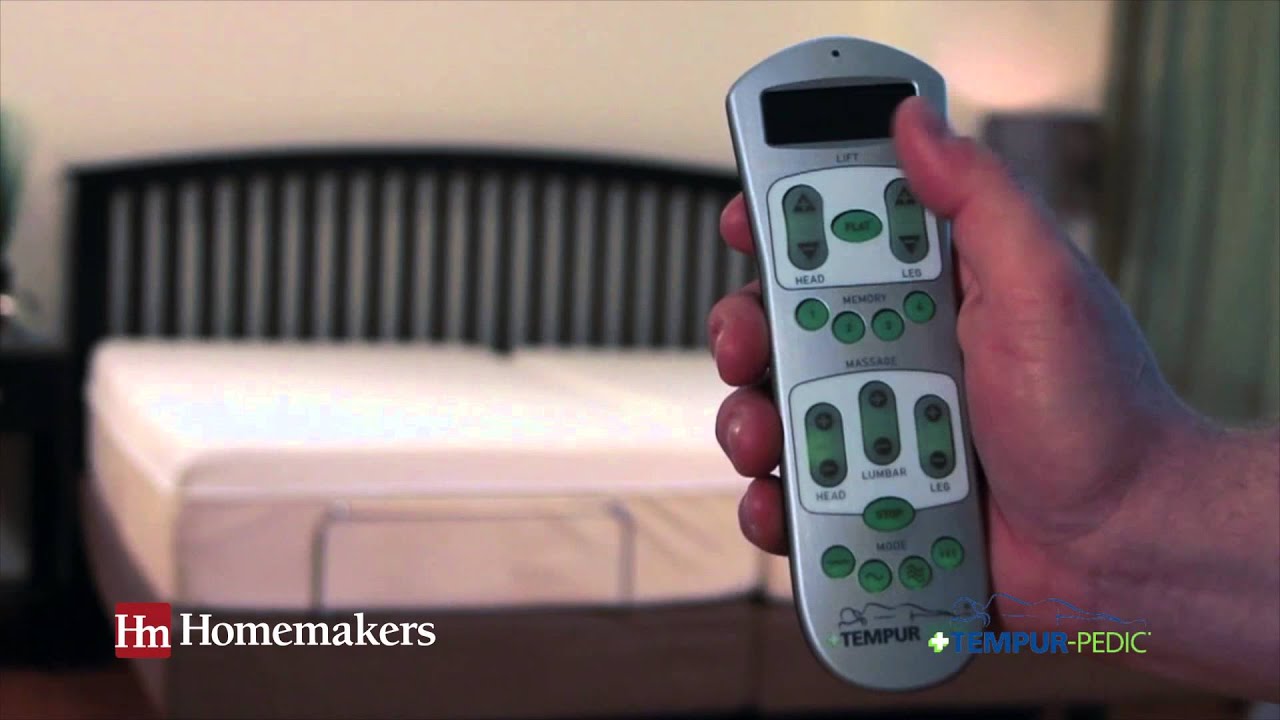
The Premier and Ergo remotes have an LCD screen and need a special reset process. Start by pressing and holding the FLAT button. Hold it for several seconds until the screen changes or the bed moves slightly.
This reset refreshes the remote’s settings and clears minor glitches. It often fixes unresponsiveness without needing a full power cycle of the bed.
Using The Flat Button Sequence
For some older models, the FLAT button reset works best combined with specific button presses. Press and hold the FLAT button first.
Then, press and hold either Head Up or Foot Up buttons. Keep holding all buttons until the bed responds or the remote screen resets.
This sequence forces the remote to sync again with the adjustable base. It can solve issues caused by power interruptions or accidental button presses.
Troubleshooting Tips
Troubleshooting an older Tempur-Pedic remote that won’t reset can feel frustrating. Simple checks can often fix the problem quickly. Start by examining the basics like batteries and power. Then, move on to checking the control box for any glitches. Each step can help restore your remote’s function and get your bed working smoothly again.
Checking And Replacing Batteries
Weak or dead batteries are the most common cause of remote issues. Open the battery compartment and remove the old batteries. Use fresh, high-quality batteries of the correct size and type. Make sure the batteries are inserted correctly, matching the positive and negative ends. Test the remote to see if it responds after the replacement.
Inspecting Power Connections
Loose or faulty power connections can prevent the remote from working properly. Check that the bed’s power cord is plugged firmly into a working outlet. Inspect the cord for any damage or fraying. Unplug the power cord, wait a few seconds, then plug it back in. This power cycle often resets the base and fixes minor power issues.
Dealing With Control Box Glitches
The control box manages the bed’s movements and remote signals. Glitches here can cause the remote to stop working. Locate the control box under your bed near the power cord. Unplug the bed from the wall outlet, then plug it into a different outlet. Press the pair or sync button on the control box until the indicator light flashes. Press any button on the remote to re-establish the connection. This can resolve many syncing problems.
When To Contact Support
Knowing when to contact Tempur-Pedic support can save time and frustration. Troubleshooting steps help fix many issues. Sometimes, the problem needs expert help. If the remote reset does not work after trying all fixes, it is time to reach out.
Ordering Replacement Remotes
Some older Tempur-Pedic remotes may stop working due to wear or damage. Replacement remotes are available from Tempur-Pedic. Verify your bed model before ordering. Using the correct remote ensures full functionality. Order from official sources to avoid compatibility issues. Keep your bed’s serial number handy when ordering. This information helps match the remote exactly to your bed.
Getting Help From Tempur-pedic Agents
Tempur-Pedic customer service agents assist with remote issues. They can guide troubleshooting or confirm if a replacement is needed. Contact them by phone or online chat. Provide your bed model and remote details for faster support. Agents may offer tips for syncing or resetting your remote. They can also schedule service if the bed’s control box has problems. Support is key for persistent remote issues that simple fixes can’t solve.
Additional Resources
Older Tempur-Pedic remotes can sometimes be tricky to reset. Extra help is useful in these cases. Additional resources offer clear instructions and visuals. They guide you step-by-step through the reset process. These tools can save time and reduce frustration. Here are some valuable resources to assist you.
Visual Sync Guides
Visual sync guides show exactly where buttons and ports are. They help you find the pairing button on the control box. These guides often include pictures of older remote models. Step-by-step images make the reset process easier to follow. They also highlight common mistakes to avoid. Accessing these guides can clarify confusing steps quickly.
Helpful Online Videos
Online videos demonstrate the reset process in real time. Watching someone perform the reset helps you understand the timing. Videos cover various remote models, including older versions. They show battery checks and power cycling techniques. You can pause and replay sections as needed. These videos often include tips from users who solved similar issues.

Credit: scuolalitubium.it
Frequently Asked Questions
How To Reset An Older Tempur-pedic Remote?
To reset an older Tempur-Pedic remote, press and hold Head Down + Foot Down, then Head Up + Foot Up together. Unplug the bed, wait, and plug it back in. Re-pair by pressing the sync button on the control box and holding any remote button until the light stops flashing.
How Do I Fix An Unresponsive Remote?
Check and replace the batteries in your remote. Unplug and replug the bed’s power base. Press the sync button on the control box, then hold any remote button until the light stabilizes. If unresponsive, order a replacement remote or contact Tempur-Pedic support.
Why Doesn’t My Tempur-pedic Remote Work?
Your Tempur-Pedic remote may not work due to dead batteries, power issues, or loss of pairing with the base. Try replacing batteries, power cycling the bed, and re-pairing the remote by pressing the sync button on the control box and a remote button until the light stabilizes.
How Do You Reset A Tempur-pedic Bed Without A Remote?
To reset a Tempur-Pedic bed without a remote, unplug the base from power for 30 seconds. Plug it back in, then press and hold the pairing button on the control box until the light flashes. Press any button on the remote to sync, or contact support for help.
Why Is My Older Tempur-pedic Remote Reset Not Working?
The remote may be locked, out of power, or not paired with the base. Try checking batteries and power connections first. Re-pairing the remote often solves the issue.
Conclusion
Troubleshooting an older Tempur-Pedic remote can be simple with the right steps. Check the batteries and power source first. Try resetting and re-pairing the remote to the base. Power cycling the bed often fixes common glitches. If these steps do not work, consider replacing the remote or contacting support.
Staying patient and following these tips can restore your remote’s function quickly. Don’t let a small issue keep you from a comfortable night’s sleep. Keep your bed working smoothly with easy troubleshooting.