
The Panasonic Viera TVs earned a reputation for quality display and reliable features. For many users, one feature stands out: the RCA audio out. This connection allows you to link your TV to external speakers, soundbars, amplifiers, or even recording devices. But understanding how RCA audio out works, how to set it up, and how to troubleshoot problems is not always simple. This article will help you get the most from your Panasonic Viera’s RCA audio out, whether you’re a beginner or an experienced home theater user.
What Is Rca Audio Out?
RCA audio out is a pair of round, color-coded ports—usually one red and one white—on the back or side of your television. These ports are also called analog audio outputs. They send stereo audio signals from your TV to another device, such as a speaker system or headphones.
Unlike optical (digital) audio out, RCA is analog, which means it transmits the sound as an electrical signal. This makes it compatible with a wide variety of older and newer audio equipment.
RCA cables have been around since the 1940s, but they remain popular because they are simple, reliable, and affordable. Even today, many soundbars, amplifiers, and powered speakers include RCA inputs.
Why Use Panasonic Viera Rca Audio Out?
You might wonder why you should use the RCA audio out on your Panasonic Viera TV when there are other options like HDMI ARC or optical audio. There are several reasons:
- Compatibility with Older Equipment: Many amplifiers, speakers, and stereo systems only accept analog inputs.
- Simplicity: RCA cables are easy to find and connect. There’s no need for complicated setup.
- Cost: RCA cables are inexpensive compared to HDMI or optical cables.
- Recording: If you want to record TV audio, analog RCA out is often the simplest option.
- Separate Audio Control: Some users prefer to have TV audio run separately from the video, for example, to play sound in another room.
These advantages make RCA audio out a practical choice for many home setups.
Where To Find Rca Audio Out On Panasonic Viera
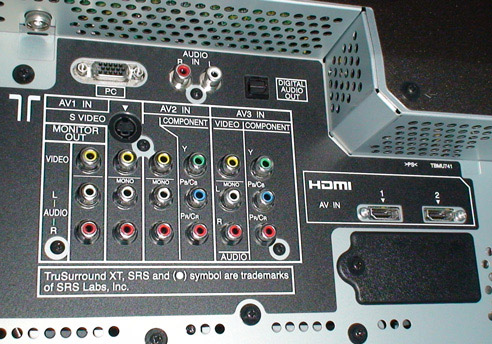
On most Panasonic Viera models, the RCA audio out ports are found on the back or side panel. Look for two round ports, usually labeled AUDIO OUT, L (left), and R (right). The left port is white, and the right port is red.
It’s important not to confuse these with RCA audio in ports, which are meant for connecting devices that send sound to the TV. You want the outputs, not the inputs.
Some newer Viera models may not have dedicated RCA audio out ports. In these cases, you may need to use adapters or other audio outputs, which we’ll discuss later.
Setting Up Rca Audio Out On Panasonic Viera
Connecting your Viera’s RCA audio out is straightforward, but getting the best performance requires attention to detail. Here’s how to do it:
1. Gather The Right Equipment
You’ll need:
- A pair of RCA cables (usually red and white connectors)
- The device you want to connect (amplifier, powered speakers, soundbar, etc.)
2. Locate The Rca Audio Out Ports
Check your TV’s back or side panel for the AUDIO OUT ports. Make sure you’re using the output, not the input.
3. Connect The Cables
Plug the white RCA cable into the white port (left audio). Plug the red RCA cable into the red port (right audio).
4. Connect The Other End
Connect the other end of the RCA cables to the input on your external device. These inputs may be labeled AUX IN, LINE IN, or RCA IN.
5. Change Tv Audio Settings (if Needed)
On some Panasonic Viera models, you may need to change the TV’s audio output setting:
- Press the Menu button on your remote.
- Go to Sound or Audio settings.
- Look for Audio Output or Speaker Selection.
- Choose External or Audio Out instead of TV Speakers.
This tells the TV to send audio through the RCA ports.
6. Adjust Volume
Some Viera TVs allow you to control the RCA audio out volume with the TV remote. Others send a fixed-level signal, meaning you’ll need to control volume on the external device.
Check your TV manual or test to see which applies to your model.
7. Test Your Setup
Play something on your TV and check that the sound comes from your external speakers or device. If there’s no sound, double-check your connections and settings.
Common Rca Audio Out Setups
The RCA audio out on your Panasonic Viera can be used in many ways. Here are some common setups and how to get the most from each:
Connecting To A Soundbar
Many soundbars have RCA inputs. This setup is simple:
- Connect RCA cables from your TV to the soundbar.
- Set the soundbar to the correct input.
- Switch the TV’s audio output to external if needed.
This is a good choice if your soundbar doesn’t support HDMI ARC or optical input.
Connecting To A Stereo Amplifier
If you have a classic stereo amplifier or receiver, RCA is often the only option:
- Connect RCA cables from the TV to the AUX IN or CD IN on your amplifier.
- Select the right input on your amplifier.
This lets you enjoy TV sound through high-quality speakers.
Using Powered Speakers
Powered speakers have built-in amplifiers and often accept RCA input:
- Connect RCA cables from the TV to the speaker’s input.
- Turn on the speakers and adjust the volume.
This is a compact, affordable way to improve TV sound.
Recording Tv Audio
If you want to record audio from the TV (for example, to a cassette deck or computer), the RCA audio out is ideal:
- Connect RCA cables from the TV to the recording device.
- Start playback on the TV and recording on the device.
Not all TVs allow recording of all inputs due to copyright restrictions, so results may vary.
Rca Audio Out Vs Other Audio Outputs
Many Panasonic Viera TVs offer several audio outputs. Choosing the right one depends on your equipment and goals. Here’s how RCA audio out compares to other common options:
| Output Type | Signal Type | Best For | Pros | Cons |
|---|---|---|---|---|
| RCA Audio Out | Analog Stereo | Older amplifiers, powered speakers | Simple, cheap, widely compatible | No surround sound, some signal loss |
| Optical (Toslink) | Digital | Soundbars, AV receivers | Supports surround sound, no interference | Requires compatible input, more expensive cable |
| HDMI ARC | Digital | Modern soundbars, AV receivers | One cable for audio and control | Needs compatible devices, setup can be tricky |
| Headphone Out | Analog Stereo | Headphones, some speakers | Easy to use, volume controlled by TV | May mute TV speakers, not best quality |
One insight many users miss is that RCA audio out generally sends a stereo signal only—not surround sound. If you want surround (5.1 or higher), you’ll need to use optical or HDMI ARC.
Another less-known fact: some Panasonic Viera TVs only enable RCA audio out when the internal speakers are disabled in the settings. If you hear no sound, check this in your menu.
Rca Output Quality: What To Expect
RCA audio out provides good quality stereo sound for most uses. However, it is not the highest quality option available. Here’s what you can expect:
- Frequency Response: Most RCA outputs cover the full range of human hearing (20 Hz to 20 kHz), so music and dialogue sound clear.
- Signal-to-Noise Ratio: Good, but can be affected by cheap cables or interference.
- Volume Level: Some TVs offer fixed output (volume doesn’t change with TV remote), while others allow variable output.
If you’re connecting to high-end audio equipment, optical or HDMI ARC may sound slightly cleaner. But for everyday listening, RCA is more than enough.
Troubleshooting Panasonic Viera Rca Audio Out
Sometimes, things don’t work as expected. Here’s how to solve common problems with RCA audio out on Panasonic Viera TVs:
No Sound From Rca Output
- Check Cables: Make sure RCA cables are fully inserted into both the TV and the external device.
- Correct Output: Ensure you’re using audio out, not audio in.
- TV Settings: Go to the TV’s audio settings. Set speakers to external or audio out.
- Source Input: Some TVs only output analog audio from certain sources (like cable TV, not streaming apps). Try different inputs.
- Volume: If your TV uses fixed output, adjust volume on the external device.
Sound Is Distorted Or Low
- Cable Quality: Use good-quality RCA cables. Cheap or damaged cables can cause noise.
- Input Matching: Ensure the device you’re connecting to accepts line-level input, not just phono (for turntables).
- Audio Settings: Check if your TV has audio equalizer or balance settings.
Audio Delay
- Processing Lag: Some TVs introduce a slight delay in audio output, especially if video processing is enabled. If your sound is out of sync, look for an audio delay or lip sync setting.
- External Device: Some amplifiers or soundbars have their own delay settings.
Only One Channel Works
- Cable Connection: Make sure both red and white connectors are plugged in.
- TV Output: Test with another device to see if the problem is with the TV or the external device.
If you’ve tried all the above and still have issues, consult your TV’s manual or Panasonic support.
Using Adapters And Converters
What if your Panasonic Viera doesn’t have RCA audio out? Some newer models removed analog outputs in favor of digital. But you still have options:
Optical To Rca Adapter
If your TV has an optical audio out but no RCA out, you can use a digital-to-analog converter (DAC):
- Connect an optical cable from the TV to the DAC.
- Connect RCA cables from the DAC to your amplifier or speakers.
Make sure to buy a DAC with RCA outputs.
Hdmi Audio Extractor
If your TV only has HDMI outputs, use an HDMI audio extractor:
- Connect HDMI from TV to extractor.
- Extractor splits video to TV and sends audio to RCA out.
- Connect RCA to your speakers or amplifier.
These adapters cost more than a simple RCA cable but can save you from replacing your audio equipment.
Headphone Jack To Rca
Some Viera TVs have a headphone output instead of RCA out. You can use a 3.5mm to RCA cable:
- Plug the 3.5mm end into the headphone jack.
- Connect the RCA ends to your external device.
Note: When using the headphone jack, TV speakers may mute automatically.
Real-world Example: Connecting Viera To A Vintage Receiver
Imagine you have a Panasonic Viera TV and a classic stereo receiver from the 1990s. The receiver only accepts RCA input. Here’s a step-by-step example:
- Check your Viera for AUDIO OUT (RCA) ports.
- Get a pair of quality RCA cables (2 meters is usually enough).
- Connect the red and white plugs to the TV’s output.
- Connect the other ends to the receiver’s AUX IN.
- On the TV, set audio output to external.
- On the receiver, select AUX as the input.
- Play content on the TV. Adjust volume on the receiver.
This setup lets you enjoy deeper, richer sound than the TV’s built-in speakers.
Rca Audio Out And Home Theater Systems
Many people want to use their Viera TV with a home theater system. RCA audio out can work, but there are some limitations:
- Stereo Only: RCA outputs only send left and right channels. True surround sound (5.1 or 7.1) requires optical or HDMI ARC.
- No Dolby Digital: If you want Dolby or DTS, use a digital output.
- Simplicity: For two-speaker setups, RCA is often easiest.
If your home theater system only has RCA input, you’ll get high-quality stereo sound, but not surround.
Rca Cable Quality: Does It Matter?
Some users wonder if buying expensive RCA cables will improve sound quality. Here’s what you need to know:
- Basic Cables Are Fine: For short runs (under 6 feet), basic RCA cables work well.
- Better Shielding: For longer runs or in high-interference areas, look for cables with good shielding.
- Gold Plating: Gold connectors resist corrosion but don’t improve sound.
- Don’t Overspend: Most improvement comes from good connections, not expensive cables.
A common mistake is to buy the cheapest cables available. These can break or introduce noise. Choose a reliable brand, but don’t feel pressured to buy “audiophile” cables.
Rca Audio Out: Practical Tips And Mistakes To Avoid
Practical Tips
- Label Your Cables: If you have many devices, label which cable goes where.
- Secure Connections: Loose plugs can cause crackling or dropouts.
- Keep Cables Short: Long cables can pick up interference.
- Check TV Menus: Audio output settings are often buried in menus.
- Test with Different Content: Some apps or inputs may not send sound to RCA out.
Mistakes To Avoid
- Connecting to RCA In: Always use output ports on the TV.
- Wrong Input on Receiver: Make sure your external device is set to the right input.
- Ignoring TV Settings: Some TVs default to internal speakers. Change to external for RCA out.
- Expecting Surround Sound: RCA only provides stereo audio.
Two insights that many miss: Some Viera TVs mute RCA out when headphones are plugged in. Also, not all apps (like Netflix or YouTube) send audio to RCA out, especially on newer smart TVs.
When To Upgrade To Digital Audio
If you want:
- Surround sound
- Higher audio quality
- Integration with modern devices
…then consider upgrading to optical or HDMI ARC. But for most people, RCA audio out is more than enough for daily TV watching, music, and basic home theater.
Panasonic Viera Models: Rca Audio Out Availability
Not all Panasonic Viera models have RCA audio out. Here’s a quick comparison of older vs newer models:
| Model Year | RCA Audio Out | Other Audio Outputs |
|---|---|---|
| 2005–2012 | Yes (most models) | Optical, Headphone |
| 2013–2016 | Some models | Optical, HDMI ARC |
| 2017–2021 | Rare | Optical, HDMI ARC, Bluetooth |
If you’re shopping for a used Viera TV and need RCA out, check the rear panel photos or the user manual before buying.
How Rca Audio Out Fits In Modern Home Entertainment
Many people worry that RCA is outdated. But the truth is, RCA audio out is still useful for connecting TVs to a wide range of devices:
- Vintage amplifiers and speakers
- Affordable powered speakers
- Recording equipment
- Simple soundbars
While HDMI and optical are better for advanced features, RCA remains a practical choice for most homes. For users who value simplicity and compatibility, RCA out is often the best solution.
Panasonic Viera Rca Audio Out: Future-proofing Your Setup
If you plan to upgrade your system, keep these tips in mind:
- Choose Universal Devices: Look for soundbars or amplifiers with both RCA and digital inputs.
- Use Adapters: Digital-to-analog converters can bridge the gap between new TVs and old gear.
- Backup Cables: Keep extra RCA cables on hand for troubleshooting.
- Stay Informed: Check the Panasonic website or Wikipedia for updates on audio connections.
Frequently Asked Questions
What Is The Difference Between Rca Audio Out And Headphone Out On Panasonic Viera Tvs?
RCA audio out sends a fixed-level stereo signal to external devices like amplifiers. Headphone out usually allows volume control with the TV remote and may mute the TV speakers. RCA out is better for connecting to home audio equipment.
Can I Get Surround Sound From Panasonic Viera Rca Audio Out?
No, RCA audio out only provides stereo (left and right) sound. For surround sound, use optical audio out or HDMI ARC if your TV and audio system support it.
Why Do My External Speakers Not Work With Rca Audio Out?
Check that you are connected to audio out (not audio in), the TV’s audio settings are set to external speakers, and your amplifier or speakers are on the correct input. Also, test with another device to rule out cable or hardware issues.
Can I Use Rca Audio Out And Tv Speakers At The Same Time?
Some Panasonic Viera TVs allow both RCA out and TV speakers to work together, but many mute the internal speakers when RCA out is active. Check your TV’s audio settings or manual for details.
What Do I Do If My Panasonic Viera Has No Rca Audio Out?
If your TV lacks RCA out, use an optical-to-RCA converter or an HDMI audio extractor. These adapters let you connect your TV to older amplifiers or speakers that only accept RCA input.
Panasonic Viera’s RCA audio out offers a valuable bridge between old and new technology. By understanding how it works and following the guidance above, you can enjoy better sound and longer life from your favorite equipment. Whether you’re setting up a home theater or just want clearer dialogue, RCA audio out remains a reliable and useful option for many TV owners.