
Every parent knows the peace of mind a baby monitor brings. You can relax, work, or even sleep, knowing you’ll hear your baby if they cry or wake up. But what happens when your Summer baby monitor screen shuts off unexpectedly? Suddenly, that sense of security disappears. If you’re facing this issue, you’re not alone. Many parents report their Summer monitor screens turning off randomly or refusing to stay on. Understanding why this happens and how to fix it is critical for your family’s safety and your own peace of mind.
In this guide, I’ll walk you through all the reasons why the Summer baby monitor screen shuts off, solutions you can try right away, and practical tips to keep your monitor working reliably. Whether you’re a first-time parent or have used baby monitors for years, this article will help you solve the problem step by step.
Let’s look at common causes, troubleshooting techniques, and some non-obvious facts that can save you time, money, and worry.
How Summer Baby Monitors Work
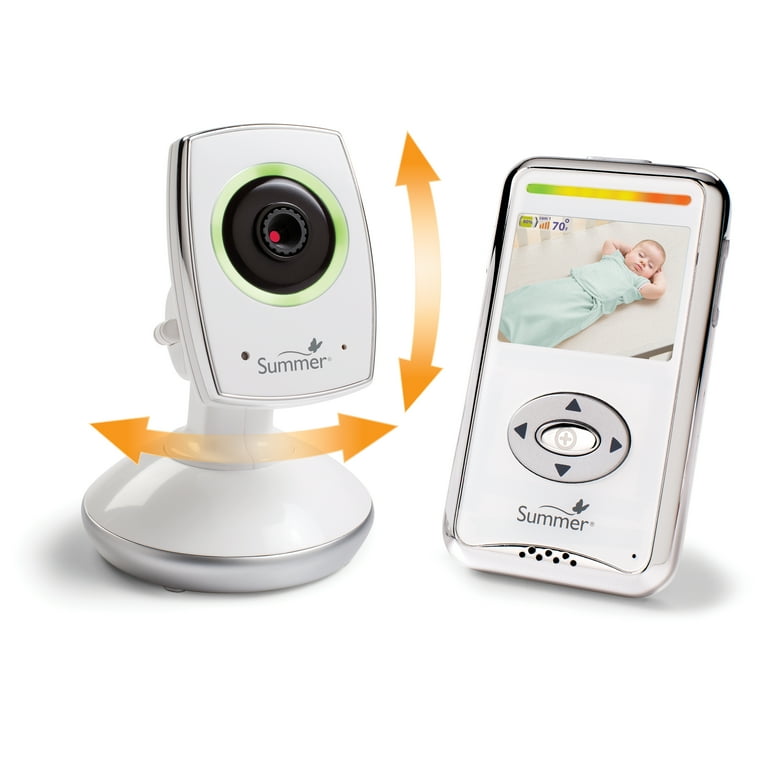
Before we fix the problem, it helps to know how these monitors function. Summer baby monitors are video monitors that come with a camera and a handheld screen (parent unit). The camera stays in the baby’s room, capturing live video and sound. The handheld unit receives this signal, showing you real-time footage. Most models offer features like night vision, two-way talk, and temperature display.
The screen on the parent unit is designed to be energy efficient. It may turn off by itself after some time to save battery. But if the screen shuts off too often, too fast, or won’t come back on, something’s wrong.
Main Reasons Why The Screen Shuts Off
Understanding the root cause is key. There are several reasons why your Summer baby monitor screen might turn off:
- Power-saving mode: Most models have an auto-off feature to save power.
- Low battery: If the battery is weak or not charging well, the screen may shut down.
- Connection loss: Signal problems can cause the screen to turn off or freeze.
- Overheating: If the unit gets too hot, it may shut off to protect itself.
- Firmware bugs: Software glitches can make the monitor behave unpredictably.
- Faulty adapter or cable: A bad charger can prevent charging and cause shutdowns.
- Screen failure: Rare, but sometimes the display itself is defective.
Let’s break down each reason in detail.
Power-saving Features
Many parents don’t realize that the monitor’s power-saving mode or VOX (voice activation) can turn off the screen automatically after a few minutes of quiet. The device does this to preserve battery life. When your baby makes noise, the screen should come back on. But this feature can be confusing if you expect the screen to stay on all night.
Low Battery Or Charging Issues
A common reason for shutdown is a low battery. If the monitor isn’t charging well—maybe the cable is loose or the adapter is failing—the screen will turn off to prevent damage to the device.
Connection Problems
If the camera and parent unit lose their connection, the screen may go black or display a “no signal” message. This can happen due to:
- Thick walls or long distance between units
- Wireless interference from Wi-Fi routers, microwaves, or other electronics
- Power outages in the baby’s room
Overheating
Many monitors have built-in safety to shut off if the internal temperature gets too high. This protects the device but can be frustrating if you don’t know why it’s happening. Placing the monitor near a heat source or covering it can cause overheating.
Software Or Firmware Issues
All digital monitors run on software. Sometimes, a glitch or bug causes the screen to freeze or turn off. This is more likely after a recent update or if you’ve had the monitor for several years.
Defective Power Adapter Or Cable
The charger and cable are often overlooked. A worn-out or incompatible adapter can cause the monitor to lose power, even if it’s plugged in.
Screen Or Hardware Failure
While rare, the monitor’s screen may be defective or damaged. This usually happens if the monitor has been dropped, exposed to water, or has a manufacturing fault.
Troubleshooting Steps
Once you know the possible causes, you can try several steps to fix the problem. Start with the simplest solutions and work your way up.
1. Check Power And Charging
- Make sure the monitor is fully charged. Plug it in with the original adapter and cable.
- Look for signs of charging (lights, icons, etc. ).
- Try a different outlet or a new cable if you suspect a problem.
- If the battery no longer holds a charge, consider replacing it.
2. Adjust Power-saving Settings
- Look for a VOX or eco mode button. Try turning it off.
- Set the screen timeout to the longest possible setting if your model allows.
- Read the manual to understand how your model handles screen sleep.
3. Improve Connection Strength
- Move the parent unit closer to the camera.
- Avoid thick walls or metal barriers between units.
- Turn off other electronics that may cause interference.
- If possible, change the wireless channel on your home Wi-Fi or move the monitor away from routers.
4. Prevent Overheating
- Place the monitor in a cool, well-ventilated spot.
- Keep it out of direct sunlight and away from heaters.
- Don’t cover the monitor with blankets or toys.
5. Reset The Monitor
- Many monitors have a reset button or a way to restore factory settings.
- Turn off both the camera and parent unit for a few minutes, then turn them back on.
- Remove and reinsert the battery if possible.
6. Update Firmware
- Check the manufacturer’s website for firmware updates.
- Follow instructions carefully to avoid bricking the device.
- Firmware updates can fix bugs and improve stability.
7. Inspect For Physical Damage
- Check for cracks, water damage, or loose parts.
- If the screen is physically damaged, you may need professional repair or replacement.
8. Test With Another Camera (if Available)
- If your monitor supports multiple cameras, try pairing a different camera.
- This can help you figure out if the problem is with the parent unit or the camera.
How To Tell If Your Monitor Is Defective
Sometimes, despite all your efforts, the screen keeps shutting off. Here are signs the monitor might be defective:
- The screen stays black even with a full charge and good connection.
- The unit gets very hot quickly.
- You see flickering, random colors, or lines on the display.
- The monitor won’t turn on at all, even with a new charger and battery.
If you notice these, contact the manufacturer’s support team. Most Summer baby monitors come with a one-year warranty, and you may be able to get a replacement.
Common Summer Baby Monitor Models And Their Issues
Let’s look at some popular Summer baby monitor models and the issues parents report most often.
Summer Infant Baby Pixel Zoom Hd
This high-definition model offers a large screen and advanced features. Parents sometimes report:
- Screen blackouts during the night
- Battery drains faster than expected
- Screen shuts off when using VOX mode
Summer Infant Panorama
Known for its wide-angle lens, this model’s main issues include:
- Screen freezing during high temperatures
- Intermittent connection in homes with thick walls
Summer Lookout Duo
This dual-camera model is praised for coverage but can have:
- Screen flicker when switching between cameras
- Random shutdowns during long use
Summer Glimpse
A budget-friendly option, this monitor sometimes experiences:
- Short battery life
- Screen turning off after only a few minutes
Understanding your model’s quirks can help you troubleshoot more effectively.
Comparison Of Common Causes
To make things clearer, here’s a quick look at how each cause compares in terms of symptoms and solutions.
| Cause | Symptom | Solution |
|---|---|---|
| Power-saving mode | Screen turns off after a set time | Adjust settings |
| Low battery | Screen shuts off quickly, won’t turn on | Charge fully, replace battery |
| Connection loss | No signal, black screen | Move units closer, reduce interference |
| Overheating | Screen shuts down, device feels hot | Cool location, allow airflow |
| Firmware bug | Random shutdowns, freezes | Reset or update firmware |
| Faulty adapter/cable | Charging issues, screen flicker | Try new cable/adapter |
| Hardware failure | Screen stays black or flickers | Repair or replace device |
How To Avoid Future Shutdowns
Now that you’ve solved today’s problem, here’s how to keep your monitor working smoothly in the future.
Charge Regularly
Don’t wait for the battery to die completely. Plug in your monitor during the day or use it plugged in at night. Battery health declines if it is often fully drained.
Use Original Accessories
Always use the original charger and cable. Third-party adapters can cause power issues or even damage the monitor.
Place Units Wisely
Keep the camera and parent unit within range but away from other electronics. This reduces interference and keeps the signal strong.
Update Software
Check for firmware updates every few months. They often solve bugs that can cause shutdowns.
Store Properly
If you’re not using the monitor for a while, store it in a dry, cool place. Remove the battery if possible to prevent damage.
When To Replace Your Monitor
No monitor lasts forever. Here are signs it’s time to upgrade:
- Battery won’t hold a charge even after replacement.
- The screen is permanently black, cracked, or flickering.
- The model is more than 5 years old (newer models have better safety features).
- You need more cameras, better range, or HD video.
Upgrading can save you frustration and give you new peace of mind.

Real-world Examples
Many parents have faced this issue and found different solutions. Here are a few examples:
Anna from Ohio noticed her Summer monitor screen shutting off every 10 minutes. She discovered the VOX mode was too sensitive. After adjusting the settings, the screen stayed on unless her baby made a noise.
Ben in California found his monitor would turn off in the middle of the night. The problem was a faulty charger. Replacing it with an original cable solved the issue.
Lisa from Texas had her monitor overheat on hot summer days. She moved the parent unit to a cooler spot and the problem stopped.
These stories show the importance of checking all possible causes—not just one.
Is It Worth Repairing?
If your monitor is out of warranty and the screen is defective, you might wonder if repair is worth it. Here are some factors to consider:
- Cost: Repairs can be expensive, often half the price of a new monitor.
- Safety: A repaired monitor may not be as reliable, especially if it’s an older model.
- Warranty: New monitors come with a warranty and better support.
In most cases, if the screen is truly broken, it’s smarter to buy a new one. However, for simple issues like charger or battery replacement, repair can be cost-effective.
Comparing Summer Monitors To Other Brands
How does Summer compare to other brands in terms of screen reliability? Let’s take a look.
| Brand | Screen Shutdown Complaints | Common Causes |
|---|---|---|
| Summer Infant | Moderate | Power-saving, charging issues |
| VTech | Low | Mostly battery-related |
| Infant Optics | Low | Occasional firmware bugs |
| Motorola | Moderate | Interference, battery |
Summer monitors are about average in reliability. The main advantage is price and availability of replacement parts, but power-saving features can confuse users.
Advanced Troubleshooting Tips
Sometimes, basic fixes aren’t enough. Here are two advanced tips most beginners miss:
1. Test For Interference At Different Times
Interference isn’t always constant. Test your monitor at different times of day, especially when household devices like microwaves, cordless phones, or routers are active. You may discover that your monitor only shuts off when other electronics are in use.
2. Check For Firmware Rollbacks
Some monitors let you rollback firmware to a previous version if a new update causes problems. This is rarely mentioned in manuals but can be found on online forums or by contacting support.
Child Safety And Screen Shutdowns
A monitor screen shutting off isn’t just an inconvenience—it’s a safety concern. Without a working monitor, you might miss your baby’s cries or warning signs. If your monitor is unreliable, consider these backup steps:
- Use an audio-only monitor as a secondary device.
- Keep baby’s door open so you can hear sounds directly.
- Set your phone as an alarm for quick checks during the night.
Never rely on a single piece of technology for child safety.
Contacting Summer Customer Support
If you’ve tried everything and the problem persists, reach out to the experts. Summer’s support team can help with:
- Warranty claims
- Replacement parts
- Firmware updates
- Troubleshooting not covered in the manual
Visit the official Summer Infant website for contact options. Be ready with your model number, proof of purchase, and a clear description of the problem.
Quick Reference: Fixing A Shutting-off Screen
Here’s a step-by-step quick reference for busy parents:
- Charge with the original adapter.
- Check and adjust power-saving settings.
- Move units closer together.
- Reduce electronic interference.
- Let the unit cool if warm.
- Reset or update firmware if needed.
- Replace battery or charger if not charging.
- Contact support if the screen stays black.
What To Do If Nothing Works
If you’ve tried every fix and the problem continues, don’t risk your child’s safety. Buy a new monitor with a strong warranty and support. Always register your device to receive updates and faster service.
For more information about baby monitor safety and technology, check out the Wikipedia page on baby monitors.
Frequently Asked Questions
Why Does My Summer Baby Monitor Screen Keep Shutting Off Even When Plugged In?
This usually means a problem with the power adapter, cable, or battery. Try a different outlet, use the original charger, and check if the battery needs replacing. If it still shuts off, the monitor may have a hardware issue.
How Can I Turn Off The Power-saving Feature On My Summer Monitor?
Most models have a VOX or eco mode button. Check the manual for your specific model. Turning off VOX mode or increasing the screen timeout can keep the screen on longer. Not all models allow you to disable this feature completely.
What Should I Do If My Monitor Overheats And Shuts Off?
Move the monitor to a cooler, well-ventilated place away from sunlight and heat sources. Make sure nothing is covering the unit. If it continues to overheat, contact support—internal damage may be present.
Is It Normal For The Screen To Turn Off After A Few Minutes?
Yes, if power-saving mode or VOX is enabled, the screen will turn off after a set period of silence. The screen should come back on when your baby makes noise. Adjust settings if you want the screen to stay on.
Can I Repair A Summer Baby Monitor Screen Myself?
Most screens are not designed for user repair. Replacing the battery or charger is safe, but screen repairs require special tools and knowledge. Attempting repairs yourself may void the warranty. Contact support or a professional for help.
A reliable baby monitor is essential for your child’s safety and your peace of mind. If your Summer baby monitor screen shuts off, use the steps above to diagnose and solve the problem. Sometimes it’s a simple fix, like adjusting settings or replacing a cable. Other times, you may need professional help or a new monitor. By staying informed and proactive, you’ll always be close to your baby, no matter where you are in the house.