
When your Toshiba 50L1350U TV refuses to turn on, frustration can build quickly. Maybe you’re ready to relax with a movie, or you just want some background news as you cook. Instead, you get a black screen, no sound, and no sign of life. The room feels unusually quiet, and you start to wonder what went wrong. Is it a small issue you can fix at home, or is the TV beyond repair? This guide will walk you through every possible cause, from the simple to the complex. With practical advice, clear explanations, and real solutions, you’ll understand what’s happening with your Toshiba TV—and what to do next.
Understanding The Toshiba 50l1350u
Before diving into solutions, it helps to know a bit about this specific TV model. The Toshiba 50L1350U is a 50-inch LED television released around 2013. It offers full HD (1080p) resolution, basic smart features (depending on the region), and a range of input ports for devices like Blu-ray players, gaming consoles, and streaming boxes. While reliable for its time, age and regular use can cause electronic parts to fail or behave unpredictably. Common issues, like not turning on, often stem from problems with the power supply, mainboard, remote control, or even simple user mistakes.
Quick Checks Before Troubleshooting
Many times, what feels like a serious problem has a simple fix. Before opening your toolbox or calling for repairs, try these initial steps:
- Double-check the power cable – Is it plugged in firmly at both ends? Sometimes, the plug at the wall or the TV comes loose.
- Test the power outlet – Plug a lamp or phone charger into the same outlet to see if it works. Outlets can fail, especially if connected to a wall switch or a tripped circuit breaker.
- Look for indicator lights – The Toshiba 50L1350U usually has a small LED on the front. Is it off, red, or blinking? Take note of any changes when you press the power button.
- Try the physical power button – Remote controls can fail. Press the button directly on the TV to rule out remote issues.
- Remove extra devices – Unplug all HDMI, USB, and other input cables. Sometimes, a faulty device can cause startup issues.
These quick checks often solve basic power problems or point you toward the real issue.
Common Reasons The Toshiba 50l1350u Won’t Turn On
Understanding why your TV won’t power up is the first step to a solution. Here are the most frequent causes:
1. Power Supply Problems
The most common reason for a TV not turning on is a power supply issue. This can include a blown fuse, damaged internal components, or a faulty power board. If your TV shows no lights, makes no sound, and feels completely dead, the power supply is a likely culprit.
2. Faulty Remote Control Or Batteries
Sometimes, the TV is fine, but the remote control isn’t working. Weak or dead batteries, a stuck button, or internal remote damage can prevent signals from reaching the TV.
3. Mainboard Failure
The mainboard is the TV’s brain. If it fails, your Toshiba TV might not respond at all. Mainboard issues are less common than power supply problems but can still prevent startup.
4. Backlight Or Display Failure
In some cases, your TV turns on (you might hear sound or see a faint glow) but the screen stays black. This can mean the backlight or the display panel is damaged.
5. Software Or Firmware Issues
Rarely, the TV’s internal software can get stuck or corrupted, especially after a failed update or power outage. This can stop the TV from booting up properly.
6. Damaged Power Button
If the physical power button on the TV is stuck or broken, it might stop you from turning the TV on, even if the rest of the electronics are working.
7. Surge Damage
Power surges from lightning or unstable electricity can damage sensitive TV components. Signs of surge damage include no response, burning smells, or visible marks near the power area.
8. User Error
It’s easy to miss a small step: an unplugged cord, a switched-off surge protector, or a child pressing the wrong button. Always check for simple mistakes first.
Step-by-step Troubleshooting Guide
Let’s walk through the most effective way to find out why your Toshiba 50L1350U won’t turn on. Each step is designed for safety and clarity.
Step 1: Check The Power Source
- Unplug the TV and wait for one minute. Plug it back in firmly.
- Test the wall outlet with another device.
- Try a different outlet if you suspect the first one is dead.
Step 2: Inspect Power Cables And Connections
- Look for any cuts or damage on the cable.
- Use the original Toshiba power cable if possible. Universal or replacement cables may not work well.
- Confirm that the cable fits tightly into both the TV and the wall.
Step 3: Observe The Standby Light
- No light: Power might not be reaching the TV.
- Solid red light: TV is in standby; try pressing power.
- Blinking light: Often signals an internal error (see your TV manual for codes).
Step 4: Try The Tv’s Physical Buttons
- Press the power button on the TV itself (often located on the lower bezel or side).
- Hold it for 5-10 seconds to see if anything happens.
Step 5: Test The Remote Control
- Replace the batteries with fresh ones.
- Remove any objects between the remote and the TV.
- Try using a universal remote if you have one.
Step 6: Remove All External Devices
- Unplug HDMI, USB, and other devices.
- Wait a few minutes, then try powering on the TV again.
Step 7: Listen For Signs Of Life
- Does the TV make a clicking sound? This can mean the power board is trying to start.
- Do you hear faint buzzing or static? Sometimes, the backlight or speakers may still work, even if the image is gone.
Step 8: Check For Backlight Failure
- Shine a flashlight at an angle on the screen while the TV is “on.” If you see faint images, the backlight has failed.
- If you hear sound but see no picture, the screen or backlight is likely the problem.
Step 9: Try A Power Reset
- Unplug the TV from the wall.
- Hold the power button on the TV (not the remote) for 30 seconds.
- Plug the TV back in and try to turn it on.
Step 10: Look For Physical Damage
- Inspect the TV for signs of burning, melting, or broken parts.
- Check the area around the power port and buttons.
Each of these steps narrows down the possible cause. If you find anything unusual, that’s an important clue.
Advanced Troubleshooting (opening The Tv)
If you’re comfortable with basic electronics and your warranty is expired, you can try opening the TV. If not, skip this section and consider calling a professional.
Tools Needed
- Phillips screwdriver
- Flashlight
- Multimeter (for electrical testing)
- Small containers for screws
Safety First
- Always unplug the TV before opening.
- Wait at least 10 minutes after unplugging to let capacitors discharge.
- Never touch the power board while plugged in.
What To Check Inside
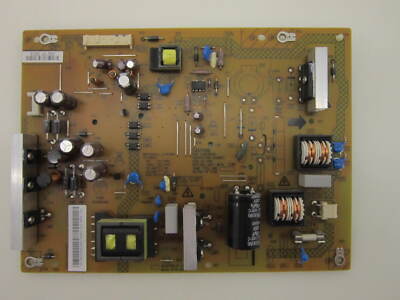
Power Board
This is where the AC power enters and gets converted for the TV’s use. Signs of failure include:
- Burn marks or a burnt smell
- Bulging or leaking capacitors (they look like small cans)
- Loose connectors
Mainboard
The mainboard controls all signals and inputs. Problems here can stop the TV from starting. Look for:
- Cracked or damaged chips
- Loose or broken cables
- Signs of overheating
Fuses
Some TVs have small glass fuses. If you spot one, check it for a broken wire or black marks. Use a multimeter to test continuity.
Cables And Connectors
Loose or disconnected cables can stop your TV from working. Make sure all connectors are seated tightly.
Using A Multimeter
- Set to continuity mode.
- Test the fuse: Touch one probe to each end. If it beeps, the fuse is good.
- Test voltage at the power board output (if comfortable). Compare to the ratings on the board.
What To Do If You Find A Fault
- Fuses: Replace with the same rating.
- Burnt or swollen capacitors: These require soldering skills. If you’re not experienced, take the board to a repair shop.
- Broken boards: Mainboards and power boards can be replaced. Search for the exact part number (e.g., “Toshiba 50L1350U power board”) online.
When To Repair, When To Replace
Not every TV is worth fixing. Here’s how to decide:
| Situation | Repair Cost | Recommended Action |
|---|---|---|
| Simple fuse or cable issue | $10–$30 | Repair |
| Power board replacement | $40–$80 (DIY) / $120+ (shop) | Repair if TV is in good condition |
| Mainboard replacement | $50–$100 (DIY) / $150+ (shop) | Repair if TV is less than 7 years old |
| Backlight or screen failure | $100–$250 | Usually replace TV |
| Multiple board failures or surge damage | $200+ | Replace TV |
Non-obvious insight: Even if you find replacement parts online for less, the time, risk, and tools needed can add up. Also, new TVs are more energy-efficient and offer better features.
Preventing Future Power Issues
Now that you’ve faced a Toshiba 50L1350U won’t turn on problem, here’s how to reduce the risk in the future:
- Use a surge protector – Surges are a main cause of TV damage.
- Keep the TV clean and ventilated – Dust and heat shorten electronic life.
- Turn off when not in use – Reduces wear on internal components.
- Update firmware carefully – If your TV supports updates, follow instructions exactly.
- Handle cables gently – Yanking power cords can loosen internal connections.
Frequently Overlooked Mistakes
Even experienced users sometimes make these errors:
- Mixing up the power and HDMI cables – Make sure you’re using the correct cable for power.
- Missing hidden switches – Some surge protectors have a switch that looks like a reset button.
- Not checking the remote’s IR sensor – If you use stickers or decorations near the TV’s sensor, the remote signal can be blocked.
- Ignoring blinking codes – Blinking standby lights often have a pattern. Count the blinks and check the Toshiba manual for error meanings.

Comparing The Toshiba 50l1350u With Other Models
How does the 50L1350U stack up against similar Toshiba TVs in terms of reliability and power issues?
| Model | Screen Size | Common Power Issues | Average Repair Cost |
|---|---|---|---|
| 50L1350U | 50” | Power board, mainboard | $60–$150 |
| 40L2400U | 40” | Power board, backlight | $50–$130 |
| 55L621U | 55” | Mainboard, software | $70–$160 |
Non-obvious insight: The 50L1350U has a higher rate of power board failure than newer Toshiba models, but its parts are easier to find online.
When To Call A Professional
If you’ve followed all troubleshooting steps and your Toshiba 50L1350U still won’t turn on, it’s time to consider professional help. Here’s when to make the call:
- You hear buzzing, popping, or smell burning
- You’re uncomfortable opening the TV or using electrical tools
- The TV is still under warranty (opening it may void coverage)
- You need to replace a mainboard or screen
Professional repair shops can diagnose issues in minutes and often have spare parts on hand. Always ask for a quote before approving repairs.

Cost And Availability Of Replacement Parts
Finding parts for the 50L1350U is usually straightforward because it’s a popular model. Here’s what you can expect:
| Part | Average Price (used/new) | Where to Buy |
|---|---|---|
| Power board | $40–$70 | eBay, Amazon, repair shops |
| Mainboard | $50–$90 | eBay, Amazon, specialty stores |
| Remote control | $10–$20 | Amazon, Toshiba website |
| Backlight strips | $30–$60 | Online repair parts shops |
Always double-check part numbers before ordering. Buying the wrong board is a common mistake.
Real-world Examples
Example 1:
Maria’s Toshiba 50L1350U wouldn’t power on after a storm. There was no light or sound. She found that the surge protector had a hidden reset switch that was off. Flipping the switch solved her problem instantly.
Example 2:
John’s TV had a red standby light but wouldn’t turn on with the remote. New batteries didn’t help. He discovered that his toddler had stuffed a piece of plastic into the TV’s power button, blocking it. Removing the object fixed the issue.
Example 3:
A repair shop received a 50L1350U with a blinking red light. Testing revealed a failed power board. A $60 replacement part and 30 minutes of labor brought the TV back to life.
How To Safely Dispose Of A Broken Tv
If you decide the TV isn’t worth fixing, dispose of it responsibly. Many cities have electronic recycling programs. Don’t leave TVs on the street—they contain materials that can harm the environment if not handled properly. Search for “electronics recycling near me” to find local options.
Where To Find More Help
If you want to dive deeper, Toshiba’s official support page offers manuals, troubleshooting tools, and contact info. For community discussions and advice, forums like Tom’s Hardware or AVS Forum are also helpful. For official guides, see the Toshiba Wikipedia page.
Frequently Asked Questions
Why Does My Toshiba 50l1350u Have A Blinking Red Light?
A blinking red light often means the TV detected an internal error. The number of blinks can point to a specific problem, such as a failed power board or mainboard. Check your user manual for error code meanings, or count the blinks and search online for your model.
Can A Power Surge Permanently Damage My Tv?
Yes, a strong power surge can burn out the power supply or other internal parts. If you suspect surge damage, check for burning smells or visible damage. Using a surge protector is the best prevention.
How Can I Tell If The Backlight Is Broken?
If your TV turns on (maybe you hear sound) but the screen stays black, shine a flashlight at an angle on the screen. If you see faint images, the backlight is likely broken. This repair is usually not cost-effective for older TVs.
Is It Worth Repairing A Toshiba 50l1350u?
If the repair cost is less than half the price of a new TV, and your Toshiba is in good condition, repair can be worth it. However, if the screen or multiple boards are broken, replacement is usually the better choice.
Where Can I Find The Model Number For Ordering Parts?
Look for a sticker on the back of the TV. The model number (e.g., 50L1350U) is usually printed near the serial number and power rating. Use this exact number when ordering parts or searching for help online.
If your Toshiba 50L1350U won’t turn on, don’t panic. Start with the simple steps, and work your way up. Most problems have a clear cause and solution—whether it’s a quick fix, a part replacement, or, in some cases, a new TV. With careful troubleshooting, you’ll know exactly what to do next.