
Many people love the feeling of being right in the middle of the action when watching a movie or listening to music at home. The main reason for this experience is the home theater audio system, especially the center channel speaker and the left and right speakers. But how do these speakers work together? Can you use a center speaker as a left or right speaker, or vice versa? And what happens if you mix up their roles in your setup?
Let’s go deep into the world of home audio, breaking down the differences between center, left, and right speakers, how to use them correctly, and what to expect if you swap their positions. This guide will give you clear answers, practical setup advice, and some useful tips you probably haven’t heard before.
Understanding The Basics: Center Channel Vs. Left/right Speakers
To get the best sound from your system, you need to know the unique roles of each speaker:
- Center Channel Speaker: This speaker is usually placed directly above or below your TV. Its main job is to deliver clear dialogue and central sounds. In movies, about 60–70% of the dialogue comes from the center channel. This is because our ears are tuned to expect voices to come from the screen.
- Left and Right Speakers: These are placed on either side of your TV, often forming a triangle with your main seating position. They handle music, sound effects, and directional audio—like a car zooming by or rain falling on one side.
Non-obvious insight: Many people think the center channel only matters for movies, but it also plays a big role in music, especially with multi-channel recordings.
Physical Differences: What Sets Center Speakers Apart?
You might wonder, “Aren’t all speakers pretty much the same? ” Not quite. Center channel speakers and left/right speakers often look different and are built with unique purposes in mind.
Design And Shape
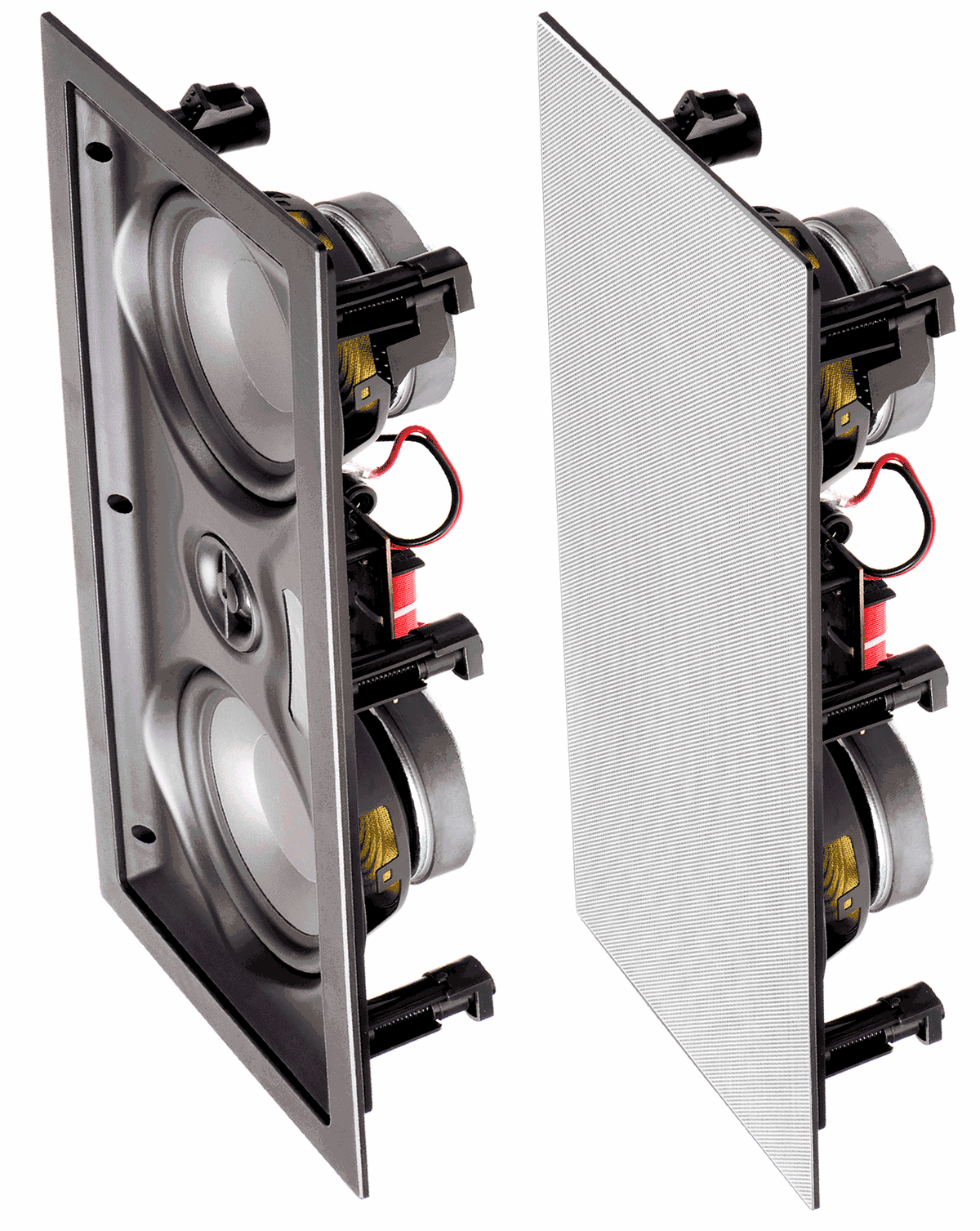
- Center channel speakers are usually wider and shorter, designed to fit under a TV. They often use a horizontal array of drivers (the cones that make sound).
- Left/right speakers are usually taller and slimmer, optimized for standing on the floor or being mounted at ear level.
Driver Arrangement
- Center channels often use two midrange drivers with a tweeter in the middle (MTM design). This helps spread sound widely across the room.
- Left/right speakers may have a single woofer and tweeter stacked vertically, giving a different sound spread.
Crossover And Tuning
- The crossover (the electronics that split the audio signal into high and low frequencies) is tuned in center speakers for clear vocals.
- Left/right speakers are tuned for a wider range, handling both music and effects.
Table: Physical And Audio Differences
| Feature | Center Channel Speaker | Left/Right Speaker |
|---|---|---|
| Shape | Wide, horizontal | Tall, vertical |
| Driver Layout | MTM (mid-tweeter-mid) | Vertical stack |
| Main Purpose | Dialogue, central sounds | Music, effects, direction |
| Crossover Tuning | Focused on speech | Full-range audio |
| Placement | Below/above TV | Left/right of screen |
Non-obvious insight: Some center speakers use special technology to avoid “off-axis” problems—where dialogue sounds strange if you sit off to one side.

Speaker Placement: Why It Matters
Correct placement of each speaker is critical for a realistic experience. Here’s what happens when you get it right—or wrong.
Ideal Setup
- Center speaker: Directly in line with your TV, facing the main seating area. It should be as close to ear level as possible.
- Left and right speakers: Form a triangle with your main seat. They should be at equal distance from you and slightly angled toward your position.
Table: Recommended Placement Distances
| Speaker | Distance from Listener | Height | Angle |
|---|---|---|---|
| Center | Directly in front | Ear level | 0° (facing forward) |
| Left/Right | Equal distance, 2–3 meters | Ear level | 22–30° inward |
Common Placement Mistakes
- Placing the center speaker too low (sound can hit your knees, not your ears)
- Pushing left/right speakers too far apart (creates a “hole” in the middle)
- Angling speakers away from the main seat
- Putting speakers inside cabinets, which can muffle sound
Tip: If your center speaker is below the TV, angle it slightly upward toward your ears.
Can You Use A Center Channel Speaker As Left Or Right?
Sometimes people wonder if they can swap speakers to save money or space. Here’s what you need to know.
When It Might Work
In some cases, you can use a center speaker as a left or right speaker, but it’s not ideal. Most center speakers are designed to sit horizontally, which affects how sound spreads. If you stand a center speaker on its end to use it as a left/right, the sound dispersion can be uneven.
Problems You May Face
- Narrow sound stage: Center speakers often send sound wider horizontally, but not vertically.
- Voice imbalance: Using a center as a left/right can make music or effects sound odd.
- Aesthetic mismatch: Center speakers can look out of place standing vertically.
Sound Quality Test
A real-world example: Some users report that switching a center speaker to left or right channels results in less “open” sound. It may feel like the audio is coming from a box, not the room.
Can You Use Left/right Speakers As A Center Channel?
This is a more common scenario, especially in custom home theaters. You might have a spare bookshelf or tower speaker and wonder if it can become your center.
When It’s Possible
If the left/right speaker matches the sound of your other speakers (same brand and model), it can work well as a center. In fact, some high-end systems use three identical speakers across the front for perfect sound “timber matching. ”
Challenges
- Size and fit: Tall speakers may not fit below your TV.
- Voice clarity: Some left/right speakers are not designed for clear dialogue at lower frequencies.
- Mounting: You may need special brackets or shelves.
Pro tip: If you want the very best sound, using three of the same speaker for left, center, and right is ideal. This is how professional studios are set up.
The Role Of The Center Channel In Movies And Music
The center channel is much more than just a “dialogue box. ” Let’s look at how it works in different types of content.
Movies
- Dialogue: Up to 70% of speech comes from the center channel.
- Central effects: Sounds that should appear in the middle of the screen—like footsteps, doors closing—are routed here.
- Crowded scenes: The center helps separate voices from background noise.
Music
In many multi-channel music mixes, the center channel carries lead vocals or solo instruments. This keeps the voice or instrument anchored, while the left and right channels add depth and atmosphere.
Gaming
Modern games use the center channel for clear communication and important sounds—like your character’s voice or in-game instructions.
Non-obvious insight: If you watch a lot of TV with people talking off-screen (like news or sports), a good center speaker can make the voices sound like they’re coming from the TV, not below it.
Mixing And Matching Speakers: Does Brand Or Model Matter?
You might be tempted to mix different brands or models for your speakers. Here’s what happens when you do that.
Matching Matters
- Timbre matching: This means the sound character (tone, warmth, brightness) is similar across all speakers. If your center speaker sounds very different from your left/right, voices can shift in tone as they move across the screen.
- Brand consistency: Using speakers from the same brand and series increases the chance of a good sound match.
When It’s Okay To Mix
- Surround speakers (the ones behind or to the side) can be different since they mostly handle effects.
- For the front three (left, center, right), matching is much more important.
Table: Timbre Matching Impact
| Setup | Sound Quality | Voice Consistency |
|---|---|---|
| Same model all fronts | Excellent | Perfect |
| Same brand, different models | Very good | Very good |
| Mixed brands | Average | Noticeable shifts |
Tip: If you must mix, try to match the tweeter type (soft dome, ribbon, etc.) for closer sound.
Wiring And Power: What To Know When Swapping Speaker Roles
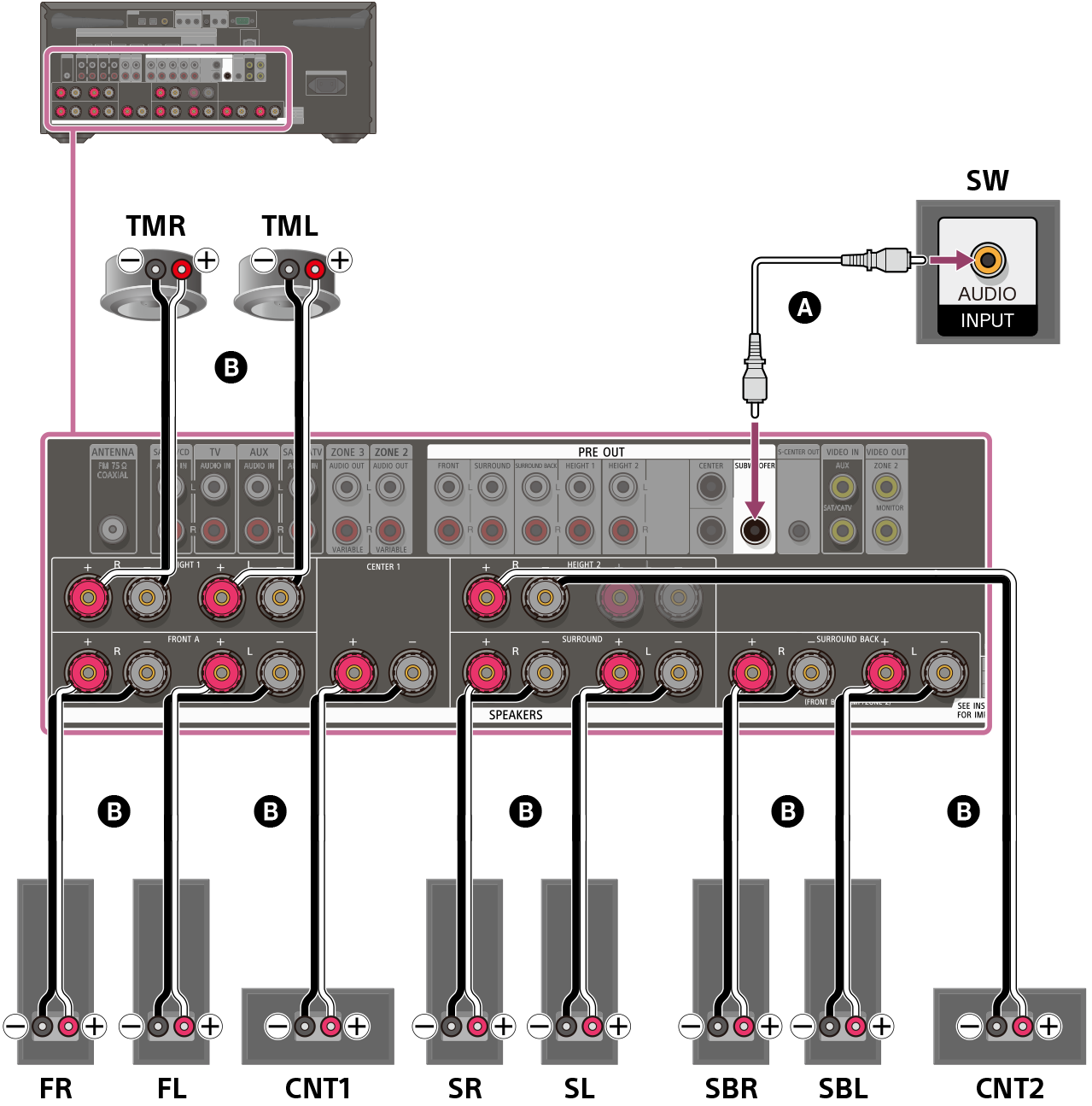
Wiring a center speaker as left/right or vice versa is simple—the cables are the same. But there are some key points:
- Impedance: Check that all your speakers have similar ohm ratings (usually 6 or 8 ohms).
- Power handling: Don’t use a small center channel as a left/right if it can’t handle the same power. You might damage it.
- Amplifier settings: Set your receiver to recognize which channel is using which speaker, so it sends the correct audio.
Non-obvious insight: Some AV receivers let you “reassign” channels—so you can use a left/right speaker as a center in the settings menu.
Surround Sound Formats And Their Impact On Speaker Roles
Different audio formats use the center, left, and right speakers in unique ways. Here’s how the most common setups affect your choices:
5.1 Surround
This is the most common home theater format: left, center, right, plus two surrounds and a subwoofer. The front three speakers (LCR) are the most important for dialogue and music.
7.1 And Above
Adds more surround speakers. The center channel’s role stays the same, but left/right become even more important for a wide sound field.
Dolby Atmos
Adds “height” speakers for 3D sound. The center still handles dialogue, but the other speakers create a bubble of sound around you.
Tip: No matter the format, the center channel is always critical for voices.
Using Virtual Center Channel: Is It Worth It?
Some soundbars and AV receivers offer a “phantom” or virtual center channel—using the left and right speakers to create the illusion of a center.
Pros
- Saves space (no center speaker needed)
- Can sound decent in small rooms
Cons
- Dialogue is less clear, especially off-center
- Sound can seem to come from below or beside the TV
When to use: Only if you cannot fit a center speaker at all. For most setups, a real center is better.
Acoustic Challenges: Room Size And Shape
Your room’s shape and size can affect how well your center, left, and right speakers work together.
Small Rooms
- Reflections from walls can make dialogue muddy.
- Place the center as close to ear height as possible.
Large Rooms
- You may need a bigger center channel for more output.
- Avoid placing left/right speakers too far apart.
Pro tip: Use a sound meter app on your phone to check volume levels at your main seat. Adjust speaker distances in your AV receiver’s setup menu for balanced sound.
Calibration: Getting The Most From Your Setup
Modern AV receivers include microphone-based auto-calibration. This process sends test tones to each speaker and sets levels, distance, and sound delay.
Steps For Proper Calibration
- Place the calibration microphone at your main listening position.
- Run the auto-calibration program (often called Audyssey, YPAO, MCACC, etc. ).
- Listen for balanced dialogue and effects.
- Adjust the center channel level up/down if dialogue is too quiet or loud.
Tip: If voices are still hard to hear, try raising the center channel volume by 1–2 dB.
Real-world Examples: What Happens When You Swap Speaker Roles
Let’s look at a few examples from actual users and audio enthusiasts.
Using A Center As A Left Or Right
- Some people report a “boxy” sound when using a center as a main speaker. The sound doesn’t fill the room as well.
- Horizontal speakers can have “lobing” issues—where certain frequencies cancel out if you sit off-center.
Using Left/right As A Center
- When matched well, this can sound excellent, especially with three identical bookshelf speakers.
- If the speaker is too tall, voices might sound like they come from above or below the screen.
No Center Channel (phantom Center)
- In small rooms, dialogue is okay, but if you sit off-center, voices shift to the nearest speaker.
- In big rooms, voices can get lost in the mix.
Practical Setup Tips For Best Sound
- Keep the center channel close to the screen—the closer, the more realistic voices will sound.
- Angle speakers toward your ears—“toe-in” helps sound reach you directly.
- Avoid blocking the center channel—don’t put objects in front of it.
- Use speaker stands or wall mounts for left/right at ear height.
- Run calibration after any change in speaker position.
Common Mistakes And How To Avoid Them
- Using a small center channel with big left/right speakers: Dialogue will sound weak.
- Mixing brands for LCR speakers: Creates uneven sound as voices pan across the front.
- Placing speakers in cabinets or behind objects: Muffles sound and ruins clarity.
- Ignoring calibration: Even the best speakers need proper setup to shine.
When Should You Upgrade Your Center, Left, Or Right Speaker?
- If you can’t hear dialogue clearly even after calibration
- When your left/right speakers are much better than your center
- If you move to a larger room and the sound feels thin
- When upgrading your AV receiver to support better formats
Investing in a quality center channel can make your whole system sound much better.
Should You Buy A Matched Lcr Set?
If you’re building a new home theater or upgrading, consider buying a matched set of left, center, and right speakers from the same series. Here’s why:
- Perfect sound blend across the front
- Consistent design for a cleaner look
- Easier setup with auto-calibration
How To Choose The Right Center Channel Speaker
When shopping for a center channel, consider:
- Driver size and count: Bigger drivers can play louder and deeper.
- Frequency response: Look for a speaker that covers at least 80 Hz to 20 kHz.
- Sensitivity: Higher sensitivity (above 88 dB) means it plays louder with less power.
- Physical size: Make sure it fits your TV stand or mount.
Tip: Listen to demo material with heavy dialogue before buying.
How To Choose The Right Left And Right Speakers
Similar rules apply for left/right:
- Match to your center for best results.
- Consider your room size: Tower speakers for big rooms, bookshelf for small ones.
- Check the speaker’s impedance and sensitivity to match your AV receiver.
Are Soundbars A Good Alternative?
Soundbars often include a “center” speaker inside, with left and right drivers as well. For small rooms or simple setups, a good soundbar can be enough. But separate speakers still offer the best sound.
For more on how soundbars create a center channel, see this Wikipedia Soundbar article.
Frequently Asked Questions
What Happens If I Use My Center Speaker As A Left Or Right Speaker?
While possible, it’s not ideal. The sound may be less clear, with a narrow sound stage. Dialogue and music can sound “boxed in. ” Only do this if you have no other option.
Can I Use A Bookshelf Speaker As A Center Channel?
Yes, if it matches your left and right speakers. It can sound excellent, but make sure it fits physically and is positioned at ear level.
Is It Okay To Mix Different Brands For My Front Speakers?
It’s best to use the same brand and model for the front three speakers. Mixing brands often leads to uneven sound and voices that change tone as they move across the screen.
Do I Need A Center Channel For Music Listening?
For stereo music (2 channels), a center channel isn’t used. But for movies, games, and multi-channel music, a center speaker greatly improves dialogue and lead vocals.
How Important Is Auto-calibration For My Home Theater?
Very important. Auto-calibration ensures all speakers are balanced and sound correct in your room. Always run it after changing your setup.
Getting the most from your home audio system isn’t about spending the most money—it’s about understanding the unique roles of each speaker and setting them up with care. By knowing when you can (and can’t) swap a center channel for left/right, matching your speakers, and tuning your room, you’ll get sound that truly brings your movies and music to life.