
A broken TV screen can be frustrating, especially if you rely on your television for entertainment, news, or gaming. Many people assume that a damaged screen means the TV must be thrown away. But the truth is, sometimes you can fix a broken TV screen, or at least understand your options.
This guide will walk you through everything you need to know, from identifying the problem to deciding whether to repair or replace your TV. If you want to save money, learn new skills, or simply understand what’s possible, keep reading.
Understanding Types Of Tv Screen Damage
Before you start fixing anything, it’s important to know what kind of damage your TV screen has. Not all problems are the same, and the right solution depends on the issue. The more you understand the type of damage, the better you can decide what to do next.
Physical Damage
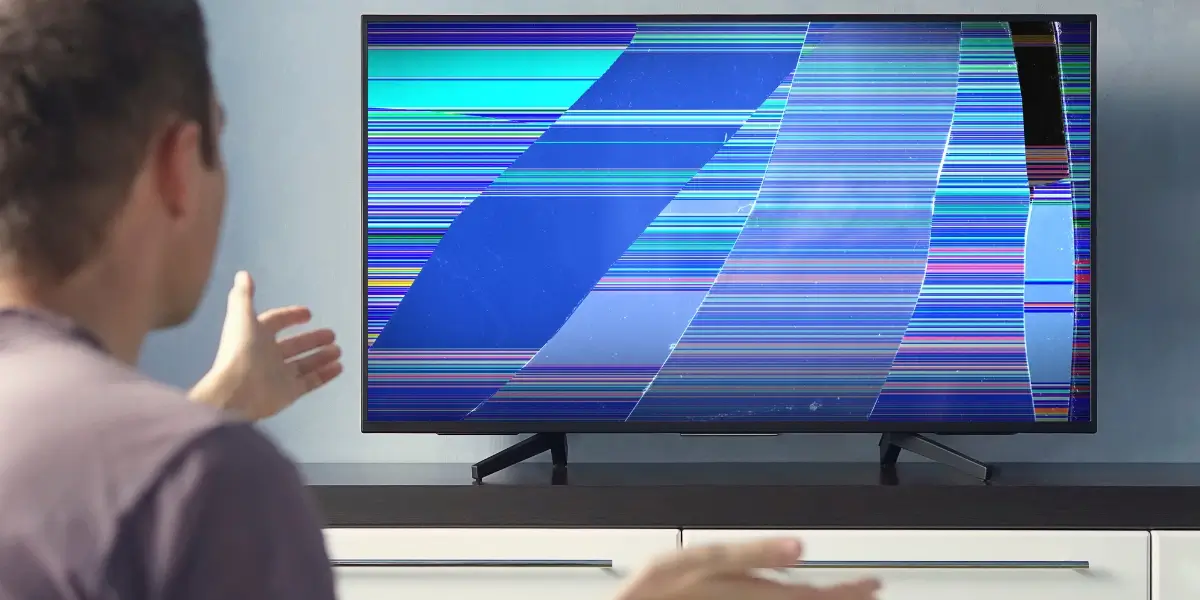
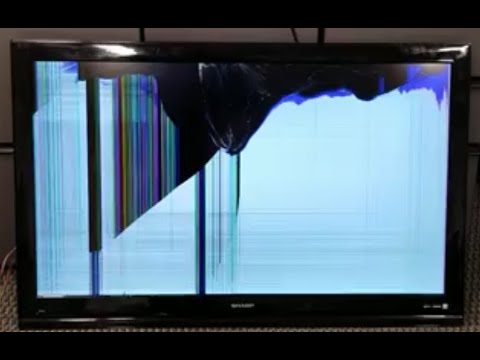
Physical damage usually comes from accidents. For example, dropping the TV, hitting it with a toy, or bumping it during a move. Signs of physical damage include:
- Cracks or lines across the screen
- Broken glass or shattered areas
- Black spots or colored blobs that don’t move
If your screen is physically cracked, the repair is often expensive and may not be possible at home. Sometimes the cracks look small, but the internal panel is broken, making the TV unusable. Even a minor hit can cause the liquid crystals or pixels inside the screen to stop working.
If you see spiderweb-like cracks, it almost always means the damage is deep.
A cracked screen does not usually affect the sound. If your TV turns on, makes sound, but the image is distorted or missing, it’s likely the panel is damaged, not the electronics. Trying to press on the screen or tape it will not work and may cause further issues.
Internal Issues
Sometimes the screen looks fine, but there are problems inside. These can include:
- Dead pixels: Small spots that stay black or don’t change color
- Lines: Vertical or horizontal lines that appear on the display
- Flickering: The image flashes or jumps
- No picture: The screen stays black even when the TV is on
Internal issues might be caused by loose connections, faulty cables, or problems with the main board. For example, if your TV fell but the glass did not crack, you might still see lines or strange colors due to the impact.
In some cases, heat or age can cause connections inside the TV to become loose or fail.
Non-obvious insight: Sometimes, only certain HDMI or input ports cause the problem. Test your TV with different cables and sources to rule out a simple external issue before opening the TV.
Backlight Problems
Modern TVs use backlights to make the picture visible. If the backlight is broken:
- The screen may appear dark or dim
- You might see a faint image if you look closely
Backlight issues are often repairable, but need careful handling. The backlight is made of tiny LED strips or tubes, and they can burn out after a few years of use, especially if you often watch TV at high brightness. If you see a picture only when shining a flashlight at an angle, the backlight is most likely the problem.
Non-obvious insight: Sudden power outages or voltage spikes can damage backlights. If your TV went dark after a storm, check the backlight before assuming the whole panel failed.
Water Damage
If your TV got wet, you may see:
- Flickering or fading
- Strange colors
- Screen not turning on
Water damage is tricky. Sometimes it can be fixed, but sometimes the components are too damaged. Even a small amount of moisture can cause corrosion inside the connectors and boards, leading to ongoing problems. If your TV was exposed to humidity for a long time (for example, near a window or in a damp room), problems might appear slowly, not immediately.
Non-obvious insight: Water damage can sometimes affect only one part of the screen, causing colored patches or ghost images, not just a dead screen.
Safety Precautions Before Repair
Fixing a TV screen is not only about skill; it’s also about safety. TVs have electrical parts and can cause shock or injury if handled incorrectly.
- Unplug the TV: Always disconnect the power before starting. Even when off, TVs can store electricity in capacitors.
- Work on a flat surface: Use a table or floor to avoid dropping the TV. Place a soft blanket or towel underneath to protect the screen from scratches.
- Wear gloves: Protect your hands from sharp edges and glass. Some TVs have metal frames that can cut fingers.
- Use proper tools: Small screwdrivers, plastic prying tools, and anti-static wristbands help prevent damage. Static electricity can destroy sensitive parts.
- Avoid liquids: Do not use water or cleaning sprays inside the TV. Only specialized cleaners or isopropyl alcohol are safe.
If you are not comfortable with electronics, consider calling a professional. Safety is more important than saving money. If you smell burning or see smoke when turning on the TV, do not attempt to repair it yourself.
Non-obvious insight: Some modern TVs have batteries for smart features. Be aware and avoid puncturing or damaging them, as they can be dangerous.
Can You Fix A Broken Tv Screen Yourself?
Not all broken TV screens can be fixed at home. Here’s a quick comparison of repair options:
| Type of Damage | DIY Repair | Professional Repair | Replacement Needed |
|---|---|---|---|
| Cracked Screen | No | Rarely | Usually |
| Dead Pixels | Possible | Yes | No |
| Backlight Failure | Possible | Yes | No |
| Loose Connections | Yes | Yes | No |
| Water Damage | Sometimes | Yes | Sometimes |
Cracked screens almost always require full replacement. For other problems, you may be able to fix the issue yourself if you follow careful steps. If your TV is still under warranty, DIY repairs may void the warranty, so check first.
Non-obvious insight: Some TV brands are easier to open and repair. Research your model before starting.
Tools And Materials Needed
Before starting any repair, gather the right tools. Having everything ready makes the process smoother.
- Screwdrivers: Phillips and flathead, small sizes. TVs often use many screws of different lengths.
- Plastic prying tools: For opening the TV case without scratching.
- Anti-static wristband: Protects electronic components from static electricity.
- Tweezers: For handling small parts, especially connectors.
- Electrical tape: To secure wires and insulate exposed areas.
- Replacement parts: Such as backlight strips, main board, or cables. Always double-check compatibility.
- Microfiber cloth: For cleaning screens and lenses.
Having a flashlight helps you see small connectors and boards clearly. If you lose screws, magnets can help pick them up safely.
Non-obvious insight: Take pictures with your phone during disassembly. This helps you remember where each part goes during reassembly.

Step-by-step Guide: Fixing Common Tv Screen Problems
Let’s look at how to fix the most common TV screen problems. Remember, these steps are for internal or minor issues. If your screen is physically cracked or shattered, jump to the replacement section.
Fixing Dead Pixels
Dead pixels are small dots that don’t change color. They can be annoying, but sometimes you can fix them.
- Turn off the TV and let it cool for a few minutes. This prevents static buildup.
- Clean the screen gently with a microfiber cloth. Dust or dirt can look like dead pixels.
- Try pixel-fixing software: Some online tools flash colors rapidly to reactivate stuck pixels. You can connect your TV to a computer and run these programs.
- Massage the area: Use a soft cloth and gently press on the dead pixel. Don’t use too much force. This sometimes helps the pixel start working again.
- Repeat steps if needed. Some pixels recover after several tries.
Non-obvious insight: Dead pixel software works best on LCD screens, but not always on OLEDs. Also, stuck pixels (which show a single color) are more likely to be fixed than completely dead (black) pixels.
If the pixel doesn’t recover, it’s usually best to live with it unless you have many dead pixels.
Repairing Vertical Or Horizontal Lines
Lines can come from loose cables or faulty boards.
- Unplug the TV and open the back panel using a screwdriver.
- Check ribbon cables: These connect the screen to the main board. Carefully unplug and plug them back in. Look for bent pins or dirt.
- Inspect for damage: Look for broken connectors or burnt spots. Even small burns can cause lines.
- Test the TV after reconnecting. If lines remain, the problem may be deeper, such as a faulty T-Con board.
If lines are caused by a damaged screen, replacement is needed. Sometimes, gently cleaning the cable contacts with isopropyl alcohol can help.
Non-obvious insight: Lines that change when you press on the screen or move the TV are often due to loose connections, not a broken panel.
Fixing Flickering Or No Picture
Flickering can be from bad connections or backlight issues.
- Check power cable: Make sure it is firmly connected. Try a different outlet to rule out power problems.
- Inspect internal cables: Open the back and check all connections. Loose or corroded cables often cause flickering.
- Replace backlight strips: If the screen is dark, buy new strips and swap them. This is more common in older LCD/LED TVs.
- Test before closing: Plug in the TV to see if the fix worked.
Non-obvious insight: Flickering can sometimes be caused by outdated firmware. Check the manufacturer’s website for updates. Also, try lowering the brightness setting, as very high settings can make flickering worse.
Repairing Backlight Problems
Backlight problems often make the screen dark, but you can still hear sound.
- Open the back panel with screwdrivers. Be careful not to touch any capacitors.
- Locate backlight strips: They are usually white and run behind the screen. You may need to carefully lift the LCD panel.
- Remove old strips and install new ones. Match the orientation and connectors carefully.
- Secure strips with tape or clips. Loose strips can cause uneven brightness.
- Reassemble and test: Turn on the TV to check brightness.
Tip: Always use strips designed for your TV model. Incorrect parts may cause new issues. Take your time, as the screen layers are fragile and easy to scratch.
Non-obvious insight: If only part of the screen is dark, you may need to replace just one backlight strip.
Solving Water Damage
Water damage is difficult, but not impossible.
- Unplug the TV and let it dry for at least 48 hours. Place in a dry, warm area.
- Open the back panel and look for moisture. Be gentle to avoid damaging wet parts.
- Use a hair dryer on low to dry inside parts. Never use high heat, as it can warp plastics.
- Clean with isopropyl alcohol: Gently wipe affected areas. Alcohol removes corrosion and helps dry quickly.
- Replace damaged boards if necessary. Look for white or green residue, a sign of corrosion.
Never use water or strong cleaners inside the TV. If the TV smells burnt after drying, parts may be permanently damaged.
Non-obvious insight: Even if your TV works after drying, corrosion may build up over weeks. Watch for new problems.
Lcd Vs. Led Vs. Oled: Repair Differences
Different screen types need different approaches. Here’s a comparison to help you understand:
| Screen Type | Repair Difficulty | Typical Issues | Cost of Parts |
|---|---|---|---|
| LCD | Moderate | Backlight, dead pixels | Low |
| LED | Moderate | Backlight, lines | Medium |
| OLED | High | Burn-in, dead pixels | High |
Non-obvious insight: OLED screens are thinner and more fragile. Most home repairs are not possible. LED and LCD screens are easier to handle. Also, OLEDs can suffer from image retention (burn-in), which cannot be repaired at home.
If you have a plasma TV, repairs are even more difficult, as parts are rare and high voltage is dangerous.
When To Replace The Tv Screen
Sometimes, fixing is not possible or not cost-effective. Here’s how to decide:
- Cost of repair: If the repair costs more than half the price of a new TV, replacement is better.
- Age of TV: Older TVs may have more problems soon. It may be smarter to buy new.
- Screen type: Cracked OLED screens are almost never repaired at home.
Check warranty status. Some manufacturers cover screen repairs in the first year. If you have home insurance, check if accidental damage is included.
Non-obvious insight: Some high-end TVs have extended warranties for screen issues. Always register your TV after purchase.
How To Replace A Broken Tv Screen
If your screen is cracked or shattered, you may want to replace it. This is a complex process, but possible for some TV models.
Finding The Right Replacement Screen
- Search for your TV’s model number online. It’s usually on the back sticker.
- Visit trusted parts suppliers or manufacturer sites. Check reviews and return policies.
- Compare prices. Screens usually cost from $100 to $300 for common models.
Tip: Avoid used screens unless they are tested. Used screens may have hidden damage or dead pixels. Also, shipping large screens is risky.
Non-obvious insight: Some TVs use the same screen as other brands. Cross-check compatible models to widen your search.
Steps To Replace A Tv Screen
- Unplug the TV and lay it face down on a soft surface. Remove the stand if needed.
- Remove the back panel with screwdrivers. Keep screws organized.
- Disconnect cables connecting the screen to the main board. Use tweezers for ribbon cables.
- Remove broken screen carefully. The glass can be sharp—wear gloves.
- Install new screen and reconnect cables. Double-check alignment.
- Secure everything and close the panel. Replace all screws.
- Test the TV before mounting or moving.
Non-obvious insight: Some TV screens are glued or clipped tightly. Take extra care not to damage connectors. If you’re unsure, watch a video for your model.
If you make a mistake, parts like the main board or T-Con can be hard to replace. Be patient and work slowly.
Comparing Repair Costs: Diy Vs. Professional
Let’s compare the costs of fixing a broken TV screen yourself versus hiring a professional.
| Repair Type | DIY Cost (USD) | Professional Cost (USD) | Success Rate |
|---|---|---|---|
| Dead Pixel Fix | 0–20 | 50–100 | High |
| Backlight Replacement | 30–80 | 100–250 | Medium |
| Screen Replacement | 100–300 | 200–500 | Low |
| Board Replacement | 40–120 | 100–300 | Medium |
Professional repairs offer a higher chance of success but cost more. DIY fixes are cheaper, but risky if you lack experience. If you damage the connectors or boards, it can make the TV unusable.
Non-obvious insight: Some repair shops offer free estimates—use this to compare costs before deciding.
Mistakes To Avoid When Repairing A Tv Screen
Many beginners make mistakes that can damage the TV further. Here are the top errors to avoid:
- Forcing parts: Never force cables or panels. Gentle handling prevents breakage.
- Skipping safety steps: Always unplug and wear gloves. Avoid distractions during repair.
- Using wrong parts: Only use parts for your model. Wrong pieces can cause damage or not fit.
- Ignoring warranty: Check if your TV is under warranty before opening it.
- Touching the screen directly: Oils from fingers can cause permanent marks. Use gloves or a cloth.
- Not testing before closing: Always test the TV before final assembly. Reopening is time-consuming.
- Mixing up cables: Take photos before disconnecting anything.
Also, avoid using strong magnets near the screen—they can cause permanent damage, especially on older TVs.
How To Prevent Tv Screen Damage
Prevention is often easier than fixing. Protect your TV with these strategies:
- Mount your TV: Wall mounts prevent accidental knocks and save space.
- Keep away from children and pets: Toys and claws can crack screens. Place barriers if needed.
- Use surge protectors: Prevents electrical damage from lightning or power surges.
- Clean with proper cloths: Avoid rough materials or harsh chemicals. Microfiber is best.
- Don’t place liquids nearby: Water spills are common causes of damage.
Non-obvious insight: Some TVs have protective films that you can apply to reduce scratch risk. You can buy screen protectors for large TVs, similar to those for phones.
Also, adjust the brightness and contrast settings to moderate levels. High settings wear out the screen faster.
Should You Repair Or Replace Your Tv?
Deciding between repair and replacement depends on several factors:
- Cost: If repairs are expensive, buying new may be smarter.
- Age: Older TVs are less reliable and may not support new features.
- Type of damage: Physical cracks almost always mean replacement.
- Warranty: If covered, professional repair is best.
If you’re unsure, take your TV to a service center for an estimate. Sometimes, even minor issues can be expensive to fix. Compare prices and check reviews before deciding.
Non-obvious insight: If your TV is smart (with apps), older models may lose support for updates. Replacement gives you access to new features.
Professional Repair Services: What To Expect
If you decide to use a professional repair service, here’s what usually happens:
- Diagnosis: Technicians check the TV and tell you the problem. Some shops offer this for free.
- Cost estimate: You get a quote for parts and labor. Ask for a written estimate.
- Repair time: Usually 2–7 days, depending on parts and the shop’s schedule.
- Warranty: Most shops offer a short-term warranty on repairs. Keep your receipt.
Tip: Choose certified repair centers for reliable service. Ask about experience with your TV brand.
Non-obvious insight: Some repair shops offer pickup and delivery, which is helpful for large TVs.
For more information about TV repairs, visit the Television Repair Wikipedia page.
Frequently Asked Questions
Can I Fix A Cracked Tv Screen Myself?
Usually, you cannot fix a cracked TV screen at home. Cracks mean the glass or display panel is broken. Replacement is the only solution, and this is difficult for most people. Professional help is recommended. Trying to glue, tape, or press the crack will not restore the image.
How Much Does It Cost To Repair A Broken Tv Screen?
The cost depends on the type of damage and TV model. Dead pixels or backlight issues may cost $50–$250. Full screen replacements range from $200–$500. Sometimes, buying a new TV is cheaper. For high-end models, repairs may be worth it, but always compare prices.
What Should I Do If My Tv Gets Water Damage?
First, unplug the TV and let it dry for two days. Open the back and dry inside gently with a hair dryer. Clean with isopropyl alcohol if needed. If problems continue, seek professional repair. Never turn on a wet TV—it can cause short circuits.
Are Tv Screen Repairs Covered By Warranty?
Most warranties cover internal defects, but not physical damage like cracks. Always check your warranty before trying repairs. If covered, contact the manufacturer for service. Some credit cards or home insurance may also help.
Is It Worth Repairing An Old Tv?
If your TV is more than 5–7 years old, replacement is usually better. Older models may have new problems soon. For expensive TVs, repair may be worth it, but compare costs first. Also, new TVs often use less energy and have better picture quality.
Fixing a broken TV screen is possible for some issues, but not all. With the right tools and information, you can solve minor problems or decide if replacement is best. Remember, safety and proper diagnosis are key. If you are unsure, professional services can help you get your TV working again.
Protect your screen to avoid future damage, and always check your warranty before making repairs. With careful steps, you can make the best choice for your situation.